You pay for coffee in Thai Baht, lunch in Vietnamese Dong, and your monthly software subscriptions in US Dollars. Your Airbnb charged Euros, your coworking space bills in the local currency, and you have no clear idea what you actually spent this month in any unified form.
Multi-currency expense tracking solves this chaos by automatically converting and aggregating expenses across currencies. For digital nomads and frequent travelers, this capability is not optional. Without it, expense tracking becomes so cumbersome that most people abandon it entirely. If you have settled in one country, our guide to expat budgeting in two currencies covers choosing a home currency and US paperwork.
This guide explains how to track expenses across countries effectively, compares apps built for international money management, and provides practical systems for maintaining financial visibility while living the global lifestyle. For general expense tracking, see our best money tracker apps in 2026 guide.
The Multi-Currency Tracking Challenge
Tracking expenses in a single currency is straightforward. Multi-currency tracking introduces complications:
Exchange rate timing: Should you use the rate at time of purchase, time of bank settlement, or time of logging? Each choice affects reported totals.
Currency of record: Do you track in local currency and convert later, or convert immediately to a home currency? Both have drawbacks.
Credit card vs. local currency: Your card may charge in USD for a Euro purchase, often at unfavorable rates, adding another layer of confusion.
Cash transactions: In many countries, cash remains dominant. These transactions are easy to forget and hard to track.
Income in one currency, expenses in many: Freelancers paid in USD but spending in Pesos, Baht, or Dong must constantly think in multiple value systems.
Historical analysis: Looking back at spending from six months ago requires remembering or reconstructing exchange rates.
Real Example: One Month as a Digital Nomad
Consider a month split between Thailand and Vietnam:
| Expense | Local Amount | Currency | USD Equivalent |
|---|---|---|---|
| Bangkok Airbnb | 18,000 | THB | ~$500 |
| Thai SIM card | 600 | THB | ~$17 |
| Bangkok coworking | 3,500 | THB | ~$97 |
| Daily expenses Thailand | 12,000 | THB | ~$333 |
| Flight to Vietnam | 2,800 | THB | ~$78 |
| Hanoi apartment | 8,000,000 | VND | ~$320 |
| Vietnam SIM | 200,000 | VND | ~$8 |
| Daily expenses Vietnam | 5,000,000 | VND | ~$200 |
| Software subscriptions | 150 | USD | $150 |
| Total | - | - | ~$1,703 |
Without a multi-currency tracker, you either do mental math constantly or lose track entirely.
What to Look For in a Multi-Currency Tracker
Essential Features
Automatic currency detection: The app should know you are in Thailand and default to THB without manual selection each time.
Historical exchange rates: Expenses should convert at the rate when incurred, not when logged, for accurate reporting.
Multiple base currencies: View totals in USD, EUR, or any currency you prefer, with on-demand switching.
Currency-specific reporting: See how much you spent in each currency, useful for trip budgets.
Offline functionality: Many countries have unreliable internet. An app that requires connectivity fails at crucial moments.
Nice-to-Have Features
| Feature | Why It Helps |
|---|---|
| Receipt scanning with currency detection | Reads local currency from receipt images |
| Location-based currency | Auto-switches default based on GPS |
| Split currency transactions | For mixed-currency purchases |
| ATM withdrawal tracking | Tracks foreign currency cash separately |
| Currency charts | Visual exchange rate trends |
Deal-Breakers
Single currency only: Apps that force everything into USD without tracking original currencies lose critical information.
No offline mode: Depending on connectivity in Southeast Asia, Africa, or South America means gaps in data.
Manual rate entry: If you must look up and enter exchange rates yourself, friction kills consistency.
Best Apps for Multi-Currency Expense Tracking
Finny
Finny's design fits the digital nomad use case well: offline-first, multi-currency, and low-friction input.
Multi-Currency Features:
- Automatic currency detection based on location
- Historical exchange rate conversion
- View reports in any base currency
- Track expenses in original currency with converted totals
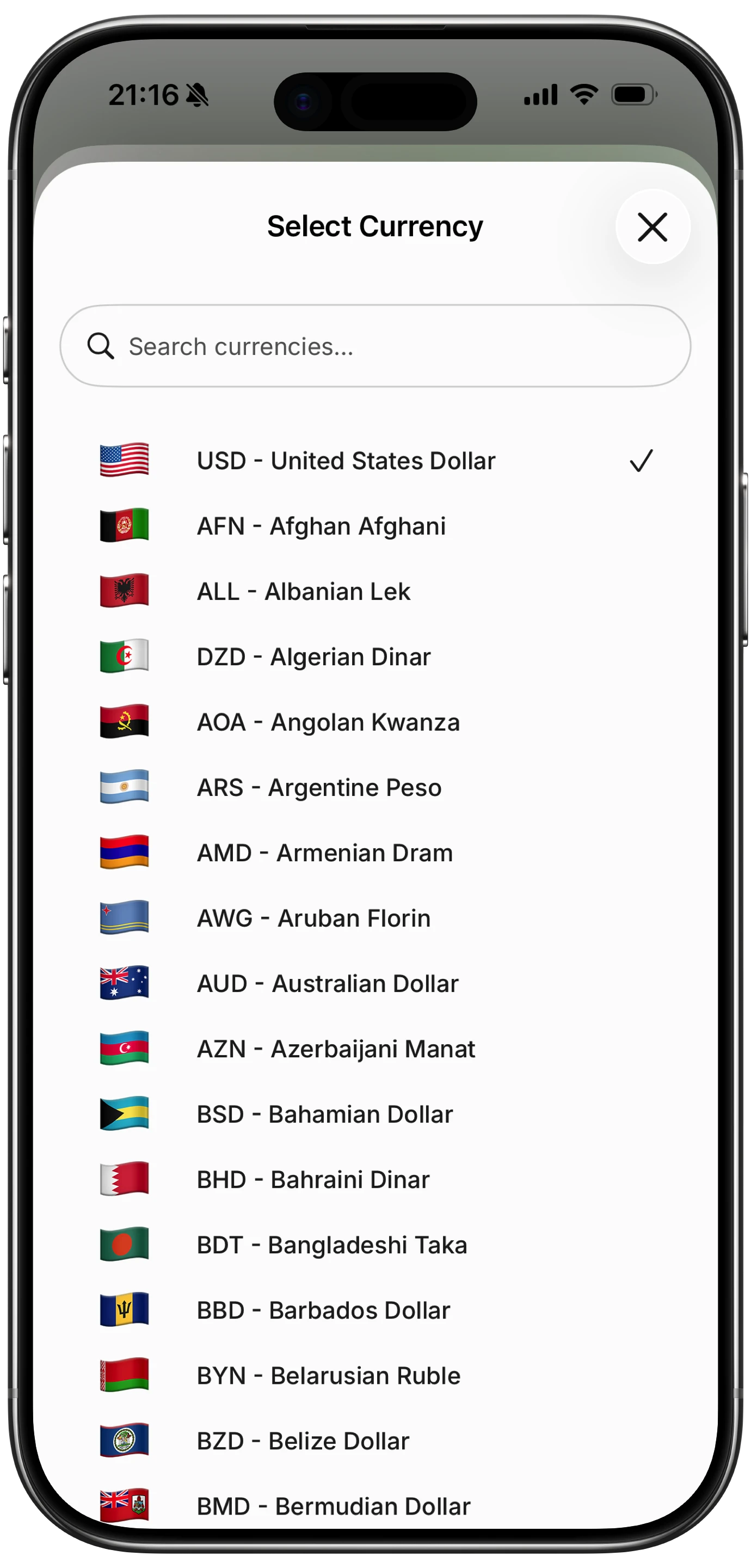
Finny app's multi-currency feature
Strengths:
- Offline-first: works without internet, syncs later
- AI-assisted input: "Lunch 450 baht" logs correctly
- Receipt scanning extracts currency from images
- Privacy-focused: no bank connections required
Limitations:
- iOS only currently
- No automatic bank import for those who want it
Best for: Nomads who want low-friction tracking without bank connections or cloud dependency.
Wallet by BudgetBakers
Wallet offers strong multi-currency support with detailed tracking.
Multi-Currency Features:
- Multiple accounts in different currencies
- Automatic rate updates
- Currency conversion reports
- Travel mode with automatic currency switching
Strengths:
- Detailed categorization
- Bank sync in supported regions
- Works across iOS and Android
- Planned payments and budgets
Limitations:
- Interface can feel complex
- Bank sync limited by region
- Premium required for best features
Best for: Detail-oriented travelers who want granular control.
Spendee
Spendee balances simplicity with multi-currency capability.
Multi-Currency Features:
- Multiple wallets in different currencies
- Automatic exchange rates
- Shared wallets for travel companions
- Cash flow overview across currencies
Strengths:
- Clean interface
- Good balance of features and simplicity
- Works well for couples traveling together
Limitations:
- Some features behind premium paywall
- Bank sync limited geographically
Best for: Travelers who want simplicity with adequate multi-currency support.
Revolut / Wise
These are banking services first, but their apps include spending analytics.
Multi-Currency Features:
- Hold and spend multiple currencies
- See spending by category and currency
- Real exchange rates
- Spending insights and budgets
Strengths:
- Actual multi-currency accounts, not just tracking
- Great exchange rates for spending abroad
- One app for banking and tracking
Limitations:
- Banking product, not dedicated tracker
- Less detailed categorization than dedicated apps
- Must use their cards for tracking
Best for: Nomads who also need multi-currency banking and are happy tracking only card transactions.
Feature Comparison
| Feature | Finny | Wallet | Spendee | Revolut/Wise |
|---|---|---|---|---|
| Multi-currency | Yes | Yes | Yes | Yes |
| Offline mode | Yes | Yes | Limited | No |
| AI input | Yes | No | No | No |
| Receipt scanning | Yes | Yes | Yes | Limited |
| Bank sync | No | Yes | Yes | N/A (is bank) |
| Privacy focus | High | Medium | Medium | Low |
| Free tier | Yes | Yes | Yes | Yes |
| Best for | Nomads | Detail seekers | Simplicity | Banking integration |
Practical Multi-Currency Tracking Systems
System 1: Single App, Real-Time Logging
Log every expense immediately in a dedicated app.
Process:
- Make purchase
- Open app immediately
- Log amount in local currency
- App converts automatically
Pros: Most accurate, fewest forgotten expenses Cons: Requires discipline, can feel tedious
Best for: Those with strong tracking habits or who rely heavily on expense data.
System 2: End-of-Day Batch Logging
Collect receipts, log everything once daily.
Process:
- Keep receipts throughout day
- Take photos of cash receipts
- End of day: log all expenses at once
- Use receipt scanner to speed entry
Pros: Less disruptive to daily flow Cons: Requires receipt discipline, risks forgetting cash expenses without receipts
Best for: Those who find real-time logging too intrusive.
System 3: Card-Based Tracking with Cash Supplement
Use card for most purchases, track card automatically, supplement with cash logging.
Process:
- Use Wise or Revolut card for most purchases
- Review transactions in banking app
- Manually log cash purchases only
- Export to spreadsheet monthly for analysis
Pros: Minimizes manual tracking Cons: Misses cash transactions if not diligent, requires specific card usage
Best for: Those who can use cards for most purchases.
Handling Common Multi-Currency Scenarios
Scenario: ATM Withdrawal
You withdraw 10,000 THB from an ATM. Your home bank will charge your account in USD later, possibly with fees.
How to track:
- Log withdrawal as expense in THB at time of withdrawal
- Use ATM exchange rate or mid-market rate
- Do not wait for bank settlement (delays tracking)
- Track ATM fees separately
Scenario: Credit Card Purchase in Local Currency
You buy something for 500 EUR, but your USD credit card will charge it later.
How to track:
- Log as 500 EUR at time of purchase
- Let app convert to USD at purchase-date rate
- When bank settles, the amount may differ slightly
- Do not adjust: the purchase-date amount is more analytically useful
Scenario: Payment in Different Currency than Location
You are in Thailand but pay for EU software in EUR.
How to track:
- Log in payment currency (EUR), not location currency
- App should handle conversion to your base currency
- Tag as "recurring" or "subscription" for clarity
Scenario: Split Bills with Travel Companions
Three people at dinner, one person pays 900 THB total.
How to track:
- Log your share only (300 THB)
- Or log full amount and categorize as partial expense
- Use apps with split expense features if traveling in groups
Managing Cash in Cash-Heavy Countries
Many countries operate heavily on cash. Tracking strategies:
Daily cash reconciliation:
- Know how much cash you have at day start
- At day end, count remaining
- Difference is cash spending
- Log as single "cash expenses" entry if you did not track individually
Receipt collection:
- Request receipts even for small purchases
- Take photos immediately
- Process at end of day
Envelope system adaptation:
- Withdraw weekly cash allowance
- Track only withdrawals as expense
- Treat remaining cash as buffer
- Simpler but less precise
For general tracking approaches, see how to track expenses.
Tax Implications for Digital Nomads
Expense tracking is not just for budgeting. Proper records matter for:
Business expense deductions: Coworking, travel, equipment may be deductible Tax residency documentation: Prove time spent in different countries Audit protection: Clear records defend against questions Self-employment reporting: Accurate expense data supports tax filings
Keep original currency amounts and dates. Tax authorities may require specific calculations for currency conversion.
The Bottom Line
Multi-currency expense tracking is essential for digital nomads and frequent travelers. Without it, financial visibility disappears into a fog of baht, dong, pesos, and rupees.
The key is choosing an approach that matches your discipline level and travel style:
- Real-time loggers: Use Finny or similar for immediate, AI-assisted entry
- Detail-oriented planners: Use Wallet for comprehensive tracking
- Simplicity seekers: Use Spendee for clean, adequate coverage
- Card-primary spenders: Use Revolut or Wise for integrated banking and tracking
Whatever system you choose, consistency matters more than perfection. A simple system used daily beats a complex system abandoned after week one. If you are planning specific trips, our travel budget app comparison can help you pick a tool tailored to trip-based spending. And if you are mostly based in Europe or spend heavily in EUR, our roundup of the best euro expense trackers in 2026 covers Europe-first picks.
Track in local currencies. Let the app handle conversion. Review monthly. Adjust when systems break down. Financial clarity is possible across any number of countries and currencies if you commit to a sustainable process.
Common Questions About Multi-Currency Tracking
Should I track expenses in local currency or my home currency?
Track in local currency first. Good apps convert automatically to any base currency you choose. Preserving original currency maintains accuracy and allows flexible reporting later.
What exchange rate should I use?
Use the rate at time of purchase, not time of logging or bank settlement. Most tracking apps update rates automatically. This gives the most analytically useful data.
How do I track cash expenses in countries where I do not get receipts?
Log immediately when possible. Otherwise, count cash at day start and end, logging the difference. Consider a small notebook or phone note for on-the-go tracking before entering into your app.
Is there a multi-currency expense tracker that works offline?
Finny is designed offline-first, storing data locally and syncing when connected. Several other apps offer offline mode with varying reliability. Test before relying on any app in low-connectivity areas.
How do I handle expenses in obscure currencies?
Most expense apps support major currencies but may lack support for smaller ones. For unsupported currencies, log in USD equivalent using Google's exchange rate at time of purchase, and note the original currency in the description.
Ready to track expenses across any currency?
Download Finny to log expenses with AI assistance in any currency, with offline support for areas without reliable internet. Keep financial clarity wherever you travel.