How to Track Cash Spending in a Card First World
Most of your spending is digital now. Apple Pay covers groceries, a card pays the utility bill, a tap handles the morning coffee. Then a friend asks you to split a bill in cash, you tip a barista in singles, the farmer's market is cash only, and somewhere between the parking meter and the ATM fee, fifty to three hundred dollars a month vanishes into a category your bank app politely calls "Other."
This guide explains how to track cash spending when almost everything else in your life runs on cards. You will get three concrete systems, ranked from lowest to highest friction, plus a short note on tipping (the single biggest source of untracked cash). Along the way we will lean on AI input, voice notes, and offline-first logging so the act of recording cash does not become its own chore. For a wider view of life without a bank link, see our guide on how to track expenses without linking your bank. If you have already gone cash-first for most spending, our companion piece on how to track cash spending only covers that workflow directly.
Why Cash Disappears in a Card First Wallet
Bank-linked apps are built around one assumption: every transaction has a digital trail. When you swipe, tap, or click, an API call eventually drops a record into your tracker. Cash breaks that loop. The moment you hand over a twenty for street tacos, the only ledger that knows about it is your memory, and memory is a terrible accountant.
Three things make cash uniquely slippery:
- There is no merchant feed. The expense exists only if you write it down.
- The amounts are usually small, which makes each one feel "not worth logging," even though they sum to real money.
- Cash is often used for socially blurred spending: tips, gifts, kids' allowance, a quick coffee for a coworker. You may not even think of it as "spending."
The result is a clean-looking budget where the numbers add up but never quite match your bank balance. If that gap is bothering you, the fix is not more discipline. It is a method that fits how you actually live.
Method 1: The ATM Batch Method (Lowest Friction)
This is the best place to start if you barely use cash and only want to stop the leak.
The idea: treat each ATM withdrawal as the spending event. The moment you take out one hundred dollars, log a single one hundred dollar expense in a placeholder category called "Cash Wallet." From your budget's perspective, that money is already gone. At the end of the week or month, you reconcile what is left in your wallet and reassign categories from memory and any receipts you stashed.
How to run it:
- Log every ATM withdrawal as it happens. Note the amount, the date, and the rough reason ("weekend cash," "farmer's market run").
- Stash any cash receipts in one pocket of your wallet or one envelope at home.
- Reconcile weekly. Count the cash you have left, subtract from the withdrawal, and split the difference across two or three real categories: Food, Tips, Misc.
- Adjust the original "Cash Wallet" entry, or split it into the real categories in your tracker.
The tradeoff is honest: you lose some category accuracy, but you capture the full dollar amount, which is the part that actually matters for budgeting. This pairs well with envelope budgeting, where each cash withdrawal is essentially refilling a physical envelope.
Best for: people who pull cash one or two times a month and want a five-minute system.
Method 2: The Voice Log Method (Medium Friction, Highest Accuracy)
If you spend cash often (street food, kids' activities, tips, vendors), batching at month end will not be accurate. You need to capture each transaction close to when it happens. Typing on a phone keyboard right after paying is awkward, especially with a coffee in one hand. Voice is faster.
The idea: open your tracker, hit voice input, and say the expense in plain language. "Five dollars coffee Wednesday." "Twenty dollars tip at the salon." "Eight dollars parking downtown." A good AI parser will extract the amount, date, and category, then ask you to confirm.
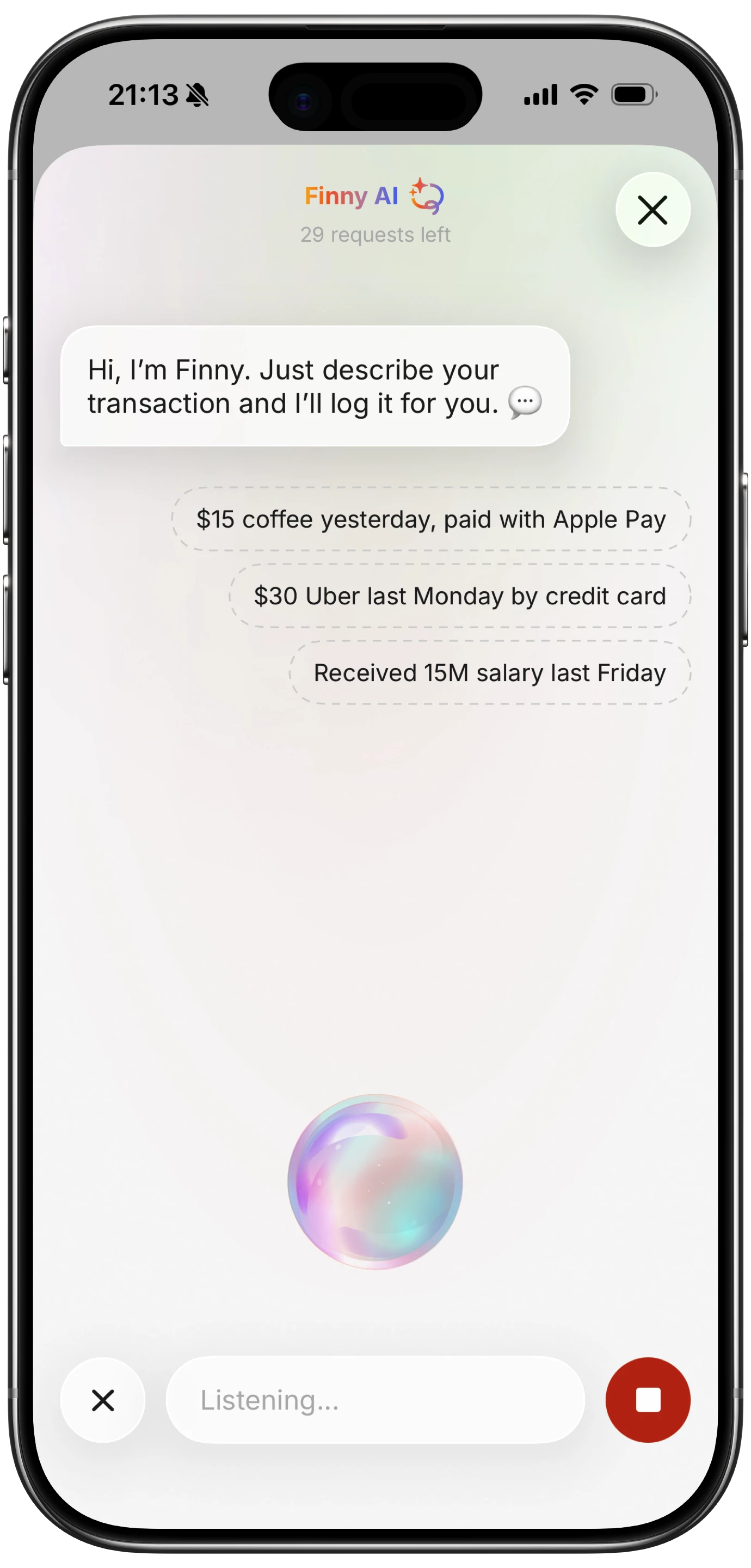
Finny app's voice input feature
This is the method our voice expense tracker guide goes deep on, and it is genuinely the closest you can get to "thinking" an expense into your tracker. Three reasons it works for cash:
- You can do it walking away from the register without breaking stride.
- The AI handles the formatting, so you do not need to remember which category the app calls "Eating Out" versus "Restaurants."
- There is no typing, which removes the main reason people give up on manual logging.
If voice is not always practical (loud street, quiet office, you are with company), the same idea works with quick text input. The point is to capture the transaction within a minute or two of paying it, before the detail fades. Our piece on how to log expenses without typing covers the lighter input modes in more detail.
Best for: anyone who spends cash several times a week and wants their categories to actually mean something.
Method 3: The Receipt Stash Method (Highest Friction, Best Audit Trail)
Some people just do not want to interact with their phone every time they buy something. Fair. The third method swaps real-time logging for a weekly batch.
The idea: any time you pay in cash, ask for a receipt. Drop it in one designated spot: a small envelope in your bag, a tray on the counter at home, or simply a folder in your phone's photo album where you snap a quick picture of each receipt. Once a week, sit down for ten minutes and process the stack.

Finny app's screenshot import feature
If you snap photos, a batch receipt scanner can turn the whole pile into entries in one pass instead of one at a time. This is where AI-assisted tools do real work: they read the merchant, total, and date from the image, and you confirm or edit. For a complementary view on minimum-friction daily logging, see how to track daily spending.
How to run it:
- Collect every cash receipt during the week. If a vendor does not give one, jot the amount on the back of any other receipt (yes, really).
- Photograph the stack at the end of the week, or feed them into a batch scanner.
- Confirm each entry. Fix any misread amounts.
- Discard the paper, or keep it in a "processed" envelope for one month as a backup.
The tradeoff: this method has the best audit trail but the longest processing time. It also fails completely for cash spending where you never get a receipt (street vendors, tips, garage sales). Pair it with the voice method for those cases.
Best for: people who already keep paper records, or who want a clean monthly export for taxes or shared expenses.
The Tipping Problem (Cash's Quietest Leak)
Tipping deserves its own paragraph because it is almost always cash and almost never tracked. A few rounds of restaurant tips, a haircut, a hotel housekeeping envelope, and a delivery driver can run forty to one hundred dollars in a single weekend.
A simple fix: create a dedicated "Tips" category. Every time you tip in cash, log just that. Do not worry about which restaurant or service: the aggregate is what tells the story. After two months you will have a real number, and you can decide whether your tipping is in line with your values or quietly wrecking your eating-out budget.
The voice method is ideal here. Three seconds at the curb after dinner: "Twelve dollars tip dinner." Done.
The Privacy Upside Most People Miss
There is one quiet benefit to using cash that card-first thinkers tend to forget: your bank does not know about it. Cash spending is genuinely off the grid. The merchant has no record beyond the receipt, the card networks see nothing, and unless you log it in a bank-linked app, no third party builds a profile from it.
This is one of the reasons cash users tend to be skeptical of bank-linked tracking apps in the first place. If you have already chosen cash partly for privacy, it makes sense to track it in something that respects that choice: an offline-first tracker that stores entries on your device, syncs only when you ask it to, and never needs your bank credentials. We cover the broader case for this in our piece on offline expense tracking.
If you ever need the data elsewhere (taxes, a spreadsheet, a shared budget), a CSV export gives you the whole ledger in a portable format without ever sending it through a third-party server.
Where Finny Fits
Finny was built for exactly this kind of user: card-first by default, but with real cash exposure that bank-linked apps cannot see. Voice input handles the on-the-go cash logs in a few seconds, the batch receipt scanner can chew through a week of paper in one sitting, and everything works offline so a basement parking garage or a remote cabin will not block you. CSV export is included if you want to keep a copy outside the app. Pro costs a low monthly price, which is a fraction of the bank-linked competitors, and there is a free tier with unlimited manual entries if you want to test the workflow first.
For an even broader take on cash-only habits and self-imposed cash budgets, see our guide on what is a cash diet.
How to Choose
Pick one method and run it for thirty days before judging it.
- If you withdraw cash one or two times a month: start with the ATM batch method.
- If you spend cash several times a week: use the voice log method.
- If you want a complete paper trail and do not mind a weekly session: use the receipt stash method with a batch scanner.
You can mix them. Many people use voice for the small, fast purchases and the receipt stash for anything over twenty dollars. The worst choice is no method, which is what most card-first wallets default to.
Common Questions About Tracking Cash Spending
What is the best app to track cash purchases?
The best app is one that lets you add an entry in under ten seconds without a bank connection. Look for voice input, receipt scanning, offline support, and the ability to create custom categories like Tips and Cash Wallet. Bank-linked apps are usually a poor fit because they treat cash as a manual exception rather than a first-class entry.
How do I track cash spending without receipts?
Use voice or quick text input the moment after you pay. A short phrase like "six dollars street food Tuesday" is enough for an AI parser to create a clean entry. If you cannot log it in the moment, jot the amount in your phone's notes app and process the list at the end of the day before details fade.
How much cash spending is normal each month?
There is no universal number, but most card-first households see fifty to three hundred dollars a month in cash. The point of tracking is not to hit a target: it is to know the real figure so you can decide whether it lines up with your values, your budget, and your tipping habits.
Does tracking cash actually change behavior?
Yes, but indirectly. Logging a five dollar coffee will not stop you from buying coffee. What it does is surface the aggregate (sixty dollars a month on coffee, ninety on tips, forty on parking) and let you make a real decision instead of an unconscious one.
Can I track cash spending offline?
Yes. An offline-first tracker stores entries locally on your device and does not require an internet connection to log, edit, or categorize. This is ideal for cash logging because you often spend cash in places with weak connections (markets, festivals, basements, transit) and you do not want a missed sync to be the reason an expense never gets recorded.
Ready to track expenses with less friction?
Download Finny to log expenses using AI, receipts, or text. No bank connections, offline support, and full control over your financial data.