
You planned the flights, booked the hostels, and mapped out every temple visit. Then you land, start spending in an unfamiliar currency, and within three days you have no idea where your money went. Street food in Bangkok, a taxi in Lisbon, entrance fees in Kyoto. The receipts pile up in your pocket. The mental math stops working. By mid-trip, you have either given up tracking or you are stress-converting every purchase on Google.
A good travel budget app prevents this. It handles multiple currencies, works when you have no signal, and lets you log expenses fast enough that you actually do it. But not every app gets these basics right. Some require constant internet. Others convert currencies poorly. A few bury their best features behind steep paywalls.
We tested five popular travel budget apps to find which ones genuinely help you stay on top of spending abroad. If you want a broader look at expense tracking tools, see our best money tracker app in 2026 guide.
What Makes a Travel Budget App Worth Using
For the receipt side specifically, including foreign decimal formats and VAT refund paperwork, see multi-currency receipt scanning for travel.
Before comparing individual apps, it helps to know what separates a useful travel budget app from a frustrating one. These are the features that matter most when you are on the road.
Multi-currency support that actually works
You need an app that handles at least 100 currencies with automatic exchange rates. But support alone is not enough. The app should preserve original amounts (so your 1,500 yen lunch stays as 1,500 yen) while also showing unified totals in your home currency. Without both, you either lose context or cannot see the big picture. For a deeper look at why this matters, read our guide on tracking expenses across multiple currencies.
Offline functionality
Connectivity abroad is unreliable at best. You might be on a train through rural Japan, at a market in Marrakech, or simply out of data. If your app requires internet to log a transaction, you will skip entries and lose accuracy. The best travel budget apps store everything locally and sync when you reconnect.
Speed of entry
Travel days are busy. You will not sit down after dinner to carefully categorize each expense with dropdown menus and manual currency selection. The app needs to be fast. Tap, type a number, done. Bonus points for voice input, receipt scanning, or smart defaults that reduce the number of steps.
Budget visibility
Setting a daily or trip budget means nothing if the app does not show you where you stand at a glance. You want to open the app and immediately know: am I on track, over budget, or under? Good travel budget apps surface this without requiring you to dig through reports.
Reasonable pricing
You are already spending money on the trip itself. A travel budget app should not cost more than a meal. Free options exist, though they often come with limits. Paid apps should justify their price with features you will actually use.
Travel Budget App Comparison
Here is how the five most popular options stack up across the features that matter for travelers.
| Feature | Trail Wallet | TravelSpend | Splitwise | TripCoin | Finny |
|---|---|---|---|---|---|
| Currencies | 100+ | 150+ | 100+ | 150+ | 150+ |
| Preserves Original Currency | Yes | Yes | Yes | Yes | Yes |
| Unified Currency View | Yes | Yes | Limited | Yes | Yes |
| Offline Mode | Yes | Yes | Partial | Yes | Yes |
| AI Input (Voice/Receipt) | No | No | No | No | Yes |
| Trip Budgets | Yes | Yes | No | Yes | Yes |
| Expense Splitting | No | No | Yes | No | No |
| Platform | iOS only | iOS, Android | iOS, Android | iOS only | iOS only |
| Price | ~$4.99 one-time | Free / Premium | Free / Pro $5/mo | Free / Pro | a low monthly price |
Each app has a clear strength. Let us break them down.
Best Travel Budget Apps in 2026
Trail Wallet: Best for Simplicity
Trail Wallet was built by a pair of long-term travelers, and that perspective shows. The app focuses on one job: tracking what you spend on a trip. You set a daily or total budget, pick your home currency, and start logging expenses. A simple bar chart shows daily spending against your budget, color-coded green or red.
The interface is intentionally minimal. There are no social features, no bank connections, and no complicated reports. You enter an amount, pick a category, and move on. For travelers who want a lightweight tool without distractions, Trail Wallet delivers.
The app supports over 100 currencies with automatic rate updates. It works offline and syncs rates when you have a connection. One notable limitation: Trail Wallet is iOS only. Android users are out of luck. It also allows only 25 free entries before requiring a one-time purchase of roughly $4.99.
Trail Wallet has not received significant feature updates in recent years, so the design feels dated compared to newer options. But if you value simplicity above everything else, it still does the job.
Best for: Solo travelers who want a minimal, no-nonsense budget tracker.
TravelSpend: Best Free Option
TravelSpend is probably the most well-known travel budget app, and for good reason. The free tier is genuinely usable. You can create trips, set budgets, log expenses in 150+ currencies, and view spending breakdowns by category and day. The app also works offline.
One standout feature is the map view, which shows where you spent money geographically. This is more fun than practical, but it adds a nice layer of context to your trip history. You can also attach photos to expenses and spread a single cost across multiple days (useful for hotels or rental cars).
TravelSpend works on both iOS and Android, making it the most accessible option on this list. The premium version removes ads and adds features like data export, but most travelers will find the free version sufficient.
The main downside is speed. Logging an expense requires several taps: select the trip, enter the amount, choose a category, confirm the currency. It is not slow, exactly, but it is not as frictionless as apps with AI-assisted input. There is no voice entry or receipt scanning.
Best for: Budget-conscious travelers who want a capable free app on any platform.
Splitwise: Best for Group Travel
Splitwise is not really a travel budget app. It is an expense-splitting tool that happens to work well on trips. If you are traveling with friends and constantly splitting restaurants, taxis, and Airbnb costs, Splitwise eliminates the awkward "you owe me" conversations.
The app tracks who paid what and calculates the simplest way to settle up. It supports multiple currencies and converts automatically. You can create groups for each trip and see running balances. The free tier handles basic splitting, while the Pro plan ($5/month) adds receipt scanning, charts, and currency conversion.
Where Splitwise falls short for solo travelers: it has no budgeting features. You cannot set a daily spending limit or see your total trip cost at a glance. It was not built for personal expense tracking. The offline support is also partial. You can add expenses offline, but syncing and settlement require connectivity.
If your main concern is splitting costs fairly, Splitwise is unmatched. For everything else, you will need a second app.
Best for: Groups of friends or couples splitting travel costs.
TripCoin: Best for Visual Budgets
TripCoin combines expense tracking with strong visual reporting. The app presents your spending through bar graphs, pie charts, and category breakdowns that update in real time. You can filter by country, date range, or transaction type, making it easy to analyze spending patterns across a multi-country trip.
The app supports 150+ currencies with real-time conversion rates and works fully offline. You can set daily or total budgets for each trip and see remaining funds at a glance. TripCoin also records the exchange rate at the time of each transaction, so your historical data stays accurate even as rates fluctuate.
The free version is limited to a small number of trips and entries. Upgrading unlocks unlimited use. TripCoin is iOS only, which limits its audience. The interface is clean but entry speed is average. You still need to manually select currencies and categories for each expense.
Best for: Data-oriented travelers who want detailed visual spending reports.
Finny: Best for Fast, AI-Powered Tracking
Finny takes a different approach to travel expense tracking. Instead of making you tap through menus, it uses AI to speed up the entire process. Say "coffee 150 baht" and the app logs 150 THB to the food category. Snap a photo of a receipt in Japanese, and the AI extracts the amount and currency automatically. These shortcuts matter when you are logging ten or fifteen expenses a day across multiple countries.

The multi-currency support is thorough. Finny handles 150+ currencies and preserves every transaction in its original currency. The Unified Currency View then converts everything to your home currency for totals and reports. You see both "1,500 JPY" on the individual entry and the dollar equivalent in your dashboard. Real-time exchange rates update automatically.
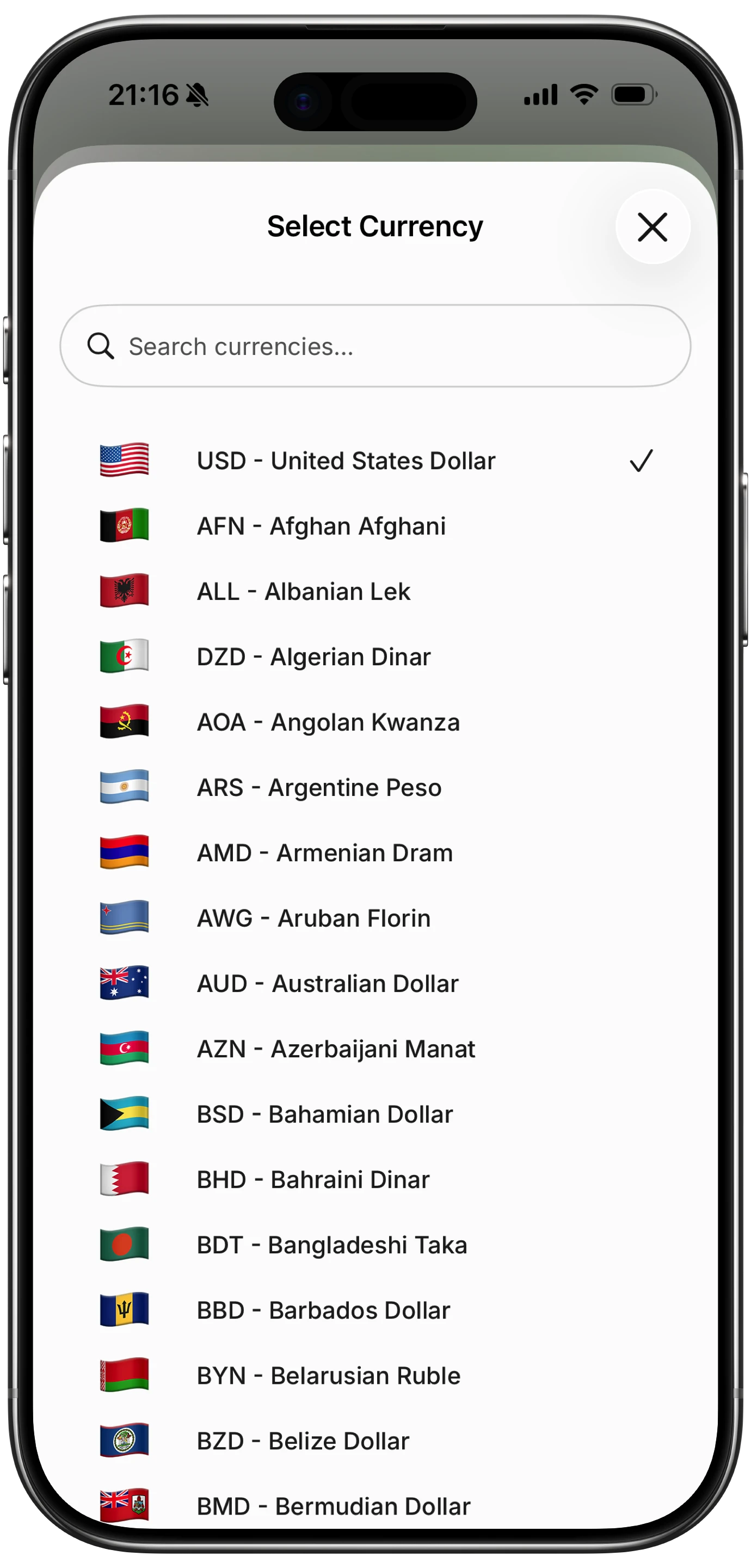
Offline mode is fully functional. Log expenses on a plane, in a subway, or at a rural guesthouse with no Wi-Fi. Everything syncs when connectivity returns. There is no reliance on bank connections or cloud processing for basic tracking, which matters in countries where data is expensive or unreliable. For more on this, read our how to track expenses guide.
At a low monthly or yearly price, Finny is less than the cost of a single meal in most travel destinations. That makes it the most affordable option with AI input, multi-currency support, and offline capability combined. The best multi-currency expense tracker comparison covers the currency features in more detail.
Best for: Frequent travelers and digital nomads who want the fastest possible expense entry with full multi-currency and offline support.
How to Set Up Your Travel Budget App Before a Trip
Downloading the app is step one. Using it effectively requires a small amount of setup before you leave.
Define your daily budget. Research average costs for your destination. Sites like Budget Your Trip provide per-country estimates. A common framework: allocate $100 to $200 per day for mid-range domestic travel and $150 to $300 for international destinations. Add a 15 to 20 percent buffer for unexpected costs.
Set up your categories. Most travel spending falls into five to seven categories: accommodation, food, transport, activities, shopping, and miscellaneous. Pre-loading these categories means fewer decisions in the moment.
Configure your currencies. If you know which countries you are visiting, set your home currency and add the local currencies in advance. This saves time during the trip and ensures rates are cached for offline use.
Do a test run at home. Track a normal day of spending using the app before your trip. This reveals any friction points while you still have time to adjust your setup or switch apps.
Common Mistakes with Travel Budget Apps
Even with a good app, a few habits derail travel budgeting.
Forgetting cash transactions. In Southeast Asia, Central America, and parts of Africa, cash is still king. Manual-entry apps handle cash naturally, but only if you log each purchase. Build the habit of logging immediately after paying.
Ignoring exchange rate differences. Your app converts at the mid-market rate, but your credit card uses a different rate plus fees. That is normal. Use the app for spending awareness, not accounting-level precision.
Waiting until the end of the day. Memory fades fast. Log expenses within a few minutes of each purchase. Voice input and tap-to-track features make this realistic even on busy travel days.
If you came back from a trip and the damage is already done, our step-by-step guide on how to recover from an overspending vacation walks through what to do next.
Frequently Asked Questions
What is the best free travel budget app?
TravelSpend offers the most complete free experience. It supports 150+ currencies, works offline, and includes trip budgets and category tracking without requiring payment. The free version displays ads and lacks data export, but for basic travel budgeting it covers the essentials.
Do I need a travel-specific app or can I use a regular expense tracker?
A regular expense tracker can work if it supports multiple currencies and offline mode. However, travel-specific features like trip-based budgets, daily spending limits, and automatic currency detection make dedicated apps noticeably more convenient. Apps like Finny bridge both worlds by functioning as a daily expense tracker at home and a travel budget app abroad.
How do I track expenses when traveling in countries with unreliable internet?
Choose an app with full offline functionality. Finny, Trail Wallet, and TripCoin all work without any internet connection. You can log expenses, view totals, and check budgets completely offline. Data syncs automatically when you reconnect. Avoid apps that require cloud processing for basic entry, as they become unusable in low-connectivity areas.
Should I track travel expenses in local currency or my home currency?
Track in local currency. This preserves the actual amounts you paid and lets you evaluate whether prices were reasonable in local terms. Use your app's unified currency view to see totals in your home currency. Apps that force immediate conversion lose valuable context. For detailed guidance, see our guide on tracking expenses in multiple currencies.
How much should I budget per day for international travel?
Daily budgets vary widely by destination. Budget travelers in Southeast Asia can manage on $30 to $50 per day. Mid-range travel in Western Europe typically runs $150 to $250. A practical approach: research your specific destination, set a daily budget in your app, and monitor it through the first few days. Adjust up or down based on actual spending patterns rather than sticking rigidly to a pre-trip estimate.
The Bottom Line
The right travel budget app depends on how you travel. Solo backpackers who want simplicity will be happy with Trail Wallet. Groups splitting costs need Splitwise. Travelers who want a free option across platforms should start with TravelSpend.
For travelers who move through multiple countries, deal with many currencies, and want the fastest possible expense logging, Finny stands out. The combination of AI input, 150+ currencies with unified totals, and full offline support means fewer missed expenses and clearer spending visibility throughout your trip.
The best travel budget app is the one you will actually use every day. Pick one, set it up before you leave, and commit to logging every purchase. For a side by side roundup of the top picks, see the best travel budget apps for 2026. Your future self, reviewing trip spending from a coffee shop back home, will thank you.
Download Finny and set up your travel budget in under two minutes.





