
How to Track Daily Spending Without It Feeling Like a Chore
Most people know they should track their spending. Very few actually do it every day. The gap between intention and action comes down to one thing: friction. When logging a purchase takes 30 seconds of tapping through form fields, it is easy to skip "just this one time." That one skipped entry becomes two, then five, then you stop tracking altogether. If you are choosing an app for it, our ranking of the best daily expense tracker apps compares entry speed and price.
The key to tracking daily spending consistently is not motivation or willpower. It is removing the steps that make logging feel tedious. When recording a purchase takes five seconds instead of thirty, the habit sticks. This guide covers practical methods for building a daily tracking habit, with a focus on tools that reduce input friction, including AI-powered text parsing, voice input, and receipt scanning. For a broader look at expense tracking methods, see our guide on how to track expenses.
Why Daily Tracking Matters More Than Monthly Reviews
Reviewing your bank statement at the end of the month tells you where money went. Tracking daily tells you where money is going. The difference matters.
When you log each purchase on the day it happens, you build real-time awareness of your spending patterns. You notice the $7 lunch that happens every Tuesday. You catch the subscription renewal before forgetting about it. You see your grocery spending creep up mid-week and adjust before the weekend.
Monthly reviews are backward-looking. Daily tracking is forward-looking. It gives you the chance to change course before the damage is done.
There is also a psychological benefit. The act of recording a purchase creates a brief pause between spending and moving on. That pause, even if it lasts three seconds, builds a layer of intentionality around your money decisions. Over time, people who track daily report spending less, not because they set strict budgets, but because they are simply more aware.
The Friction Problem: Why Most People Quit
Research on personal finance app usage consistently shows the same pattern. Users start strong, log everything for a week or two, then gradually stop. The drop-off curve is steep: most people who abandon expense tracking do so within the first 14 days.
The cause is almost always friction. Traditional expense tracking requires:
- Opening the app and navigating to the entry screen
- Entering the amount using a number pad
- Selecting a category from a dropdown or scrollable list
- Adding a note to remember what the purchase was
- Setting the date if it is not today
- Saving the entry
Six steps for a single purchase. Multiply that by 5 to 10 transactions per day, and you are spending 5 to 10 minutes daily on data entry. That is enough to make anyone quit.
The solution is not to track less. It is to make each entry faster. If you can reduce a 30-second process to 5 seconds, daily tracking becomes something you do without thinking about it.
Five Methods for Tracking Daily Spending
1. Pen and Paper
The simplest approach. Carry a small notebook, write down each purchase with the amount and a short description. At the end of the week, add up the totals by category.
Works well for: People who prefer physical objects, those who find writing by hand more satisfying than typing, anyone who wants to avoid screens.
Limitations: No automatic totals, no category analysis, easy to lose, hard to search, and you have to do the math yourself. Also impractical if you want to track spending over months or years.
2. Spreadsheets
Create a simple spreadsheet with columns for date, description, amount, and category. Log each purchase as it happens, or batch-enter at the end of the day.
Works well for: People comfortable with Excel or Google Sheets, those who want custom formulas and charts, anyone who enjoys building their own system.
Limitations: Requires a laptop or tablet for comfortable entry. Mobile spreadsheet editing is slow and awkward. The setup time is front-loaded, and maintaining formulas adds ongoing effort.
3. Form-Based Expense Apps
Traditional finance apps like PocketGuard use structured forms for expense entry. You fill in each field manually.
Works well for: People who prefer structured data entry, those who want precise control over every field.
Limitations: Multiple taps per entry. The category selection step alone can take 5 to 10 seconds if the list is long. This friction is the primary reason users abandon form-based trackers within two weeks.
4. Bank-Linked Automatic Tracking
Apps like Monarch Money and Copilot Money connect to your bank accounts and import transactions automatically. No manual entry needed.
Works well for: People who want zero-effort logging, those comfortable sharing bank credentials, anyone who primarily uses cards rather than cash.
Limitations: Cash transactions are missed. Categorization errors require manual correction. There is a 1 to 3 day delay between purchase and import. Privacy concerns around bank credential sharing are real. Subscription costs are often $10 to $15 per month. And the lack of manual logging means you lose the awareness benefit that makes daily tracking valuable.
5. AI-Assisted Quick Logging
AI-powered daily expense trackers let you log purchases using natural language. Type "coffee $5" or speak "lunch at the deli twelve dollars" and the app parses the amount, merchant, and category automatically. You confirm with a single tap.
Works well for: Anyone who wants speed without sacrificing control. People who track in real time throughout the day. Those who want accuracy without bank connections.
Limitations: AI suggestions occasionally need correction, especially for ambiguous merchants. You still need to initiate each entry. But the time per entry drops from 30 seconds to under 5 seconds, which makes the difference between quitting and sticking with it.
How to Build the Daily Tracking Habit
Knowing the tools is only half the challenge. The other half is building the habit. Here are practical strategies that work.
Log Immediately After Each Purchase
The best time to record an expense is within 10 seconds of paying. You have the amount fresh in your mind, the receipt in your hand, and the context clear. Waiting until the end of the day means relying on memory, which leads to missed entries and guesswork.
AI text input makes immediate logging practical. Pull out your phone, type "parking $8," confirm, and put it away. Five seconds. No excuse to skip it.
Use Voice Input When Your Hands Are Busy
Just paid for groceries and loading bags into the car? Tap the microphone and say the total. Walking out of a restaurant? Speak the amount before you reach the next block. Voice input works best in quiet or moderately noisy environments.
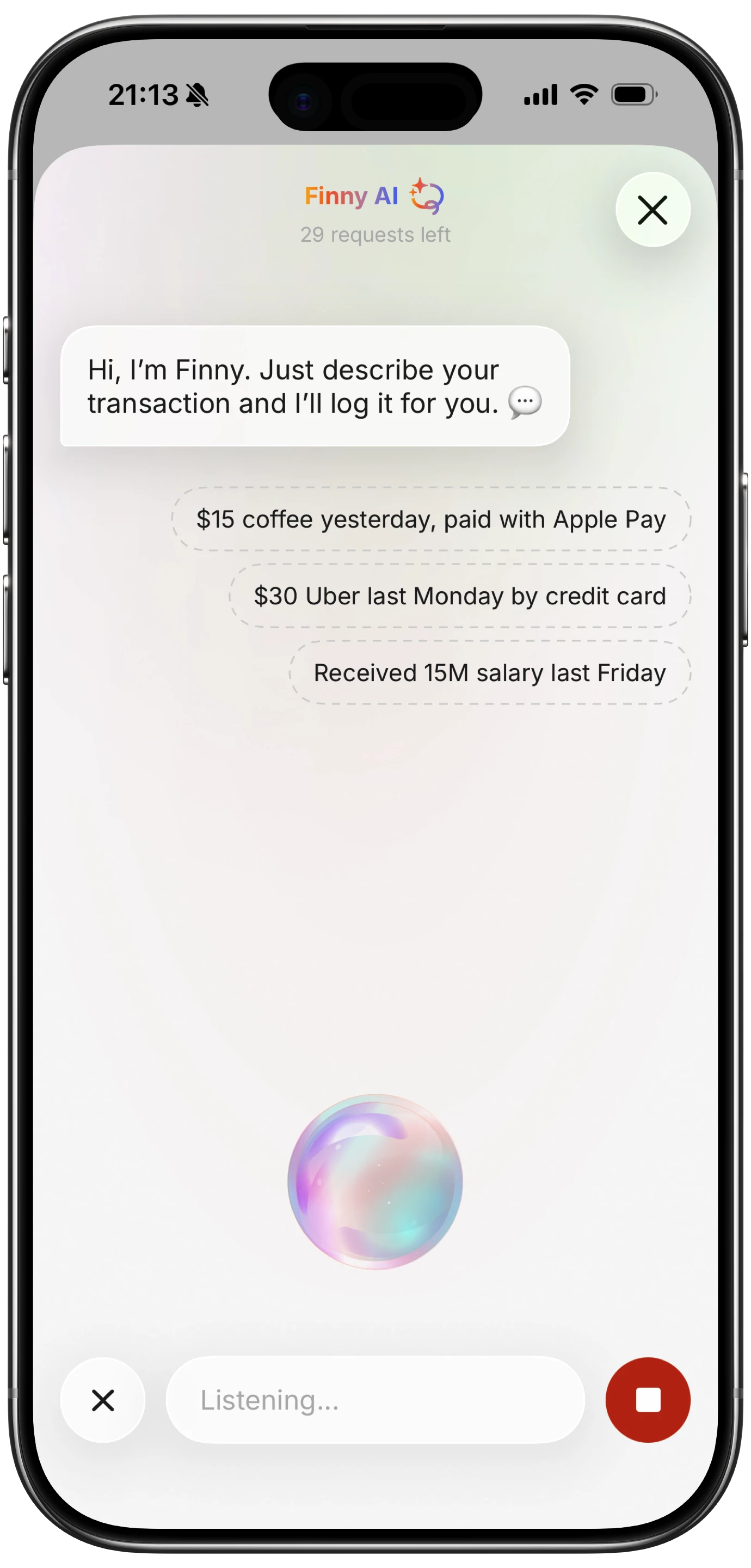
Finny app's voice input feature
This approach removes the "I will log it later" delay that kills tracking habits. If you can speak, you can track. For more on voice-based tracking, see our voice expense tracker guide.
Batch-Scan Receipts at the End of the Day
Some purchases are easier to track by receipt. Grocery runs with long item lists, business meals you need for tax purposes, or any purchase where you want to keep a visual record. Instead of photographing each receipt immediately, collect them throughout the day and scan them all at once in the evening.
Receipt scanning with AI extracts the merchant, date, total, and category from the image. You review the parsed data and confirm. A stack of five receipts takes about two minutes to process, compared to ten minutes of manual entry.

Finny app's screenshot import feature
Set a Two-Minute Evening Review
Spend two minutes before bed reviewing the day's entries. Check that every purchase is logged, categories are correct, and nothing is missing. This review step catches errors and reinforces the awareness that makes tracking valuable. If you prefer a structured monthly view instead of daily logs, our guide on the monthly expense tracker walks through four practical methods.
Keep it short. If your review takes more than two minutes, your logging method is too slow and you should switch to something faster.
Start With One Week, Not One Month
Do not commit to tracking daily for a month. Commit to one week. Seven days is manageable, and by day five, the habit often feels automatic. After one week, extend to two. After two, you will likely continue without needing to set goals.
What Finny Does Differently for Daily Tracking
Finny is designed specifically around the problem of daily tracking friction. Every feature is built to reduce the time between "I just bought something" and "it is logged."
Text input: Type a natural language description like "groceries Trader Joe's $47" or "uber home $22." Finny parses the amount, merchant, category, and date. One tap to confirm.
Voice input: Tap the microphone button and speak your expense. Finny transcribes and parses in real time. Useful when walking, driving, or carrying bags.
Receipt scanning: Photograph one to five receipts at once. Finny extracts all the relevant data from each image. Review everything on a single screen.
Offline support: Log expenses anywhere, even without cell service. Entries are stored locally and sync when you reconnect. No missed entries because of spotty Wi-Fi. For more on offline tracking, see our offline expense tracking guide.
150+ currencies: Traveling or managing money in multiple currencies? Log in any currency without switching apps or doing conversions manually.
The free tier covers all core tracking features. The Pro plan at a low monthly or yearly price adds advanced analytics and additional features for power users.
Common Mistakes That Kill the Daily Tracking Habit
Trying to categorize perfectly from day one. Start with broad categories: food, transport, shopping, bills. Refine later once you have data. Perfectionism in categorization leads to slower entries and faster burnout.
Logging in batches at the end of the day. Unless you have receipts, you will forget transactions. Log in real time whenever possible.
Choosing a slow tool. If your tracking app requires more than three taps per entry, find a faster one. Speed is the single biggest factor in habit retention.
Not reviewing. Logging without reviewing is like exercising without ever checking your progress. The two-minute evening review closes the feedback loop and makes the habit feel worthwhile. If the logging itself is the hard part, our guide to automating daily purchase tracking on iPhone shows how to make most purchases record themselves.
The Bottom Line
Daily spending tracking works when it is fast enough to be automatic. The specific tool matters less than the friction level. If you can log a purchase in under five seconds, you will keep tracking. If it takes thirty seconds, you probably will not.
For pen-and-paper fans, a small notebook works fine. For spreadsheet users, a well-designed template can work. But for most people, AI-assisted logging offers the best balance: fast enough for real-time tracking, accurate enough for meaningful analysis, and private enough to use without sharing bank credentials.
The goal is not to track perfectly. The goal is to track consistently. Start with one week, use the fastest method available, and build from there.
Common Questions About Tracking Daily Spending
How many transactions should I track per day?
Track all of them. The value of daily tracking comes from completeness. If you skip small purchases, your data will understate your actual spending, which defeats the purpose. AI-assisted input makes logging even small purchases fast enough to be practical.
What is the best daily expense tracker app in 2026?
The best daily expense tracker is the one fast enough that you actually use it every day. Bank-linked apps like Monarch Money automate the process but miss cash. AI-assisted trackers like Finny make manual entry fast without requiring bank access. Choose based on your privacy preferences and payment methods.
Can I track daily spending without an app?
Yes. Pen and paper or a simple spreadsheet both work. The trade-off is speed and analysis: manual methods take longer per entry and require more effort to see patterns. But they are perfectly valid if you prefer physical or desktop tools.
How long does it take for daily tracking to become a habit?
Most people report that daily tracking feels automatic within 5 to 7 days of consistent practice. The key is using a method fast enough that it does not feel like a burden. If you are still struggling after two weeks, the tool is too slow, not your willpower.
Ready to make daily tracking effortless?
Download Finny to log expenses in seconds using AI text input, voice, or receipt scanning. No bank connections, full offline support, and your data stays on your device.