
AI Finance Tracker: How AI Is Changing Personal Money Management
The phrase "AI-powered" has been attached to nearly every category of software, and personal finance apps are no exception. But when it comes to actually managing your money, what does AI do? We also tested whether a general assistant can do the job in can ChatGPT track my expenses. Is it genuinely useful, or is it a marketing label applied to features that have existed for years?
The honest answer is somewhere in between. An AI finance tracker in 2026 is not a robot that manages your budget for you. It is a set of tools that reduce the manual work of logging, categorizing, and reviewing your spending. Some of these tools are genuinely useful. Others are overhyped. This guide separates the real capabilities from the noise and covers how AI is being applied across the major personal finance apps available today. For a broader look at tracking tools, see our best money tracker apps in 2026 guide.
What AI Actually Does in Finance Apps
AI in personal finance covers four main capabilities. Each one works differently, and each has clear strengths and limitations.
Text Parsing: Natural Language Input
The most immediately useful AI feature in expense tracking is text parsing. Instead of filling out structured forms with separate fields for amount, category, merchant, and date, you type a short sentence.
Examples of text input:
- "Coffee at Blue Bottle $4.50"
- "Groceries Trader Joe's 47 dollars"
- "Uber to airport $34.50 yesterday"
The AI model parses the text and extracts structured data: amount, merchant name, category, and date. You review the parsed result and confirm with a single tap.
This is not a new idea conceptually. What has changed is accuracy. Modern language models handle abbreviations, slang, multiple date formats, and currency symbols reliably. The error rate for simple one-line expense entries is low enough that most people only need to correct categorization occasionally, not the core data extraction.

Finny app's AI chat feature
Where it helps: Speed. Typing "lunch $15" and tapping confirm takes about three seconds. Filling out a form with the same information takes fifteen to twenty seconds. Over dozens of transactions per week, this difference determines whether someone maintains the tracking habit or quits.
Where it struggles: Ambiguous inputs. "Target $85" could be groceries, clothing, or household supplies. The AI picks the most common category for that merchant, but it cannot know what you actually purchased. You handle that in the review step.
Receipt Scanning: OCR Plus Language Models
Receipt scanning combines optical character recognition with language models. You photograph a paper receipt, and the app reads the text, identifies the merchant, date, total amount, and tax. Some apps also extract individual line items.
How it works in practice: Point your camera at the receipt. The app captures the image, runs OCR to convert the printed text into digital text, then uses a language model to identify which parts of that text represent the total, the merchant name, the date, and the category. Results appear on screen for your review.

Finny app's screenshot import feature
Where it helps: Receipts contain more information than you would typically type: exact merchant names, itemized breakdowns, tax amounts, and timestamps. AI scanning captures all of this in seconds. It is particularly useful for grocery runs, business meals, and any purchase where you want a complete record.
Where it struggles: Faded receipts, handwritten additions, unusual layouts, and crumpled paper reduce accuracy. Thermal paper that has been in a wallet for a week may be partially unreadable. For most standard printed receipts, though, accuracy is high.
Voice Input: Speech to Structured Data
Voice input adds a transcription step before text parsing. You speak your expense aloud, the app converts speech to text, then parses the text the same way it handles typed input.
Where it helps: Hands-free logging. You just paid at a counter, you are walking to your car, or you are in the middle of something. Tap the microphone, say "parking garage twelve dollars," and the expense is logged. This removes the "I will do it later" delay that leads to forgotten entries.
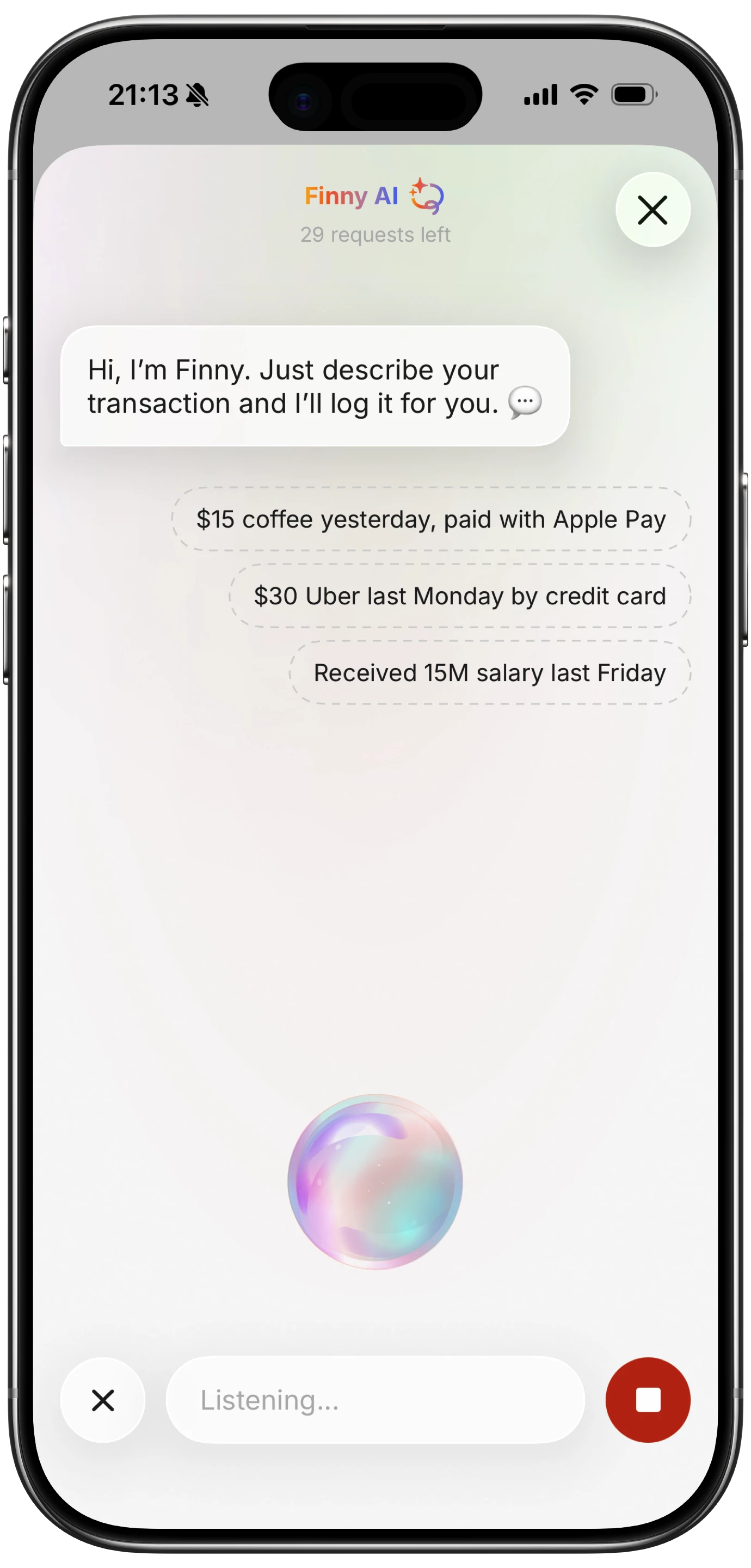
Finny app's voice input feature
Where it struggles: Background noise. Cafes, busy streets, and crowded stores introduce transcription errors. "Twelve dollars" might become "twelve collars." Always review voice-entered expenses. Quiet and moderately noisy environments work fine. For more detail on voice-based tracking, see our voice expense tracker guide.
Auto-Categorization: Pattern Recognition
Every AI finance tracker categorizes your transactions. The approach varies:
Bank-linked categorization: Apps that import transactions from your bank use merchant codes and names to assign categories. "Whole Foods" maps to Groceries. "Shell" maps to Gas. This works for known merchants but fails for generic names, peer-to-peer payments, and small businesses without recognizable names.
User-trained categorization: Some apps learn from your corrections. If you change "Target" from Shopping to Groceries three times, the app starts defaulting to Groceries for Target. This improves accuracy over time but requires an initial period of frequent corrections.
Context-based categorization: The most advanced approach considers multiple signals: the merchant name, the amount, the time of day, and your past patterns. A $5 charge at Starbucks at 8 AM is Coffee. A $45 charge at Starbucks at 2 PM is probably a meeting expense. This level of nuance is still developing but improving.
What AI Cannot Do for Your Finances
It is worth being direct about the limits. AI in personal finance in 2026 does not:
Automatically detect all purchases: Unless linked to your bank, AI does not know you spent money. You still need to initiate the logging, whether by text, voice, or receipt scan. Bank-linked apps capture card transactions but miss cash, peer-to-peer payments, and some digital wallets.
Replace human judgment: AI can suggest that your $200 Target purchase is "Shopping," but it cannot know whether that purchase was wise, necessary, or within your budget. Financial decisions require context that AI does not have.
Guarantee accurate categorization: Even the best AI categorizers have error rates. Categories are somewhat subjective, and what counts as "Groceries" versus "Household" is a personal decision. AI provides a starting point; you make the final call.
Predict your future spending accurately: Some apps offer spending predictions based on past patterns. These are rough estimates, not forecasts. Life changes, unexpected expenses, and seasonal variation make accurate prediction difficult.
Negotiate bills or reduce your spending: AI can show you that you spent $300 on dining out. It cannot make you spend less. Behavior change is a human challenge, not a technology problem.
AI Finance Tracker Apps Compared
| Feature | Cleo | Copilot Money | Monarch Money | Finny |
|---|---|---|---|---|
| AI Input (text/voice/receipt) | Chat only | None | None | Text, Voice, Receipt |
| Bank Connection | Required | Required | Required | Not required |
| Auto-Categorization | Yes | Yes | Yes | Yes |
| Offline Support | No | No | No | Yes |
| Free Tier | Limited | No | No | Yes |
| Price (paid) | $5.99-14.99/mo | $14.99/mo | $14.99/mo | a low monthly price |
| Platforms | iOS, Android | iOS | iOS, Android, Web | iOS |
Cleo
Cleo uses AI through a conversational chatbot interface. You interact with an AI character that analyzes your bank-linked transactions, provides spending insights, and offers savings suggestions. The tone is casual and personality-driven.
AI strengths: Engaging conversational analysis. The chatbot can answer questions like "How much did I spend on food this month?" or "What are my biggest expenses?" in natural language.
AI limitations: Cleo's AI is analytical, not an input tool. You cannot log expenses through Cleo. It reads your bank data and comments on it. If you do not link your bank, Cleo has nothing to work with.
Copilot Money
Copilot uses AI for transaction categorization and spending pattern detection. It imports transactions from linked bank accounts and learns your categorization preferences over time.
AI strengths: Strong auto-categorization that improves with corrections. Clean visual presentation of spending patterns. Subscription detection.
AI limitations: No AI-assisted manual input. If you want to add a cash purchase, you use a traditional form. The AI is applied to imported data, not to user input.
Monarch Money
Monarch combines AI categorization with financial planning features. It handles budgets, investments, and net worth tracking alongside expense categorization.
AI strengths: Comprehensive financial picture. Good categorization across multiple account types. Collaborative features for households.
AI limitations: Similar to Copilot, the AI works on imported bank data. Manual entry is form-based. The AI does not help with the input step.
Finny: AI Applied to Input, Not Just Analysis
Finny takes a different approach to AI in personal finance. Instead of using AI to analyze bank-imported data, Finny uses AI to make the input step fast enough that bank connections become optional.
Three input modes, all AI-assisted:
- Text: Type "dinner $35" and Finny parses the amount, merchant, and category.
- Voice: Speak your expense and Finny transcribes and parses in real time.
- Receipt scanning: Photograph receipts and Finny extracts all relevant data.
Every entry includes a confirmation step. AI suggests, you verify. This keeps accuracy high while reducing input time from thirty seconds to five seconds per expense.
Additional features that differentiate Finny:
- Offline-first: Works without internet. Data is stored locally and syncs later.
- No bank connection: Your financial credentials are never shared.
- 150+ currencies: Log in any currency without manual conversion.
- Free tier: Core features available at no cost. Pro at a low monthly or yearly price.
For more on how AI compares to manual tracking in practice, see our AI expense tracking vs manual guide.
How to Evaluate AI Claims in Finance Apps
When evaluating an AI finance tracker, ask these practical questions:
What does the AI actually do? Is it parsing your input, categorizing imported data, or generating conversational insights? These are fundamentally different capabilities.
Does the AI replace your control or assist it? The most reliable AI tools let you confirm every action. Apps that auto-categorize without a review step often produce errors you never catch.
What data does the AI need? Some AI features require bank connections. Others work with data you provide manually. The data requirements determine the privacy trade-off.
Is AI doing something new, or renaming an old feature? Auto-categorization based on merchant names has existed for over a decade. Calling it "AI-powered" does not make it new. Look for genuinely new capabilities like natural language input, receipt OCR, and voice parsing.
Can you use the app without the AI? Good apps let you fall back to manual entry when AI suggestions are wrong. If the app is unusable without AI, you are dependent on the AI's accuracy, which is never 100%.
The Realistic Role of AI in Personal Finance
AI is a useful tool for reducing the busywork of personal finance management. It makes logging faster, categorization less tedious, and receipt processing practical. These are genuine improvements.
But AI does not solve the hard part of personal finance: making better decisions with your money. Knowing where your money goes is necessary but not sufficient. You still need to set priorities, stick to limits, and adjust when circumstances change. Those are human tasks.
The best AI finance tools acknowledge this distinction. They handle the data entry and organization, then get out of the way so you can focus on the decisions that actually matter. For foundational guidance on budgeting, see our budgeting for beginners guide.
Common Questions About AI Finance Trackers
What is an AI finance tracker?
An AI finance tracker is an app that uses artificial intelligence to assist with logging, categorizing, and analyzing personal spending. AI capabilities vary by app: some parse natural language input, some scan receipts, some categorize imported bank transactions, and some offer conversational spending insights.
Is AI money tracking safe for privacy?
It depends on the app. AI trackers that require bank connections share your financial data with third-party aggregators. AI trackers that work with manual input, like Finny, do not access your bank accounts and can store data locally on your device.
Can AI replace a financial advisor?
No. AI finance trackers help with data collection and basic analysis. They do not provide personalized financial advice, tax planning, investment strategy, or estate planning. For complex financial decisions, a qualified human advisor is still the appropriate resource.
Are AI expense trackers accurate?
For simple transactions (one merchant, one amount), accuracy is high. For ambiguous or complex transactions, AI categorization may need manual correction. The most reliable approach is AI-assisted input with a human confirmation step before saving.
Do AI finance apps cost more than regular apps?
Not necessarily. Some AI-powered apps like Finny offer a free tier. Others, like Copilot and Monarch, cost $14.99 per month regardless of whether you consider their categorization "AI" or not. Price depends on the app, not on whether it uses AI.
Want to try AI-assisted expense tracking without sharing your bank credentials?
Download Finny to log expenses with text, voice, or receipt scanning. AI handles the parsing, you handle the confirmation. No bank connection, offline support, and 150+ currencies.