Apple Cash Family: How to Track Teen Spending on iPhone (2026)
Most parents know what it feels like to hand a teenager money and wonder where it goes. Whether your teen uses Apple Pay at the lunch counter or Venmo-splits costs with friends, the trail goes cold fast. You want to stay informed without hovering, and you want your teen to build real money habits before they leave home.
This guide covers apple cash family teen tracking: how Apple's built-in tools work, what they genuinely cannot do, and how to pair them with an expense tracker app for a complete picture. Everything here reflects the Apple Cash Family feature set as of May 2026, based on Apple Support documentation. Some details may change with future iOS releases, so it is worth checking Apple's support pages if you are setting this up months from now.
What Apple Cash Family Actually Does
Apple Cash Family is a feature inside Family Sharing that lets the family organizer, typically a parent, manage a child or teen's Apple Cash account from their own device. It does not require a separate app download. The controls live in Settings, Wallet, and the Messages app.
Here is what parents can see and do:
- View balance and transaction history. Every payment your teen sends or receives appears in the family organizer's Wallet app under the teen's Apple Cash card.
- Receive real-time notifications. You can turn on "Notify Me When [name] Makes Any Transaction" in Settings to get a push notification the moment money moves.
- Restrict who the teen can pay. Options are: everyone, contacts only, or family members only. This single setting matters more than most parents realize.
- Lock the account. You can freeze the account instantly if something looks wrong.
- Set up recurring payments. Inside the Wallet app under Apple Cash Family, you can schedule an allowance on a weekly or monthly cadence, which is useful for replacing cash-in-an-envelope routines.
Age requirements: children must be under 18 to be managed through Apple Cash Family. If your teen turns 18 and takes ownership of their account, parental visibility ends automatically. Under-13 users can receive and spend Apple Cash but cannot add a personal debit card. Spending limits for managed accounts are capped at $2,000 sent or received within any rolling seven-day period, with a maximum Apple Cash balance of $4,000. (These figures are from Apple's official transfer limits page; verify before relying on them for planning.)
Family Sharing must already be active before you can enable Apple Cash Family, and all devices need to be running a current version of iOS, with two-factor authentication enabled on every Apple ID in the group. The device region must be set to United States.
What Apple Cash Family Does Not Do
Apple Cash Family is a payment oversight tool. It is not a budgeting tool. That distinction matters.
There are no spending categories. You can see that your teen spent $14.99 on Saturday, but the transaction description may say only "Apple Pay Purchase" or the merchant name. There are no labels for groceries, entertainment, or clothing.
There are no budgets or limits by category. You cannot say "spend no more than $40 on restaurants this month" inside Apple Cash Family. You can only restrict who receives money, not how much goes to any particular type of spending.
There is no recurring bill detection. If your teen pays a streaming subscription every month, Apple Cash Family shows each charge as a one-off transaction. Nothing flags it as recurring.
There are no reports or summaries. No monthly email, no weekly digest, no chart of where the money went. You have a transaction list, and that is it.
This is not a criticism of Apple's feature. Apple Cash Family is designed to be a guardrail for younger users, not a full financial dashboard. For the full picture, most families find they need to pair it with an app.
Pairing Apple Cash Family with an Expense Tracker
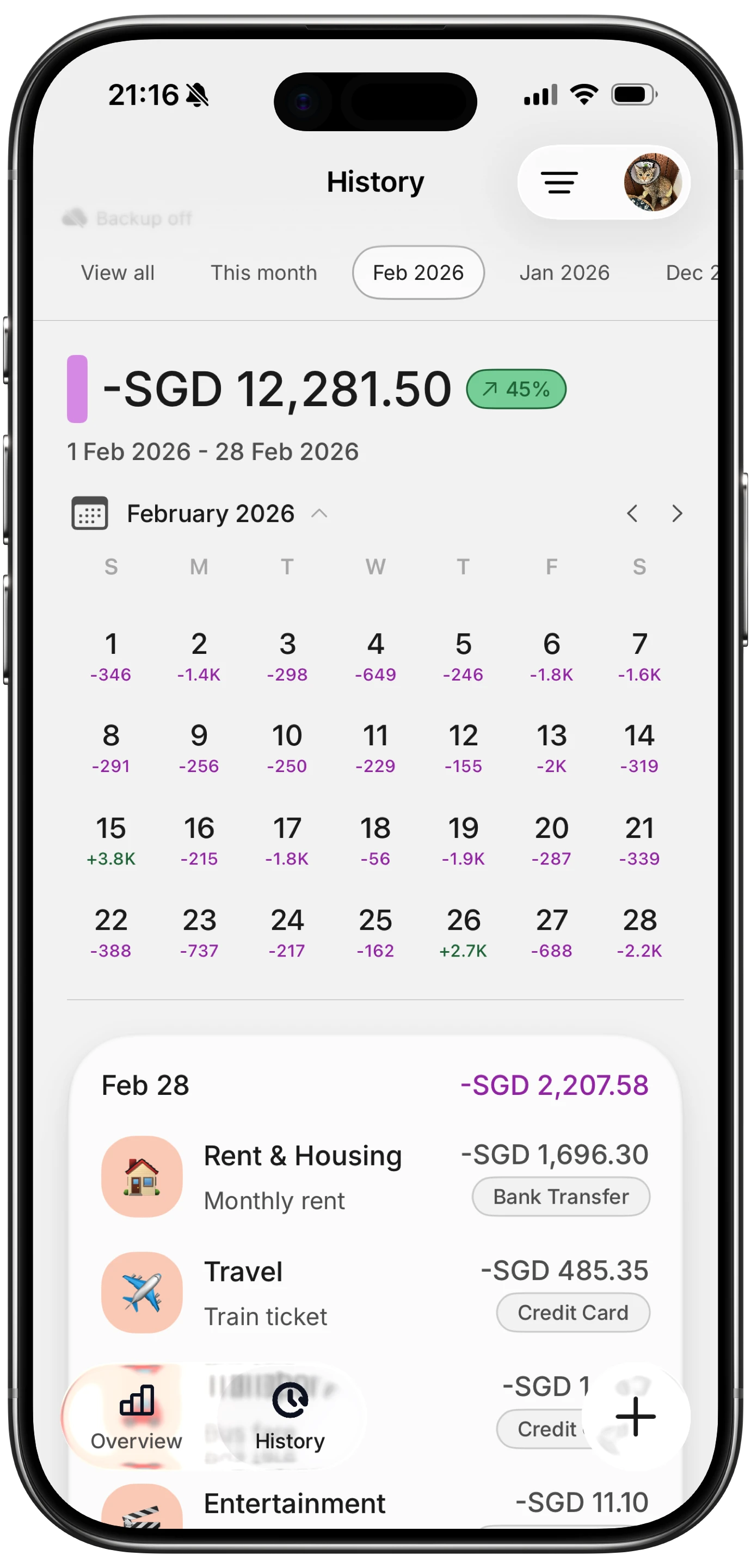
The gap Apple Cash Family leaves is categorization, reporting, and habit-building. That is where a dedicated expense tracker earns its place.
A few options are worth knowing about. Apps like Greenlight, GoHenry, and Step are built specifically for teens and include debit cards with parental controls baked in. If you prefer that your teen use their existing iPhone and Apple Pay rather than a separate card, a general-purpose expense tracker is often a better fit.
Finny was built with low-friction input in mind, which matters for teens who will not spend five minutes manually logging a coffee. The AI input lets a teen say or type "spent $6 at Starbucks" and the app handles categorization. The free tier covers the basics, so a teen can start without the parent paying anything. If the family wants shared visibility or more advanced reporting, the Pro plan costs a low monthly price, which is reasonable for a parent-funded setup.
For students who want to go deeper on budgeting beyond just logging, the best budget apps for students in 2026 comparison covers several options at different price points. If your teen is heading to college and will share expenses with roommates, tracking shared expenses with roommates is worth reading before move-in day.
Setup Walkthrough: Parent and Teen Device Side by Side
Keep both devices on hand. This takes about ten minutes.
On the parent's iPhone:
- Open Settings and tap your name at the top.
- Tap Family Sharing, then select the teen's name.
- Tap Apple Cash and follow the prompts. You may be asked to verify your identity.
- Once setup is complete, open the Wallet app and tap your Apple Cash card.
- Tap the More button (the three dots), then tap Apple Cash Family.
- Select the teen's name. Here you can view their balance, set contact restrictions, and enable transaction notifications.
On the teen's iPhone:
- Open the Wallet app. The Apple Cash card should appear automatically after the parent completes setup.
- The teen can tap the card to see their own transaction history and balance.
- They send and receive money exactly as they would with a standard Apple Cash account, through Messages or by tapping to pay at any contactless terminal.
If the Apple Cash card does not appear on the teen's device, check that Family Sharing is active on both devices, that two-factor authentication is enabled, and that the device region is United States.
For families who already use a family budget app or an app to manage family expenses, the teen's spending data can be folded into the same review process you use for household expenses. Having one weekly session rather than separate parent and teen check-ins tends to work better.
Weekly Review Workflow That Builds Money Skills
The goal of visibility is not surveillance. It is conversation. A weekly ten-minute review, done together, teaches more than any app can on its own.
Here is a simple rhythm that works for most families:
Sunday evening, ten minutes:
- Open the teen's Apple Cash transaction list (either on the parent's Wallet view or on the teen's device together).
- Go through each transaction and ask the teen to name the category: food, transportation, entertainment, personal care.
- If the teen also logs in Finny or another tracker, pull that up alongside. The side-by-side view quickly shows whether anything was missed.
- Ask one question: "Was there anything you wish you had spent differently this week?" Not a critique, just a prompt.
- Note any recurring charges that surprised either of you.
Over time, this builds categorization instincts. The teen learns to anticipate the review and starts self-sorting purchases mentally before the session. That is the beginning of a budget mindset.
If your teen is new to thinking about money at all, budgeting for beginners is a good starting point to read before the first session, so you share a common vocabulary.

Privacy and Trust as the Teen Grows
Parental oversight is appropriate for a 13-year-old. It feels differently to a 16-year-old, and it ends legally at 18. Building in natural transitions prevents the handoff from feeling abrupt.
A reasonable progression:
- Ages 13 to 15: Full Apple Cash Family visibility. Weekly review is parent-led.
- Ages 15 to 17: Teen starts maintaining their own expense log. Review shifts to a conversation the teen presents to the parent, not the other way around.
- Age 17 to 18: Transition to an independent budget. The teen keeps using their tracker. The parent checks in monthly rather than weekly, or only when asked.
- Age 18: Apple Cash Family oversight ends automatically. Ideally the teen already has habits in place before this happens.
Privacy-first apps like Finny are a better fit for older teens who are moving toward independence. The teen's data stays on their device, and the app does not sell spending behavior to third parties. That framing, "this is your financial data, you own it," resonates with teenagers in a way that parent-controlled platforms often do not.
Frequently Asked Questions
Can a parent see every Apple Cash transaction their teen makes?
Yes. When Apple Cash Family is set up, the family organizer can view the teen's full transaction history, including the amount, date, and payee name. You can also enable notifications for every transaction so you receive an alert in real time. This visibility ends automatically if the teen turns 18 and takes ownership of their account.
What is the spending limit for teens on Apple Cash Family?
As of current Apple documentation, managed Apple Cash Family accounts are limited to $2,000 sent or received within any rolling seven-day period. The maximum account balance is $4,000. These limits apply to the Apple Cash account itself; spending at a merchant via Apple Pay does not require the funds to pass through Apple Cash, so limits depend on the funding source used.
Does Apple Cash Family work if the teen does not have an iPhone?
Apple Cash Family works on iPhone and Apple Watch. The teen needs a compatible Apple device with a current version of iOS or watchOS, signed into their Apple ID with two-factor authentication enabled, and with the device region set to United States. It does not work on Android.
Is Apple Cash Family the same as Apple Card Family?
They are related but separate. Apple Cash Family manages a child's peer-to-peer payment account, the balance they can send and receive through Messages and Apple Pay. Apple Card Family is about adding a family member as a participant on an Apple Card credit account. Some families use both; neither requires the other.
At what age can a child use Apple Cash on their own?
To have an independent Apple Cash account without parental oversight, a user must be 18 and a U.S. resident. Children under 13 can use Apple Cash through Family Sharing but cannot add a personal debit card to Wallet. Teens aged 13 to 17 can participate fully through Apple Cash Family, with the family organizer maintaining visibility and controls.
Frequently Asked Questions (Continued)
Which expense tracker apps work well alongside Apple Cash Family?
Any app where the teen logs their own purchases works. Finny is a low-friction option for teens because of its AI-assisted input and privacy-first design. For families that want a more structured envelope-based approach, Goodbudget is another option. For teens who want detailed analytics as they get older, Copilot and Monarch Money offer strong reporting but are designed more for adult-level finances.
Apple Cash Family gives parents a reliable window into how their teen moves money on iPhone. It is not a complete financial toolkit, but paired with a lightweight expense tracker and a consistent weekly review, it covers both the oversight parents need and the habit-building teens benefit from. The combination works best when it is framed as a skill-building exercise rather than a monitoring system.
If your teen is ready to start tracking their own spending, Finny is free to try and takes less than a minute to set up.