
Most people have at least three financial accounts: a checking account, a savings account, and a credit card. Many have more. Between cash-back cards, investment accounts, digital wallets, and maybe a joint account with a partner, your money sits in a lot of places at once.
The problem is obvious: when spending is scattered across five or six accounts, you lose track of the full picture. You might think you are doing fine because your checking balance looks healthy, only to realize your credit card has been quietly accumulating charges all month. To compare cards without linking them, see our guide on how to see your spending by credit card.
The best apps to track spending across multiple accounts in 2026 solve this by pulling everything into one view. Some do it through bank connections using services like Plaid. Others let you log transactions manually with tools that are fast enough to keep up. A few combine both approaches.
We tested six options and compared them on account coverage, ease of setup, pricing, and how well they actually consolidate your financial picture. If you are looking for a broader overview of tracking tools, start with our guide to the best expense tracker apps in 2026.
Why Tracking Across Multiple Accounts Matters
Tracking a single checking account is simple. The challenge starts when you spread spending across multiple cards, e-wallets, and cash. Here is what goes wrong without a unified view:
- Blind spots in your budget: You set a dining budget of $400, but half your restaurant charges hit a rewards card you forgot to check. By month end, you have spent $600.
- Missed recurring charges: Subscriptions can hide across accounts. A streaming service on one card, a gym membership on another, an app subscription through Apple Pay. Without aggregation, these slip through.
- Inaccurate net worth: If your tracker only sees one account, your savings and debt numbers are incomplete. Decisions based on partial data lead to bad outcomes.
- Duplicate effort: Logging into four different banking apps to check balances is tedious. Most people stop doing it after a few weeks.
The right multi-account tracker eliminates these problems by giving you one consolidated dashboard. The question is whether that tracker should connect to your banks directly, or whether there is a better way.
Account Aggregation: Bank-Linked vs. Manual Approaches
There are two fundamental approaches to multi-account tracking, and each involves trade-offs.
Bank-Linked Aggregation (Plaid, MX, Finicity)
Apps like Monarch Money, Copilot, and YNAB use third-party services (primarily Plaid) to create read-only connections to your bank accounts. Once linked, transactions import automatically. The upside is convenience: you connect once and spending flows in without effort.
The downsides are real, though. You must share your banking credentials with a third party. Connections break when banks update their systems. Some institutions are not supported. And if the aggregation service has an outage, your tracker goes dark. For people who prefer not to share credentials, we wrote a full guide on how to track expenses without linking your bank.
Manual and AI-Assisted Tracking
The alternative is logging transactions yourself. Traditional manual entry is slow: open the app, pick a category, type the amount, select the account. That friction is why most people abandon manual trackers within weeks.
Modern AI-assisted apps change this equation. Voice input, receipt scanning, and natural language text entry reduce logging time to a few seconds per transaction. Some apps can even auto-log contactless payments. The result is that you maintain control over your data without sacrificing much convenience.
The best approach depends on your priorities. If convenience is everything and you are comfortable with bank connections, aggregation apps work well. If privacy matters or your accounts include things Plaid cannot reach (cash, foreign accounts, digital wallets), AI-assisted manual tracking fills the gaps. For a deeper look at tracking methods, see our guide on how to track expenses.
Quick Comparison Table
| App | Price | Account Linking | Manual Entry | Offline | Multi-Currency | AI Input |
|---|---|---|---|---|---|---|
| Finny | a low monthly price | No (manual/AI) | Yes (AI-powered) | Yes | 150+ currencies | Text, voice, receipt, chat |
| Monarch Money | $14.99/mo | Yes (Plaid) | Limited | No | Limited | No |
| Copilot | $13/mo | Yes (Plaid, MX, Finicity) | Limited | No | Yes | Limited |
| YNAB | $14.99/mo | Yes (Plaid) | Yes | No | Yes (manual rates) | No |
| PocketGuard | $12.99/mo | Yes (Plaid) | Cash accounts only | No | No | No |
| Wallet by BudgetBakers | ~$4.49/mo | Yes (15,000+ banks) | Yes | Partial | Yes | No |
The Best Apps for Multi-Account Spending Tracking
Monarch Money: Best for Full Household Aggregation
Monarch Money became the de facto Mint replacement when Intuit shut that service down in 2024. It connects to over 13,000 financial institutions through Plaid and presents everything: checking, savings, credit cards, loans, and investments in a single dashboard.
The strength here is breadth. Monarch does not just show transactions. It tracks net worth over time, monitors investment performance, identifies recurring subscriptions, and provides cash flow forecasts. For households, the unlimited collaboration feature means every family member sees the same financial picture without paying per-user fees.
Where Monarch falls short for multi-account users is reliability. Bank connections occasionally drop, requiring re-authentication. There is no offline mode, so you cannot review your data without internet. Manual entry exists but feels like an afterthought: no AI, no receipt scanning, no voice input. If an account cannot connect through Plaid, your only option is tedious manual logging.
Multi-currency support is limited, which makes Monarch a poor fit for anyone with international accounts. And at $14.99/month ($99.99/year) with no free tier, it is one of the most expensive options available.
Pricing: $14.99/month or $99.99/year
Best for: US households that want every domestic account in one dashboard and are comfortable with bank linking.
Copilot: Best Design for Linked Accounts
Copilot is an iOS-exclusive finance app with outstanding visual design. It uses Plaid, Finicity, MX, and Akoya for account connections, covering over 10,000 financial institutions. Transactions import automatically and are categorized by AI that learns your preferences over time.
For multi-account tracking, Copilot excels at presenting consolidated spending data in a way that is genuinely pleasant to review. Monthly snapshots break down where money went across all linked accounts. The categorization AI is among the best we tested: most transactions land in the correct category without manual adjustment.
The limitations mirror other bank-linked apps. No Android or web version means you are locked to Apple devices. Offline access is not available. Receipt scanning exists but plays a secondary role to the bank-sync workflow. If you have accounts that Plaid cannot reach, you are stuck with basic manual entry.
Pricing: $13/month or $95/year
Best for: iOS users who want a visually polished view of all their linked accounts.
YNAB: Best for Budgeting Across Accounts
YNAB (You Need a Budget) approaches multi-account tracking differently. Instead of just aggregating balances and transactions, it forces you to assign every dollar a purpose through zero-based budgeting. When you connect multiple accounts, YNAB treats the combined balance as one pool of money to be allocated.
This methodology is powerful for people who struggle with overspending. By seeing all your money in one budget regardless of which account holds it, you stop thinking in terms of account balances and start thinking in terms of category budgets.
YNAB supports bank linking through Plaid but also has solid manual entry. You can add accounts that do not support automatic import and log transactions by hand. The app distinguishes between "budget accounts" (checking, credit cards) and "tracking accounts" (investments, assets) to keep your active budget focused.
The downsides: $14.99/month ($109/year) makes it the priciest option on this list. Multi-currency support requires manual exchange rate adjustments, which is cumbersome for anyone managing international accounts. There is no AI input, no receipt scanning, and no offline mode.
Pricing: $14.99/month or $109/year
Best for: People who want a proven budgeting methodology that works across all their accounts.
PocketGuard: Best for a Quick Spending Snapshot
PocketGuard's signature feature is its "In My Pocket" number: a single figure that tells you how much you can safely spend after accounting for bills, goals, and necessities across all connected accounts. For multi-account users, this simplification is genuinely useful.
The free tier connects up to two bank accounts. PocketGuard Plus ($12.99/month or $74.99/year) unlocks unlimited connections and adds features like debt payoff planning, transaction splitting, and advanced categorization. You can also create up to 50 manual cash accounts for tracking money outside the banking system.
The trade-offs are significant. PocketGuard requires bank connections to deliver its core value. There is no AI input, no receipt scanning, and no multi-currency support. If your financial life includes foreign accounts, cash spending, or digital wallets that cannot connect through Plaid, PocketGuard will show you an incomplete picture.
Pricing: Free (2 accounts); Plus at $12.99/month or $74.99/year
Best for: People who want one simple number that summarizes their spending power across linked accounts.
Wallet by BudgetBakers: Best for Global Bank Coverage
Wallet stands out for its international reach. It connects to over 15,000 banks worldwide, which is broader coverage than most US-focused competitors. For users with accounts in multiple countries, this matters.
The app supports multi-currency tracking, shared wallets for household budgeting, and both automatic and manual transaction entry. You can create unlimited accounts in the premium tier, covering everything from savings to vouchers to cash in your pocket.
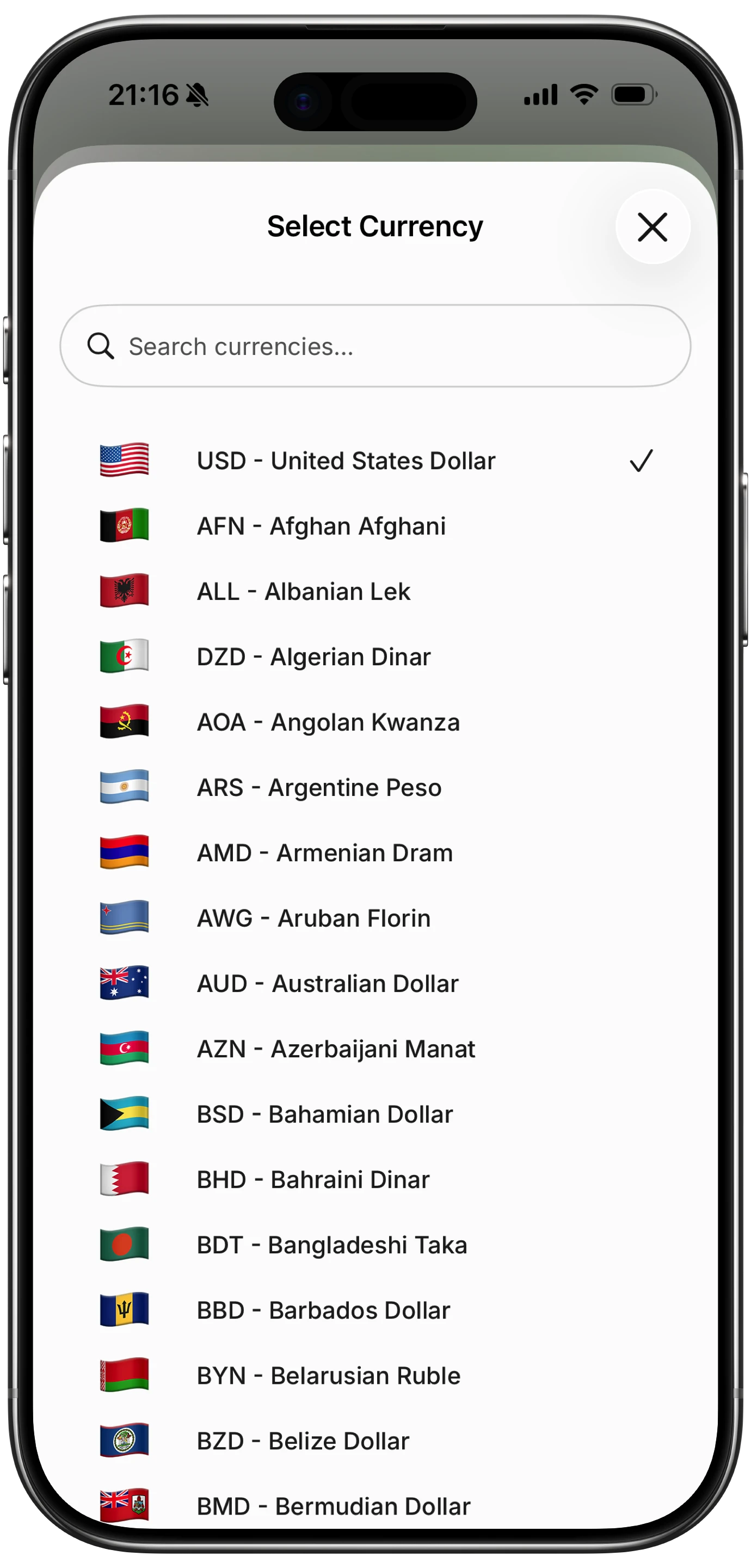
Finny app's multi-currency feature
Manual entry is functional but lacks AI assistance. There is no voice input, no receipt scanning, and no natural language processing. The interface, while comprehensive, feels busier than competitors like Copilot or Monarch. Offline support is partial: you can view data but some features require a connection.
Pricing: Free tier available; Premium from ~$4.49/month
Best for: Users with bank accounts in multiple countries who want broad automatic sync coverage.
Finny: Best for Manual Multi-Account Tracking Without Bank Links
Finny takes the opposite approach to aggregation apps. Instead of connecting to your banks, it gives you tools to log transactions so quickly that manual entry stops feeling manual.
The core innovation is AI-powered input with five methods: type a natural sentence like "coffee 4.50 Chase Visa," speak it by voice, scan up to five receipt photos at once, import statement screenshots, or chat with the AI. Each transaction can be tagged to a specific payment method or account, so your spending stays organized by source even without bank connections.
Tap to Track adds another layer for Apple Pay users. Every contactless payment triggers an automatic log entry before you put your phone away. Combined with 150+ currency support and a Unified Currency View that preserves original transaction currencies while converting totals, Finny handles the multi-account scenario that aggregation apps struggle with: mixed domestic accounts, foreign spending, cash, and digital wallets.
The app works fully offline, syncs via Apple Sign-In when connected, and never touches your banking credentials. At a low monthly or yearly price, it costs a fraction of every bank-linked competitor.
The trade-off is effort. Even with AI assistance, you are logging transactions rather than having them appear automatically. For people with many accounts who are disciplined about logging, this works well. For those who want true set-and-forget automation, a bank-linked option may be a better fit.
Pricing: a low monthly or yearly price
Best for: Privacy-conscious users who want fast multi-account tracking without sharing bank credentials.
How to Choose the Right Multi-Account Tracker
Your decision comes down to three questions.
How many accounts do you need to track?
If you have three to five domestic bank accounts, any app on this list will handle it. If you have accounts in multiple countries or use digital wallets and cash regularly, your options narrow to apps with broad manual entry tools (Finny, Wallet) or wide international bank coverage (Wallet).
How do you feel about bank connections?
Bank-linked apps offer real convenience but require trust. You are granting a third party read access to your financial data through aggregation services. If that is acceptable, Monarch and Copilot provide the smoothest experience. If you prefer keeping credentials private, Finny and YNAB's manual mode are strong alternatives. For a detailed breakdown of the privacy question, read our guide to tracking expenses without linking your bank.
What is your budget for a finance app?
The price range here is wide. Finny costs a low monthly price. Wallet starts around $4.49/month. YNAB, Monarch, Copilot, and PocketGuard all cost $12 to $15/month. Over a year, the difference between the cheapest and most expensive option is over $150. If you are tracking spending to save money, paying $180/year for the privilege is worth questioning. For more affordable options, see our list of the best money tracker apps in 2026.
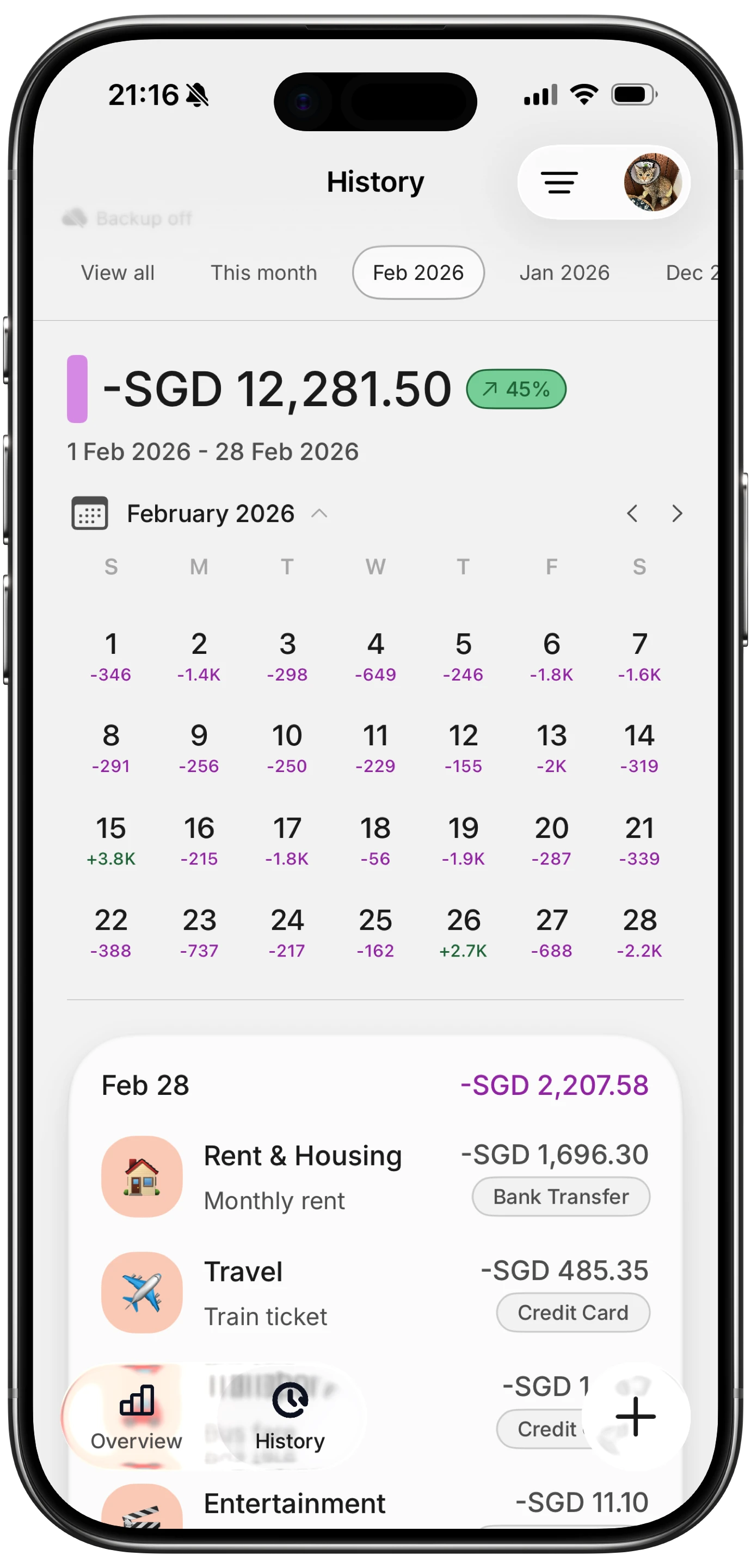
Finny app's History calendar feature
What About Plaid Security and Privacy?
Plaid is the infrastructure behind most bank-linked finance apps. It creates a read-only connection to your accounts, meaning apps can view transactions and balances but cannot move money or make changes.
Plaid uses 256-bit AES encryption and does not share your credentials with the apps themselves. However, Plaid has faced scrutiny over data practices. In 2022, the company settled a class-action lawsuit alleging it collected more financial data than necessary and shared it without adequate disclosure.
For most people, Plaid connections are reasonably safe. But "reasonably safe" is a personal threshold. If you manage significant assets or simply prefer not to have a third-party intermediary accessing your accounts, manual and AI-assisted tracking gives you the same spending visibility without the connection.
Frequently Asked Questions
Can I track spending from all my accounts in one place without linking my bank?
Yes. Apps like Finny let you create custom payment methods for each account (checking, credit card, cash, e-wallet) and tag every transaction accordingly. AI-powered input makes this fast enough to be practical. You get a consolidated view of all spending without sharing any banking credentials, and you can track account types that bank-linking services cannot reach.
How many accounts can Plaid-based apps connect to?
Most Plaid-based apps support unlimited account connections on their paid tiers. Monarch connects to over 13,000 institutions. Copilot covers 10,000+. PocketGuard's free tier limits you to two accounts, but the Plus plan removes that restriction. The real limitation is not the app but whether your specific institution supports Plaid connections, as smaller banks and credit unions sometimes lack support.
Do multi-account tracking apps work with international bank accounts?
Coverage varies significantly. Wallet by BudgetBakers has the broadest international reach with 15,000+ banks worldwide. Plaid primarily covers US and some Canadian and European institutions. For accounts in countries without Plaid support, you will need an app that supports strong manual entry and multi-currency features, such as Finny with its 150+ currency support and Unified Currency View.
Is it safe to connect all my financial accounts to one app?
Bank-linked apps use aggregation services like Plaid that create read-only connections with bank-grade encryption. They cannot move money or make changes to your accounts. The risk is primarily data exposure: a breach of the aggregation service could reveal transaction history and balances. For people who want to minimize this risk while still tracking everything, manual apps with no bank connections offer the same consolidated spending view.
What is the cheapest way to track spending across multiple accounts?
Finny at a low monthly price offers the lowest-cost multi-account tracking with AI input to keep logging fast. PocketGuard and Wallet have limited free tiers, but their full multi-account features require paid plans at $12.99/month and $4.49/month respectively. Among bank-linked options, Wallet offers the best value. Among all options, Finny provides the most features per dollar spent.
Start Tracking All Your Accounts
Scattered spending across multiple accounts does not have to mean scattered awareness. Whether you choose bank-linked aggregation or AI-assisted manual tracking, the goal is the same: one clear view of where your money goes.
Download Finny to log expenses using AI, receipts, or text. No bank connections, offline support, and full control over your financial data.





