Best Automatic Expense Trackers in 2026
Every expense tracking app claims to be automatic. Open any App Store listing and you will find phrases like "automatic transaction import," "effortless tracking," and "your spending, logged automatically." But when you look at what these apps actually do, most of them define "automatic" as "we connect to your bank and pull transactions."
That is not automatic. That is connected.
Automatic expense tracking should mean you do not have to do anything. You make a purchase, and it appears in your tracker. No opening the app. No typing. No waiting for your bank to process the transaction and send it to a third party. True automatic tracking happens at the moment of payment, not hours later when your bank feed updates.
This distinction matters because bank-synced transactions often arrive delayed, miscategorized, and stripped of useful context. In 2026, there are better options. This guide compares the apps that come closest to genuinely automatic expense tracking, and explains why the definition of "automatic" needs an update. For a broader look at tracking tools, see our best money tracker apps in 2026 roundup.
The Problem with "Automatic" Bank Sync
Bank-linked apps like Monarch Money and Copilot Money pull transactions from your financial institutions through aggregation services like Plaid or MX. This process has several friction points that make it less automatic than advertised.
Delayed Transactions
Bank transactions take anywhere from a few hours to several days to appear in your tracking app. Pending charges may show up without final amounts. Some transactions, especially at restaurants with tips, update multiple times before settling. You are not tracking spending in real time. You are reviewing a delayed ledger.
Missing Context
Bank feeds give you a merchant name and an amount. Sometimes the merchant name is cryptic ("SQ *COFFEEPLACE" instead of "Blue Bottle Coffee"). You rarely get itemized details. Cash transactions, Venmo payments, and shared expenses do not appear at all. You end up manually editing or supplementing half your transactions anyway.
Privacy Cost
Every bank-linked app requires you to share your banking credentials with a third-party aggregator. That aggregator can access your full transaction history across all linked accounts. For people who value financial privacy, this is a steep price for convenience. For more on this trade-off, see our AI expense tracking vs manual comparison.
What True Automatic Tracking Looks Like
True automatic tracking captures a transaction at the point of purchase, without requiring you to open an app or enter any information. It should work instantly, include the details you need, and not require bank credentials.
Only one method currently meets all these criteria: Tap to Track.
The Best Automatic Expense Trackers Compared
Finny
Finny redefines what automatic expense tracking means. Its Tap to Track feature instantly captures your Apple Pay transactions the moment you pay. When you tap your iPhone or Apple Watch at a payment terminal, Finny logs the transaction details without you opening the app, typing anything, or connecting your bank.
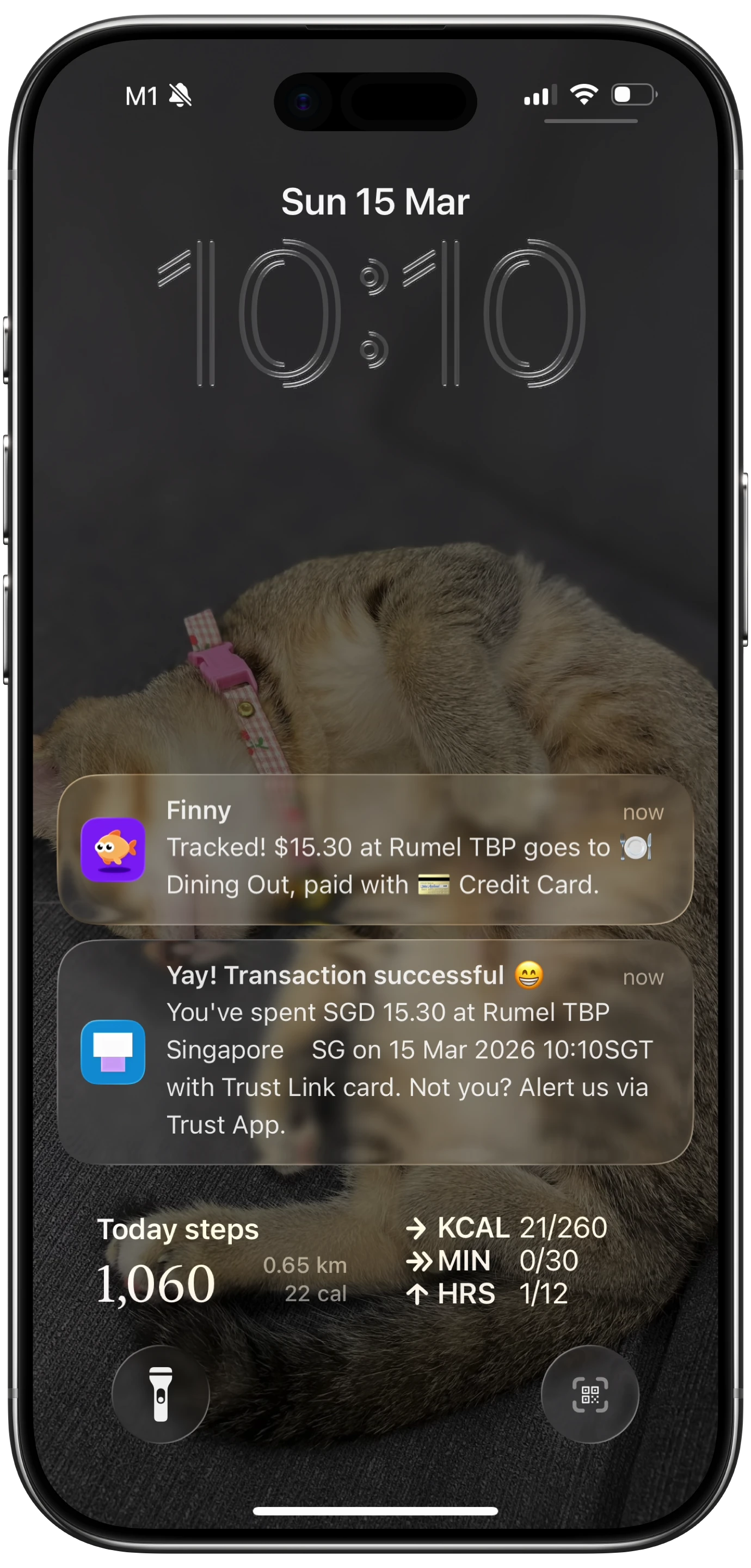
This is the closest thing to truly automatic expense tracking available in 2026. No other finance app offers this capability. You pay, and it is logged. That is it.

But Finny does not stop at Tap to Track. For purchases where you do not use Apple Pay, Finny provides multiple fast-input methods:
- AI text input: type "groceries at Costco $87.30" and Finny parses the amount, merchant, and category
- Voice input: speak your expense and Finny transcribes and categorizes it
- Receipt scanning: photograph up to 5 receipts at once for batch processing
- Share Extension: share a receipt photo from your camera roll directly to Finny
- Statement screenshots: import transactions by screenshotting your bank app
These methods cover every payment scenario without requiring bank credentials. Finny works offline, supports 150+ currencies with a unified currency view, and costs a low monthly or yearly price. You get 50 AI requests per day, which is more than enough for daily tracking.
Monarch Money
Monarch Money is the most polished bank-linked tracker on the market. It connects to over 13,000 financial institutions and imports transactions automatically via Plaid. The interface is well-designed, with clean category views, customizable budgets, and detailed reports.
Monarch recently added AI features including an AI Assistant for budgeting help and receipt scanning. The Monarch Extension syncs Amazon orders to accurately categorize and split those transactions, which is a nice touch for heavy Amazon shoppers.
The "automatic" part of Monarch is entirely bank-dependent. Transactions appear after your bank processes them, typically with a delay of several hours to two days. There is no way to track expenses at the point of sale. Cash transactions and peer-to-peer payments require manual entry.
Monarch costs $14.99/month or $99.99/year. There is no free tier, just a 7-day trial. That makes it one of the most expensive personal finance apps available.
Copilot Money
Copilot Money takes a similar approach to Monarch: connect your bank accounts and let transactions flow in. The app is iOS-only and known for its clean design and smooth user experience.
Copilot offers automatic categorization, subscription tracking, and spending insights based on your bank data. The interface makes it easy to review and recategorize transactions. Investment tracking is also included.
Like Monarch, Copilot's automation depends entirely on bank sync. Transaction delays, cryptic merchant names, and missing cash transactions are the same limitations. There is no point-of-sale tracking.
Copilot costs $13/month or $95/year. A one-month free trial is included. The company emphasizes that it does not sell user data or show ads, which is worth noting given the privacy concerns around bank-linked apps.
YNAB (You Need A Budget)
YNAB is primarily a budgeting tool, not an automatic expense tracker. Its philosophy centers on zero-based budgeting: every dollar gets assigned a job before you spend it. YNAB does offer bank syncing, but the app actively encourages manual transaction entry alongside it.
The logic: when you enter transactions manually, you are more aware of your spending. YNAB calls this "being intentional." The bank sync serves as a backup to catch anything you miss, not as the primary tracking method.
YNAB costs $14.99/month or $109/year with a 34-day free trial. It supports family sharing for up to six people, which brings the effective per-person cost down significantly. The app includes debt management tools, detailed reports, and goal tracking.
For people who want budgeting discipline, YNAB is excellent. For people who want tracking to happen without effort, it is not the right fit. YNAB requires active engagement with every dollar. For more on different tracking approaches, see our guide on how to track expenses.
Wally
Wally offers a mix of manual and bank-linked tracking. The app supports receipt scanning, manual entry, and bank connections from over 15,000 institutions across 70 countries. Multi-currency support covers 200+ currencies.
Wally Gold ($1.99/month or $24.99/year) unlocks advanced budgeting, foreign accounts, and team features. A lifetime option is available for $39.99. WallyGPT lets you ask questions about your finances in natural language.
Wally's automation comes from bank sync, same as Monarch and Copilot. The receipt scanning is a manual action, not automatic. The app does not offer anything equivalent to point-of-sale tracking. However, the pricing is competitive and the global currency support is strong.
Comparison Table
| Feature | Finny | Monarch | Copilot | YNAB | Wally |
|---|---|---|---|---|---|
| Price | a low monthly price | $14.99/mo | $13/mo | $14.99/mo | $1.99/mo |
| True Auto-Tracking | Tap to Track | No | No | No | No |
| Bank Sync | Not needed | Yes (Plaid) | Yes (Plaid) | Yes (Plaid) | Yes |
| AI Input | Text, voice, receipt, screenshot | AI Assistant, receipt scan | Auto-categorization | No | Receipt scan, WallyGPT |
| Offline Mode | Yes | No | No | Partial | Partial |
| Multi-Currency | 150+ | Limited | No | No | 200+ |
| Transaction Delay | Instant (Tap to Track) | Hours to days | Hours to days | Hours to days | Hours to days |
Why the Definition of Automatic Matters
When every app calls itself automatic, the word loses meaning. Consumers end up comparing apps that all do the same thing: pull bank data through Plaid and display it in different interfaces.
True automatic tracking should eliminate the gap between spending and recording. It should not depend on a third party processing your bank feed. It should not require you to open an app, fill out a form, or wait for a sync.
Finny's Tap to Track is currently the only feature that meets this standard for everyday purchases. You tap your phone to pay, and the expense is logged. Zero steps. Zero delay. Zero bank credentials shared.
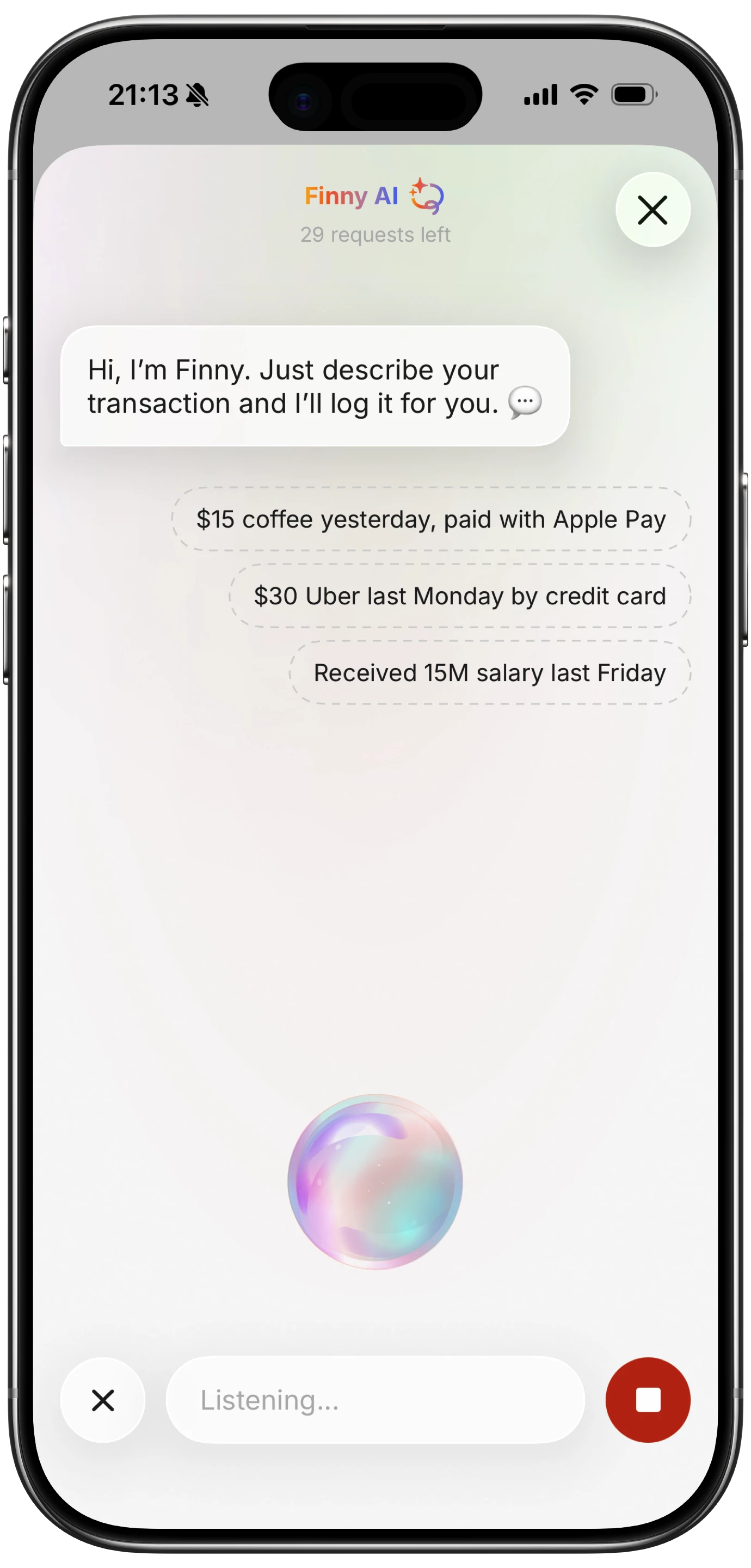
For purchases outside Apple Pay, Finny's AI input methods are the next best thing. Typing "coffee $4.50" takes five seconds. Speaking it takes three. Scanning a receipt takes one photo. None of these are fully automatic, but they are faster than waiting for a bank feed to update and then manually fixing the category.
Who Should Use Bank-Linked Tracking?
Bank sync is not useless. It works well for people who:
- Want a complete historical record without any manual effort
- Primarily use cards (not cash) for all purchases
- Do not mind sharing bank credentials with aggregators
- Are comfortable with delayed transaction data
- Have the budget for premium subscriptions ($10-15/month)
If that describes you, Monarch and Copilot are strong options. But if you want tracking that happens in real time, works offline, costs less, and keeps your bank credentials private, the alternatives are worth serious consideration. For more on offline-capable options, see our offline expense tracking guide.
Frequently Asked Questions
What is the most automatic expense tracker in 2026?
Finny's Tap to Track feature is the only method that logs expenses at the point of sale without opening an app or connecting a bank account. It works through your iPhone's built-in payment detection when you pay with Apple Pay. Bank-linked apps like Monarch and Copilot import transactions after a delay, which is automatic in a different sense but not instant.
Is bank sync really automatic expense tracking?
Bank sync imports transactions after your bank processes them, which can take hours to days. It also misses cash transactions, peer-to-peer payments, and shared expenses. It is better described as "connected" tracking rather than truly automatic, since the data arrives delayed and often needs manual correction.
Can I track expenses automatically without sharing my bank login?
Yes. Finny's Tap to Track auto-logs Apple Pay purchases without any bank credentials. For non-Apple Pay transactions, AI text and voice input let you log expenses in seconds. This combination gives you near-automatic tracking speed with full privacy.
Which automatic expense tracker is the best value?
Finny at a low monthly price offers the most features per dollar: Tap to Track, AI multi-modal input, 150+ currencies, offline mode, and no bank connection required. Monarch ($14.99/month) and Copilot ($13/month) cost significantly more and only offer bank-sync automation. Wally is priced lower but lacks point-of-sale tracking.
Download Finny to experience truly automatic expense tracking. Tap to Track logs Apple Pay purchases instantly, no bank login needed. Starting at a low monthly price.