Best Expense Trackers Without Bank Login in 2026
Most finance apps want your bank credentials before you can do anything useful. They route your login through third-party services like Plaid, which means a company you have never heard of holds the keys to your checking account. If you are not comfortable with that arrangement, you are not alone.
An expense tracker without bank login lets you record spending, set budgets, and review your finances without handing over sensitive credentials. The trade-off has always been convenience: manual entry takes time. But in 2026, AI-powered input methods have closed that gap significantly.
This guide compares the best no-bank-login expense trackers available right now, explains why skipping the bank connection might be the smarter choice, and helps you decide which app fits your workflow. For a broader overview of tracking tools, check out our best money tracker apps in 2026 guide.
Why Skip the Bank Connection?
Data Breach Risk
When you link your bank account to an app, your credentials pass through a middleman. In most cases, that middleman is Plaid. In 2022, Plaid paid $58 million to settle a class action lawsuit alleging it harvested and sold consumer financial data without proper consent. The lawsuit claimed Plaid displayed login screens designed to look like they came from users' banks, while the screens were entirely controlled by Plaid.
Even if you trust Plaid's current practices, the risk remains: any aggregator holding millions of bank credentials is a high-value target for attackers.
Third-Party Access You Cannot Control
When you authorize a bank connection, you often grant access to years of transaction history across all linked accounts. That data can include your salary deposits, medical payments, and every purchase you have made. Some aggregators retain this data even after you disconnect.
You May Not Need It
Bank-linked tracking is convenient for people who want zero effort. But if you already check your bank app daily, or if you want to track cash spending, reimbursements, and shared expenses that do not show up in bank feeds, manual and AI-assisted entry gives you more accurate data with less privacy exposure.
For a deeper look at manual vs. AI-assisted approaches, see our AI expense tracking vs manual comparison.
The Best No-Bank-Login Expense Trackers
Finny
Finny is built from the ground up to work without bank connections. Instead of pulling transactions from your bank, it uses AI-powered input to make manual entry fast enough that you do not miss the automation.
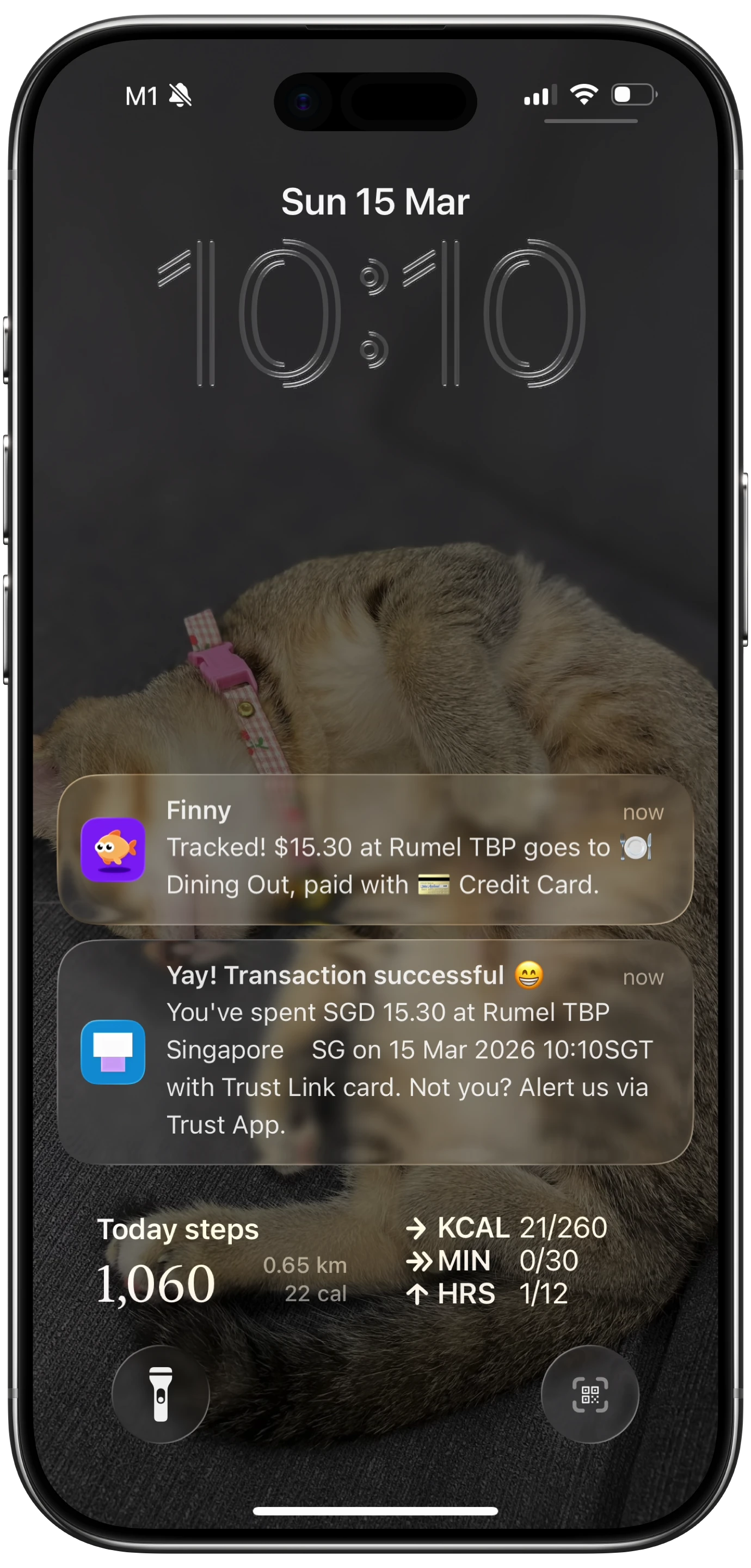
Here is Screen Log capturing a payment straight from the screen, no bank connection involved:
You can log expenses by typing natural language ("lunch at Chipotle $12.50"), speaking aloud, scanning receipts with your camera (up to 5 photos at once), or sharing receipt screenshots directly from your Photos app via the Share Extension. Finny also supports importing bank statement screenshots, so you can capture transactions from your bank app without giving Finny any login credentials.
The standout feature is Tap to Track. The moment you pay with Apple Pay, Finny instantly captures the transaction in the background. No other finance app does this. You pay with Apple Pay, and the expense appears in Finny without opening the app or typing anything. That is genuinely automatic tracking without a bank connection.

Finny supports 150+ currencies with a unified currency view: transactions stay in their original currency while totals auto-convert to your default. The app works offline, syncs via Apple Sign-In, and offers CSV export. All of this costs a low monthly or yearly price, with 50 AI requests per day included.
Spendee
Spendee offers both bank-linked and manual modes. You can use it entirely without connecting a bank account, creating wallets and budgets for manual entry. The free tier limits you to one wallet and one budget, which is restrictive for anyone tracking multiple accounts or categories.
Spendee Plus ($14.99/year) unlocks unlimited budgets and shared wallets. Spendee Premium ($22.99/year) adds bank synchronization and automatic categorization, but you can skip those features and stay on Plus for a privacy-friendly setup.
Spendee recently added an AI receipt scanner that extracts price, category, and description from photos. Multi-currency support is included. The interface is clean, though the free tier feels limited compared to competitors.
Goodbudget
Goodbudget uses the envelope budgeting method. You allocate money to virtual envelopes for each spending category, then log transactions against those envelopes. When an envelope is empty, you stop spending in that category or move money from another envelope.
The free version gives you 20 envelopes, one account, two devices, and one year of history. Goodbudget Premium ($10/month or $80/year, formerly called Plus) unlocks unlimited envelopes and accounts, five devices, and seven years of history. Premium also adds automatic bank syncing for US banks, but you can ignore that feature and stay fully manual, which is what most envelope budgeters do. See our Goodbudget pricing breakdown for the full plan comparison.
Goodbudget works well for people who want a structured budgeting method without bank access. The downside: there is no AI input, no receipt scanning, and no voice entry. Every transaction requires manual form entry, which takes 15-30 seconds each time.
DailyBean
DailyBean is a minimalist, privacy-friendly tracker that works entirely offline. No bank connections, no account creation required, no data leaves your device. It is about as private as expense tracking gets.
The app is free and simple. You log expenses with basic category selection and amount entry. There are no AI features, no receipt scanning, and no advanced analytics. DailyBean works best for people who want the absolute minimum: a digital ledger that stays on their phone.
The trade-off is clear. DailyBean gives you maximum privacy but minimum convenience. If you track more than a handful of transactions per day, the lack of AI input becomes a bottleneck.
PocketGuard
PocketGuard is primarily designed as a bank-linked budgeting app, but it does offer manual tracking. The free version lets you create one cash account for manual entry. PocketGuard Plus ($12.99/month or $74.99/year) adds unlimited manual cash accounts.
The problem: PocketGuard's best features, including its smart spending algorithms, real-time expense monitoring, and cash flow predictions, depend on bank-linked data. In manual mode, you get a basic expense log without the intelligence layer. The app technically works without a bank login, but it was not designed for that use case.
If you want a no-bank-login tracker, PocketGuard's manual mode is functional but underwhelming compared to apps built for that purpose.
Comparison Table
| Feature | Finny | Spendee | Goodbudget | DailyBean | PocketGuard |
|---|---|---|---|---|---|
| Price | a low monthly price | Free / $14.99/yr | Free / $10/mo | Free | $12.99/mo |
| AI Input | Yes (text, voice, receipt, screenshot) | Receipt scanner only | No | No | No |
| Bank Required | No | Optional | Optional | No | Optional |
| Offline Mode | Yes | Partial | Yes | Yes | No |
| Multi-Currency | 150+ currencies | Yes | Limited | No | No |
| Auto-Tracking | Tap to Track (Apple Pay) | No | No | No | No |
| Privacy Focus | High (no bank needed) | Medium | Medium | High | Low |
What Makes the Difference
The main reason people link their bank accounts is convenience. Nobody wants to type out every coffee and grocery run. But the apps on this list show that "no bank connection" no longer means "tedious manual entry."
Finny's approach stands out because it attacks the convenience problem from multiple angles. Tap to Track handles Apple Pay purchases automatically. AI text and voice input handle everything else in seconds. Receipt scanning and the Share Extension cover situations where you have a photo but do not want to type. You get the speed of bank-linked tracking with none of the privacy trade-offs.

For people who track expenses in multiple currencies, Finny's unified currency view is a significant advantage. Transactions stay in whatever currency you spent, while your dashboard converts everything to your default currency automatically. Most competitors either lack multi-currency support or charge extra for it. For more on tracking expenses effectively, see our guide on how to track expenses.
Should You Ever Link Your Bank?
Bank connections are not inherently dangerous. They are convenient, and for some people, the time savings outweigh the privacy concerns. But you should make that choice intentionally, not because an app forced you to link before you could start tracking.
There is a second-order effect worth knowing about too. Linked account data is what makes financial product offers profitable to target, which is why so many free connected apps end up recommending credit cards and loans. Our roundup of the best ad-free budget apps covers how to tell which model an app is actually running on.
If you decide to go bank-free, you will want an app that compensates for the lost automation. AI-powered input, offline support, and fast entry methods are the features that make bankless tracking sustainable. For more on how offline tracking works, see our offline expense tracking guide.
Frequently Asked Questions
Is it safe to link your bank to a budgeting app?
It depends on the app and the aggregation service it uses. Most apps route through Plaid, which has faced lawsuits over data handling practices. The connection itself uses encrypted credentials, but you are still granting a third party access to your transaction history. If privacy is a priority, apps that work without bank connections eliminate this risk entirely.
Can you track expenses accurately without bank sync?
Yes. AI-powered input methods like text parsing, voice entry, and receipt scanning make manual tracking fast and accurate. Finny's Tap to Track goes further by auto-logging Apple Pay transactions without any manual input or bank credentials.
What is the cheapest no-bank expense tracker?
DailyBean is free and works without any bank connection. For a more full-featured option, Finny costs a low monthly price and includes AI input, multi-currency support, and Tap to Track. Spendee's free tier also works without bank links but limits you to one wallet. If you also need it free and do not have a bank account to connect, see our guide to the free budget app with no bank account.
Do no-bank expense trackers work offline?
Some do. Finny and DailyBean both work fully offline. Goodbudget supports offline use with syncing when you reconnect. PocketGuard and Spendee require internet for most features. If offline access matters to you, check this before committing.
Download Finny to start tracking expenses without linking your bank. AI-powered input, Tap to Track, and 150+ currencies, all for a low monthly price.