
Most expense tracker apps advertise "free" on the App Store or Google Play, then lock essential features behind a paywall within the first week. Bank syncing, reports, even basic category customization: all premium-only. The free version becomes a demo you never asked for.
If you want to track spending without a subscription, you need to know which apps are genuinely free and which use that word loosely. We tested seven best free expense tracker apps in 2026 and documented exactly what each one offers at no cost, what gets locked behind a paywall, and whether the free tier is actually usable long-term.
This guide focuses specifically on expense tracking, not budgeting. If you need a full budgeting suite, see our best free budgeting apps in 2026 roundup. For paid options with more features, check out our best expense tracker apps in 2026 comparison.
What "Free" Means in Expense Tracker Apps
Not all free tiers are created equal. Here is how the free model breaks down:
Truly free: The core app works indefinitely at no cost. You can track expenses, review history, and manage categories without hitting a wall. Revenue comes from optional upgrades, one-time purchases, or ads.
Freemium with usable free tier: A paid plan exists, but the free version covers daily expense tracking for most people. You miss advanced reports or bank syncing, but the basics work.
Free trial disguised as free: The app is "free to download," but after 7-14 days, core features disappear. PocketGuard now falls into this category: after a 7-day trial, you need a subscription to continue using the app meaningfully.
Free but barely functional: Heavy restrictions make the free version impractical. Two categories, one account, constant upgrade prompts.
Every app in this guide offers at least a usable free tier. We excluded apps where the free version is just a trial period.
Free Expense Tracker Comparison Table
| App | Platform | Offline | Free Tier Limits | Ads | Paid Upgrade |
|---|---|---|---|---|---|
| Finny | iOS | Yes | Unlimited tracking, no bank link, 1 AI credit | No | a low monthly price |
| Goodbudget | iOS, Android, Web | Yes | 20 envelopes, 1 account | No | $10/mo |
| Wallet by BudgetBakers | iOS, Android, Web | Yes | Multi-account, budgets, reports | Yes | $6.99/mo |
| Spendee | iOS, Android | Yes | 1 wallet, manual entry, charts | No | $1.99/mo |
| Monefy | iOS, Android | Yes | Basic categories, chart view | Yes | $2.49 one-time |
| AndroMoney | iOS, Android | Yes | Multi-account, budget alerts | Yes | $3.99 one-time |
| DailyBean | iOS | Yes | Calendar tracking, basic stats | No | $1.67/mo |
The Best Free Expense Tracker Apps in 2026
Finny: Best Free Privacy-First Tracker
Finny takes a different approach to expense tracking: no bank connections, no account linking, no third-party data sharing. Everything stays on your device. It captures transactions automatically two ways: Tap to Track logs Apple Pay purchases on their own, and Screen Log records any payment on your screen (an online receipt, a bank app, a renewal email) with a single press. Because nothing is linked, there is no transaction feed for a third party to hold.
Here is Tap to Track logging an Apple Pay purchase with no manual entry:
What you get free:
- Unlimited manual expense and income logging
- Custom categories and payment methods
- Multi-currency support with 150+ currencies and unified currency view
- Dashboard with net income charts, expense breakdown, and trend lines
- Calendar view, search, and filtering
- CSV export and import
- Daily expense reminders
- 1 AI credit to try smart input
What requires Pro (a low monthly price):
- AI text and voice input (50 requests/day)
- Receipt scanning and batch photo import
- Tap to Track: automatic logging of Apple Pay purchases, no bank link
- Screen Log: one press captures any payment on your screen, beyond Apple Pay
- Cloud backup and sync
The free tier is genuinely usable for daily tracking. Manual entry is straightforward, the multi-currency support works without limits, and offline functionality means you can log expenses anywhere. The single AI credit lets you test whether smart input is worth upgrading for.
Best for: People who want full-featured expense tracking without sharing financial data or paying a subscription.
Goodbudget: Best Free Envelope-Based Tracker
Goodbudget applies the envelope method to expense tracking. You divide money into virtual envelopes (categories) and track spending against each one.
What you get free:
- 20 envelopes (spending categories)
- 1 account
- Expense tracking with manual entry
- Sync across 2 devices
- Monthly reports
- 1 year of transaction history
- Savings goals and debt tracking
What requires Plus ($10/mo):
- Unlimited envelopes
- Up to 5 accounts
- Unlimited devices
- 7 years of history
The 20-envelope limit works for most people. Groceries, dining, gas, entertainment, clothing: you can cover the main categories without running out. The one-account restriction is the bigger limitation. If you carry multiple bank accounts or credit cards, you cannot track them separately on the free tier.
No bank connection is required, which makes Goodbudget a privacy-friendly option. The web version means you can log expenses from any browser, not just your phone.
Best for: People who want category-based spending limits and do not need more than 20 categories.
Wallet by BudgetBakers: Most Feature-Rich Free Tier
Wallet by BudgetBakers packs more into its free version than most paid expense trackers offer. It functions more like a financial dashboard than a simple expense log.
What you get free:
- Multiple accounts
- Budget creation with spending limits and alerts
- AI-powered automatic categorization
- Detailed spending reports and charts
- Manual entry with scheduled transactions
- Offline backup and restore
- Bank sync in select countries
What requires Premium ($6.99/mo):
- Bank sync in all supported regions
- Export to CSV/PDF
- Shared wallets
- Priority support
The free tier is impressively complete. Multiple accounts, budget alerts, and AI categorization are features that competitors typically reserve for paid plans. The main drawback is ads in the free version and regional limitations on bank syncing.
The app supports both manual and automatic tracking, which gives flexibility depending on whether you prefer hands-on control or passive monitoring.
Best for: Users who want a full financial dashboard without paying, and do not mind ads.
Spendee: Best Free Visual Tracker
Spendee focuses on visual clarity. Its free tier is simple but well-designed, with clean charts that make spending patterns easy to understand at a glance.
What you get free:
- 1 wallet
- Manual expense entry with categories and notes
- Photo attachments on transactions
- Line chart of income vs. spending over time
- Pie chart breakdown by category
- Basic overview and history
What requires Plus ($1.99/mo) or Premium ($5.99/mo):
- Multiple wallets
- Bank sync
- Shared wallets for couples
- Recurring transactions
- Currency conversion
The single-wallet limit is the primary constraint. If you only need to track spending from one account or just want a general spending log, the free version handles it well. The interface is polished and the visual reports provide quick insight into where money goes.
Spendee also offers a 7-day free trial for premium features, so you can test bank syncing and multiple wallets before committing.
Best for: Visual learners who want clean charts and a simple logging experience.
Monefy: Best Free Quick-Entry Tracker
Monefy strips expense tracking down to the essentials. Open the app, tap a category, enter an amount. Done. The entire interaction takes under five seconds.
What you get free:
- Tap-to-add expense logging
- Preset spending categories
- Pie chart overview
- Daily, weekly, monthly views
- Multiple payment methods
What requires Pro ($2.49 one-time):
- Additional categories
- Passcode protection
- Cloud sync and backup
- Dark theme
Monefy's strength is speed. There are no menus to navigate, no forms to fill out. The circular category wheel lets you log an expense in two taps. The trade-off is limited reporting: you get a pie chart and basic timeline view, but no trend analysis or detailed breakdowns.
The Pro upgrade is a one-time purchase, not a subscription. That makes Monefy one of the cheapest options overall if you eventually want the extra features.
Best for: People who want the fastest possible expense logging with no complexity.
AndroMoney: Best Free Multi-Account Tracker
AndroMoney offers more free functionality than most competitors, particularly for users managing multiple accounts.
What you get free:
- Unlimited expense and income logging
- Multiple account tracking
- Budget creation with alerts when limits are exceeded
- Real-time expense reports and charts
- Recurring transaction support
- Category customization
What requires Pro ($3.99 one-time):
- Cloud backup
- Home screen widgets
- Extra customization options
The free version is surprisingly complete. Multi-account support, budget alerts, and recurring transactions are features many apps charge for. The interface is functional rather than polished, but it does the job without restriction.
Like Monefy, the Pro upgrade is a one-time purchase. The app has a loyal user base though developer updates have slowed in recent years.
Best for: Users who need multi-account tracking and budget alerts without a subscription.
DailyBean: Best Free Minimalist Tracker
DailyBean takes a calendar-first approach. Instead of lists and charts, you see your spending laid out on a monthly calendar with daily totals.
What you get free:
- Calendar-based expense view
- Daily expense logging
- Basic spending statistics
- Category assignment
- Simple, distraction-free interface
What requires Premium ($1.67/mo):
- Advanced statistics and reports
- Data export
- Additional customization
DailyBean works for people who think in terms of daily spending rather than monthly budgets. The calendar view makes it obvious which days had high spending. The free tier covers basic tracking, though you lose access to detailed reports and export.
Best for: Minimalists who want a calendar view of daily expenses.

Finny app's AI chat feature
How to Choose the Right Free Expense Tracker
The best app depends on how you track expenses and what you need from the free tier.
If you want privacy (no bank linking)
Finny, Goodbudget, Monefy, and AndroMoney all work without bank connections. Your financial data stays local. For more on how to track expenses without linking accounts, see our dedicated guide.
If you want the most features for free
Wallet by BudgetBakers offers the richest free tier with multi-account support, AI categorization, and budget alerts. AndroMoney is a close second with multi-account tracking and budget limits at no cost.
If you want simplicity
Monefy and DailyBean prioritize speed and clarity over features. You can log an expense in seconds without navigating complex menus.
If you want visual spending insights
Spendee and Wallet by BudgetBakers provide the best charts and visual breakdowns on their free tiers. Spendee in particular is designed around visual clarity.
If you want multi-currency support
Finny stands out here with 150+ currencies and a unified currency view that preserves original transaction amounts while converting totals automatically. For more options, see our best money tracker app in 2026 guide.
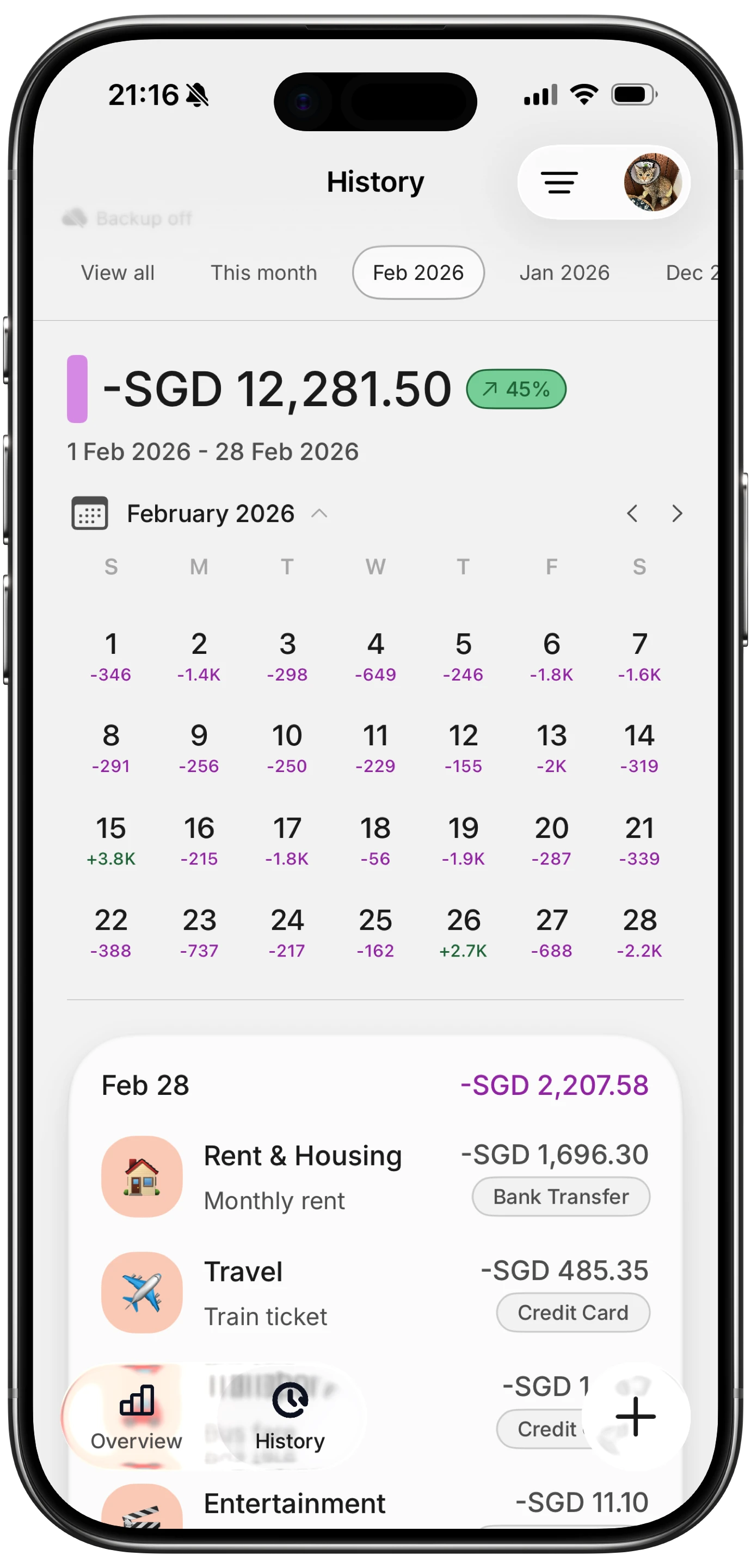
Finny app's History calendar feature
Free Tier Limitations Worth Knowing
Every free expense tracker makes compromises. Here are the most common restrictions and whether they matter:
No bank syncing: Most free tiers require manual entry. This sounds tedious, but manual logging has benefits: you become more aware of spending, and you avoid sharing bank credentials with third parties. Research suggests manual trackers develop stronger spending awareness than those relying on automatic imports.
Ad support: Wallet by BudgetBakers, Monefy, and AndroMoney show ads in their free versions. The frequency varies. Monefy's ads are occasional. BudgetBakers shows them more regularly.
Limited accounts or wallets: Goodbudget (1 account) and Spendee (1 wallet) restrict how many sources you can track. If you use one card for most purchases, this is fine. If you juggle multiple accounts, look at AndroMoney or BudgetBakers.
No export: Some free tiers lock CSV or PDF export behind the paywall. If you need your data in a spreadsheet, check this before committing. Finny includes CSV export and import on the free tier.
Reduced history: Goodbudget keeps only 1 year of transaction history on the free plan. Others retain data indefinitely.
When a Paid App Is Worth It
Free expense trackers work for most people. But certain situations justify paying:
- You absolutely need automatic bank syncing and will not maintain manual entry
- You track expenses across multiple accounts and need them consolidated
- You share finances with a partner and need shared access
- You need advanced reporting for freelance or business expenses
- You track spending in multiple currencies regularly
For the best way to track expenses in these scenarios, a paid app with the right features often saves enough time to justify its cost.

Finny app's Overview feature
Common Questions About Free Expense Trackers
What is the best completely free expense tracker app?
It depends on your priorities. AndroMoney and Wallet by BudgetBakers offer the most features at no cost. For privacy-focused tracking without bank connections, Finny provides unlimited manual logging, multi-currency support, and CSV export on its free tier. If simplicity matters most, Monefy lets you log expenses in two taps.
Are free expense tracker apps safe to use?
Reputable free apps from established developers are generally safe. Apps that do not require bank connections carry less risk since they never access your accounts. For apps that do connect to banks, check that they use read-only access and bank-level encryption. Always download from official app stores and review privacy policies before linking financial accounts.
What is the difference between an expense tracker and a budgeting app?
An expense tracker records what you spend. A budgeting app helps you plan what to spend before you spend it. Many apps do both, but the emphasis differs. Goodbudget leans toward budgeting with its envelope system. Monefy is purely an expense tracker. Apps like Wallet by BudgetBakers combine both. If you want budgeting focus, see our best free budgeting apps in 2026 guide.
Can I switch expense tracker apps without losing data?
Most apps support some form of export, though not always on the free tier. Finny offers CSV export and import for free, making migration straightforward. Before committing to any app, check whether the free version includes data export. If it does not, your transaction history could be trapped if you decide to switch later.
Is manual expense tracking better than automatic?
Neither is objectively better: it depends on your habits. Manual tracking increases spending awareness because you actively review every purchase. Automatic tracking via bank sync is more convenient but can lead to a "set and forget" mentality where you never review transactions. Many financial advisors recommend starting with manual tracking to build awareness, then switching to automatic once habits are established.
Ready to track expenses without a subscription?
Download Finny to log expenses using AI, receipts, or text. No bank connections, offline support, and full control over your financial data.





