
The average American now spends around $219 per month on subscriptions across roughly eight active services. The uncomfortable part: most people estimate they spend about $86. That 2.5x perception gap means hundreds of dollars leak out of your budget every year without you noticing.
A good subscription tracker closes that gap. It shows you every recurring charge in one place, sends reminders before renewals, and helps you decide what to keep and what to cancel. Some apps detect subscriptions automatically by scanning bank transactions. Others let you log them manually for full privacy.
We tested five popular options and compared them on what matters most: how easily they surface recurring charges, what they cost, and whether they respect your data. If you have already experienced the slow creep of forgotten subscriptions, our guide on how to stop subscription creep walks through a full audit process. For a broader look at expense management, see our complete guide to tracking expenses.
Why You Need a Subscription Tracker
Subscription spending has quietly become one of the largest budget categories for most households. West Monroe research puts the figure even higher at $273 per month, up from $237 in 2020. Streaming video alone averages $69 per month across four services for the typical American household.
The problem is not that subscriptions are expensive individually. It is that they accumulate invisibly:
- Free trials convert to paid plans you forget about
- Annual billing hides charges from month-to-month awareness
- Bundled services obscure what each component actually costs
- Price increases happen silently between billing cycles
A dedicated subscription tracker solves this by putting every recurring charge on a single screen with dates, amounts, and upcoming renewal alerts. Some go further with cancellation assistance and bill negotiation.
Quick Comparison Table
| App | Price | Auto-Detection | Manual Entry | Renewal Alerts | Cancellation Help | Offline | Bank Required |
|---|---|---|---|---|---|---|---|
| Finny | Free / low-cost Pro | Via Tap to Track | Yes | Yes | No | Yes | No |
| Rocket Money | Free / $6-12/mo | Yes (bank-linked) | Yes | Yes | Yes (Premium) | No | Yes |
| Bobby | Free + one-time IAP | No | Yes | Yes | No | Yes | No |
| Copilot | $7.92-13/mo | Yes (bank-linked) | Yes | Yes | No | No | Yes |
| PocketGuard | Free / $6.25/mo | Yes (bank-linked) | Yes | Yes (3-day advance) | No | No | Yes |
The Best Subscription Tracker Apps in 2026
Finny: Best for Privacy-First Recurring Expense Tracking
Finny's recurring transactions feature, introduced in v1.9, lets you set up daily, weekly, monthly, or yearly rules for any subscription or bill. Once configured, transactions log automatically on schedule, and you get reminders before each charge hits. This turns Finny into a straightforward subscription tracker without requiring bank access.
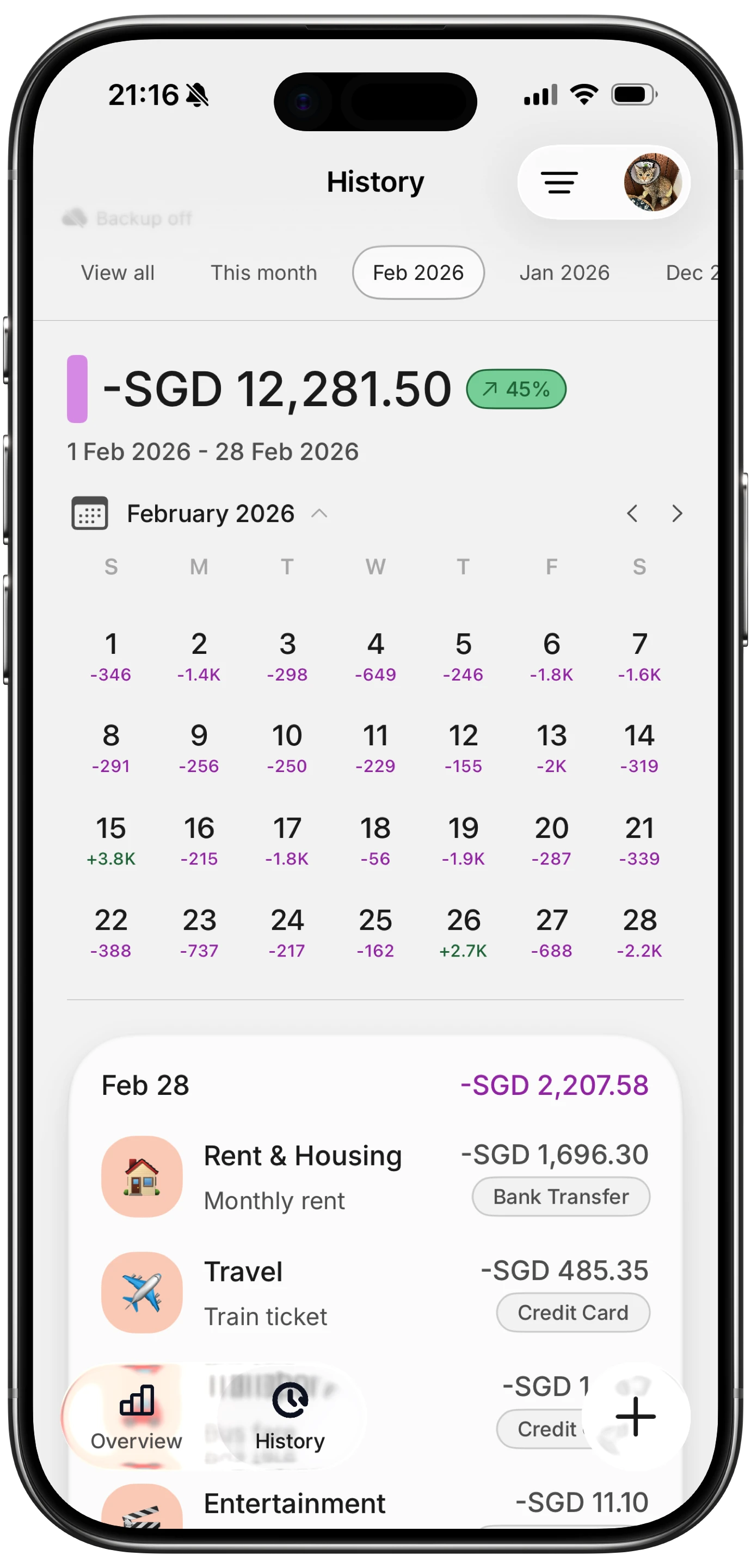
Finny app's History calendar feature
What sets Finny apart from bank-linked alternatives is the privacy model. You never hand over login credentials. Instead, you add subscriptions manually or use AI input to log them from text, voice, or a screenshot of your billing email. The app also supports Tap to Track, which captures Apple Pay transactions the moment they happen, making it easy to catch new subscriptions as they appear on your card.
The free tier covers unlimited manual tracking with custom categories and charts, so you can monitor all your subscriptions without paying anything. Pro at a low monthly price adds AI input, receipt scanning, and cloud sync. Compare that to Rocket Money Premium at $6 to $12 per month or Copilot at $7.92 to $13 per month.
Best for: People who want full subscription visibility without connecting bank accounts.
Rocket Money: Best for Automatic Detection and Bill Negotiation
Rocket Money is the most popular dedicated subscription management tool, and for good reason. Connect your bank accounts and the app automatically scans transactions to find every recurring charge. Subscriptions appear in a timeline view showing what has been paid and what is coming up next.
The free tier handles subscription detection and basic alerts. Premium ($6 to $12 per month, pay-what-you-think-is-fair model) unlocks the standout feature: the Rocket Money team will cancel subscriptions on your behalf and negotiate lower rates on bills like internet, phone, and insurance. Bill negotiation is performance-based, costing 35% to 60% of the first year's savings.
The main tradeoff is privacy. Rocket Money requires bank credentials to function, and it does not work offline. If you prefer to keep your financial accounts disconnected from third-party apps, this is not the right choice. For those comfortable with bank linking, it is one of the most hands-off options available.
Best for: People who want fully automatic detection and are willing to share bank access.
Bobby: Best Minimalist iOS Tracker
Bobby takes the opposite approach from Rocket Money. There is no bank connection, no automatic detection, and no AI. You add each subscription manually, choose an icon and color, and Bobby shows your total monthly cost alongside a clean list of renewal dates.
The app has a 4.7 rating from nearly 8,000 iOS reviews, and its appeal is pure simplicity. A one-time "all-in-one pack" in-app purchase unlocks extra features with no recurring fee, which is refreshingly appropriate for an app that tracks recurring fees.
Bobby supports multiple currencies, custom billing cycles, and payment reminders. It does not try to be a budgeting app or expense tracker. If all you need is a clean list of subscriptions with renewal alerts, Bobby does that job well.
The limitation is that everything is manual. If you have dozens of subscriptions, the initial setup takes time. And because there is no bank scanning, newly added services will not appear automatically.
Best for: iOS users who want a simple, private, one-time-purchase subscription list.
Copilot: Best for Apple Users Who Want Full Financial Context
Copilot is a full-featured budgeting app with a dedicated recurring transactions section. It connects to over 10,000 financial institutions and uses AI to categorize transactions automatically. Subscriptions and recurring charges live in their own view where you can see what has been paid each month and what is still upcoming.

Finny app's Overview feature
The advantage of Copilot over a standalone subscription tracker is context. You see subscriptions alongside your entire financial picture: income, spending categories, net worth, and investment accounts. This makes it easier to evaluate whether a subscription is worth keeping relative to your overall budget.
At $13 per month (or $7.92 per month on the annual plan), Copilot is a significant expense. It makes sense if you want subscription tracking bundled with comprehensive budgeting. It does not make sense if you only need to list and monitor subscriptions.
Best for: Apple users who want subscription tracking within a complete budgeting system.
PocketGuard: Best for Spending Awareness with Bill Alerts
PocketGuard connects to your bank and automatically identifies recurring subscriptions. You get notifications three days before each charge, giving you time to cancel before the next billing cycle. The app also shows your "safe to spend" number after accounting for bills, subscriptions, and savings goals.
The free tier includes basic subscription detection with bank linking. The Plus plan at $6.25 per month adds more detailed analytics and a lifetime purchase option for users who prefer a one-time payment.
PocketGuard's strength is the spending context it provides around subscriptions. Rather than just listing charges, it shows how subscriptions affect your available spending money. The weakness is that auto-detection is not perfect. Some recurring charges need to be manually flagged, and the app requires a bank connection to work.
Best for: Users who want subscription alerts integrated with daily spending awareness.
How to Choose the Right Subscription Tracker
Your choice depends on two questions: how much privacy do you need, and how hands-off do you want the experience to be.
If privacy is your priority
Choose Finny or Bobby. Neither requires bank credentials. You maintain full control over your data. The tradeoff is manual entry, though Finny's AI input significantly reduces that friction. For a focused comparison of options that keep your data off third-party servers, see our roundup of the best privacy-focused subscription tracker apps. For more on tracking expenses without linking your bank, see our guide to expense tracking without bank connections.
If you want automatic detection
Choose Rocket Money, Copilot, or PocketGuard. All three scan bank transactions to find subscriptions. Rocket Money goes furthest with cancellation and negotiation services. Copilot offers the most complete financial picture. PocketGuard balances subscription tracking with spending awareness.
If you want the lowest cost
Finny's free tier handles unlimited subscription tracking through recurring transactions. Bobby's one-time purchase has no ongoing cost. Rocket Money's free tier detects subscriptions but limits management features.
Setting Up Subscription Tracking in Finny
Getting started with recurring transactions in Finny takes about five minutes:
- Open any subscription transaction and tap the recurrence option
- Set the billing cycle: daily, weekly, monthly, or yearly
- Choose a start date matching your next billing date
- Enable reminders to get notified before each charge
Finny logs the transaction automatically on schedule. You can review all recurring charges from the recurring transactions view, which shows upcoming charges and their frequencies.
For subscriptions you pay via Apple Pay, Tap to Track captures the transaction instantly. The recurring rule then keeps tracking even when you are offline or not actively using the app. This combination of automatic capture and scheduled logging covers most subscription tracking needs without any bank connection.
Tips for Reducing Subscription Spending
Tracking is only the first step. Here are practical ways to cut subscription costs once you have visibility:
Audit quarterly, not annually. Set a calendar reminder every three months to review your subscription list. Services you valued in January may be irrelevant by April.
Use free tiers aggressively. Many services offer capable free plans. Spotify Free, YouTube with ads, and free cloud storage tiers eliminate costs while keeping access.
Batch entertainment subscriptions. Instead of paying for five streaming services simultaneously, subscribe to one or two at a time. Rotate when you finish the content you want.
Watch for price increases. Streaming services raised prices an average of 13% year-over-year in 2025. A subscription that was reasonable at launch may no longer be worth it at the new price.
Share family plans. Spotify Family, YouTube Premium Family, and Apple One Family plans split costs across up to six people. The per-person cost drops dramatically.
For a deeper dive into managing subscription creep, see our guide on stopping subscription creep with a step-by-step audit framework.
Frequently Asked Questions
What is the best free subscription tracker app?
Finny offers free unlimited subscription tracking through its recurring transactions feature without requiring a bank connection. Rocket Money's free tier automatically detects subscriptions if you are comfortable linking your bank. Bobby is free for basic use with a one-time purchase for extra features. The best choice depends on whether you prefer privacy (Finny, Bobby) or automation (Rocket Money).
How much does the average person spend on subscriptions per month?
Research from 2025 and 2026 puts the average at $219 per month across about eight active subscriptions. Some studies report higher figures, with West Monroe finding $273 per month. The consistent finding is that people underestimate their subscription spending by roughly 2.5 times, making a tracker valuable even if you think you have a handle on your costs.
Can I track subscriptions without linking my bank account?
Yes. Finny, Bobby, and several other apps let you add subscriptions manually without any bank connection. Finny adds AI input options so you can log subscriptions from text, voice, or billing email screenshots. The tradeoff is that new subscriptions will not appear automatically, so you need to add them as you sign up. For more privacy-focused options, see our guide to tracking expenses without bank linking.
Do subscription tracker apps actually save money?
Most users discover at least one or two forgotten subscriptions during their first audit, typically saving $20 to $50 per month. The real value is ongoing awareness. When you see your total subscription cost on a single screen, you make better decisions about new signups and renewals. Apps like Rocket Money that offer bill negotiation can save additional money on services you want to keep.
How often should I review my subscriptions?
A quarterly review works well for most people. Major life changes like moving, changing jobs, or adjusting your budget warrant an immediate review. Setting up renewal reminders in your subscription tracker ensures you evaluate each service before it charges, rather than discovering unwanted charges after the fact.