
Budget tracking is the practice of recording where your money goes and comparing it against a plan. It sounds simple, and it is. The hard part is doing it consistently.
Most people have tried some form of budget tracking. A spreadsheet that lasted two months. A banking app's built-in categorization that never felt accurate. A notebook that got left in a drawer. The method itself was rarely the problem. The friction of daily logging was.
This guide covers everything you need to build a budget tracking system that actually works: choosing a method, setting it up, avoiding common mistakes, and picking the right tools. Whether you prefer pen and paper, spreadsheets, or apps, the principles are the same.
Why Budget Tracking Matters
You cannot improve what you do not measure. That cliche applies to money more than almost anything else.
Without tracking, most people underestimate their spending by 20 to 40 percent. Small purchases add up: $15 per day in "little stuff" is over $5,400 a year. A $7 daily coffee habit costs $2,555 annually. These numbers only become visible when you track them.
Budget tracking provides three specific benefits:
- Awareness. Knowing where your money goes removes the anxiety of not knowing. Even if you do not change your habits immediately, clarity reduces financial stress.
- Control. When you can see that dining out consumed 30% of your discretionary budget by the 15th, you can adjust before the month ends.
- Progress. Tracking creates a record. Over months, you can see trends, celebrate improvements, and identify persistent problem areas.
If you are new to budgeting entirely, start with our guide on what a budget is before diving into the tracking methods below.
Budget Tracking Methods Compared
There is no single best way to track a budget. The best method is the one you will actually use. Here are the most popular approaches, ranked from simplest to most detailed.
Pen and Paper
The original budget tracker. Write down every purchase in a notebook or on a printed worksheet.
Pros: No technology required. Tactile experience helps some people remember and process spending. Zero cost. Complete privacy.
Cons: Easy to forget when you are out. No automatic totals or charts. Hard to analyze trends over time. No backup if you lose the notebook.
Best for: People who dislike technology or find that writing by hand makes spending feel more real.
Spreadsheets
A step up from paper. Use Google Sheets, Excel, or another spreadsheet tool to log transactions and create formulas for totals, averages, and charts.
Pros: Fully customizable. Formulas handle math automatically. Charts visualize trends. Free (Google Sheets) or included with software you already own. Easy to share with a partner.
Cons: Requires manual data entry. Setup takes time. Not mobile-friendly for on-the-go logging. Can become complex and fragile as you add features.
Best for: People who enjoy building systems and want full control over their tracking setup.
Banking App Categorization
Most banks now categorize transactions automatically. You can review your spending by category directly in your banking app.
Pros: No extra app needed. Automatic categorization. Works with debit and credit card purchases.
Cons: Cash transactions are invisible. Categories are often inaccurate or too broad. No forward-looking budget planning. Splits spending across multiple bank apps if you have accounts at different institutions.
Best for: People who want minimal effort and are okay with approximate tracking.
Dedicated Budget Tracking Apps
Purpose-built apps for tracking expenses and managing budgets. These range from simple manual trackers to comprehensive financial dashboards.
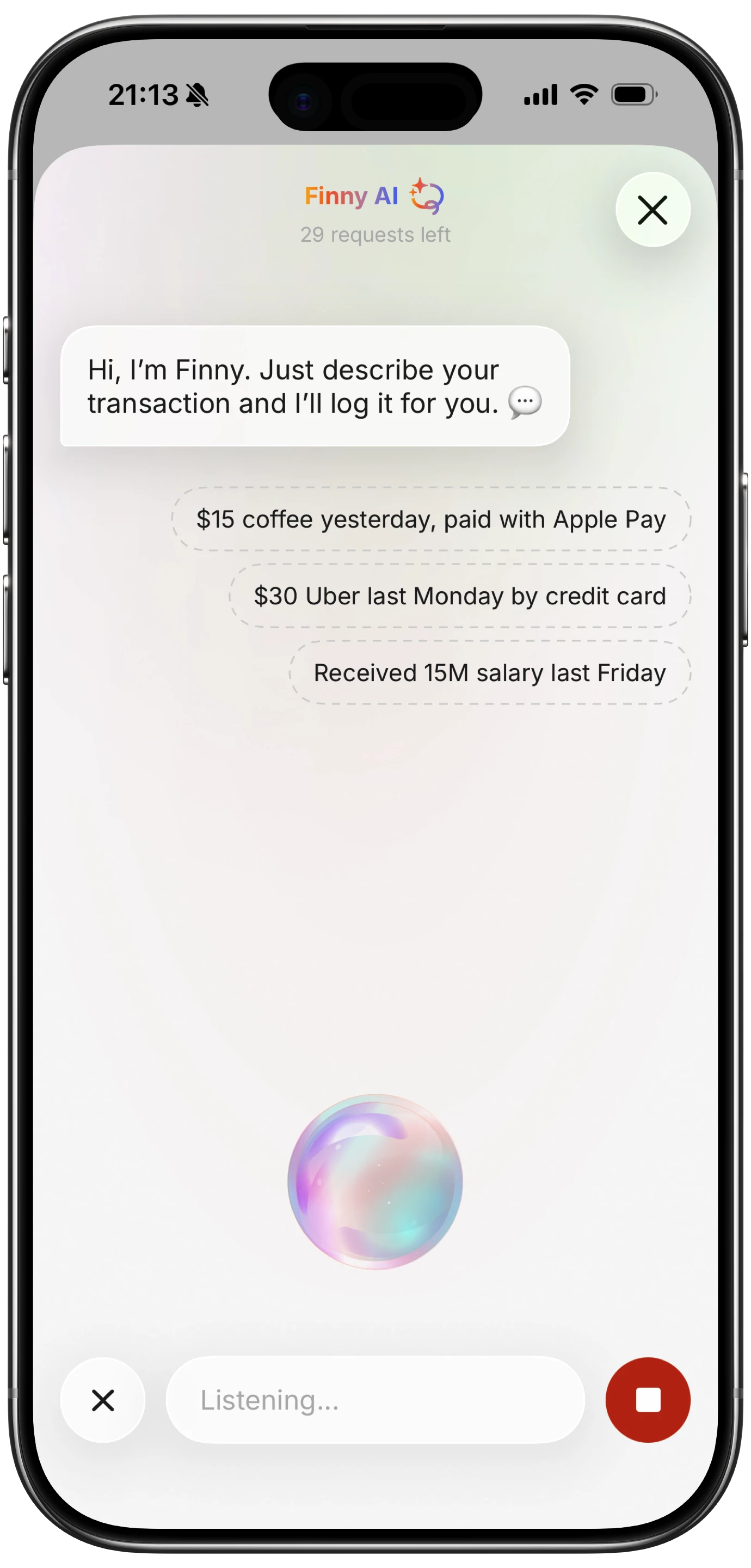
Finny app's voice input feature
Pros: Designed specifically for budgeting. Visual charts and reports. Category management. Many offer AI features like receipt scanning and voice input. Mobile-first for on-the-go logging.
Cons: Some require subscriptions. Learning curve varies. Bank-connected apps raise privacy concerns for some users.
Best for: Most people. Apps reduce the friction that causes other methods to fail. If you want to explore options, see our best expense tracker apps in 2026 comparison.
How to Set Up Budget Tracking: Step by Step
Regardless of which method you choose, the setup process follows the same structure.
Step 1: Calculate Your Monthly Income
Start with your take-home pay (after taxes, health insurance, and retirement contributions). If your income varies, use the average of the last three months. Include all sources: salary, freelance work, side income, investment returns.
Write this number down. Everything else builds from it.
Step 2: List Your Fixed Expenses
Fixed expenses are the same (or nearly the same) every month:
- Rent or mortgage
- Insurance premiums
- Loan payments
- Subscriptions
- Phone and internet bills
These are non-negotiable in the short term. Subtract them from your income to find your discretionary budget.
Step 3: Choose Your Categories
Categories are the backbone of budget tracking. Too few and you lose insight. Too many and logging becomes tedious.
Start with 8 to 12 categories. A practical starting set:
- Housing
- Groceries
- Dining out
- Transportation
- Health
- Entertainment
- Personal care
- Clothing
- Savings
- Miscellaneous
You can always refine categories later. The first month is about data collection, not perfection. If you want guidance on setting up categories effectively, our guide on how to budget money walks through this in detail.
Step 4: Set Category Limits
Using your discretionary budget from Step 2, allocate amounts to each category. If you are new to budgeting, base these on your best guess. After one month of actual tracking, you will have real data to refine them.
A common starting framework is the 50/30/20 rule: 50% of after-tax income for needs, 30% for wants, 20% for savings and debt repayment.
Step 5: Start Logging
This is where most systems succeed or fail. The key is logging transactions as close to the moment of purchase as possible. Waiting until the end of the day means you forget details. Waiting until the end of the week means you forget entire purchases.

Finny app's screenshot import feature
Apps with AI input make this step significantly easier. With Finny, for example, you can type "grocery $47 Trader Joe's" and the app handles categorization automatically. Voice input lets you log expenses while walking to your car. Receipt scanning with Batch Snap and Log processes up to five receipts at once, which is useful for catching up after a shopping trip.
Step 6: Review Weekly
Set a recurring 10-minute appointment with yourself each week. During this review:
- Check that all transactions are logged and correctly categorized
- Compare spending to your category limits
- Note any categories that are running hot
- Adjust plans for the remaining days of the month
This weekly habit is the single most important factor in successful budget tracking.
Step 7: Adjust Monthly
At the end of each month, do a deeper review. Compare your planned budget to actual spending. Ask:
- Which categories were over budget, and why?
- Which categories had money left over?
- Were there any expenses that did not fit your categories?
- Do your category limits need adjustment for next month?
Then create next month's budget based on what you learned.
Common Budget Tracking Mistakes
Knowing what goes wrong helps you avoid it. These are the most frequent mistakes people make.
Not Tracking Small Purchases
A $4 coffee, a $3 app, a $6 snack. Individually, these feel insignificant. Collectively, they can consume hundreds of dollars per month. Track everything, no matter how small. Apps that accept natural language input (like typing "coffee $4") make this fast enough that there is no excuse to skip it.
Making the Budget Too Strict
A budget with zero flexibility is a budget you will abandon. Leave room for spontaneous spending. A "fun money" or "miscellaneous" category of $50 to $100 per month prevents the feeling of deprivation that leads to budget abandonment.
Forgetting Irregular Expenses
Car registration, annual insurance premiums, holiday gifts, dental visits. These predictable but infrequent expenses wreck budgets when they arrive unexpectedly. List all annual and semi-annual expenses, divide by 12, and include that amount in your monthly budget.
Skipping the Weekly Review
Tracking without reviewing is like collecting data you never analyze. The weekly check-in is where tracking turns into control. Without it, you are just recording history. Schedule it, protect it, do it.
Trying to Be Perfect
Perfection is the enemy of good budget tracking. If you miss a day, log what you remember and move on. If you cannot recall a $3 purchase, round up and file it under miscellaneous. An 80% accurate budget is infinitely more useful than an abandoned one.
Not Accounting for Cash Spending
If you use cash, it becomes invisible to bank-based tracking. Either switch to card payments for trackability, or develop a habit of logging cash purchases immediately. Privacy-focused apps like Finny that work without bank connections are designed specifically for tracking expenses without linking your bank.
Tools for Budget Tracking
Free Options
- Finny (Free tier): Unlimited manual tracking, custom categories, visual charts, 150+ currency support. Works offline. No bank connection needed. Pro tier at a low monthly price adds AI text input, voice logging, receipt scanning, and Tap to Track for Apple Pay users.
- Google Sheets / Excel: Full flexibility for custom setups. Free templates available online.
- Goodbudget (Free tier): Envelope-based budgeting with 20 categories and manual entry.
- Pen and paper: Zero cost, zero learning curve.
Paid Options
- YNAB ($14.99/mo): Best for zero-based budgeting with bank sync and educational methodology.
- Monarch Money ($14.99/mo): Comprehensive financial dashboard with budgeting, net worth, and investment tracking.
- Copilot ($13/mo): Premium design for iPhone users with bank connections and spending insights.
- PocketGuard ($12.99/mo): Shows your "spendable" amount after bills and goals.
The price difference between these tools is substantial. If you are budget-conscious (and you probably are, since you are reading this), starting with a free option makes sense. You can always upgrade later if you need bank syncing or more advanced features.
Building the Budget Tracking Habit
The method and tool matter less than the habit. Here is how to make tracking stick.
Start small. Track just one category for the first week (dining out is a good one). Add more categories once the habit feels natural.
Attach it to an existing routine. Log expenses right after you make a purchase, or during your morning coffee, or right before bed. Pairing it with a habit you already have makes it easier to remember.
Use the easiest input method available. If typing feels slow, try voice input. If receipts pile up on your desk, batch scan them. The lower the friction, the higher the consistency. Finny's AI input options (text, voice, and receipt scanning) exist specifically to reduce this friction.
Celebrate the streak, not the numbers. In the first month, the goal is consistency, not perfection. Logging 28 out of 30 days is a win, regardless of what the numbers look like.
Forgive the gaps. You will miss days. You will forget transactions. That is normal. The difference between people who budget successfully and those who quit is not perfection. It is the willingness to pick up where they left off.
Frequently Asked Questions
How long does budget tracking take each day?
With a good app, 1 to 2 minutes. Log each transaction as it happens (10 seconds each), and do a quick review at the end of the day (30 seconds). The weekly review takes 5 to 10 minutes. Monthly planning takes 15 to 30 minutes. Over an entire month, you are looking at roughly 2 hours total for a practice that can save you hundreds or thousands of dollars.
Should I track every single purchase?
Yes, especially in the first few months. Small purchases are where most budget leaks happen. Once you have established patterns and built awareness, you can decide if approximate tracking works for certain categories. But starting strict builds the awareness muscle that makes budgeting effective.
What is the best app for budget tracking?
It depends on your priorities. For privacy and low friction, Finny offers AI-powered tracking without requiring bank connections. For zero-based budgeting discipline, YNAB remains the standard. For a full financial dashboard, Monarch Money covers the most ground. See our best expense tracker apps comparison for a detailed breakdown.
Can I track my budget with just a spreadsheet?
Absolutely. Spreadsheets offer complete flexibility and cost nothing (with Google Sheets). The tradeoff is that you must log everything manually, build your own formulas and charts, and you will not have mobile-friendly quick entry. Many people start with spreadsheets and move to apps when the manual entry becomes a barrier to consistency.
How do I track a budget when my income changes each month?
Variable income budgeting requires a slightly different approach. Budget based on your lowest expected monthly income. In months where you earn more, direct the surplus toward savings or debt. Track your actual income alongside expenses so you can see patterns over time and adjust your baseline as needed. Our how to budget money guide covers variable income strategies in more detail.