
Knowing where your money goes is useful. Knowing where it is headed is better. That is the difference between expense tracking and cash flow tracking: one looks backward at what you spent, the other shows the relationship between money coming in and money going out over time.
A best cash flow tracking app does not just list transactions. It calculates net income, visualizes trends across weeks and months, and helps you see whether your financial trajectory is improving or deteriorating. Some apps add forecasting to project future balances. Others focus on giving you a clear, real-time picture of income minus expenses.
In this guide, we compare five popular options for tracking personal cash flow in 2026, including what each one does well, where it falls short, and what it costs. If you are still building a foundation, start with our guide on what cash flow is and why it matters.
Cash Flow Tracking vs Expense Tracking
Before comparing apps, it helps to understand what separates cash flow tracking from basic expense tracking. The distinction matters because choosing the wrong type of tool leads to blind spots.
Expense Tracking
An expense tracker records what you spend. It answers questions like: how much did I spend on groceries this month? Where did my money go last week? It focuses on the outflow side of your finances.
Cash Flow Tracking
A cash flow tracker records both income and expenses, then calculates the difference. It answers harder questions: am I spending more than I earn? Is my financial position improving month over month? How much surplus do I actually have after all obligations?
Some cash flow apps go further with forecasting: projecting your future balance based on recurring income and scheduled bills. This helps you anticipate shortfalls before they happen rather than discovering them when a payment bounces.
For a broader look at tools that focus specifically on the spending side, see our roundup of the best expense tracker apps in 2026.
What to Look for in a Cash Flow App
Not every budgeting app handles cash flow well. Some excel at categorizing purchases but treat income as an afterthought. Others offer beautiful dashboards that lack the depth needed for real cash flow analysis.
Key criteria to evaluate:
- Net income visibility: Does the app clearly show income minus expenses, not just spending totals?
- Time-based views: Can you see cash flow by day, week, month, and year?
- Trend analysis: Does it show whether your cash flow is improving or declining over time?
- Forecasting: Can it project future balances based on recurring transactions?
- Input method: How easy is it to log both income and expenses consistently?
- Offline support: Can you track cash flow without internet access?
- Price: What does the app cost relative to the value it provides?
The right balance depends on your situation. Someone with a steady salary and fixed bills needs different tools than a freelancer with variable income. Both need cash flow visibility, but the complexity differs.
Quick Comparison Table
| App | Monthly Price | Annual Price | Cash Flow View | Forecasting | Offline | Bank Sync Required | AI Input |
|---|---|---|---|---|---|---|---|
| Finny | Optional | Optional | Yes | No | Yes | No | Text, voice, photo, chat |
| Monarch Money | $14.99 | $99.99 | Yes | Yes | No | Yes | Limited (AI assistant) |
| Copilot | $13 | $95 | Yes | No | No | Yes | Limited |
| YNAB | $14.99 | $109 | Indirect | No | No | Yes | No |
| PocketGuard | $12.99 | $74.99 | Yes | Limited | No | Yes | No |
Best Cash Flow Tracking Apps in 2026
Finny: Best for Manual Cash Flow Tracking Without Bank Connections
Finny approaches cash flow differently from bank-linked apps. Instead of syncing with your accounts and importing transactions automatically, it uses AI to make manual logging fast enough that you actually do it consistently.
The app tracks both income and expenses with a clear net income chart that shows your cash flow over any time period. You can view daily, weekly, monthly, or yearly breakdowns using a swipeable interface, and the column view makes it easy to compare income against spending across multiple periods.

Finny app's Overview feature
What sets Finny apart is the speed of input. Tap to Track captures Apple Pay transactions the instant they happen. AI text input lets you type something like "freelance payment $2,500" and the app extracts the amount, category, and date. You can also dictate by voice, scan up to five receipts at once, or import statement screenshots. The result is cash flow data that stays current without requiring bank credentials.
Multi-currency support is built in with a Unified Currency View that preserves original transaction amounts while converting totals to your default currency. This is particularly valuable for freelancers and remote workers who receive income in one currency and spend in another.
The app works fully offline and syncs when you reconnect. At a low monthly or yearly price, it costs a fraction of bank-linked alternatives.
Strengths: Fastest input methods, offline-first, multi-currency cash flow, strong privacy, lowest price
Limitations: No bank sync, no cash flow forecasting, requires consistent manual logging (though AI reduces friction significantly)
Pricing: a low monthly or yearly price
Monarch Money: Best for Automated Cash Flow with Forecasting
Monarch Money offers the most complete cash flow tracking experience among bank-linked apps. After connecting your accounts, it automatically imports transactions and separates them into income and spending categories with a dedicated cash flow view.
The cash flow page breaks down your finances by category, merchant, or custom group, sortable by month, quarter, or year. You can see exactly how much surplus or deficit you generated in any period and drill into what drove the numbers.
Where Monarch stands out is forecasting. The app projects your future balance based on recurring income and scheduled expenses, helping you map out financial decisions before committing to them. The recently added AI assistant lets you ask natural language questions about your cash flow patterns: a useful feature for understanding trends you might not spot in charts alone.
Collaborative features allow partners and families to share a single financial dashboard, making it one of the few apps that handles household cash flow well.
The main drawback is the price and the requirement for bank connections. At $14.99/month ($99.99/year), it is among the most expensive personal finance apps. There is no free tier, only a 7-day trial. The app cannot function without internet and requires sharing your bank credentials through a third-party aggregator.
Strengths: Dedicated cash flow view, forecasting, AI assistant, household sharing, investment tracking
Limitations: Expensive, requires bank connections, no offline mode, limited multi-currency support
Pricing: $14.99/month or $99.99/year
Copilot: Best Cash Flow Design on iOS
Copilot has one of the best-looking financial dashboards available, and its cash flow reporting reflects that design quality. The app visualizes income, spending, and net income with clean charts that make trends immediately obvious.
Monthly snapshots summarize your cash flow at a glance, and the spending intelligence feature learns your categorization preferences over time. Copilot recently added savings goals that integrate with its cash flow analysis: the app examines your recurring payments and spending patterns to suggest realistic targets.
Receipt scanning and some AI features are available, though they feel secondary to the core bank-sync experience. The categorization system is strong, and the overall polish makes reviewing your financial data less tedious than most alternatives.
Copilot is iOS-only with no Android or web version, which limits its audience. At $13/month ($95/year), it sits in the premium tier alongside Monarch and YNAB. Like those apps, it requires bank connections and does not work offline.
Strengths: Exceptional design, clean cash flow visualization, smart categorization, savings goals
Limitations: iOS only, expensive, requires bank connections, no offline mode, no forecasting
Pricing: $13/month or $95/year
YNAB: Best Budgeting Philosophy, Weakest Cash Flow View
YNAB (You Need a Budget) is a powerful budgeting tool, but its approach to cash flow is philosophical rather than visual. The app does not have a dedicated cash flow page. Instead, it tracks cash flow indirectly through its zero-based budgeting system: every dollar of income gets assigned a purpose, and the gap between assignments and spending reveals your effective cash flow.
This works well for people who embrace the YNAB methodology. The discipline of assigning every dollar naturally creates awareness of your income-to-expense ratio. The extensive educational resources and community forums help users internalize good cash flow habits.
However, if you want a chart that shows income vs expenses over time, YNAB does not offer that natively. Third-party tools and community workarounds exist, but the app itself deliberately avoids forecasting. YNAB's philosophy is that you should only budget money you currently have, not money you expect to receive. This is a reasonable stance, but it means the app does not project future cash flow.
At $14.99/month ($109/year), YNAB is the most expensive option on this list. There is no AI input, no receipt scanning, and no offline mode.
Strengths: Proven budgeting methodology, strong education, active community, forces financial discipline
Limitations: No dedicated cash flow view, no forecasting by design, most expensive, no AI input, no offline mode
Pricing: $14.99/month or $109/year
PocketGuard: Best for Simple "What's Left" Cash Flow
PocketGuard takes the most practical approach to cash flow: it tells you how much money is left after bills and goals. The signature "In My Pocket" feature calculates your disposable income in real time by subtracting upcoming bills, savings goals, and necessities from your available balance.
This is not a full cash flow analysis, but for many people it is the only number that matters. The app connects to over 18,000 financial institutions, automatically categorizes spending, and includes a subscription manager that flags recurring charges you might want to cancel.
Cash flow and net worth views are available in the reporting section, though they are not as detailed as what Monarch or Copilot offer. The bill organizer and spending alerts add practical value for people focused on staying within their means.
PocketGuard costs $12.99/month or $74.99/year, with a 7-day free trial. The app no longer offers a permanent free tier. It requires bank connections, does not work offline, and has no multi-currency support or AI input.
Strengths: Simple "leftover" calculation, subscription tracking, bill organization, wide bank support
Limitations: Limited cash flow depth, no forecasting, no offline mode, no AI input, no multi-currency
Pricing: $12.99/month or $74.99/year
How to Choose the Right Cash Flow Tracker
Your ideal app depends on what you need from cash flow data and how you prefer to interact with your finances.
If you want automation and forecasting: Monarch Money is the strongest option. It imports everything automatically, shows dedicated cash flow views, and projects future balances. The tradeoff is price ($14.99/month) and the requirement to share bank credentials.
If you want control and privacy: Finny lets you track cash flow without connecting any accounts. AI input keeps logging fast, and the app works offline. You sacrifice automation for privacy and a significantly lower price. For more on why this tradeoff matters, read our guide to financial analytics and what your data reveals about spending habits.
If you want simplicity: PocketGuard's "In My Pocket" feature distills cash flow into a single actionable number. It lacks depth but delivers clarity.
If you want budgeting discipline: YNAB teaches you to manage cash flow through its zero-based system. The cash flow visibility is indirect but the behavioral results are proven.
The Connection Between Cash Flow and Wealth Building
Tracking cash flow is not just about knowing whether you are in the red or black this month. Consistent positive cash flow is the foundation of wealth accumulation. Every dollar of surplus represents money available for saving, investing, or paying down debt.
The apps on this list help you see that surplus (or deficit) clearly. But the real value comes from tracking it over months and years, spotting patterns, and adjusting before small problems become large ones. A person who monitors cash flow monthly and maintains a consistent surplus will, over time, build more wealth than someone earning twice as much with zero visibility into their spending patterns.
For a deeper look at how tracking connects to long-term financial health, see our guide on net worth tracking and wealth building.
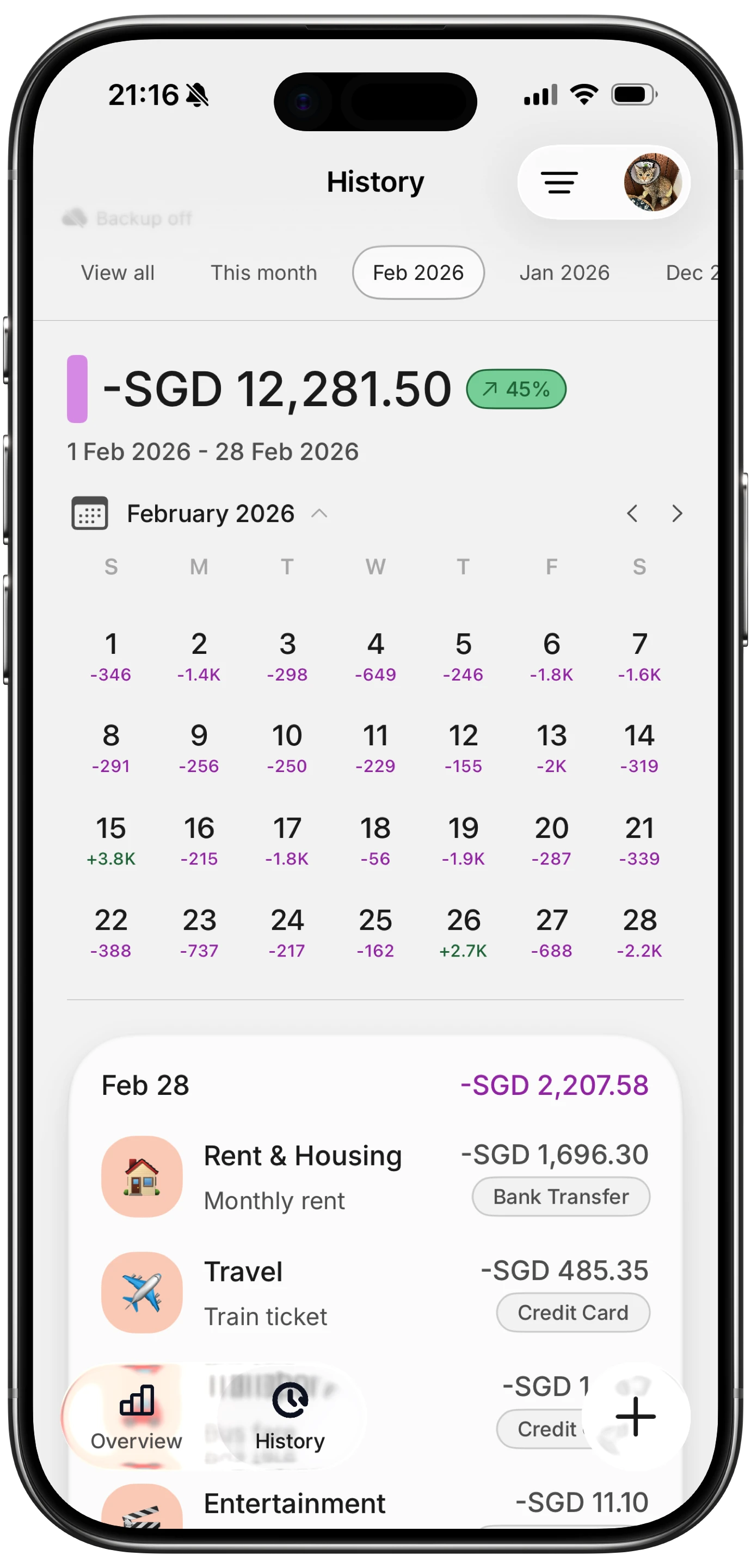
Finny app's History calendar feature
Cash Flow Tracking Tips That Work With Any App
Regardless of which app you choose, these practices improve your cash flow tracking:
Track income as carefully as expenses. Many people log spending religiously but forget to record freelance payments, reimbursements, or side income. Cash flow requires both sides of the equation.
Review weekly, not just monthly. Monthly reviews catch problems after the fact. Weekly check-ins let you adjust spending before a month turns negative.
Separate fixed from variable expenses. Fixed costs (rent, insurance, subscriptions) are predictable. Variable costs (food, entertainment, shopping) are where cash flow fluctuates. Focus your attention on the variable side.
Use the trending data. A single month of negative cash flow is not a crisis. Three consecutive months is a pattern. Look at the trend line, not individual data points.
For a broader perspective on choosing the right tracking tool for your situation, see our comparison of the best money tracker apps in 2026.
Frequently Asked Questions
What is the difference between a cash flow app and a budget app?
A budget app helps you plan how to allocate money across categories before you spend it. A cash flow app tracks the actual movement of money in and out, showing whether you are gaining or losing ground financially. Some apps do both, but the emphasis differs. Budget apps focus on planned allocation. Cash flow apps focus on the net result of income minus expenses over time.
Do I need bank connections for cash flow tracking?
No. Bank connections automate transaction imports, but apps like Finny let you track cash flow manually using AI-assisted input. The tradeoff is speed versus privacy: bank-linked apps capture everything automatically but require sharing credentials, while manual apps keep your data private but need consistent logging.
Which cash flow app is best for freelancers?
Freelancers benefit from apps that handle variable income well. Finny's multi-currency support and manual income logging suit freelancers who receive payments from multiple sources and currencies. Monarch's forecasting helps freelancers project cash flow during lean months. The best choice depends on whether you prioritize automation or privacy.
Can cash flow tracking actually improve my finances?
Yes, but only if you act on what you see. Studies consistently show that awareness of spending patterns leads to better financial decisions. Cash flow tracking quantifies the gap between earning and spending, making it harder to ignore when that gap shrinks or turns negative. The key is reviewing your data regularly and adjusting behavior based on the trends.
Is a free cash flow tracking app good enough?
Free tiers exist for some budgeting apps, but most serious cash flow tools require a subscription. The question is whether the insight justifies the cost. If a $2-15/month app helps you identify and eliminate $50/month in unnecessary spending, the return on investment is clear. Start with a free trial to test whether the app's approach fits your habits before committing.
Start Tracking Your Cash Flow
The gap between what you earn and what you spend determines your financial trajectory. The right app makes that gap visible, measurable, and actionable.
Download Finny to log expenses using AI, receipts, or text. No bank connections, offline support, and full control over your financial data.




