
SMS Expense Tracking App: How Automatic Parsing Works in 2026
Every time your bank sends a transaction alert, there is structured data sitting in your inbox: the amount, the merchant, the date, and sometimes the remaining balance. An SMS expense tracking app reads those messages, extracts the financial data, and logs it as an expense entry without you typing anything.
This approach is especially popular in countries like India, where banks send detailed transaction SMS for every debit, credit, UPI payment, and card swipe. If your phone already has hundreds of bank messages, an SMS tracker can reconstruct months of spending history in seconds. Our roundup of the best expense tracker apps in India covers the apps built around this.
But SMS-based tracking comes with real trade-offs: broad permissions, privacy concerns, platform restrictions, and parsing accuracy that varies by bank. This guide covers how SMS expense tracking works, which apps do it well, what the limitations are, and what alternatives exist for people who want automation without handing over inbox access. For a broader comparison of tracking methods, see our guide to tracking expenses effectively.
How SMS Expense Tracking Works
The concept is straightforward. Your bank sends an SMS like this:
INR 1,250.00 debited from A/c XX4532 on 12-Mar-26. UPI Ref: 409876123456. Balance: INR 23,400.50
An SMS parsing engine breaks this message apart using pattern matching and regular expressions. It identifies:
- Amount: INR 1,250.00
- Transaction type: Debit
- Account: ending in 4532
- Date: March 12, 2026
- Reference: UPI transaction
- Remaining balance: INR 23,400.50
The app then creates an expense entry, attempts to categorize it (based on the merchant name or UPI ID if present), and adds it to your spending history. All of this happens in the background the moment the SMS arrives.
What Makes It Work in India
India is the strongest market for SMS-based expense tracking for several reasons:
-
Universal SMS alerts: Indian banks are required by RBI guidelines to send transaction alerts for every debit and credit. This creates a reliable data source that covers virtually all spending.
-
UPI adoption: With billions of UPI transactions monthly, most spending generates an SMS. Unlike card-optional markets, nearly every payment in India leaves a text trail.
-
Standardized formats: While not perfectly uniform, Indian bank SMS messages follow recognizable patterns that parsers can handle with reasonable accuracy.
-
Android dominance: Over 95% of smartphones in India run Android, which historically allowed apps to read SMS with user permission. This made SMS parsing technically feasible at scale.
Best SMS Expense Tracking Apps Compared
Here is how the major SMS-based trackers compare across features, pricing, and platform support.
Axio (Formerly Walnut): The Pioneer
Walnut was one of the first apps to build an entire product around SMS parsing in India. Now rebranded as Axio, it remains the most recognized name in SMS-based expense tracking.
The app reads transaction SMS from over 40 Indian banks and cards, categorizes spending automatically, and provides monthly summaries. It also includes bill reminders, UPI payments, and the ability to split expenses with contacts.
Axio has expanded beyond expense tracking into lending products (Axio Pay Later, personal loans, fixed deposits), which means the free expense tracker now sits inside a broader fintech platform. This shift has raised questions among users about whether the app's primary purpose is still expense management or customer acquisition for financial products.
Platform: Android only. Pricing: Free for expense tracking.
Moneyview: The All-in-One Manager
Moneyview, founded in 2014, reads transactional SMS and automatically categorizes spending without manual data entry. The app provides weekly and monthly summaries, budget alerts, bill payment reminders, and bank balance tracking.
Like Axio, Moneyview has evolved into a lending platform alongside its money management features, offering personal loans from INR 5,000 to INR 10 lakh. The expense tracking remains functional, but the app's interface increasingly promotes its loan products.
Platform: Android and iOS. Pricing: Free for expense tracking.
FinArt: The Premium Alternative
FinArt takes a different approach: it reads both SMS messages and bank app notifications to track transactions. The app uses AI for categorization and supports tracking credit cards, subscriptions, and recurring payments. It launched on iOS in 2026, making it one of the few SMS-style trackers available on Apple devices (using notification reading rather than direct SMS access).
FinArt includes family budget planning, shared financial views, and bill reminders. Unlike Axio and Moneyview, it does not offer lending products, keeping its focus on expense management.
Platform: Android and iOS. Pricing: Free 5-day trial, then paid subscription (price varies by country). Ad-free.
PennyWise AI: The Open-Source Option
PennyWise AI is a free, open-source SMS expense tracker that runs entirely offline. It uses pattern-based parsing for SMS from 85+ banks across 14 countries and includes an on-device AI assistant powered by Qwen 2.5 for natural language queries about your spending.
The critical difference: PennyWise processes everything on your device. No accounts, no cloud sync, no data collection. The entire codebase is available under AGPL v3 for anyone to audit. For privacy-conscious users, this is the strongest option in the SMS tracking category.
Platform: Android only. Pricing: Completely free, no ads, no subscriptions.
SMS Expense Tracker Comparison Table
| Feature | Axio (Walnut) | Moneyview | FinArt | PennyWise AI |
|---|---|---|---|---|
| SMS parsing | Yes (40+ Indian banks) | Yes (auto-categorize) | Yes + notification reading | Yes (85+ banks, 14 countries) |
| Platform | Android | Android, iOS | Android, iOS | Android |
| Pricing | Free | Free | Paid (after trial) | Free, open-source |
| Offline support | Partial | No | Partial | Full offline |
| AI features | Basic categorization | Basic categorization | AI categorization | On-device AI assistant |
| Privacy model | Cloud-based | Cloud-based | Cloud-based | Fully on-device |
| Lending products | Yes | Yes | No | No |
| Multi-currency | INR only | INR only | Multiple | Multiple (INR, USD, AED, etc.) |
| Open source | No | No | No | Yes (AGPL v3) |
| Data export | Limited | Limited | Yes | CSV, PDF |
The Privacy Problem with SMS Tracking
SMS expense tracking requires one of the broadest permissions an Android app can request: the ability to read all your text messages. Not just bank alerts, but every SMS on your device.
What Apps Can Access
When you grant SMS read permission, the app technically has access to:
- All incoming SMS messages (not just from banks)
- Your complete SMS history
- OTPs and verification codes
- Personal messages from contacts
Reputable apps claim they only parse messages from known bank sender IDs and ignore everything else. But the permission itself is binary: full access or no access. There is no way to grant "bank SMS only" permission on Android.
Google Play Restrictions
Google has tightened SMS permission policies significantly. Apps on the Play Store must demonstrate that SMS access is core to their functionality and must comply with stricter data handling requirements. Some SMS tracking apps have been removed from the Play Store over the years for policy violations, and others have had to modify their permission requests.
This is one reason several SMS tracking apps distribute through APK downloads or alternative app stores rather than (or in addition to) Google Play.
The Trust Question
For apps like Axio and Moneyview that also offer lending products, the combination of SMS access and financial services creates a more complex trust equation. These apps can see your transaction patterns, spending behavior, and financial habits: data that is directly useful for credit scoring and loan targeting.
PennyWise AI addresses this concern by keeping all processing on-device with open-source code. FinArt offers a "private mode" option. But for most commercial SMS trackers, you are trusting the company's privacy policy rather than a technical guarantee.
Limitations of SMS-Based Expense Tracking
Even if you are comfortable with the permissions, SMS tracking has practical limits that affect day-to-day usefulness.
Cash Transactions Are Invisible
SMS tracking only captures electronic transactions. Any spending with physical cash: street food, local markets, tips, small shops that do not accept digital payments: goes untracked. In markets where cash still accounts for a significant share of daily spending, this creates gaps in your expense picture.
Categorization Is Often Generic
Bank SMS messages rarely include merchant category information. A message might say "debited at SWIGGY" and the app can map that to "Food Delivery," but a message saying "debited at POS TERMINAL 4523" gives the parser nothing to work with. Many transactions end up in generic categories that require manual correction.
No Cross-Platform Parity
Most SMS expense trackers are Android-only because iOS does not grant third-party apps access to the SMS inbox. FinArt works around this by reading notifications instead of SMS directly, but this approach captures less data and depends on how your bank's notification system works.
If you switch between Android and iOS, or share finances with someone on a different platform, SMS-based tracking becomes fragmented.
You Cannot Add Context
A bank SMS tells you that INR 3,500 was debited. It does not tell you whether that was a business lunch, a birthday gift, or a grocery run. SMS trackers have no way to add notes, attach receipts, or split transactions across categories unless you manually edit each entry after the fact. For more on the differences between automated and manual approaches, see our comparison of AI expense tracking vs manual logging.

Finny app's AI chat feature
Alternatives to SMS-Based Tracking
If the trade-offs of SMS tracking: privacy concerns, Android-only support, gaps in cash spending, limited context: do not work for you, there are other approaches worth considering.
AI-Powered Manual Input
Instead of reading your messages automatically, some apps let you describe transactions in natural language. You type "lunch at Subway 350 rupees" or speak it aloud, and AI parses the amount, merchant, and category. This takes a few seconds per transaction but gives you full control over what gets logged and how.
This approach works on both Android and iOS, requires no special permissions, and handles cash transactions just as easily as digital ones. The trade-off is that you have to initiate each entry yourself. For many users, this 5-second interaction is an acceptable cost for better privacy and cross-platform support. You can explore more about this approach in our guide on tracking expenses without linking your bank account.
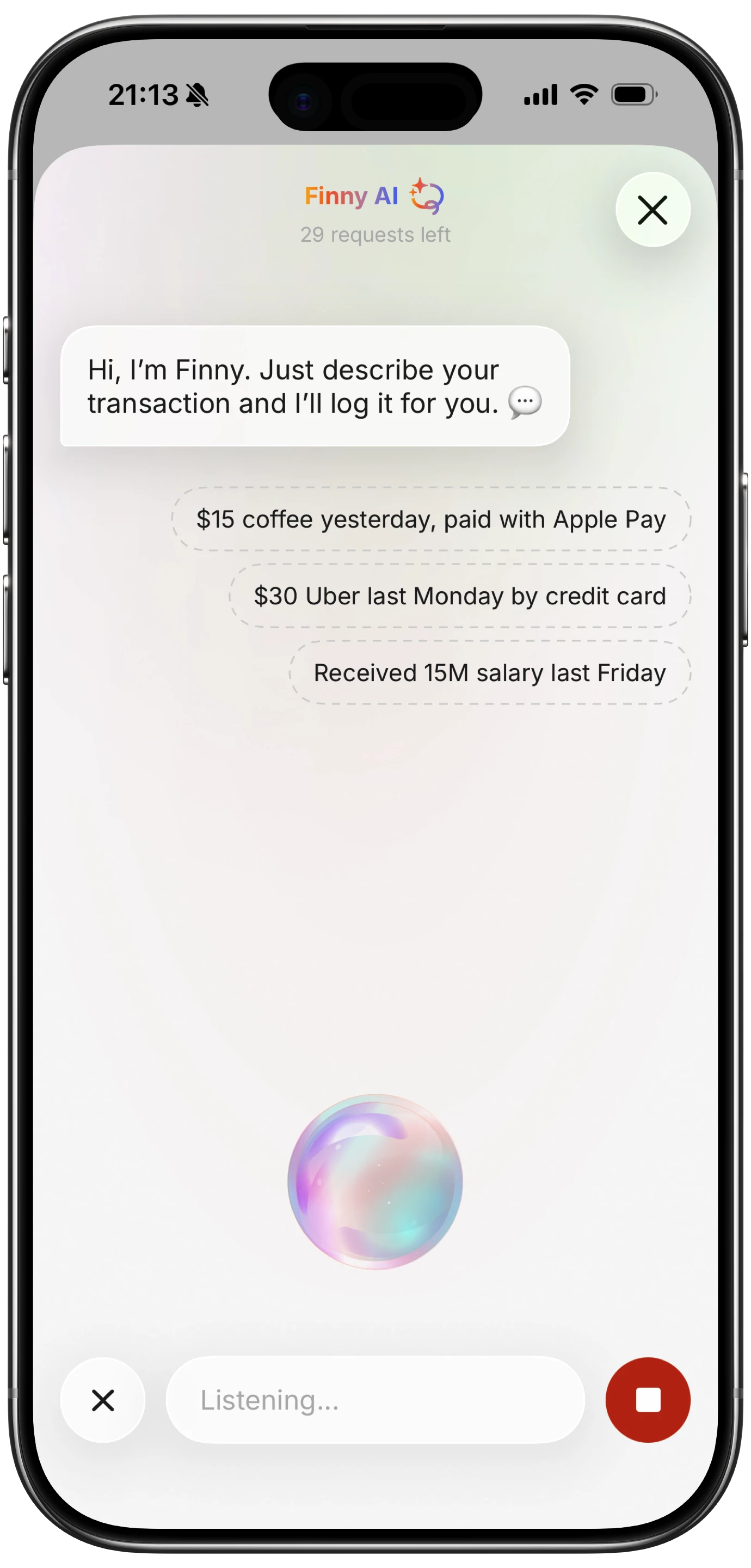
Finny app's voice input feature
Receipt Scanning
Photograph a receipt and let AI extract the details: merchant, date, total, tax, and individual line items. This captures more information than an SMS ever could and creates a visual record you can reference later. Receipt scanning works regardless of payment method and does not require any inbox permissions. See our guide to AI receipt scanning for a deeper look at how this technology works.

Finny app's screenshot import feature
Bank-Connected Tracking
Apps like Monarch Money and Copilot connect directly to your bank accounts via APIs (Plaid, MX, or similar) and pull transaction data automatically. This provides more detailed information than SMS parsing and works across platforms. The trade-off is that you are sharing your bank credentials with a third party, and these services typically require a monthly subscription.
Hybrid Approaches
The most practical solution for many people combines automatic tracking for digital transactions with quick manual input for cash spending. Whether the automatic component comes from SMS parsing, bank connections, or notification reading depends on your platform, privacy preferences, and which banks you use.
When SMS Tracking Makes Sense
SMS-based expense tracking is a strong fit in specific situations:
- You bank with Indian institutions that send detailed transaction SMS
- You use Android as your primary phone
- Most of your spending is digital (UPI, cards, net banking)
- You want completely passive tracking with no daily input required
- You are comfortable granting SMS read permission to a third-party app
If any of those conditions do not apply, the value of SMS tracking drops significantly. For a comprehensive overview of the best options available right now, check our best expense tracker apps for 2026.
Frequently Asked Questions
Is SMS expense tracking safe for my financial data?
The safety depends on the specific app you choose. Apps that process data on-device (like PennyWise AI) never send your information to external servers, making them inherently safer. Cloud-based apps like Axio and Moneyview encrypt data in transit but do store information on their servers. Always review the privacy policy and check whether the app has been audited or is open-source before granting SMS permissions.
Do SMS expense trackers work on iPhone?
Traditional SMS parsing does not work on iOS because Apple does not allow third-party apps to read the SMS inbox. Some apps like FinArt work around this by reading bank notifications instead of SMS directly. However, this captures less data and is less reliable than direct SMS access on Android. iPhone users generally get better results from AI-powered manual input or bank-connected tracking apps.
Can SMS trackers handle multiple bank accounts?
Yes, most SMS expense trackers support multiple bank accounts simultaneously. Axio supports over 40 Indian banks, and PennyWise AI covers 85+ banks across 14 countries. The app identifies which bank sent each SMS based on the sender ID and parses messages from all your accounts into a unified spending view. However, accuracy may vary between banks depending on how standardized their SMS formats are.
What happens to my data if I uninstall an SMS tracking app?
This varies by app. Cloud-based apps like Axio and Moneyview may retain your data on their servers according to their data retention policies, even after you uninstall the app. You should request data deletion through the app or their support channels before uninstalling. On-device apps like PennyWise AI delete all data when uninstalled since nothing is stored externally.
Are there SMS expense trackers that work outside India?
PennyWise AI supports banks in 14 countries and handles multiple currencies including INR, USD, AED, THB, and NPR. FinArt also offers multi-currency support. However, SMS-based expense tracking is most effective in markets where banks consistently send detailed transaction SMS. In countries where banks rely primarily on push notifications or email alerts rather than SMS, these apps capture fewer transactions automatically.
Download Finny to log expenses using AI, receipts, or text. No bank connections, offline support, and full control over your financial data.





