
I have a confession. I am terrible at logging expenses. Not because I do not care about money, but because the process of opening an app, tapping the plus button, typing an amount, picking a category, and hitting save feels like doing homework after every coffee.
So I set myself a challenge: track 200 expenses without typing once. One full month. No forms. No keyboards. No manual entry of any kind. Just Finny's automation tools: Tap to Track, voice input, receipt scanning, and statement screenshot import.
Here is what happened.
The Rules
Before the month started, I set three ground rules:
- Every expense must be logged in Finny.
- I cannot open the manual add-expense form. Not once.
- Every transaction must use one of Finny's hands-free input methods.
If I could not log a transaction without typing, I would note it as a failure and log it manually at the end. The goal was to see how far zero-typing tracking could realistically take me.
For context on why manual tracking falls short for most people, see our guide on AI expense tracking vs manual methods.
Week 1: Setting Up Tap to Track
The first thing I did was configure Tap to Track. This is Finny's Apple Pay integration that instantly captures every transaction the moment you tap to pay. Your iPhone already knows when you tap your card at a terminal. Finny just listens.
Setup took about two minutes. I followed the quick one-time setup, connected the automation to my Apple Wallet and Finny, and that was it. From that point on, every Apple Pay tap would create a transaction in Finny automatically.
The first few days were almost eerie. I paid for a morning coffee with Apple Pay, and by the time I sat down, Finny had already logged it. Lunch at a sandwich shop. Groceries after work. Gas on Sunday. Each tap created a transaction without me doing anything.
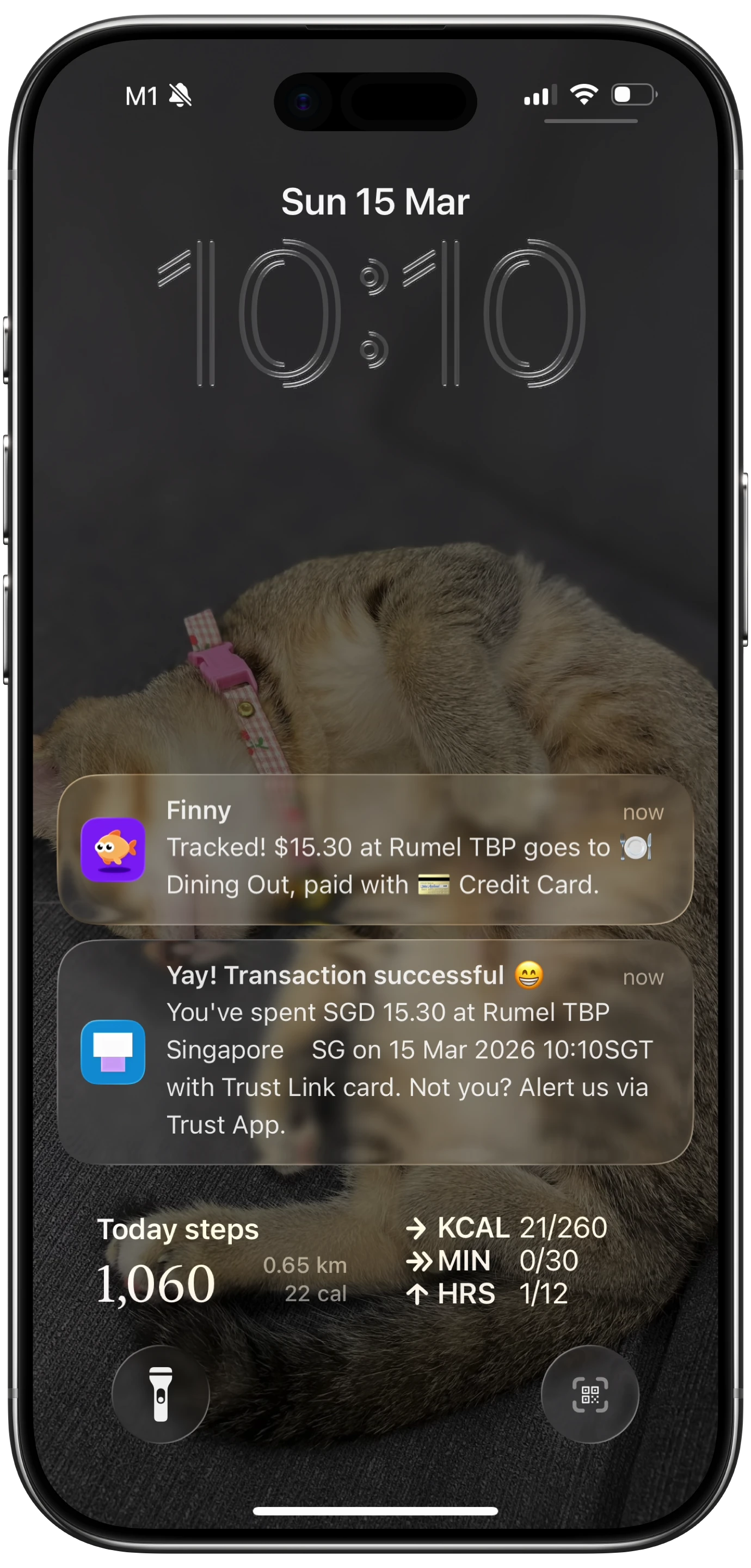
By the end of Week 1, I had 23 transactions logged. All from Apple Pay taps. I opened Finny's add-expense form exactly zero times.
The feeling was strange. I was used to the guilt of forgetting to log things. Instead, my transaction history was filling itself in.
Week 2: Voice Logging on the Go
Week 2 is where things got interesting. Not every purchase goes through Apple Pay. The parking meter downtown only takes coins. The farmer's market vendor uses a cash box. My barber prefers Venmo.
For these, I used voice input. Finny's AI voice logging lets you speak naturally. "Spent eight dollars at the farmer's market." "Fifteen bucks for a haircut." "Three fifty for parking."
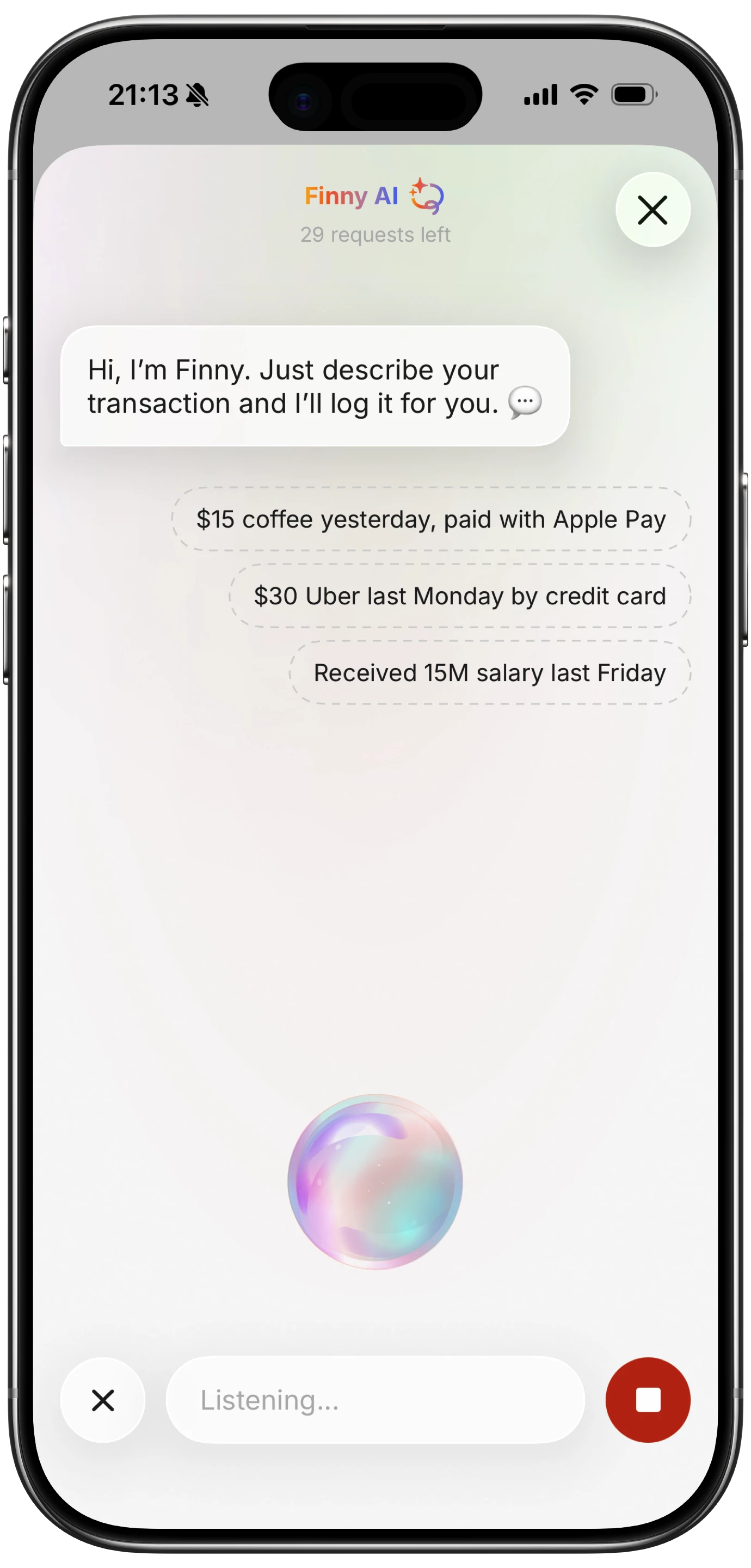
The AI parses the amount, assigns a category, and asks you to confirm. The whole process takes about five seconds. No typing. No scrolling through category lists.
I also scanned my first receipt this week. Dinner with friends at an Italian restaurant where we split the bill. I snapped a photo of the receipt, and Finny's AI receipt scanner pulled the total, the date, and even the restaurant name. One tap to confirm.

By the end of Week 2, the count was up to 71 transactions: 41 from Tap to Track, 22 from voice, and 8 from receipt scans.
Week 3: The Statement Screenshot Import
This was the week that pushed the count up dramatically. I realized I had a pile of Amazon purchases, a couple of online subscriptions, and some Venmo transfers that were not captured by Apple Pay or voice logging.
Instead of typing them in one by one, I used Finny's statement screenshot import. I pulled up my bank statement on the banking app, took a screenshot, and shared it directly into Finny using the Share Extension from Photos. Finny's AI read the screenshot and extracted every transaction from it.
Sixty-seven transactions imported from two screenshots. The AI recognized dates, amounts, and merchant names. A few categories needed minor adjustments, but the core data was all correct.
This is the feature that made the 200 target realistic. Without it, I would have had to type dozens of online purchases manually, which would have broken the challenge.
For more on how batch processing receipts works, check out our guide on batch receipt scanning for expense tracking.
Week 4: The Dashboard Check
By the final week, I was barely thinking about expense tracking. Tap to Track handled my daily in-person purchases. Voice covered the cash and Venmo transactions. Receipt scanning picked up the occasional restaurant bill. And statement imports caught everything else.
I opened Finny on the last day of the month to check the dashboard. Everything was there. Categorized, dated, and organized.

Here are the final numbers:
- 87 Apple Pay taps logged via Tap to Track
- 34 voice logs spoken into Finny throughout the month
- 12 receipt scans from restaurants, gas stations, and retail stores
- 67 statement imports from two bank statement screenshots
That is 200 transactions. Zero typing. Zero forms. Zero category dropdowns.
I opened Finny's add-expense form exactly zero times this month.
What Made This Work
Three things made the challenge possible.
Tap to Track Runs in the Background
Most expense trackers require you to open the app before something can be logged. Tap to Track flips that. The moment you tap to pay, the automation fires instantly. You do not need to open Finny, you do not need to think about it, and you do not even need your phone unlocked. The transaction just appears.
No other finance app does this. Apps like Monarch Money ($14.99/mo), YNAB ($14.99/mo), and Copilot ($13/mo) all require bank syncing to achieve automatic logging. Finny does it locally, privately, and instantly, for a low monthly price.
AI Input Understands Context
Finny's voice and receipt AI does not just transcribe. It understands. Say "twelve bucks for coffee" and it knows the category is Food and Dining, the amount is $12.00, and the date is today. Snap a receipt and it pulls the line items, the total, and the merchant name.
This is not a gimmick. It is the difference between "I'll log it later" and "Done, without thinking about it." If you want to explore how voice tracking works in more depth, see our voice expense tracker guide.
Statement Import Handles the Long Tail
The first three methods (tap, voice, scan) cover roughly 70% of transactions. The remaining 30%, online orders, subscriptions, transfers, are the ones that usually fall through the cracks. Statement screenshot import catches them all in one batch. No typing. No manual entry. Just a screenshot.
The Honest Caveats
Was the experience perfect? Almost.
Two transactions required me to edit the category after import. The AI categorized a hardware store purchase as "Shopping" when I wanted it under "Home." And one voice log misheard "thirteen" as "thirty." I caught it during the confirmation step and corrected it with a single tap.
These are minor corrections, not manual entry. The point was never that AI is flawless. The point is that the default experience should not be a blank form.
What This Means for How You Track Money
If you are still filling out expense forms for every coffee and grocery run, you are spending more time on bookkeeping than budgeting. The tools exist right now to eliminate manual entry for the vast majority of transactions.
For a broader look at what the best tracking apps offer in 2026, see our best money tracker app guide. And if you want to understand the full spectrum of how to log expenses, start with our how to track expenses guide.
The shift from manual to automated tracking is not just a convenience upgrade. It is the difference between tracking 40% of your spending and tracking 100%.
FAQ
Can I really track all my expenses without typing anything?
Yes. Finny's Tap to Track covers Apple Pay purchases, voice input handles cash and informal transactions, receipt scanning captures physical receipts, and statement screenshot import catches online purchases and subscriptions. Combined, these methods cover virtually every type of expense.
Does Tap to Track work without a bank connection?
Absolutely. Tap to Track uses your iPhone's built-in payment detection, not bank syncing. Your financial credentials are never shared with Finny or any third party. It runs entirely on your device. For more on tracking without bank links, see our guide on offline expense tracking.
How accurate is the AI for voice and receipt scanning?
In my experience, the AI correctly parsed about 98% of transactions without any edits. The occasional category adjustment or misheard number is corrected with a single tap during the confirmation step. It is far more accurate than my memory of what I spent three days ago.
What does Finny cost compared to other tracking apps?
Finny costs a low monthly or yearly price. That is significantly less than Monarch Money at $14.99/mo, YNAB at $14.99/mo, or Copilot at $13/mo. Finny also includes 50 AI requests per day, multi-currency support, and offline-first design at that price.
Download Finny and try tracking your next 200 expenses without typing a single word. Your thumbs will thank you.