
Best Aesthetic Budget Apps for iPhone in 2026
It's easy to dismiss design as a nice-to-have in a money app. But a budget only works if you open it, and most people don't keep opening an app that feels like a tax form. The apps people stick with tend to be the ones they like looking at: clear numbers, calm colors, and small details that make checking your spending feel less like a chore.
This guide compares the best aesthetic budget apps for iPhone in 2026, apps that look good and still do the work. We focus on design choices that affect whether you'll keep using the app, not just screenshots. If you care most about charts, our roundup of expense tracking apps with the best charts goes deeper on visualizations.
Why design matters in a budget app
Good design in a finance app isn't decoration. It changes behavior in a few specific ways:
- Clarity. The number you need, like what's left this month, should be readable in one second.
- Low friction. Logging an expense should feel quick and pleasant, or it gets skipped.
- Calm. Harsh reds and alarms make people avoid their finances. A calmer palette makes checking in easier.
- Personal. Themes, icons, and photos make the app feel like yours, which keeps you coming back.
- Glanceable. Widgets let you see your spending without opening anything at all.
The best aesthetic budget apps compared
| App | Price | Design highlights | Platforms | Bank link |
|---|---|---|---|---|
| Finny | Free, Pro a low monthly price | 3D icons, receipt-style entries, photo calendar, 4 color themes | iPhone | Not required |
| Copilot Money | $13/mo or $95/yr | Polished Apple-native design, fluid charts | iPhone, iPad, Mac, web | Required |
| Monarch Money | $14.99/mo or $99.99/yr | Clean, calm dashboard | iOS, Android, web | Required |
| Spendee | Free, paid plans | Colorful charts and category visuals | iOS, Android | Optional |
| Toshl Finance | Free, Pro $2.99/mo or $19.99/yr | Playful illustrated style | iOS, Android, web | Optional (Medici tier) |
Prices are US prices checked in September 2026.
1. Finny: best for a personal, playful look
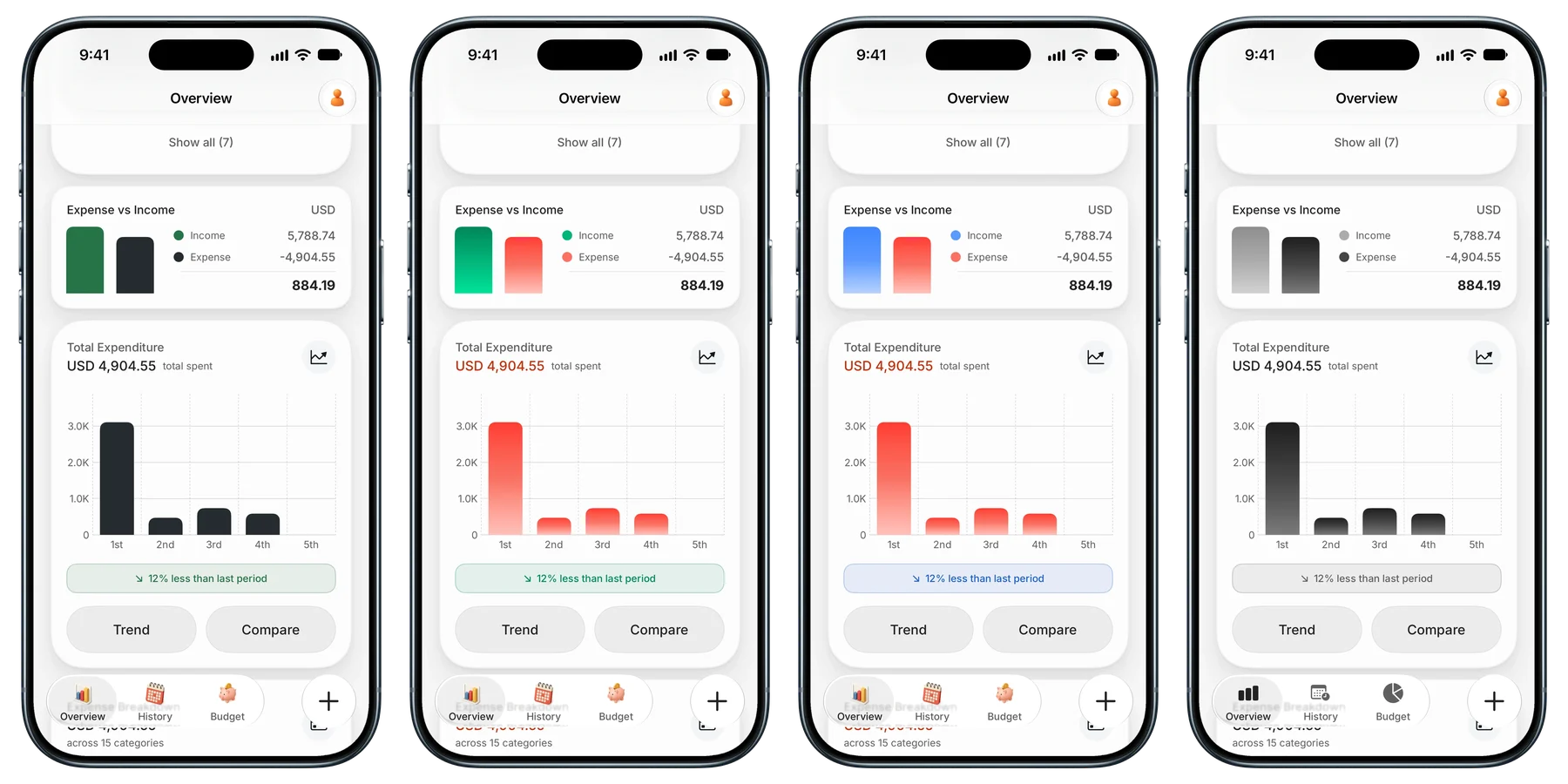
Finny's design leans warm and tactile. Categories use soft 3D icons, each expense opens as a receipt-style card, and the Payment Methods card on the Overview shows your spending by card as a stack in a wallet pocket. Four color themes change how income and expense look across the app, from the bright Coastal to a muted Monochrome, and the tab bar can switch between 3D and flat icons to match.
The History calendar is where it stands out. Each day shows its top categories, and in photo mode the month becomes a board of photos from your expenses: meals, trips, the things you actually spent on. It's also privacy-first, with no bank connection required, and card payments can be logged as you make them.
Best for: people who want an app that feels personal and are happy without bank sync.
2. Copilot Money: best polished, Apple-native design
Copilot is widely regarded as one of the best-designed finance apps on iPhone, and the company says it was a 2024 Apple Design Award finalist. It feels native to Apple platforms, with smooth animations, clear charts, and apps for iPhone, iPad, and Mac, plus a web app.
It's a bank-sync app at $13 a month or $95 a year, with no free tier. Our Copilot Money review covers it in depth.
Best for: Apple users who want the most polished bank-connected experience and don't mind the price.
3. Monarch Money: best calm dashboard
Monarch's design is quieter than Copilot's: a clean dashboard with muted colors, clear budgets, and a layout that works equally well on the web and on a phone. It's built for households, with separate logins for partners.
Monarch Core costs $99.99 a year or $14.99 a month after a 7-day trial.
Best for: couples and families who want a calm, complete view of their finances in one place.
4. Spendee: best colorful charts
Spendee is known for bright, friendly visuals: colorful category icons and charts that make a month's spending easy to read. It supports shared wallets and manual or bank-linked tracking, with a free plan and paid tiers.
Best for: visual thinkers who want their spending to look vivid.
5. Toshl Finance: best playful personality
Toshl stands out with an illustrated, slightly quirky style that makes budgeting feel less serious. It covers manual tracking, budgets, and multi-currency support. Toshl Pro costs $2.99 a month or $19.99 a year, and the Medici tier adds bank import.
Best for: people who find traditional finance apps intimidating and want something lighter.
Widgets: the most glanceable design of all
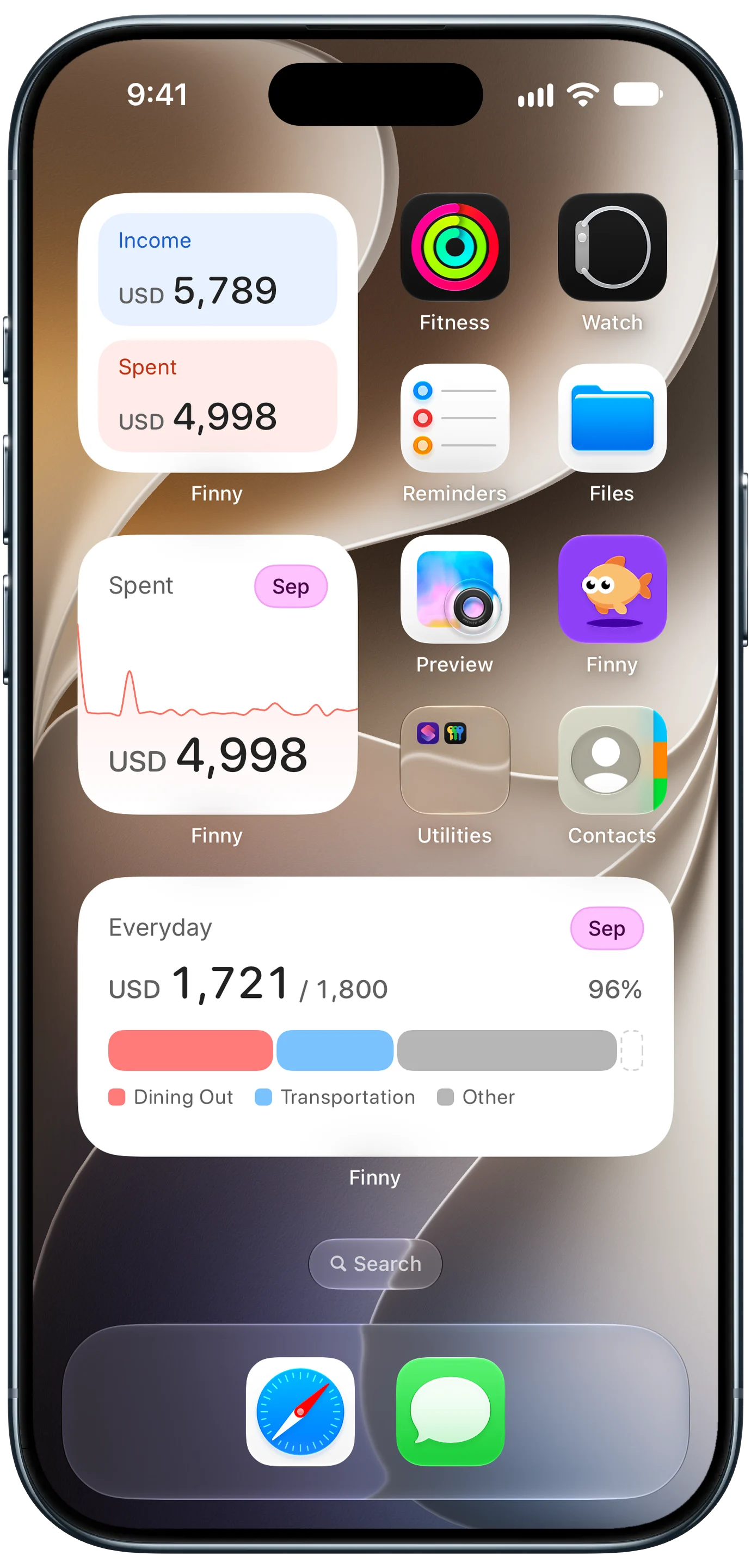
The best-looking budget is often the one on your Home Screen. Widgets put this month's spending, your income, and a budget's progress right next to your apps, so checking your money takes a glance instead of a tap. Our guide to iPhone Lock Screen budget widgets compares the options.
Here's a card payment logged automatically, which keeps widgets current without any typing:
How to choose an aesthetic budget app
Pick based on what you'll actually use:
- You want the most polished bank-linked app: Copilot.
- You manage money with a partner: Monarch.
- You love colorful charts: Spendee.
- You want something playful and light: Toshl.
- You want a personal look, themes, and a photo calendar without bank linking: Finny.
Accessibility counts as design too. If you're colorblind or want lower contrast, look for alternative themes. Our guide to a colorblind-friendly budget app covers what to look for.
Frequently Asked Questions
What is the most aesthetic budget app?
It depends on your taste. Copilot is widely praised for polished, Apple-native design. Monarch has the calmest dashboard. Spendee has the most colorful charts, and Toshl the most playful style. Finny stands out for personal touches: four color themes, 3D icons, and a calendar that can show photos from your expenses.
Does the design of a budget app really matter?
Yes. A budget only works if you check it regularly, and people keep opening apps they find clear and pleasant. Good design makes the key number readable at a glance, keeps logging quick, and avoids alarming visuals that make people avoid their finances.
Are there aesthetic budget apps that don't need my bank login?
Yes. Finny works without any bank connection, and Spendee and Toshl support manual tracking with optional bank linking. Copilot and Monarch are built around bank sync, so they need linked accounts to be useful. If privacy is the reason you're avoiding bank sync, check each app's privacy policy for how your data is stored and whether it's shared.
Can I customize the colors of my budget app?
Some apps allow it. Finny offers four color themes that change how income and expense look across the app, plus a choice of 3D or flat tab icons. Most other apps offer light and dark modes, and a few let you change category colors or icons.
The bottom line
The best aesthetic budget app is one you'll open every day, and that's the whole point of good design. Copilot and Monarch lead for polished bank-linked tracking, Spendee and Toshl for color and personality. If you want a personal, calm app with themes and a photo calendar, and no bank login, Finny is built for exactly that.