AI in Personal Finance: 7 Trends Shaping 2026
Ask anyone who tracks their money and you'll hear the same complaint: every app now advertises "AI," but it's hard to tell what genuinely helps and what's just a badge on the marketing page. If you want to understand where AI in personal finance 2026 is actually heading (what's new, what's hype, and what to expect next), this guide is for you.
We're well past the point where AI in a finance app meant a single chatbot bolted onto a dashboard. This year, AI shows up at nearly every step: how you enter an expense, how it gets categorized, how your future balance is predicted, and even where that computation happens. Below are seven concrete trends shaping the category right now, each with real examples, honest caveats, and a summary table.
Where AI in Personal Finance Stands in 2026
Before we dig in, here's the shape of the landscape. This is a trends piece, not an app ranking. If you want a head-to-head of specific products, our best AI budget apps in 2026 roundup covers that. The table below maps each trend to what it does and how mature it is this year.
| Trend | What it does | Where it stands in 2026 |
|---|---|---|
| Multi-modal input | Log or query money by typing, speaking, or snapping a photo | Mainstream in new AI apps |
| Smarter auto-categorization | Labels transactions and learns from your corrections | Mature but still imperfect |
| Predictive cash flow & alerts | Forecasts upcoming balances and flags risks early | Maturing |
| Conversational coaching | Answers plain-English questions about your spending | Growing quickly |
| On-device, privacy-first AI | Processes data locally, shares less raw bank data | Emerging, Apple-led |
| Receipt & document understanding | Extracts details from receipts and statement images | Mature for receipts |
| Honest limits & oversight | Confirmation steps, disclaimers, human review | Increasingly built in |
1. Multi-Modal Input: Type It, Say It, or Snap It
The biggest near-term shift is in how you get data into an app. For years, logging an expense meant a form: tap amount, pick a category, choose a date, hit save. In 2026, that form is becoming optional.
Modern apps accept natural language and multiple input modes. You type "lunch 14.50," speak into the mic on the walk home, or snap a photo of a receipt, and a language model pulls out the amount, merchant, and likely category. The same flexibility is reaching the query side too: instead of filtering a table, you simply ask.
This matters most for the spending traditional apps miss (cash, peer-to-peer payments, and purchases made while traveling), which rarely lands in a clean bank feed.
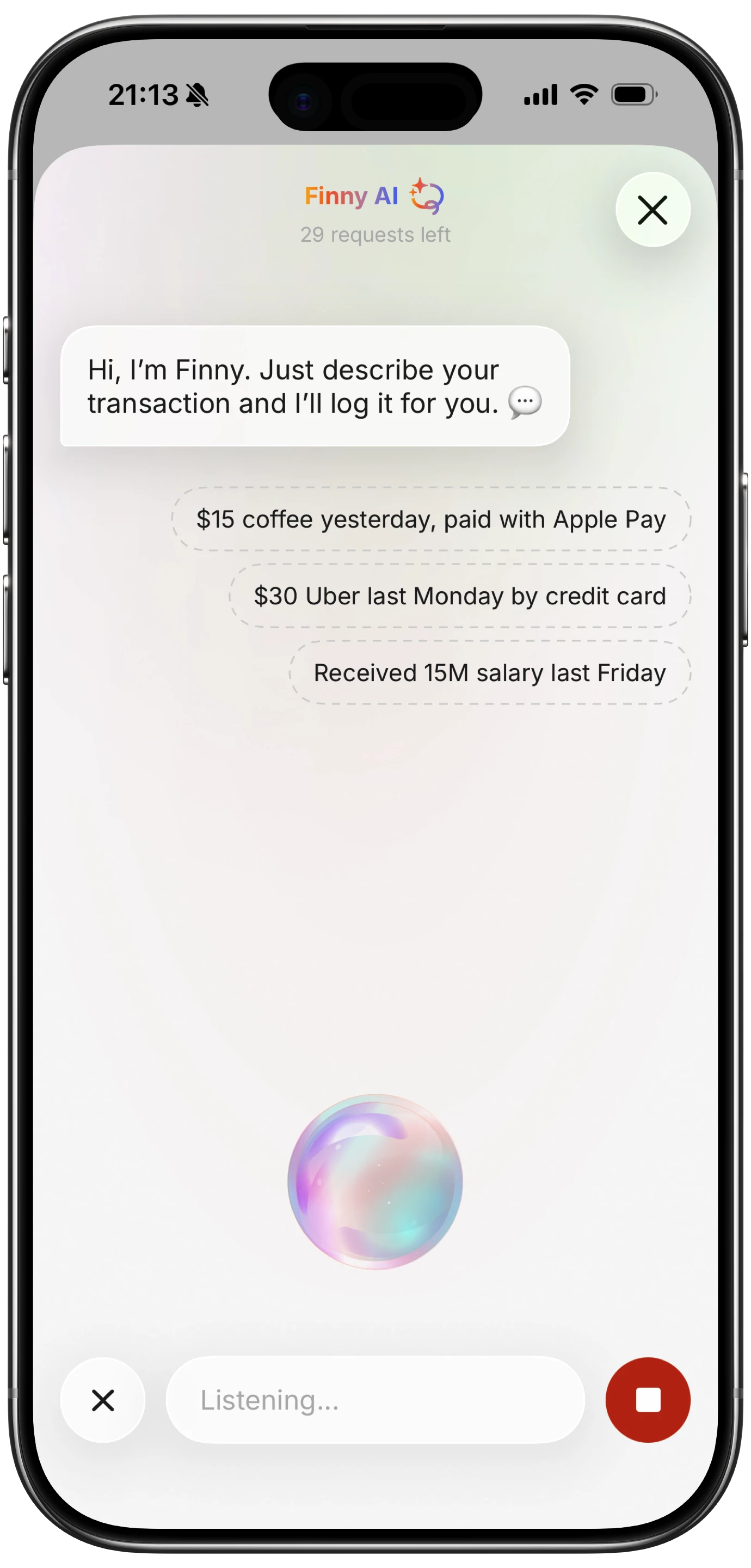
Finny is one example built around this idea: you log through text, voice, receipt scan, statement screenshot, or chat, with a quick confirmation step before anything saves. The trade-off across all multi-modal tools is the same: input becomes fast and human, but you still decide what counts, which is a feature if you value control and a cost if you wanted everything captured automatically.
2. Smarter Auto-Categorization (and Its Accuracy Limits)
Categorization is the oldest "AI" job in budgeting, and it keeps getting better. The newest systems don't just match a merchant to a fixed rule. They build a per-user model that learns from your corrections. Copilot Money is known for exactly this: each user gets their own training data, so the app adapts to how you treat ambiguous merchants. Monarch Money has pushed similar enhanced categorization across its base.
The honest part is that accuracy still has a ceiling. A charge from Amazon could be groceries, electronics, or a gift; a Venmo transfer could be rent or splitting dinner. The model guesses from patterns, and when confidence is low it gets a meaningful share wrong, which is why every serious app still leans on you to confirm or correct.
Two things follow. First, the apps that feel "smart" are usually the ones that learn fastest from your edits, not the ones that claim perfection. Second, categorization works best when the underlying data is clean, which is why receipt parsing (trend 6) increasingly feeds it.
The practical takeaway: treat auto-categorization as a strong first draft, not a finished ledger. The few seconds you spend correcting an odd label this month is what makes next month's guesses better.
3. Predictive Cash Flow and Proactive Alerts
If categorization looks backward, the next trend looks forward. Predictive cash-flow features model your recurring income and bills, then project where your balance is headed, and warn you before a problem lands.
In practice this looks like a few nudges. The app spots that rent, a subscription, and a card payment all clear in the same week and flags that you may run short before payday. It notices a charge larger than your usual pattern and asks whether it was intentional. It detects a new recurring subscription you may have forgotten.
What's changed in 2026 is timing. Earlier tools surfaced these insights after the fact, in a weekly summary. The shift now is toward proactive, real-time alerts that arrive while you can still act: pause a purchase, move money, or cancel something.
The caveat is that a forecast is only as good as its data. Irregular income, cash spending, or accounts the app can't see all blur the projection, and predictions tend to assume your past repeats, exactly what breaks during a move, a job change, or a holiday month. The best implementations show their reasoning so you can sanity-check the number rather than just trust it.
4. Conversational Coaching: Asking Questions About Your Money
Closely related but distinct is the rise of conversational coaching: apps you can interrogate in plain English. Instead of building a report, you ask "how much did I spend on dining out last quarter?" or "can I afford a $400 flight this month?" and get an answer in a sentence.
Monarch Money's AI Assistant is a clear example: it answers natural-language questions about your data and summarizes changes in a weekly recap. More broadly, general assistants have started connecting to financial data directly: ChatGPT's integration with Plaid, for instance, lets people ask about their accounts conversationally, blurring the line between a budgeting app and a chatbot.
The appeal is obvious: for people who bounce off dashboards and spreadsheets, a question-and-answer interface lowers the barrier to ever looking at their money. The risk is just as real: a conversational tool can sound confident while being wrong, and it doesn't know your full financial picture unless you've given it everything.
So the smart way to use coaching in 2026 is for retrieval and framing: pulling up numbers you trust, spotting trends, and turning data into plain words. It's far weaker as personalized advice, which depends on context a chatbot usually can't see. We'll return to that limit in trend 7.
5. On-Device, Privacy-First AI
Almost every trend above runs on sending data somewhere to be processed. The countertrend gaining real momentum in 2026 is keeping that processing close to home.
Apple has leaned into this hard. Apple Intelligence is built to run most tasks on-device, and when a request needs more horsepower it routes to Private Cloud Compute, where Apple says personal data isn't stored or made accessible to anyone. For a category as sensitive as personal finance, that's a meaningful shift: less of your raw financial detail has to leave your phone to get an AI feature.
This also reframes the privacy conversation. Most AI finance tools depend on linking a bank through an aggregator like Plaid and, in some cases, passing transaction text to third-party language models. On-device approaches shrink that footprint by processing inputs locally and sharing less.
Finny sits on the privacy-first end of this spectrum: it doesn't require a bank link at all, parsing the text or receipt you enter rather than ingesting your full transaction history. The trade-off, as always, is convenience: you log entries yourself instead of having every swipe imported automatically.
The broader signal is that "where the AI runs" is becoming a feature people compare, not just a backend detail. Expect more apps to advertise local processing through 2026.
6. Receipt and Document Understanding
Receipts and statements are where optical character recognition (OCR) meets large language models, and the combination has matured fast. OCR reads the pixels into text; the language model then makes sense of it, pulling merchant, total, date, tax, and even individual line items into structured fields.
The leap over older scanners is interpretation. A plain OCR tool could read "$42.17" off a receipt; an LLM-backed one understands it's a grocery total at a specific store on a date, and can split out line items if you want them. The same pipeline now handles inputs older tools choked on: crumpled receipts, dim lighting, even screenshots of bank or card statements.
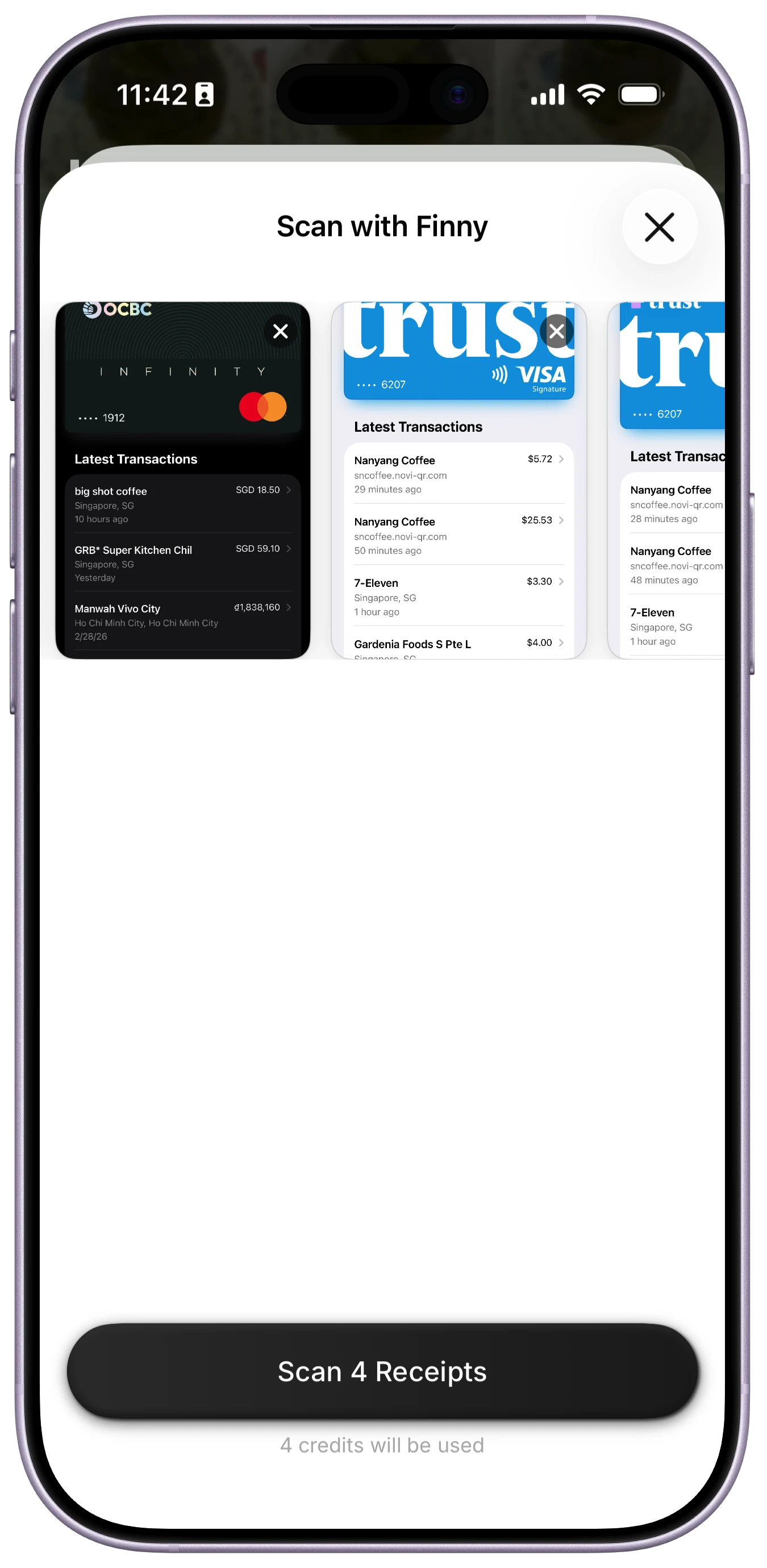
Batch processing is the other upgrade. Several apps now let you queue a stack of photos and extract them together, useful after a trip or a month of saved receipts. For a deeper look at how this works and where it slips up, our guide to the AI receipt scanner breaks it down.
The limits are honest ones: faded thermal paper, handwriting, and foreign-language receipts still trip extraction up, and a confident-looking total can be misread by a digit. As with categorization, a confirmation step keeps a fast scan from quietly becoming a wrong entry.
7. The Honest Limits of AI in Personal Finance
No trends piece is complete without the part the marketing pages skip. AI in personal finance is genuinely useful in 2026, but it isn't infallible, and treating it that way is how people get burned.
The core issue is hallucination. Language models are built to produce plausible text, not verified truth, so they can state a wrong number with total confidence: a misread receipt total, or a forecast that quietly assumes income you don't have. Worse, models often sound most certain exactly when they're wrong, which makes errors easy to miss.
There's also a knowledge gap. A chatbot doesn't automatically know your tax bracket, your debt, your employer's 401(k) match, or your risk tolerance. Financial decisions are context-dependent, time-sensitive, and often legally regulated, areas where generic AI advice can be confidently off base.
This is why human oversight still matters, and why the best-designed tools build it in: confirmation steps before saving, visible reasoning behind a forecast, and clear disclaimers that an assistant isn't a fiduciary. When you compare options (our best personal finance apps in 2026 guide is a good place to start), favor the ones that make verification easy over the ones that hide it. The healthy mental model for 2026 is simple: let AI handle the fast, repetitive work, and keep a human in the loop for the judgment calls.
What These Trends Add Up To
A pattern emerges when you step back: AI is moving from a single feature you tap into something woven through the whole flow, while a privacy-first movement decides where it happens. If your spending runs mostly on cards and you're fine linking a bank, predictive and conversational tools save the most time. If you spend cash, travel, or would rather not hand over credentials, the multi-modal-input and on-device side is where the real progress is for you.
Want fast, AI-assisted logging that stays on your device? Finny captures expenses by text, voice, or receipt scan with no bank link required: the AI suggests, you confirm, and your data stays with you. The core app is free, with Pro at a low monthly price.
Frequently Asked Questions
How is AI used in personal finance apps?
In 2026, AI shows up at several points. It parses natural-language and voice input into structured entries, extracts data from receipts and statement images, auto-categorizes transactions and learns from your corrections, forecasts upcoming cash flow, and answers plain-English questions about your spending. Increasingly, some of this runs on-device for privacy. Most apps combine a few of these rather than doing all of them.
Is AI in budgeting apps accurate?
Reasonably, but not perfectly. Auto-categorization, receipt scanning, and forecasting are strong first drafts that improve as the model learns your habits, but they still misfire on ambiguous merchants, faded receipts, and irregular income. Because language models can sound confident while being wrong, reliable apps keep a confirmation step. Treat AI output as a draft to verify, not a final answer.
Will AI replace financial advisors?
Not in 2026, and not for anything high-stakes. AI is excellent at fast, repetitive work: logging, categorizing, summarizing, and surfacing trends. It's far weaker at personalized advice, which depends on your taxes, debts, goals, and risk tolerance and is often legally regulated. A chatbot isn't a fiduciary and usually can't see your full picture, so it works best as an assistant while a human makes the judgment calls.
Are AI finance apps safe with my data?
It depends on the architecture. Bank-linked apps share transaction data with aggregators like Plaid and sometimes with third-party language model providers, which widens the data footprint. On-device, privacy-first tools process inputs locally and share less raw bank data. Apple Intelligence and no-bank-link apps point that way. Neither approach is automatically unsafe; the profiles just differ. Check the privacy policy and any option to opt out of AI features.
The Bottom Line
The throughline of AI in personal finance 2026 is integration, not novelty. The interesting shifts aren't new chatbots: they're AI quietly improving every step from input to insight, paired with a growing push to keep sensitive data on your device. Multi-modal input, smarter categorization, predictive alerts, and conversational coaching are all maturing at once, while privacy-first processing decides where the computation lives.
The constant is that AI works best as an accelerator with a human in the loop. Let it do the fast, repetitive work, verify what it surfaces, and reserve the real decisions for yourself. Judge any 2026 app less by how much AI it claims and more by how easily it lets you check the AI's work.