
Best AI Budget Apps in 2026
Every budgeting app now claims to use AI. Some do, some do not, and the ones that do are not all doing the same thing. We separated the four things the label can mean in best personal finance AI assistant apps. Picking the best AI budget app in 2026 is less about which product has the most impressive marketing page and more about which kind of AI actually fits the way you manage money.
The category has split into three distinct shapes. Chatbot coaches like Cleo lean on conversation. Predictive tools like Copilot Money and Monarch Money lean on categorization and pattern detection. AI-input tools like Finny lean on fast, structured logging through text, voice, and receipts. This guide segments the best ai budget app options across those categories, compares pricing and privacy, and helps you pick based on what you actually need. For a wider view of tracking tools, see our best money tracker apps in 2026 guide.
What Is an AI Budget App?
An AI budget app is a personal finance tool that uses machine learning or large language models to reduce some part of the budgeting workflow. The AI layer can sit on top of three different jobs: understanding your spending through conversation, categorizing transactions pulled from linked bank accounts, or parsing the expense data you provide yourself.
Each approach serves a different user. Understanding the three categories up front makes every later comparison clearer.
Chatbot AI
Chatbot apps use a conversational interface as the main way you interact with your money. You ask questions in natural language and the app replies in natural language. Cleo is the defining example. The AI is mostly a front end over your bank data, translating numbers and charts into chat bubbles and personality.
This works well for people who bounce off dashboards and spreadsheets. It works less well for people who want fast, specific answers without narrative wrapping.
Predictive AI
Predictive apps connect to your bank, import your transactions, and use AI to categorize them, detect recurring charges, and surface patterns. Copilot Money, Monarch Money, and Rocket Money live here. The AI is doing the cleanup work that manual spreadsheet budgeting would force you to do yourself.
This works well for people who already use credit and debit cards for most purchases and trust a third-party aggregator to read their accounts. It works less well for cash-heavy spenders and privacy-conscious users.
AI-Input
AI-input apps use machine learning on the entry step rather than the analysis step. You type a short sentence, speak into the mic, or snap a receipt, and the AI pulls out the amount, merchant, and category. Finny is the example in this guide. There is no bank connection, no aggregator, and no passive import. You still decide what gets logged; the AI just makes logging fast.
This works well for people who want the speed of AI without sharing bank credentials. It works less well for people who want every card swipe captured automatically without lifting a finger.
Best AI Budget Apps in 2026
Here is a side-by-side look at the six apps covered in this guide. Prices and features reflect current public information as of April 2026.
| App | AI Style | Bank Link | Free Tier | Paid Price | Platforms |
|---|---|---|---|---|---|
| Cleo | Chatbot | Required | Yes | $5.99 to $14.99/mo | iOS, Android |
| Copilot Money | Predictive | Required | No | $13/mo or $95/yr | iOS, Mac, Web |
| Monarch Money | Predictive + Assistant | Required | Trial only | $99.99/yr | iOS, Android, Web |
| Rocket Money | Predictive (subscriptions) | Required | Yes | $7 to $14/mo (pick your price) | iOS, Android |
| Emma | Predictive | Required | Yes | Plus, Pro, Ultimate tiers | iOS, Android |
| Finny | AI-Input | Not required | Yes | a low monthly or yearly price | iOS |
Cleo
Cleo is the chatbot model in its clearest form. You link a bank account, and an AI character walks you through your spending, sends bill reminders, and answers questions in chat. Cleo is known for its roast mode, a tone setting that delivers sarcastic feedback on your spending decisions instead of neutral commentary.
The free tier covers budgeting, tracking, and the core chatbot. Cleo Plus at $5.99 per month unlocks cash advances and additional insights. Cleo Builder at $14.99 per month adds a secured credit-building card. The cash advance and credit features change the product from a pure budgeting tool into a broader financial services app, which is worth knowing before you sign up.
Cleo fits users who avoid their finances and want a more casual entry point. It fits less well for anyone who wants detailed tables, exportable reports, or a non-conversational dashboard.
Copilot Money
Copilot Money is the design-forward predictive app. It connects to bank accounts through Plaid and uses a private per-user model to categorize transactions with what the company describes as near-perfect accuracy when confidence is high. Each user gets their own training data, so the categorizer adjusts to how you treat merchants like Amazon, Target, or Costco.
Copilot costs $13 per month or $95 per year, roughly $7.92 per month on the annual plan. It is available on iPhone, iPad, Mac, and the web, and does not support Android. It also does not currently support users outside the United States in any meaningful way.
Copilot fits Apple-ecosystem users who want polished visuals, smart categorization, and subscription detection without a chatbot layer. It fits less well for Android users, non-US users, and anyone who wants to avoid linking bank accounts. For a deeper take on whether the $13 monthly price is worth it, see our Copilot Money review for 2026.
Monarch Money
Monarch Money is the broad-coverage predictive app. It connects to more than 13,000 financial institutions and combines budgeting, investment tracking, goals, and net worth into one view. In 2026, Monarch added an AI Assistant that answers natural-language questions, AI-powered Insights on the dashboard, and a Weekly Recap that summarizes changes in your finances.
Pricing is $99.99 per year for consumers with a seven-day trial, and there is no permanent free tier. Monarch supports iOS, Android, and the web, and the collaboration features make it one of the more popular choices for couples who want a shared financial view.
Monarch fits households that want a single, comprehensive dashboard with both traditional budgeting and AI insights on top. It fits less well for solo users who just want fast expense logging without a full financial-planning layer.
Rocket Money
Rocket Money is the subscription-focused predictive app. Its AI scans transaction history for recurring charges, flags forgotten subscriptions, and can help cancel them. It also includes budgeting, bill tracking, and optional bill negotiation, which takes a cut of first-year savings when it lands a result.
Rocket Money has a usable free tier with unlimited account connections and basic budget categories. Premium uses a pick-your-price model from $7 to $14 per month, with the same features unlocked at every price point. All features require a bank connection.
Rocket Money fits users whose main budgeting pain is subscription creep. It fits less well for anyone who wants a clean budgeting-first experience without the bill-negotiation upsell.
Emma
Emma is a predictive budgeting app with strong UK roots and support for US and Canadian banks as well. It shows spending through pie charts and timelines, tracks bills and subscriptions, and includes AI-powered savings suggestions that estimate how much you can safely set aside each week.
Emma offers a free tier plus three paid plans: Plus, Pro, and Ultimate, each unlocking more accounts, categories, and savings features. The app also supports shared spaces for couples and side projects.
Emma fits users who want a visual, predictive app with multi-country bank support and simple AI savings nudges. It fits less well for users who want deep investment tracking or a chatbot-style interface.
Finny
Finny takes the AI-input approach. Instead of linking to your bank, Finny uses AI to parse expenses you enter yourself through three modes: short text like "groceries $42," voice input for hands-free logging, and receipt photos processed with OCR plus a language model. Every entry passes through a confirmation step, so the AI suggests and you verify.
Pricing starts at a low monthly or yearly price, with a free tier that covers unlimited manual tracking, custom categories, and 150 plus currencies. Finny is iOS only.
Finny fits users who want AI speed without a bank connection, work across currencies, or prefer to keep data on-device. It fits less well for users who want every card swipe captured automatically or who need Android or web access.
AI-Chatbot vs AI-Categorization vs AI-Input
The three styles are not interchangeable. Choosing between them is really choosing where you want AI to take work off your plate.

Finny app's AI chat feature
Chatbot AI is best when the blocker is engagement. If opening a budgeting app feels like homework, a chat interface can lower the barrier. You ask a question, you get an answer, and the experience feels more like texting a friend than reviewing a spreadsheet. The trade-off is depth. Chatbot apps are less efficient when you want to see ten categories at once or run a detailed month-over-month comparison.
Predictive AI is best when the blocker is cleanup. If your card usage is heavy and most of your spending hits a bank feed, predictive categorization is the closest thing to a hands-off experience. The app sees the transaction, guesses the category, and your job is to correct it occasionally. The trade-off is the bank link. You are trusting a third-party aggregator with your credentials and your spending history, and the AI is only as useful as the data it imports.
AI-Input is best when the blocker is logging itself. If you spend cash, use peer-to-peer apps, travel across currencies, or simply do not want a bank aggregator in the loop, the input step is where you need help. AI parsing turns a five-word sentence into a structured entry in a few seconds. The trade-off is that nothing is automatic. You still decide what to log, which is an advantage for control and a cost in convenience.
A useful way to decide is to look at the last month of your spending. If most of it passed through a linked card account and the problem is labeling, predictive AI will help most. If most of it passed through cash, multiple currencies, or apps you do not want to connect, AI-input will help most. If you avoid the whole topic, chatbot AI may be the only thing that gets you started.
The Privacy Trade-off in AI Budget Apps
AI does not exist without data, and in personal finance that data is sensitive. Each AI style handles it differently.
Bank-linked apps aggregate your credentials. Cleo, Copilot Money, Monarch Money, Rocket Money, and Emma all connect to your accounts through a third-party aggregator, usually Plaid. That aggregator stores either your bank credentials or tokenized access and passes transaction data to the app. If either the aggregator or the app is breached, your transaction history and, in some cases, your credentials are at risk. Plaid and similar services invest heavily in security, but the exposure is still larger than self-entered data.
Some predictive apps send transaction data to third-party LLMs. Monarch, for example, has publicly described using a mix of third-party large language models and in-house models for features like the AI Assistant, AI Insights, receipt scanning, and enhanced categorization. This is not unusual in 2026, but it means your transaction text may be processed by providers outside the app you signed up with. If that matters to you, check the privacy policy and any settings that let you opt out of AI features.
Chatbot AI can be more exposed, not less. Because Cleo and similar apps pass user questions and transaction context into an LLM to generate replies, more of your financial activity moves through model prompts than in a pure dashboard app. The experience feels casual, but the data path is often broader.
AI-input apps can avoid bank data entirely. Finny, for example, does not link to bank accounts and stores data locally with optional sync. AI parsing happens on the input text or receipt image, not on a feed of your transaction history. The trade-off is that you have to log entries yourself; the upside is a smaller data footprint. For a deeper look at that trade-off, see our AI expense tracking vs manual guide and our AI finance tracker overview.
None of this means bank-linked apps are unsafe. It means the privacy profiles are different, and the right choice depends on how comfortable you are with aggregators and model providers holding parts of your financial life.
How to Choose an AI Budget App
Instead of picking based on marketing, pick based on four practical questions.
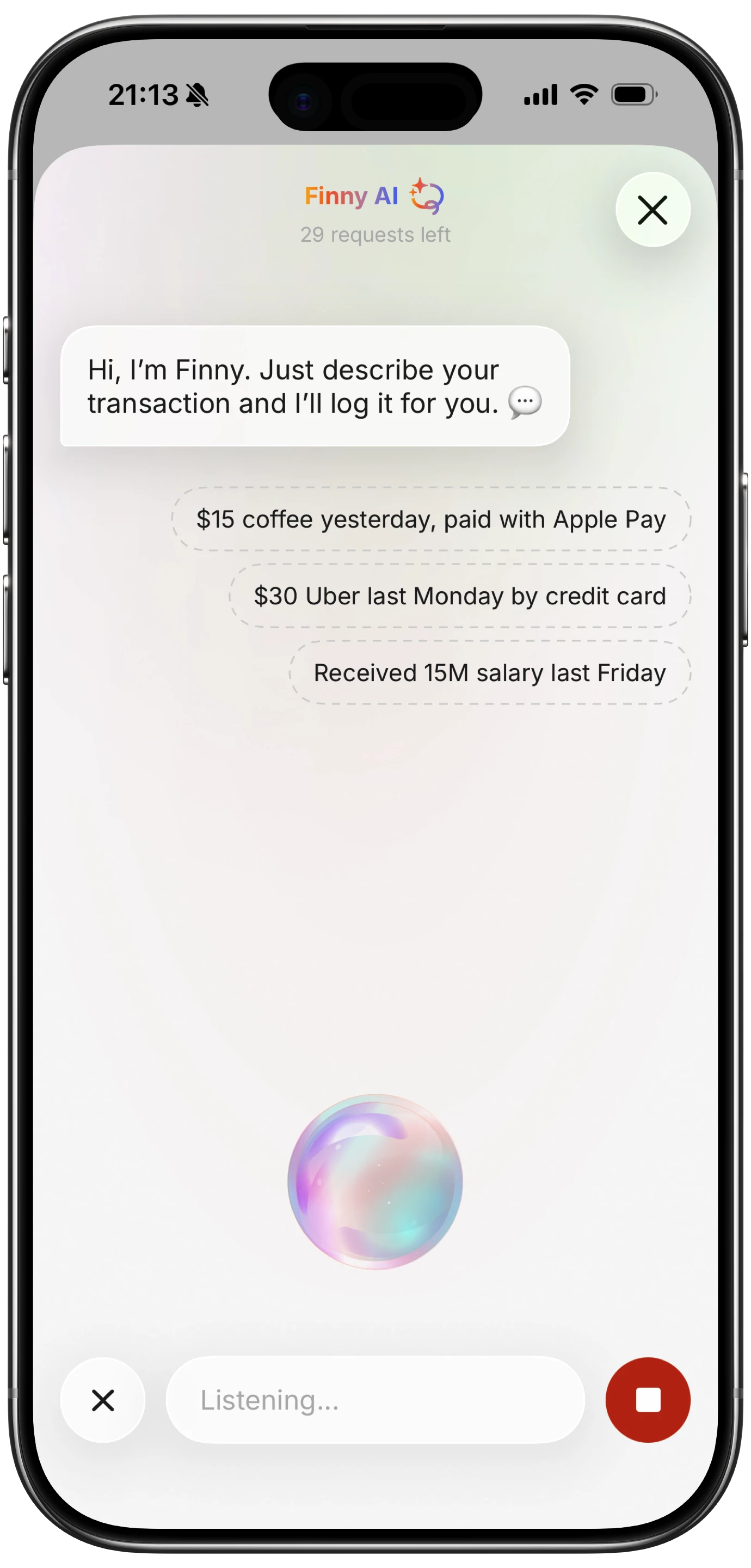
Finny app's voice input feature
Where does your money actually move? If most of it runs through cards on known institutions, predictive AI will capture it cleanly. If it moves through cash, multi-currency travel, peer-to-peer apps, or small merchants that do not categorize well, AI-input will be faster and more accurate. If you barely engage with your finances today, a chatbot entry point may be the only option that sticks.
What do you want the AI to do? Write it down before you install anything. Auto-categorize imported transactions? Scan receipts? Parse typed entries? Flag subscriptions? Answer conversational questions? Different apps do different subsets of this list, and the app that wins on features you do not care about is not the right app for you.
What are you willing to share? A bank connection is not free. It trades control of your credentials or tokens for automatic import. If that trade is fine for you, predictive apps are stronger. If it is not, your universe narrows to AI-input apps or purely manual tools.
What is the realistic monthly cost? Copilot Money is roughly $95 per year. Monarch Money is $99.99 per year. Cleo's paid tiers range from $5.99 to $14.99 per month. Rocket Money Premium is $7 to $14 per month. Finny Pro costs a low monthly or yearly price. Price should not be the only factor, but the best AI budget app for you is not the one you cancel in three months because the value did not match the bill.
For related comparisons, see our best budget planner apps in 2026 roundup and our best expense tracker apps in 2026 guide. If you are specifically weighing Copilot Money against the field, our apps like Copilot Money comparison covers the same space. For a broader category view that includes management tools as well as planners, see our AI budget management tools in 2026 overview. For an iPhone-specific take on what Apple's on-device AI can and cannot do for budgeting, see our Apple Intelligence and personal finance guide.
Frequently Asked Questions
What is the best AI budget app in 2026?
There is no single best AI budget app in 2026 because the category covers three different jobs. Monarch Money and Copilot Money lead on predictive categorization. Cleo leads on chatbot-style coaching. Finny leads on AI-assisted input without bank linking. The best choice depends on whether you want AI applied to analysis, conversation, or data entry.
Is Cleo AI a real budgeting app or just a chatbot?
Cleo is both. It functions as a full budgeting app with bank connections, expense tracking, and bill reminders, but the main interaction model is a chatbot rather than a dashboard. You can do traditional budgeting inside Cleo, and the chat layer sits on top of that data rather than replacing it.
Are AI budgeting apps safe?
AI budgeting apps are generally built with standard financial-app security practices, including encryption and third-party aggregators like Plaid for bank connections. The larger question is data exposure. Bank-linked AI apps share transaction data with aggregators and sometimes with large language model providers. AI-input apps without bank connections have a smaller data footprint. Neither style is automatically unsafe, but they offer different privacy trade-offs.
Do AI budget apps work without linking a bank?
Most do not. Cleo, Copilot Money, Monarch Money, Rocket Money, and Emma all require a bank connection to function. Finny is the outlier in this guide, using AI on text, voice, and receipt input without any bank link. If avoiding bank aggregators is important to you, AI-input tools are the realistic option.
How much do the best AI budget apps cost in 2026?
Pricing ranges widely. Finny Pro costs a low monthly or yearly price. Cleo Plus is $5.99 per month. Rocket Money Premium is $7 to $14 per month on a pick-your-price model. Copilot Money is $13 per month or $95 per year. Monarch Money is $99.99 per year. Cleo Builder is $14.99 per month but adds credit-building services rather than more budgeting features.
Want AI-assisted expense logging without a bank connection?
Download Finny to log expenses with text, voice, or receipt scanning. AI handles the parsing, you confirm every entry, and your data stays on your device. Free tier available, Pro at a low monthly price.





