Best Expense Reporting Apps for Receipts (2026)
Receipts pile up fast: hotel folios, client dinners, transit cards, contractor invoices. When it is time to submit an expense report, hunting through a wallet or inbox for paper is slow and error-prone, and delayed reimbursements create real cash-flow pressure for employees and freelancers alike. The right best expense reporting apps solve this at the point of capture: you snap a receipt the moment you have it, the app reads the data, and the report builds itself.
This guide covers tools built for business expense reporting and reimbursement workflows: receipt OCR, mileage logging, approval routing, and accounting integrations. If you need lightweight personal receipt capture rather than a full corporate workflow, see our guide to the best receipt scanner apps instead.
What Business Expense Reporting Actually Requires
Personal budgeting apps track where your money went. Business expense reporting apps do something different: they create a structured, auditable record that gets submitted to a manager or accountant, approved, and reimbursed.
The core workflow looks like this: capture the receipt at the point of purchase, categorize it against a company policy, attach it to a report, route it for approval, and trigger reimbursement or reconciliation with a corporate card. Miss any step and you get rejected reports, delayed payments, or compliance problems at tax time.

For solo freelancers, the workflow is simpler: capture receipts, tag them as business expenses, export for your accountant or bookkeeping app, and deduct at tax time. The tooling overhead should match the scale. A small team of five does not need enterprise policy enforcement. A 200-person company cannot get by on a spreadsheet.
Key features to evaluate:
- Receipt OCR accuracy: Does it correctly read merchant, date, amount, and currency without manual correction?
- Mileage tracking: GPS-based or manual entry? IRS-compliant rate support?
- Approval workflows: Can you set up multi-level approvals, spending limits, or category restrictions?
- Accounting integrations: QuickBooks, Xero, NetSuite, or direct bank sync?
- Reimbursement speed: ACH direct deposit, same-day, or just a report the accounting team manually processes?
- Corporate card reconciliation: Does it match card transactions automatically?
The apps below cover a range of team sizes and price points. For multi-day trips, also see our business travel expense tracker guide for tools that handle per diem and itinerary-based logging.
The Top Expense Reporting Apps Compared
Expensify
Expensify is the most widely used standalone expense reporting tool in the market. Its core strength is SmartScan: point your phone at any receipt and the OCR extracts merchant, date, amount, and category. Reports can be set to auto-submit on a weekly or monthly cadence, which removes the end-of-month scramble.
Pricing (as of mid-2026): Free tier for basic personal tracking. The Collect plan is $5 per user per month and covers receipt scanning, automated reporting, and direct accounting integrations (QuickBooks, Xero, NetSuite, Sage). The Control plan is $9 per user per month and adds policy enforcement, multi-level approvals, and payroll integration. You pay for every workspace member on Collect; on Control, you only pay for users who actively create or approve reports in a given month, which can reduce costs for occasional submitters.
Mileage tracking is built in, using the current IRS rate. Reimbursements can be sent via ACH directly through the platform. Expensify also issues corporate cards that auto-reconcile with expense reports, removing the manual-match step entirely.
Best for: Teams of 5 to 200 who need a proven, full-featured workflow with strong accounting integrations and don't want to build their own approval logic.
Honest tradeoff: The interface has grown complex over years of feature additions. Onboarding a new employee takes longer than it should. And if your team submits expenses infrequently, the per-seat fee can feel expensive relative to usage.
Zoho Expense
Zoho Expense is the strongest choice if you already use the Zoho ecosystem (Zoho Books, Zoho CRM, Zoho People). It handles receipt scanning, mileage, per diem, and approval workflows, and it connects cleanly to Zoho Books for automated expense posting.
Pricing (as of mid-2026): Free plan for up to 3 users. Standard plan at $3 per user per month with custom approval workflows and accounting integrations. Premium at $5 per user per month adds corporate card reconciliation and automated policy enforcement. Enterprise at $8 per user per month includes dedicated support and custom branding.
Receipt OCR in Zoho Expense is reliable for standard receipts. Multi-currency support covers 150-plus currencies, which matters for teams with international travel. Approval workflows are configurable: you can require manager sign-off above a spending threshold, set category-level policies, and send automated reminders to approvers.
Best for: Small to mid-size businesses already on Zoho's platform, or teams that want capable expense management at a lower per-seat cost than Expensify.
Honest tradeoff: If you are not in the Zoho ecosystem, the integrations with third-party tools are workable but not as seamless. The mobile app is functional but less polished than Expensify's.
Ramp
Ramp takes a different approach: rather than being a standalone expense reporting add-on, it is a corporate card platform with expense management built in. When employees pay with a Ramp card, transactions are captured automatically, and the app prompts for a receipt and memo. There is no import step.
Pricing (as of mid-2026): The core Ramp platform is free for unlimited cards, real-time spending controls, invoice extraction, and basic integrations. Ramp Plus is $15 per user per month and adds advanced accounting automation, custom fields, and priority support. Enterprise is quote-based. Note: ACH bill payments now carry a $0.59 per-transaction fee as of June 2026.
Approval workflows are built around card-level controls: you can set per-card spending limits, restrict merchants by category, and require receipt attachment before a transaction closes. The accounting integrations cover QuickBooks, Xero, NetSuite, Sage Intacct, and others, with line-item sync rather than just top-level totals.
Best for: Companies willing to move corporate spending onto Ramp cards and want expense management as a consequence of card use rather than a separate workflow. Works well for venture-backed startups and growth-stage companies.
Honest tradeoff: Ramp works best when all employees use the Ramp card. If your team has a mix of personal card reimbursements and corporate cards, the workflow gets split. Also, Ramp is US-focused; international teams may face limitations.
Comparison Table
| App | Starting Price | Receipt OCR | Mileage | Approval Workflows | Accounting Integrations | Best For |
|---|---|---|---|---|---|---|
| Expensify | $5/user/mo (Collect) | Yes, SmartScan | Yes (GPS + manual) | Yes, multi-level | QuickBooks, Xero, NetSuite, Sage | Teams of 5 to 200 |
| Zoho Expense | Free (3 users); $3/user/mo | Yes | Yes (GPS + per diem) | Yes, configurable | Zoho Books, QuickBooks, Xero | Zoho ecosystem users |
| Ramp | Free core; $15/user/mo (Plus) | Yes, auto-capture | Limited | Yes, card-level controls | QuickBooks, Xero, NetSuite, Sage Intacct | Corporate card-first teams |
| Finny | Free; Pro a low monthly price | Yes, AI receipt scan | No (personal only) | No | None (export only) | Solo freelancers, personal receipt capture |
Choosing the Right Tool for Your Situation
The right app depends less on feature lists and more on who is doing the submitting and who is doing the approving.
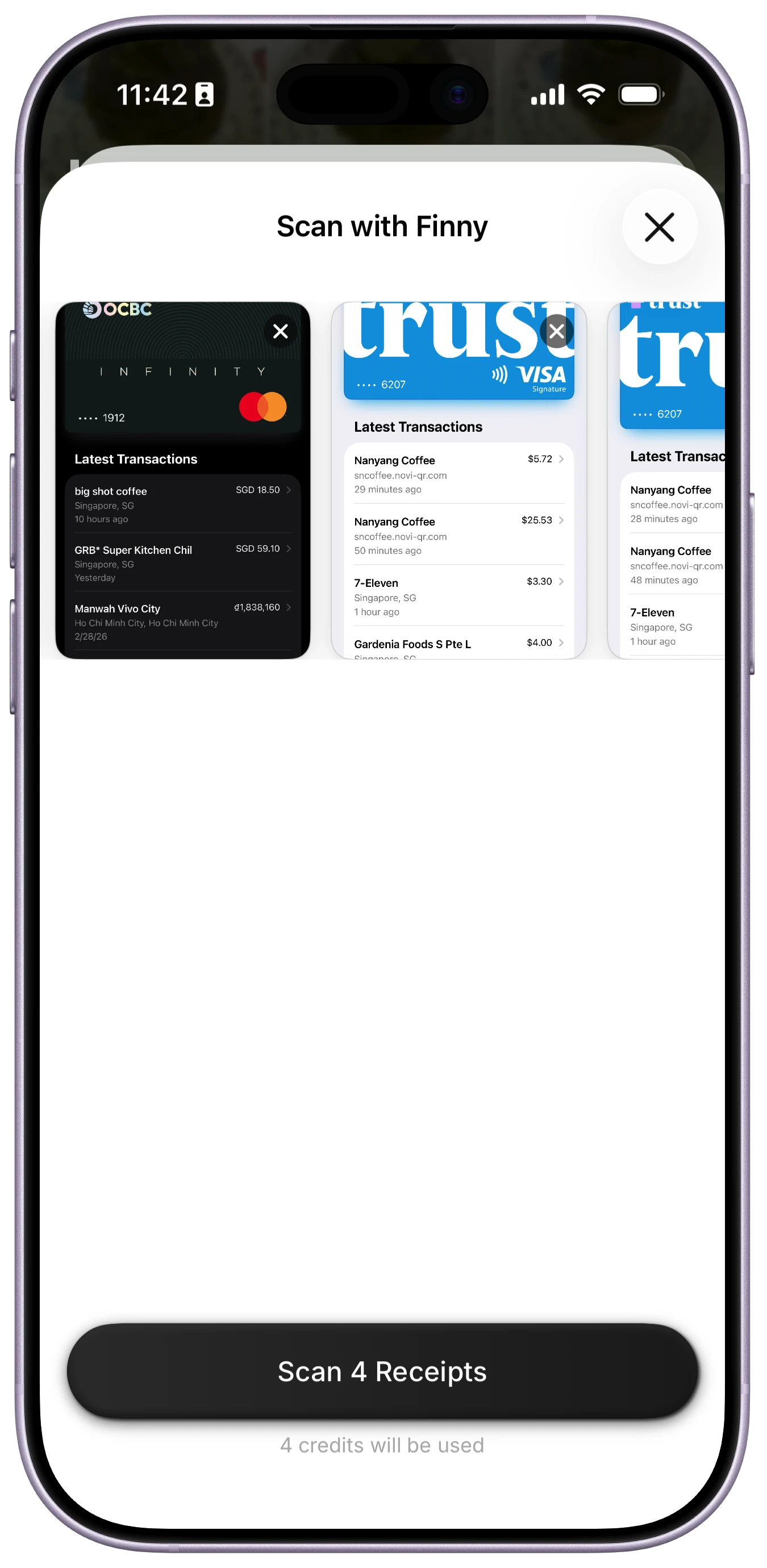
Solo freelancers and self-employed: You probably do not need approval workflows or corporate card reconciliation. You need fast receipt capture, reliable categorization, and a clean export for your accountant. Expensify's free tier covers basic capture, but it pushes you toward paid plans quickly. Zoho Expense's free plan for up to 3 users is more generous. For personal receipt capture and tax deduction tracking, a lightweight tool like Finny handles batch receipt scanning via its Batch Snap and Log feature, which lets you photograph up to five receipts at once. It is not a business expense suite, but for a sole proprietor logging receipts for Schedule C, it keeps the overhead low. See our full comparison of tax-deductible expense trackers for more options.
Small teams (2 to 20 people): Zoho Expense at $3 to $5 per user per month gives you the core workflow (capture, submit, approve, reimburse) without overpaying. Expensify's Collect plan at $5 per user is competitive and has a larger network effect (many accountants and bookkeepers already know it).
Growing companies (20 to 200 people): Expensify Control at $9 per user gives you policy enforcement and audit trails. Ramp is worth a serious look if you want to shift from reimbursements to real-time corporate card controls, which reduces reconciliation effort and eliminates out-of-pocket float for employees.
Mileage-heavy roles: Both Expensify and Zoho Expense include GPS mileage tracking. For dedicated mileage logging, see our guide on how to track mileage and fuel expenses for work, which covers apps built specifically for IRS-compliant mileage logs.
Common Questions About Expense Reporting Apps
What is the difference between expense tracking and expense reporting?
Expense tracking means recording what you spend. Expense reporting means packaging those records into a structured document that gets submitted to someone else for approval and reimbursement. Most personal finance apps do the first. Business expense reporting apps do both, with workflow tools for submission, approval routing, and reimbursement.
Do I need an expense reporting app if I am self-employed?
If you are a sole proprietor with moderate business expenses, a lightweight receipt capture tool or even a well-organized spreadsheet may be enough. A dedicated expense reporting app makes more sense if you have clients who reimburse project expenses, if you work with a bookkeeper who needs structured exports, or if you want an audit-ready record for tax deductions.
How accurate is receipt OCR in these apps?
OCR accuracy varies by receipt quality. Printed restaurant receipts and retail receipts parse reliably in all three apps reviewed here. Handwritten receipts, foreign-language receipts, and very long itemized receipts are where errors appear. Always spot-check high-value receipts before submitting.
Can these apps track mileage automatically?
Expensify and Zoho Expense both include GPS mileage tracking: start the trip, end the trip, and the app logs distance and calculates the IRS reimbursement rate. Ramp is primarily card-focused and does not offer the same mileage logging experience. Dedicated mileage apps like MileIQ remain an option for high-volume drivers.
Is Ramp really free?
Ramp's core platform is free for unlimited users and cards. The free tier covers real-time spending controls, receipt collection, and basic accounting sync. Ramp Plus at $15 per user per month adds advanced automation and custom fields. As of June 2026, ACH bill payments carry a $0.59 per-transaction fee, which adds up for teams processing many vendor payments.
Ready to simplify how you capture and log receipts? For solo users and freelancers who want fast, AI-assisted receipt capture without a monthly subscription, download Finny and start logging expenses in seconds.