
Free Budget App With No Bank Account (2026)
Most budgeting apps open with the same request: connect your bank. They promise convenience, but what they actually want is read access to your transaction history, routed through a third-party data broker like Plaid or MX. For a lot of people, that trade is not worth it. You might be privacy-conscious, unbanked, a cash spender, or simply not comfortable handing over your credentials to an app you just downloaded. The good news is that a free budget app no bank account setup is completely viable in 2026, and the options are better than ever.
This post covers the apps that are genuinely free AND work without any bank connection, explains why that combination matters, and shows how manual or AI-assisted entry makes the experience practical day-to-day. If you want a broader look at privacy-focused tracking, see our guide to expense trackers that never ask for your bank login.
Why Skip the Bank Link?
The instinct to avoid connecting your bank to an app is reasonable, not paranoid. Here is what actually happens when you hand over access.
Third-party data exposure. Most apps use aggregators like Plaid, Finicity, or MX to pull your transactions. These are separate companies with their own terms, breach histories, and data retention policies. You are granting access to a chain of entities, not just one app.
Credential risk. Some aggregators still use credential-based scraping, meaning your actual username and password sit on their servers. Even OAuth-based connections keep a persistent token that can be revoked only if you manually disconnect each account.
Unbanked and underbanked users are left out. Roughly 6 million U.S. households have no traditional bank account. Apps that require a bank link simply do not work for them. Cash-first users, those who rely on prepaid cards, or anyone who manages spending with physical envelopes need a different approach.
The "free" problem. Many apps that require bank linking monetize your transaction data or sell aggregated spending patterns. The data is the product. Staying manual keeps your financial behavior off those pipelines entirely.
For a deeper look at why manual tracking is a legitimate strategy, see how to track expenses without linking your bank.
Apps That Are Free and Bank-Link-Free
The table below summarizes the most relevant options. "Manual entry" means the app works fully without any bank connection on the free tier. "Bank link required?" means you cannot use core features without connecting an account.
| App | Free Tier | Manual Entry | Bank Link Required? | Privacy / Data | Platforms | Best For |
|---|---|---|---|---|---|---|
| Goodbudget | Yes, 10 envelopes, 1 account | Yes, primary method | No, never | No bank credentials ever | iOS, Android, Web | Envelope budgeters |
| Wallet by BudgetBakers | Yes, unlimited manual accounts | Yes, full feature set | No, bank sync is paid | Bank sync is premium-only | iOS, Android, Web | Visual spending reports |
| PocketGuard | Limited (2 accounts, 2 categories) | Yes, but limited | No, optional | Bank link optional | iOS, Android | Spending awareness |
| Finny | Yes, unlimited manual tracking | Yes, plus AI/voice/receipt | No, never | No bank connection, offline-first | iOS | AI-assisted manual logging |
Key takeaway: Goodbudget and Wallet by BudgetBakers offer the strongest fully-manual free tiers. PocketGuard technically allows manual entry but the free tier is restrictive enough that it may not serve most users well.
Goodbudget
Goodbudget is built entirely around the envelope budgeting method, and it has never offered bank syncing on any tier. Every transaction is entered manually. The free tier gives you 10 envelopes and 1 account, which covers most basic budgets. There is no paywall surprise after 30 days.
The design philosophy here is intentional: Goodbudget's creators believe that typing in what you spend keeps you more aware of where the money goes. The friction is the feature. If you later want automatic bank sync, it exists in the $10/month Premium plan, but it is never required.
Free tier limits: 10 envelopes, 1 account, 2 devices, 1 year of history. That is enough for a single-person or couple budget with a handful of categories.
PocketGuard
PocketGuard is primarily built around bank-connected "In My Pocket" calculations, but it does allow manual transaction entry. The free tier is limited: 2 linked accounts (or manual accounts) and 2 budget categories. That ceiling makes it difficult to use as a full budgeting system without upgrading to Plus at $12.99/month or $74.99/year.
Manual entry works in PocketGuard, but it is clearly a secondary path. If you want a no-bank-link budget tracker and plan to stay on the free tier, PocketGuard is not the strongest choice. It is worth considering if you want the option to add bank connections later without switching apps.
Wallet by BudgetBakers
Wallet by BudgetBakers takes a hybrid approach: the free tier supports full manual entry and CSV import with no bank credentials required. Bank synchronization is a premium feature, meaning you can use the app indefinitely for free without ever connecting a financial institution.
The free tier includes unlimited manual accounts, detailed spending charts, and category breakdowns. The visual reporting is a standout: Wallet produces some of the clearest budget-vs-actual charts available in a free app. If your priority is understanding where money went (rather than forecasting), Wallet is a strong pick.
Premium adds bank sync, recurring transaction detection, and PDF export, starting around $4.99/month.
How Manual and AI-Assisted Logging Works in Practice
The biggest objection to ditching bank sync is the logging burden. If you have to enter every coffee and grocery run by hand, you will quit within a week. This objection was fair in 2018. It is less fair now.
This short demo shows Screen Log logging a payment in a single press:

Speed matters. Modern manual-entry apps are designed for one-tap or one-sentence logging. You open the app, type "lunch $14 Thai place," and move on. The best apps parse that sentence automatically: amount, category, merchant, all filled in. That is maybe five seconds per transaction.
AI input changes the math. Some apps now accept natural-language or voice input. Instead of navigating a form, you describe the expense and the app structures it. This is meaningfully faster than bank sync in one respect: bank imports often arrive with generic merchant codes ("SQ*RESTAURANT 4929") that you have to clean up anyway. A natural-language entry is already clean.
Receipt capture. Photographing a receipt and letting the app extract line items removes the manual step entirely for larger purchases. This works offline, requires no internet connection to a bank, and keeps the data on your device.
Batch entry. If you save receipts and log once a day or once a week, a week's spending takes under five minutes. Many manual trackers are built for this workflow.
The privacy dividend. Every dollar you log manually stays in your app. There is no upstream data broker receiving a feed of your spending. For users who want to stay off offline expense tracking and data-sharing pipelines entirely, manual entry is the only method that guarantees it.
Finny is built specifically for this workflow: you log by typing, talking, or photographing a receipt, and the AI structures the entry for you. There is no bank connection, no Plaid, and the free tier has no limit on manual transactions. The Tap to Track feature lets you add a common expense in one tap from the home screen.
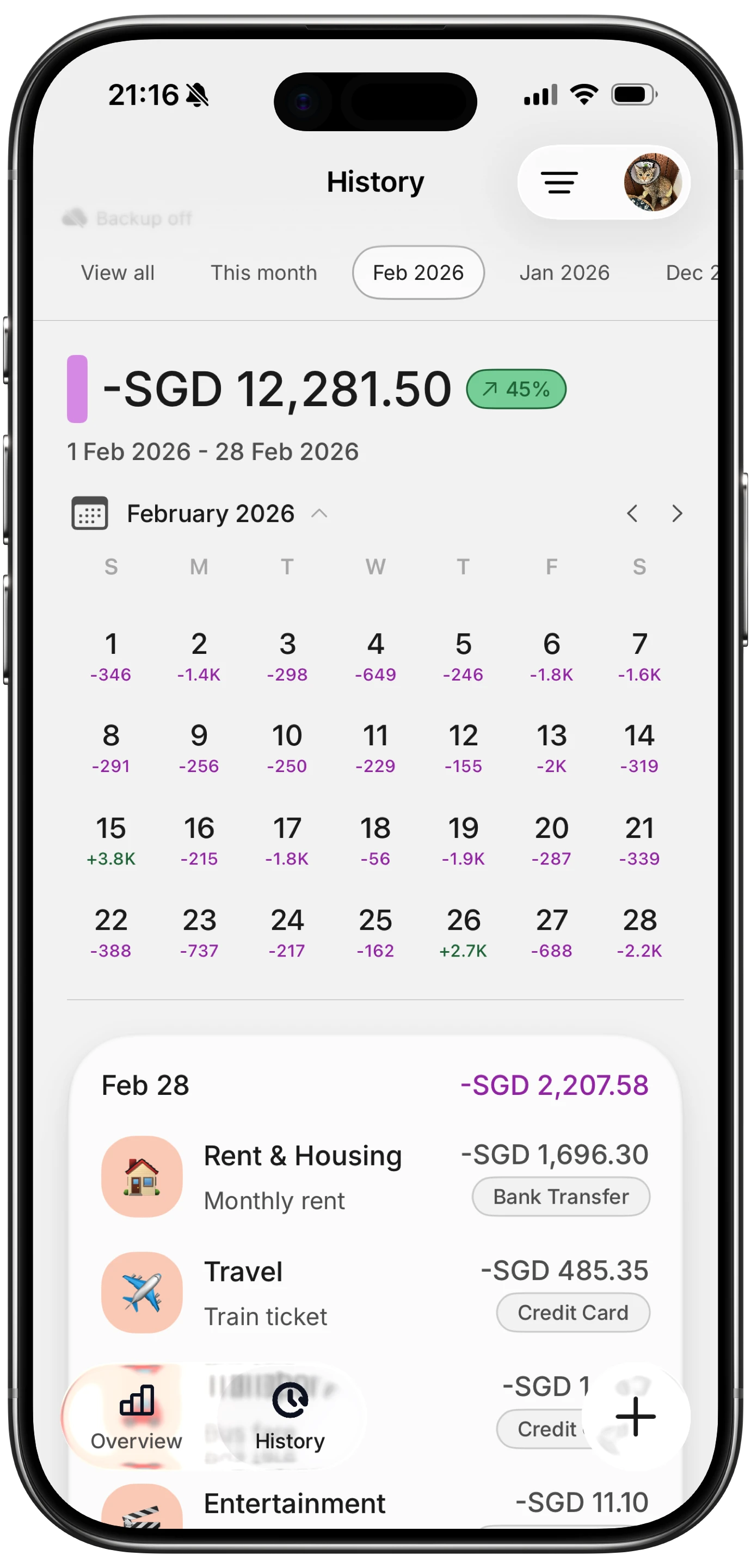
For a broader comparison of apps that skip bank connections entirely, the best free budgeting apps of 2026 roundup covers more options across different use cases.
How to Choose the Right App
The right answer depends on what you actually need from a budget app.
Choose Goodbudget if you want a structured envelope system, you budget as a couple (envelope sharing works across devices), and you are comfortable with manual entry as the only method. It is the most purpose-built no-bank-link app in this list.
Choose Wallet by BudgetBakers if visual reporting matters to you. The charts and category breakdowns on the free tier are unusually good, and the manual entry experience is clean. It also gives you the option to add bank sync later if you change your mind.
Choose PocketGuard if you want a simpler spending-awareness tool and plan to eventually add bank connections. The free tier is restrictive, but the core concept (how much is safe to spend today) is useful.
Choose Finny if you want AI-assisted manual logging: natural language, voice, and receipt capture in one app, with a privacy-first design that never asks for bank credentials. The free tier covers unlimited manual tracking, and Pro adds advanced AI features at a low monthly price.
If your concern is not just bank links but all forms of financial data sharing, our guide to privacy-focused subscription trackers covers that angle as well.
Common Questions About Budgeting Without a Bank Connection
Can a budget app actually be useful without bank sync?
Yes. Manual entry gives you complete control over what is recorded. You are not dependent on import delays, merchant name cleanup, or third-party aggregator uptime. Many long-term budgeters prefer manual entry because the act of logging creates awareness that automated imports do not.
Is it safe to use a budget app that never asks for my bank login?
It is safer in one specific sense: if the app never receives your bank credentials or a data access token, there is nothing to breach on that front. You still want to evaluate how the app stores the data you do enter, but the attack surface is smaller without a bank connection.
What if I use cash and prepaid cards?
These are the users most underserved by bank-sync apps. Cash transactions never appear in any bank feed, and many prepaid cards are not supported by Plaid. Manual entry is the only accurate method for tracking cash spending, which makes no-bank-link apps a natural fit.
Are there budget apps that work without a bank account at all?
Yes. Goodbudget, Wallet by BudgetBakers, and Finny all work without any bank account. You do not need to be banked to use them. They are designed around manual entry, so the product experience does not assume you have a linked institution.
Will I lose features by not connecting a bank account?
In some apps, yes. PocketGuard's core "In My Pocket" calculation works best with live balance data. But Goodbudget and Wallet by BudgetBakers are designed from the ground up for manual workflows, so you are not missing a degraded experience; you are using the intended one.
Ready to track your spending without handing over your bank login? Download Finny and start logging in seconds: type, talk, or snap a receipt. No bank connection, no data brokers, no setup friction.