How to Cancel Monarch Money (and Keep Your Data)
How to cancel Monarch Money depends on who bills you. If you subscribed on Monarch's website, cancel on the web from the Billing Settings page. If you subscribed in the iPhone app, Apple bills you, so you cancel in your iPhone's Settings. If you subscribed on Android, you cancel in the Google Play Store. Deleting the app cancels nothing.
After you cancel, you keep access for the time left on your subscription, and your data is not deleted. Thirty days later, your bank connections disconnect and nothing new syncs. Downloads only work on the web, so export first. This guide covers each step in order: export, cancel, trial timing, refunds, and deleting your account. For what you are paying now, see our Monarch Money pricing guide.
Step 1: Export Your Monarch Data First
Monarch lets you download your transactions and balance history as CSV files, and its help center says your full history stays downloadable even after your subscription or trial ends. Still, export before you cancel, and before you delete any connections.
Exports work on the web only, not in the mobile app.
Download everything at once:
- Sign in at monarch.com on a computer.
- Go to Settings, then Data.
- Select Download Transactions. Then select Download account balances for a second file.
Download one account:
- Go to Accounts and select the account.
- Select Edit in the top right.
- Select Download transactions or Download balance history.
Monarch recommends downloading 5,000 transactions or fewer at a time, since larger files are more likely to fail. If you have years of history, split the export by date range, and rename each file so you can find it later.
Keep both files somewhere you control. The transactions file is what you would move into another app. The balances file records what each account was worth over time, which most spending apps do not import.
Step 2: Cancel Monarch on Your Platform
Pick the section that matches how you pay. If Monarch is listed in your iPhone's subscriptions, Apple bills you.
Web (direct billing)
- Sign in at monarch.com and go to the Billing Settings page. This page is on the web only.
- Click Manage subscription.
- Click Cancel Subscription.
If you do not see a cancel option, you are probably a household member rather than the admin. Only the admin can cancel, so ask the person who set up the household.
iPhone (Apple App Store)
- Open the Settings app.
- Tap your name.
- Tap Subscriptions.
- Select Monarch.
- Tap Cancel Subscription. If there is no cancel button, or you see an expiration date in red, it is already canceled.
Android (Google Play)
- Open the Google Play Store app.
- Tap your profile picture in the top right.
- Tap Payments & subscriptions, then Subscriptions.
- Select Monarch, then tap Cancel subscription.
If Monarch is missing from your Apple or Google list, you may be on a family plan, and the family organizer needs to cancel it. Monarch subscriptions cannot be paused or frozen, so canceling is the only way to stop billing. You keep full access until the paid period runs out.
Canceling During the Free Trial
Monarch's first week is free, on both Core and Plus. According to its FAQ, you are billed when the trial ends and the plan renews automatically until you cancel.
The rule that matters: cancel at least 24 hours before the trial ends and you will not be charged. You keep access for the rest of the trial no matter when you cancel, so there is no reason to wait until the last day. If you are unsure, cancel on day one and keep using it.
Here is what the trial converts into, per Monarch's pricing page:
| Plan | Price after the trial |
|---|---|
| Core, monthly | $14.99 a month |
| Core, annual | $99.99 a year |
| Plus, annual | $199.99 a year |
An annual plan converts straight into a full-year charge, which is why the 24-hour rule is worth a calendar reminder. Our Monarch Money free trial guide covers the trial in more detail, and our Core vs Plus comparison explains what the higher tier adds.
One more trap: switching from App Store billing to web billing does not start a new free trial. If you cancel in the App Store and resubscribe on the web, you are charged right away.
Refunds: Who Pays You Back
Monarch has a money-back guarantee for direct subscriptions. If you decide at any point after purchase that Monarch is not for you, it refunds the remaining time on your subscription with no questions asked. That is generous, especially for an annual plan you just renewed.
A few conditions apply:
- Request the refund before deleting your account. Monarch asks you not to delete it first, so it can process the request.
- Access ends right away. When the refund is issued, your subscription is canceled and paid access stops immediately, but you can still log in to download your data.
- App Store purchases are excluded. Apple manages those, and only Apple can refund them. Request one at reportaproblem.apple.com, where Apple reviews each request.
- Google Play is not addressed. The guarantee page only excludes the App Store. If you pay through Google Play, contact Monarch support first and ask.
Monarch can decline refunds it sees as fraud or abuse of promotions.
Step 3: Disconnect Banks and Delete Your Account
Canceling stops billing. It does not delete your account, and it does not delete your data. If you want Monarch to stop holding your financial connections, there are two more steps.
Bank connections. Monarch disconnects your financial connections 30 days after a subscription ends. To remove them sooner, go to Settings, then Institutions on the web (or tap your profile, then Institutions in the app), tap the ... menu next to a bank, and choose Delete this connection. You then pick between "Connection only," which stops syncing but keeps the history, or "Connection, accounts, and transactions," which removes everything from that bank and cannot be undone. You type the bank's name to confirm. It is also worth checking your bank's own security or connected-apps page for any lingering third-party access.
Delete the account. Cancel your subscription first. Then go to Settings, select Security, and select Delete Account. Monarch's deletion guide is clear that this is permanent: you cannot reopen it, and you lose your connections, transactions, and balances. If you joined someone else's household, you instead go to Settings, Members, select Edit on your account, and choose Remove.
Closing the account is not the same as erasing everything Monarch holds about you. To ask for your personal information to be deleted or de-identified, email support@monarch.com. Some records may be kept where the law requires it.
Where to Go Next
Most people who leave Monarch miss one thing: seeing at a glance where the month's money went. Whatever you pick next, check that it gives you that view.
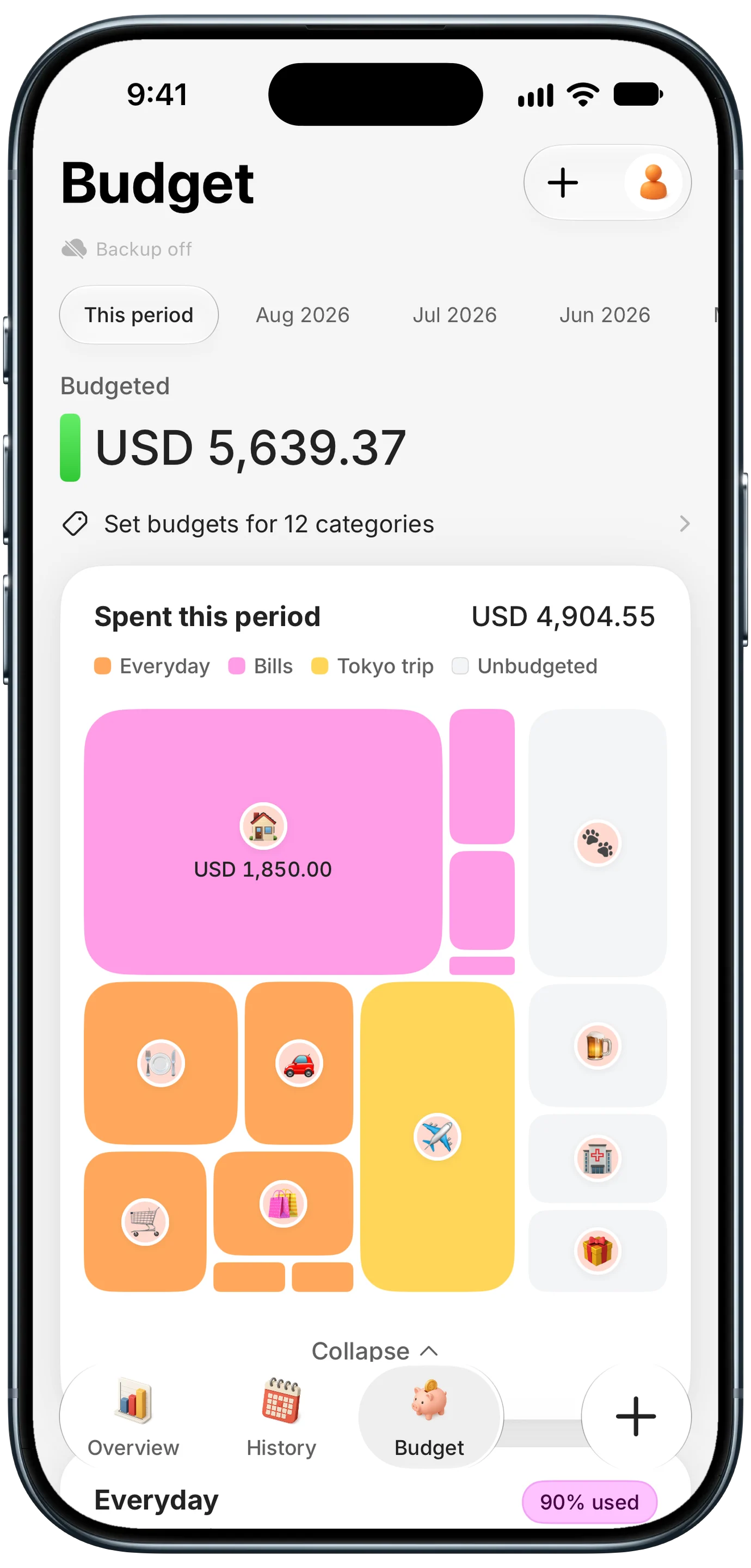
Finny app's budget map feature
A category map like the one above, where each category is a box sized by what you spent, gives you the same answer without a bank connection. Here are fair options depending on what pushed you away.
Copilot Money
If you liked Monarch's bank-synced dashboard, Copilot Money is the closest alternative. It links your bank accounts and runs on iPhone, iPad, Mac, and the web, in the US only. It is still an aggregator app, so the privacy tradeoff is similar.
YNAB
If Monarch felt too passive, YNAB is built around zero-based budgeting, where you give every dollar a job before you spend it. It asks more of you each week, and that is the point.
Finny
If you are done linking banks, Finny tracks spending on your iPhone with no bank login on any plan. Budgets, recurring bills, and CSV import and export are free. Our apps like Monarch Money roundup compares more options in depth.
Moving Your Monarch CSV Into Finny
Finny's CSV import is free and does not need a bank connection, so your Monarch history can come with you.
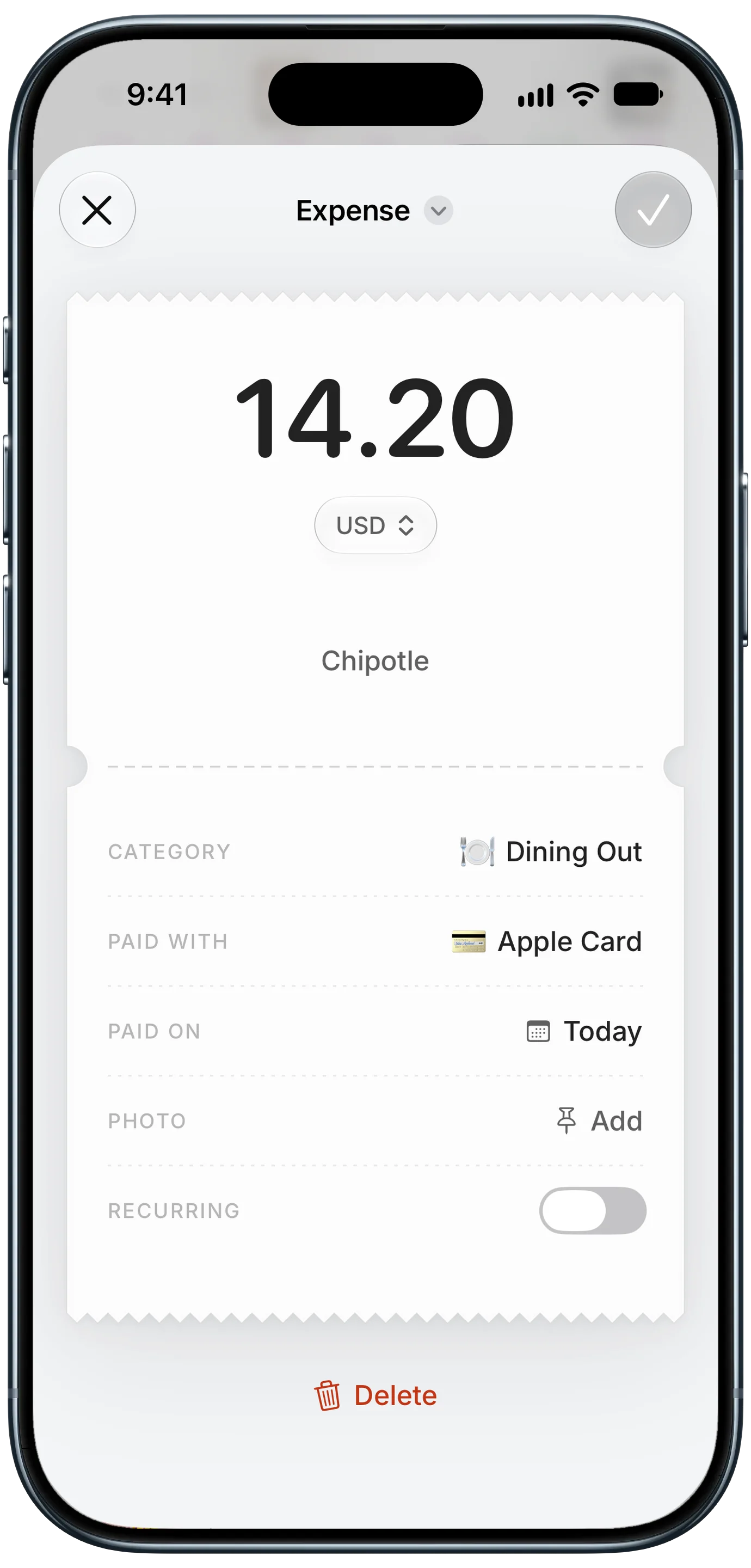
Finny app's expense entry feature
Each imported row becomes an entry like this one: an amount, a category such as Dining Out, a payment method such as Apple Card, and a note for the merchant. Finny's importer reads columns in a fixed order, so the Monarch file needs a quick reshape in a spreadsheet first. In Finny, Settings, Import Data offers a template showing the exact layout: Date, Type, Amount, Currency, Category, Payment Method, Note.
- Type. Monarch marks spending with a minus sign. Add a column that says "Expense" for negative amounts and "Income" for positive ones.
- Amount. Make every amount positive, for example with
=ABS(). - Currency, Category, Payment Method, Note. Use USD, Monarch's category, the account name, and the merchant.
- Remove transfers and credit card payments, so they are not counted as spending.
Finny shows a preview before anything is saved. From there, card payments can be logged as you make them with Tap to Track, a Pro feature:
For the wider case for this approach, see our guide to tracking expenses without linking your bank.
Common Questions About Canceling Monarch Money
Does canceling Monarch delete my data?
No. Monarch says your existing data is not deleted when you cancel. You keep access until the paid period ends, and you can still log in afterward to download your history from the web. Thirty days after the subscription ends, your financial connections disconnect and nothing new syncs. To remove your data, delete your account separately.
Can I get a refund from Monarch?
Yes, if you pay Monarch directly. Its money-back guarantee refunds the remaining time on your subscription, no questions asked, and your paid access ends when the refund is issued. Request it before deleting your account. If you subscribed through the Apple App Store, Monarch cannot refund you, so request it from Apple at reportaproblem.apple.com. For Google Play, contact Monarch support and ask.
Can I cancel Monarch during the free trial?
Yes. Monarch says you can cancel at any point in the trial and keep access for the rest of it. As long as you cancel at least 24 hours before the trial ends, you will not be billed. Cancel through the same place you signed up: the web Billing Settings page, your iPhone's Subscriptions list, or Google Play.
Why can't I find the cancel button in Monarch?
There are three common reasons. You may be a household member rather than the admin, and only the admin can cancel. You may be billed by Apple or Google, so the option lives in your iPhone Settings or the Play Store instead of Monarch. Or you may be on a family plan, in which case the family organizer needs to cancel.
Does deleting the Monarch app cancel my subscription?
No. Uninstalling Monarch does not stop billing on any platform. If you subscribed through the App Store or Google Play, cancel there. If you subscribed on the web, cancel from the Billing Settings page. Your account and data also remain until you delete the account from Settings, then Security.
Leaving Monarch and done with bank connections?
Download Finny to import your history from CSV for free and keep tracking spending on your iPhone, with no bank login on any plan.