Chase Year-End Summary, Plus Amex and Capital One
Most big issuers will add up your year for you, but not equally. American Express has the most complete version: a Year-End Summary of the previous calendar year by month and category, downloadable as PDF, Excel, CSV, Quicken or QuickBooks. Chase offers a year-end spending report for its credit cards after you sign in, plus downloadable transaction history. Capital One documents a year-end summary for its small business cards, while personal card statements only total the fees and interest charged so far this year.
The chase year end summary, the Amex version and Capital One's alternatives all live in slightly different places. Below is where to click for each, when to expect it, what format you get and what each one leaves out. Menus change, so if your screen looks different, start in your account's statements or documents area.
Year-End Summaries Compared
Here is what each issuer's own pages describe as of November 2026.
| Issuer | Year-end summary | When | Where | Formats |
|---|---|---|---|---|
| American Express | Yes: prior year by month and category | Early in the new year | americanexpress.com/yes after sign-in | PDF, Excel, CSV, Quicken, QuickBooks |
| Chase | Yes: year-end spending report for credit cards | Once the year closes; no fixed date published | chase.com year-end summary page after sign-in | Spending Planner downloads: CSV, QFX, QIF, QBO (desktop), PDF (app) |
| Capital One | Small business cards only | Not published | Online account | Not documented |
| Discover | None documented; Spend Analyzer by category | Any time | Discover app and website | Not documented |
Every issuer can give you a full list of transactions, even without a tidy summary on top. Only Amex publishes a start date, so give the others until mid-January before concluding yours is missing.
Discover is now part of Capital One. Capital One completed its acquisition of Discover in May 2025 and said it would keep offering Discover-branded cards.
Chase Year-End Summary: Where to Find It
Chase has a dedicated year-end summary page for credit card customers. It reads "Your year-end spending report is available now" and asks you to sign in to see your Chase credit card spending report. Chase does not publish a release date or a list of which cards qualify on that page, so if a card is missing, check again later in January or ask Chase.
For more control, use Chase's Spending Planner, which covers checking and credit card accounts together:
- On desktop: sign in at chase.com and open "Manage Your Spending Plan" under the "Plan, Track, or Manage" dashboard.
- In the Chase Mobile app: sign in and tap "Track your spending habits" on the main page.
- Switch the view to monthly, quarterly or annual.
- Download your transactions. Desktop offers CSV, QFX, QIF or QBO covering the last two years. The app offers PDFs for the last calendar year.
Monthly statements are separate. Chase says that, depending on account type, you can access up to 7 years of statements. On chase.com, open the main menu and choose "Statements & documents." In the app, tap "Profile & Settings," then "Statements & documents" under Document manager.
The Amex Year-End Summary
American Express says that each year you receive an annual Year-End Summary of charges that lets you evaluate yearly spending by month and spend category. It covers the previous calendar year, so in January you get the year that just ended.
Where to find it. Sign in to your online account. The shortcut americanexpress.com/yes takes you to the summary after you log in. It covers the previous calendar year, so look for it early in the new year, once your December statement has closed.
Formats. Amex says you can download the Year-End Summary as QuickBooks, Quicken, Excel, PDF or CSV using the Download button. That is the widest choice of any issuer here, and Excel or CSV is the one to pick for a spreadsheet.
Beyond the summary. Amex also keeps your previous two years of transactions online to sort, filter and download as PDF, Excel or CSV. Older statements are archived but can still be requested from the statement list, and Amex says archived statements show up online within 24 hours.
Because it is grouped by month as well as category, it answers "which month did I overspend?" without any spreadsheet work.
Capital One and Discover
Capital One lists a year-end summary that tracks expenses by category as a benefit of its small business cards. For personal cards, Capital One's help pages do not describe a downloadable annual spending summary.
What personal cards do have is a year-to-date box on each statement. Capital One's guide to reading your statement describes a section showing how much you have been charged in fees and interest for the current year. Useful, but it is not a spending summary.
The workaround is transaction history. Statements are available in the Capital One Mobile app and in your online account. Capital One's help center does not document a file export, but third-party walkthroughs describe a "Download transaction" option on capitalone.com under the card's "Statements & documents" menu, where you pick a date range and CSV. Select January 1 to December 31 and you have the raw material for a summary.
Discover offers Spend Analyzer in its app, which breaks spending down by category so you can see where the money goes. Discover's pages do not describe a year-end summary, so for a full year, download your statements or transactions and total them yourself. Our guide to tracking expenses from a bank statement covers both routes.
What to Use a Year-End Summary For
A year-end summary is most useful for three jobs.
A budget review. Category totals for a full year show where your money actually goes, which is often different from where you think it goes. Pair the summary with our year-end money review to turn it into next year's targets, or the spending wrapped guide for the numbers worth pulling.
Business expenses at tax time. If you put business costs on a card, the summary is a fast way to find them. The IRS lists credit card receipts and statements among the documents that support business expenses, though it also says you may need a combination of documents. Keep receipts for anything you deduct. Our guide on how to track expenses for taxes covers the setup.
Spotting subscriptions. Scan the merchant list for names that show up every month. A $12 charge is easy to ignore monthly. Seen as $144 for the year, it gets a second look.
A fourth use: check whether each card earned its keep. If your dining spend went on a card with no dining rewards, the summary will show it.
The Limits of Issuer Summaries
Issuer summaries are convenient, but they share the same blind spots.
One issuer at a time. Each summary only knows its own cards. If you carry a Chase card, an Amex and a debit card, you get two summaries and a gap. Combining them means exporting each one and merging spreadsheets, which our guide to seeing spending by credit card walks through.
The issuer picks the categories. Categories come from how the merchant is coded, not from what you bought. A pharmacy run can land under a generic shopping label, and a warehouse club trip can mix groceries, gas and a TV under one label. You can usually fix categories inside a spreadsheet, not inside the summary.
Cash and other accounts are missing. Cash, Venmo, a debit card and checks never show up. For some households that is a large slice of spending.
Statement cycles do not match calendar months. Year-end summaries run January 1 to December 31, but your statements close on a set day each month. That makes it awkward to reconcile a summary against statements. Our guide on how to match receipts to a bank statement helps with the reconciling.
It arrives once a year. By the time you see it, the year is over.
One View Across Every Card
If you want a year-end view that covers every card and cash, the alternative is logging as you go.
Every card side by side
In Finny, every payment method becomes a card in a wallet on Overview, with its share and amount for the period you pick, and tapping one opens its transactions. A Chase card, Apple Card and bank transfers sit side by side with any other card you add, and no bank connection is needed on any plan.
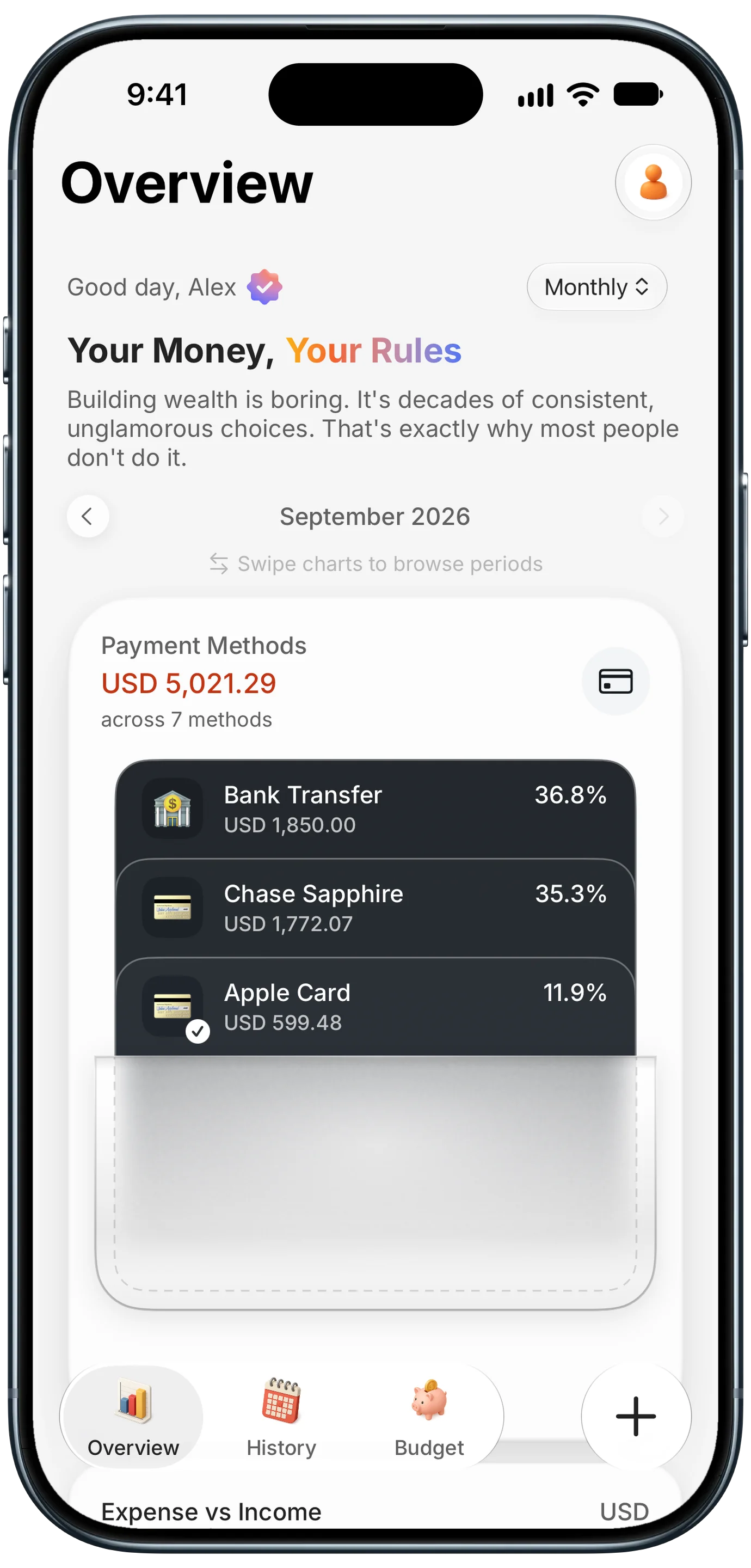
Finny app's Payment Methods feature
Months that match your statement
Finny can start your month on any day from the 1st to the 28th (Pro), so a month can run from one statement closing date to the next instead of the calendar month.
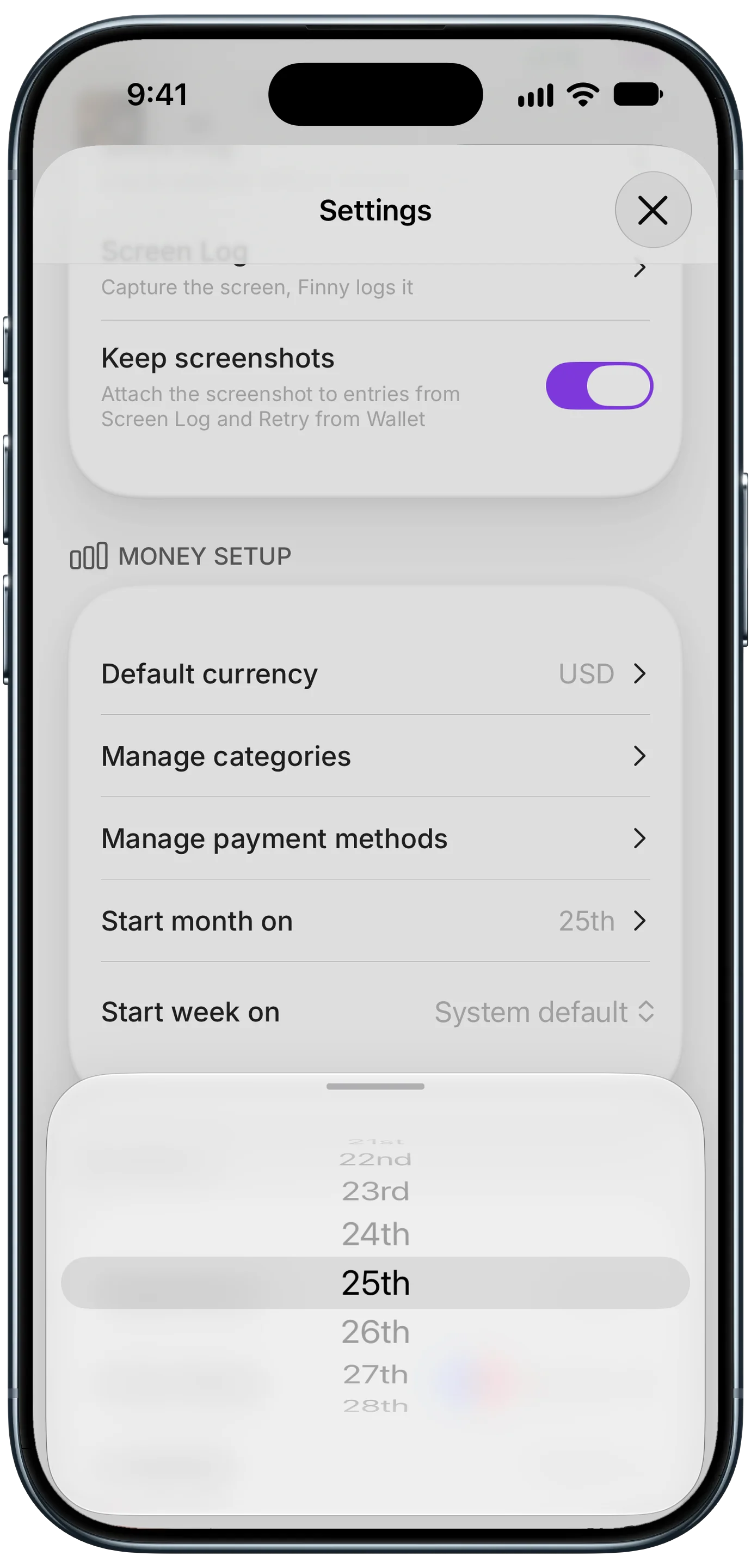
Finny app's custom month start feature
Logging cards that never notify you
Some cards send no payment alerts. Here is Screen Log logging any payment showing on your screen, such as a statement or a bank app:
CSV import is free, so this year's issuer exports can come in as a starting point. Apple Card users can follow our Apple Card year-end summary guide for the export steps.
Common Questions About Credit Card Year-End Summaries
When is the Chase year-end summary available?
Chase does not publish a fixed date. You sign in on its year-end summary page at chase.com to view the spending report once it is posted, so look for it early in the new year. If it has not appeared by mid-January, Spending Planner on desktop can download the last two years of transactions as CSV, QFX, QIF or QBO in the meantime.
Does Capital One have a year-end summary?
For small business cards, yes: Capital One lists a year-end summary by category as a business card benefit. For personal cards, Capital One's help pages do not describe one. Personal statements include a section with fees and interest charged so far this year. To see a full year of spending, download your transaction history for January 1 to December 31 and summarize it in a spreadsheet.
Can I get a year-end summary for the current year?
Not from Amex, whose summary covers the previous calendar year. For this year so far, Chase customers can use Spending Planner's annual view. With any issuer, you can also download your transactions with a January 1 start date. Running that export in late November gives you a solid first look, and you can rerun it after your December statement closes.
Is a credit card year-end summary a tax document?
No. Issuers do not send it as a tax form, and it does not tell you what is deductible. It is a helpful record: the IRS lists credit card statements among documents that support business expenses. But it may not be enough alone, since statements show the merchant and total, not what you bought. Keep receipts for anything you plan to deduct and mark business purchases yourself.
Want one year-end view across every card and cash?
Download Finny to see spending by card all year, logged as you go, with no bank connection.