Is PocketGuard Safe? 2026 Security and Privacy Review
PocketGuard is built around one number: how much you can spend after bills, goals and essentials are covered. To work that number out, it wants to see your checking account, credit cards and loans, which means handing a bank connection to an app and the data partners behind it.
So is PocketGuard safe? Short answer: yes, by the usual standards. PocketGuard uses 256-bit encryption, a read-only bank connection that cannot move money, and a PIN or biometric lock on the app, and there is no reported breach as of October 2026. The parts worth reading closely are its privacy policy, which allows more marketing use of your data than some rivals, and the list of banks it struggles to sync with. This review covers both. For the same check on other apps, see our reviews of whether YNAB is safe and whether Quicken Simplifi is safe.
Who Makes PocketGuard
PocketGuard is made by PocketGuard, Inc., a privately held company with its listed address in Menlo Park, California. The app has been around since 2015, which is the first year in the copyright line on its own site, and it runs on iPhone, Android and the web.
Unlike Quicken, PocketGuard is not part of a well-known private equity portfolio, and we found no public record of it being acquired. That cuts both ways. A small, focused company has every reason to protect its reputation, but it also publishes less about its internal controls than larger rivals. Its privacy policy is candid that your data is a business asset that would transfer to a buyer if the company were sold, a standard clause that matters more when long-term ownership is less visible.
PocketGuard earns money mainly from PocketGuard Plus. The long-running free tier is gone, and as of October 2026 its pricing page lists Plus at $12.99 a month, $74.99 a year or $149.99 for lifetime access, with a 7-day trial. Our PocketGuard pricing breakdown covers what each option includes.
How PocketGuard Protects Your Data
The first layer you see is the app lock. PocketGuard protects the app with your own 4-digit code, with biometrics as an option, so someone holding your unlocked phone cannot open your finances. That is a sensible baseline that every finance app should offer, and most keep it in Settings, as in the screen below.
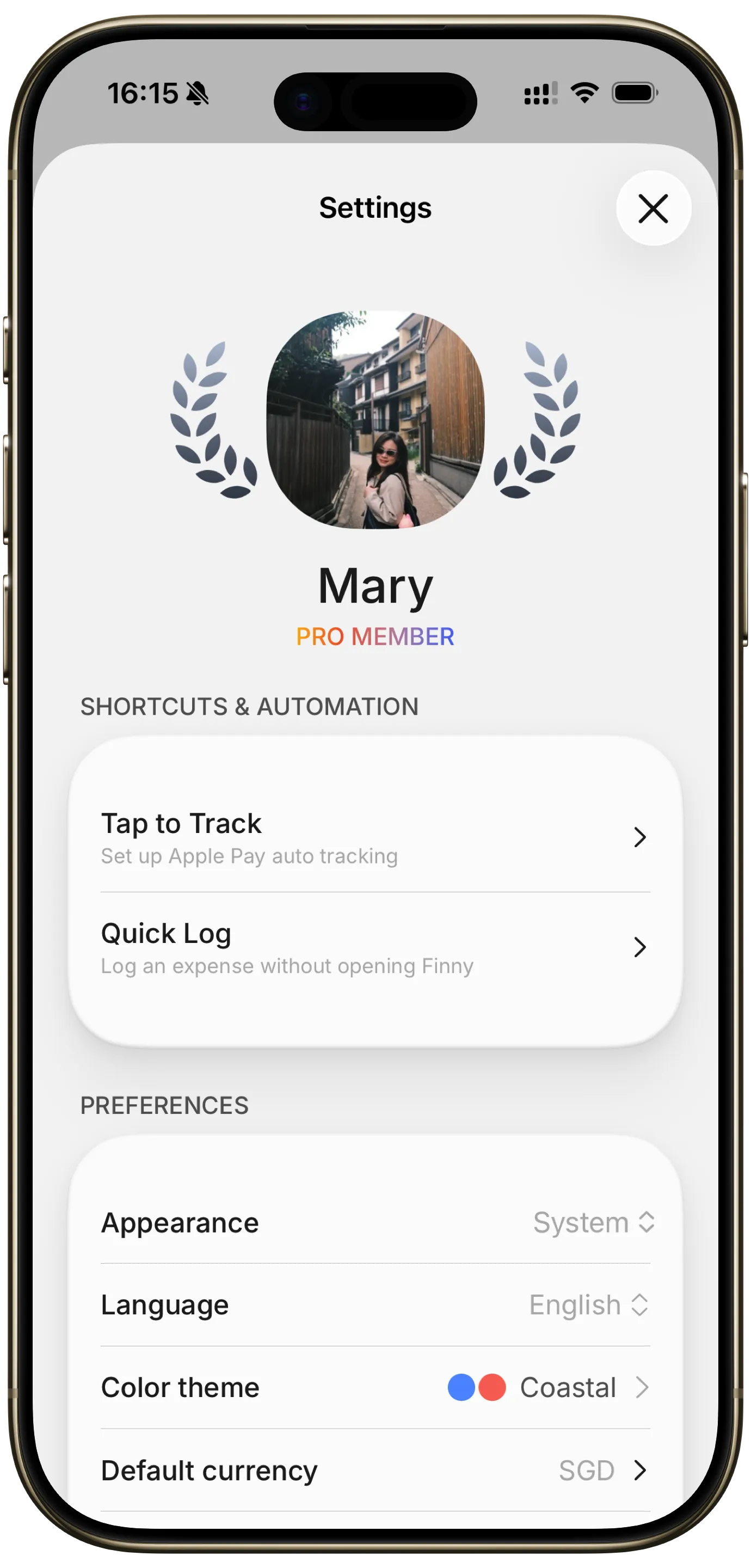
Finny app's Settings feature
Encryption. PocketGuard's security page says it uses 256-bit SSL encryption. Its privacy policy adds that sensitive information entered in its forms is encrypted, and that it takes "reasonable administrative, physical, and electronic measures" to protect your data.
Remote erase. If you lose your phone, PocketGuard says you can wipe your information remotely, a useful feature most budgeting apps do not mention.
Sign-in. The MFA on PocketGuard's security page refers to the verification your bank runs when you connect an account, not a second step on your PocketGuard login. Its privacy policy notes you can register with Apple, Google or LinkedIn, and if you do, that account's own two-factor protection guards the door.
What we could not find. PocketGuard does not publish a SOC 2 report, a bug bounty program or details about where its servers are hosted. You are trusting its description of the controls rather than an independent audit.
How the PocketGuard Bank Connection Works
PocketGuard does not connect to banks itself. Its security page names four data connectors: Finicity, Plaid, Salt Edge and Apple Wallet. A help center article from March 2026 describes Plaid as a second provider, added to improve connections and widen bank coverage, so if a bank fails through the main connection you can try again through Plaid.
The access is read-only. In PocketGuard's words, it can see descriptions and amounts of your purchases but "cannot move money to or out of your accounts." Even if someone got into your PocketGuard account, they could look at your spending but could not transfer funds.
On credentials, the wording differs between pages. The security page says PocketGuard purposefully does not store your card account credentials. The privacy policy says that when you link a bank, PocketGuard collects information "such as your online login credentials" to provide the service. The likeliest reading is that your login passes through to the aggregator, which keeps the connection alive, rather than sitting in PocketGuard's own database. Either way, a third party holds a key to your account data for as long as it stays linked.
What PocketGuard's Privacy Policy Allows
PocketGuard's privacy policy (last updated May 12, 2025) says it will not share your information except as described. The descriptions are where it gets interesting.
Marketing offers built from your finances. The policy says PocketGuard will never share your financial information with marketing partners without your express consent, but it "may use your Financial Information to generate offers for financial products and services" from those partners. If you accept an offer, such as a loan, PocketGuard can pass your personal and financial details to that lender with your agreement. In other words, your spending data shapes which products get pitched to you.
De-identified data can be sold. The policy says PocketGuard may create aggregated or de-identified data and "disclose, share, or sell" it to third parties, as long as it cannot identify you. That is common in the industry, but PocketGuard states it more bluntly than most.
Ad cookies on the website. The policy allows third-party advertising cookies on its site, and the footer carries a "Do Not Sell or Share My Personal Information" link.
None of this is unusual for a bank-linked app. It is a step further than apps such as Monarch or YNAB, which are funded by subscriptions and say they do not sell your financial data. Our finance app security and privacy guide explains how to compare these policies.
Incidents and Connection Reliability
We found no reported data breach, regulator action or security lawsuit involving PocketGuard as of October 2026.
The practical risk is reliability. PocketGuard keeps a help center page listing banks with ongoing sync problems, last updated September 3, 2026. It names American Express Personal Savings, HSBC, Marcus by Goldman Sachs, Synchrony Bank and PayPal for US users, plus several Canadian banks. The page warns that these accounts may update late or fail to connect at all, and says there is no ETA for a fix.
That matters for an app built around a safe-to-spend number. If your Synchrony store card or PayPal balance stops updating, the number PocketGuard shows you is wrong, and it will look just as confident as when it is right. Use the manual refresh it recommends, check your bank directly before a big purchase, and test your own banks during the 7-day trial before you pay for a year or a lifetime plan.
PocketGuard also offers bill negotiation through a partner, Billshark. That is optional, but using it means sharing bill details with another company under its own privacy terms.
Can You Use PocketGuard Without Linking a Bank?
Partly. PocketGuard's security FAQ says you can start with a manually created cash account without entering any bank credentials, and its privacy policy says you can upload bank statements as CSV files.
That makes a manual setup possible, and it is a fair way to try the app before deciding whether to link anything. A CSV upload also lets you bring in recent history from your bank's website without handing over a login, though you have to repeat it to stay current.
In practice, though, PocketGuard is designed around the bank feed. The safe-to-spend figure, bill detection, recurring charge tracking and spending insights all assume transactions arrive on their own. On manual entry alone you pay for automation you are not using, while typing every purchase into an app that was not built around fast entry. Our guide to tracking expenses without linking your bank covers apps built for that from the start.
Who Should Feel Fine, and Who Should Skip
PocketGuard suits you if a single safe-to-spend number is what keeps you on track, your banks connect reliably, and you are comfortable with aggregator connections and occasional financial-product offers. The lifetime plan also appeals if you dislike subscriptions.
Consider skipping the bank link if you do not want your spending data shaping loan or card offers, you bank with an institution on PocketGuard's sync-issue list, or you would rather no third party held ongoing access to your accounts.
Finny takes the no-link route on every plan. You record payments by card, cash or wallet, and the app shows where the money went without any connection to your bank, as the payment methods screen below shows.
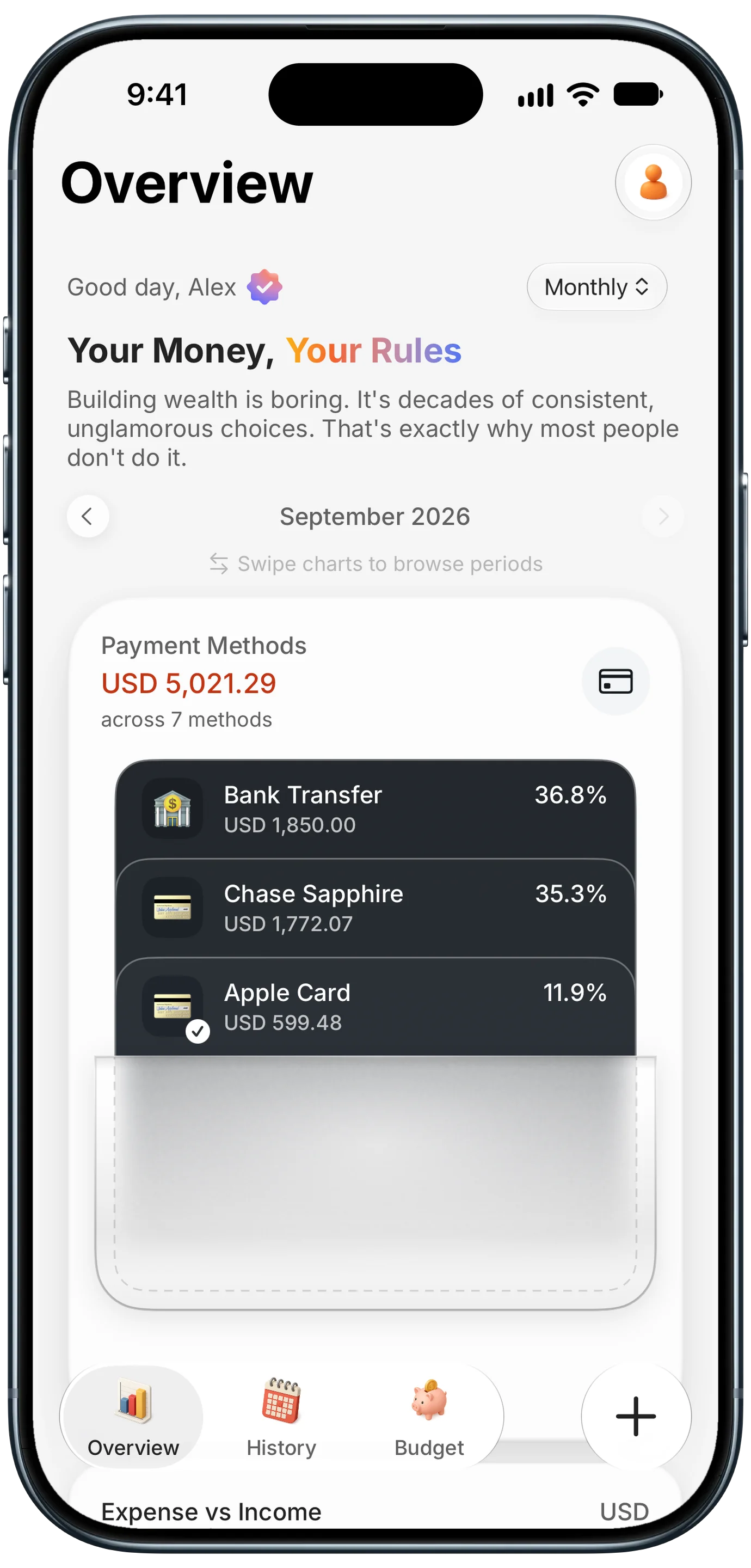
Finny app's Payment Methods feature
Because nothing is linked, the banks that trip up aggregators do not matter. With Pro, a payment showing on your screen, whether a PayPal receipt or an Amex alert, becomes an entry, and card payments get logged as you make them. The tradeoff is that Finny cannot find a charge you never logged, and it does not track loans or net worth the way PocketGuard does. Pro costs a low monthly or yearly price.
This short video shows Screen Log turning a payment on screen into an entry:
Common Questions About PocketGuard Safety
Is PocketGuard legit?
Yes. PocketGuard is a real budgeting app from PocketGuard, Inc., based in Menlo Park, California, and has been available since 2015 on iPhone, Android and the web. It is funded by its PocketGuard Plus subscription and lifetime plan, connects to banks through established aggregators like Finicity and Plaid, and has no reported data breach as of October 2026. It is not a scam, though its privacy policy allows more marketing use of your data than some rivals.
Can PocketGuard access or move my money?
No. PocketGuard has read-only access to linked accounts. It can see transaction descriptions, amounts and balances, but it cannot move money into or out of your accounts or change anything about them. If someone broke into your PocketGuard account, they could view your spending but could not transfer funds. The bank connection itself runs through partners such as Finicity and Plaid, which handle authentication with your bank.
Does PocketGuard sell my data?
PocketGuard says it will never share your financial information with marketing partners without your express consent. However, it may use that information to choose which financial product offers it shows you, and it may sell aggregated or de-identified data that cannot identify you. If an offer like a loan appeals to you and you accept, it can pass your details to that lender. US users can also use its "Do Not Sell or Share" link.
Does PocketGuard use Plaid?
Yes, among others. PocketGuard's security page lists Finicity, Plaid, Salt Edge and Apple Wallet as its data connectors. Its help center describes Plaid as a second provider added to improve connections and expand bank coverage, so if a bank will not connect or keeps failing through the main provider, you can try connecting it again through Plaid instead.
Want a budget that never needs your bank login?
Download Finny and start free, with no account and no bank connection required. Pro adds AI input, Screen Log and Tap to Track for a low monthly or yearly price, with a 3-day free trial.