Quicken Simplifi Free Trial 2026: No Trial, 30-Day Refund
Quicken Simplifi does not offer a free trial in 2026. Instead, you pay for a full year up front, currently $3.99 a month billed annually (about $47.88) on the first-year promo, and you get a 30-day money-back guarantee: cancel and request a refund within 30 days of purchase and Quicken returns the full amount. After the first year, Simplifi renews at the regular rate of $6.99 a month, billed annually.
So the Quicken Simplifi free trial people search for is really a refund window. It works almost the same way if you plan for it, and it can cost you a year's fee if you do not. This guide covers what you pay on day one, how to cancel and get your money back, what happens to your data, and how to use the 30 days well. For the full plan breakdown and how renewals work, see our Quicken Simplifi pricing guide.
Is There a Quicken Simplifi Free Trial?
No. Quicken's own Simplifi help center says it plainly: there is no free trial, and the 30-day money-back guarantee from your original purchase date takes its place. You can request a full refund for any reason inside that window.
The practical difference matters. A true free trial asks for nothing, or asks for a card and charges you later. Simplifi charges the full annual price to your card immediately at checkout. You are a paying member from minute one, and the refund is something you have to request. Nothing reverses on its own if you simply stop opening the app.
Where you buy also changes who handles the refund:
- Bought on quicken.com or from a retailer such as Amazon, Staples, or Best Buy: Quicken handles the refund through its refund form or Simplifi Support.
- Bought in the Apple App Store or Google Play: the refund goes through Apple or Google, and Quicken's help center notes those refunds are at the store's discretion, not Quicken's.
If you want the cleanest Simplifi money-back guarantee, buy directly from Quicken. The guarantee also applies to auto-renewals: Quicken's refund terms give you 30 days from a renewal charge to ask for that money back, which is useful if a renewal slips past you.
What Simplifi Costs When the 30 Days Start
Simplifi has one plan, and it is annual only. The website shows a monthly figure, but the total is billed as one yearly charge.
| First-year promo | Regular rate | |
|---|---|---|
| Monthly equivalent | $3.99 | $6.99 |
| Billed | Annually, charged at checkout | Annually, at renewal |
| Approximate yearly total | $47.88 | $83.88 |
| Who gets it | New members ordering direct | Everyone at renewal |
A few details from Quicken's offer terms are worth knowing before you check out:
- The promo is the discount. There is no coupon code to hunt for. The first-year price applies automatically to new memberships ordered directly from Quicken, and it cannot be combined with other offers. Quicken's terms also say the final charge may differ slightly from the monthly figure times 12, so look at the total on the checkout page.
- The offer has a cutoff date. The current terms run to mid-November 2026. Quicken has kept a first-year discount running for most of the year, but treat any specific date as temporary.
- Renewal is at the then-current price. The help center says renewals are charged at the full standard price, not a discounted rate. Today that is $6.99 a month billed annually, and Quicken's terms say the renewal price is subject to change, so check it again before your renewal date.
If you are hunting for a Simplifi discount beyond the promo, the realistic one is timing: buy during the promo, then decide at renewal with the regular price in mind.
How to Cancel Simplifi and Get Your Refund
Canceling and refunding are two separate actions in Simplifi, and mixing them up is the most common mistake.
Canceling turns off auto-renewal. You keep using Simplifi until the end of the year you paid for, but you do not get money back.
Refunding returns your full payment and ends access immediately. This is what you want if you decide inside 30 days that Simplifi is not for you.
To request a refund for a direct purchase:
- Note your purchase date. The 30 days run from the original purchase date (or from a renewal charge).
- Submit Quicken's refund form or contact Simplifi Support before day 30. The form is for US and Canadian customers.
- Wait for the money. Quicken says refunds usually process in 3 to 5 business days, and the funds can take 7 to 10 business days to show up depending on your bank.
To cancel renewal instead, sign in at quicken.com/my-account, open Subscriptions, choose Manage, then Cancel Renewal and confirm. You should see a "Renewal Canceled" message. If there is no Cancel Renewal button, you probably subscribed through an app store. On an iPhone, go to Settings, tap your name, then Subscriptions, and cancel Simplifi there. On Android, use Payments and Subscriptions in the Google Play app.
One more point from the help center: refunds are not available for unused time after the 30-day window. If you miss it, canceling only stops the next renewal.
What Happens to Your Data After You Cancel
This is the part most people forget to check until it is too late.
If you cancel renewal, nothing changes until your paid year ends. Your accounts, transactions, and history stay viewable through the end of the term.
If you take the refund, Quicken's help center says access to your data and profile ends immediately. That is the trade: your money back now, your view of the data gone now.
After a membership lapses, Quicken says your data stays on its servers for an unspecified period. You cannot view it without renewing, and if you resubscribe you pick up where you left off. To have your financial data removed, the help center tells you to delete your bank accounts inside Simplifi first, then contact support for anything further.
So the order matters if you want to leave cleanly:
- Export first. Simplifi exports transactions to CSV, and only from the web app, not the phone. Turn on split transactions in the settings if you use them, or they will not appear as separate rows.
- Delete linked accounts if you want your bank data removed.
- Then request the refund.
If how Simplifi stores and connects to your bank data is part of your decision, our look at whether Quicken Simplifi is safe covers its security and data practices in more detail.
A 30-Day Checklist for Evaluating Simplifi
A refund window only protects you if you actually use it to decide. Thirty days is enough to judge Simplifi fairly, but only if you set it up properly in the first week and set a firm decision date.
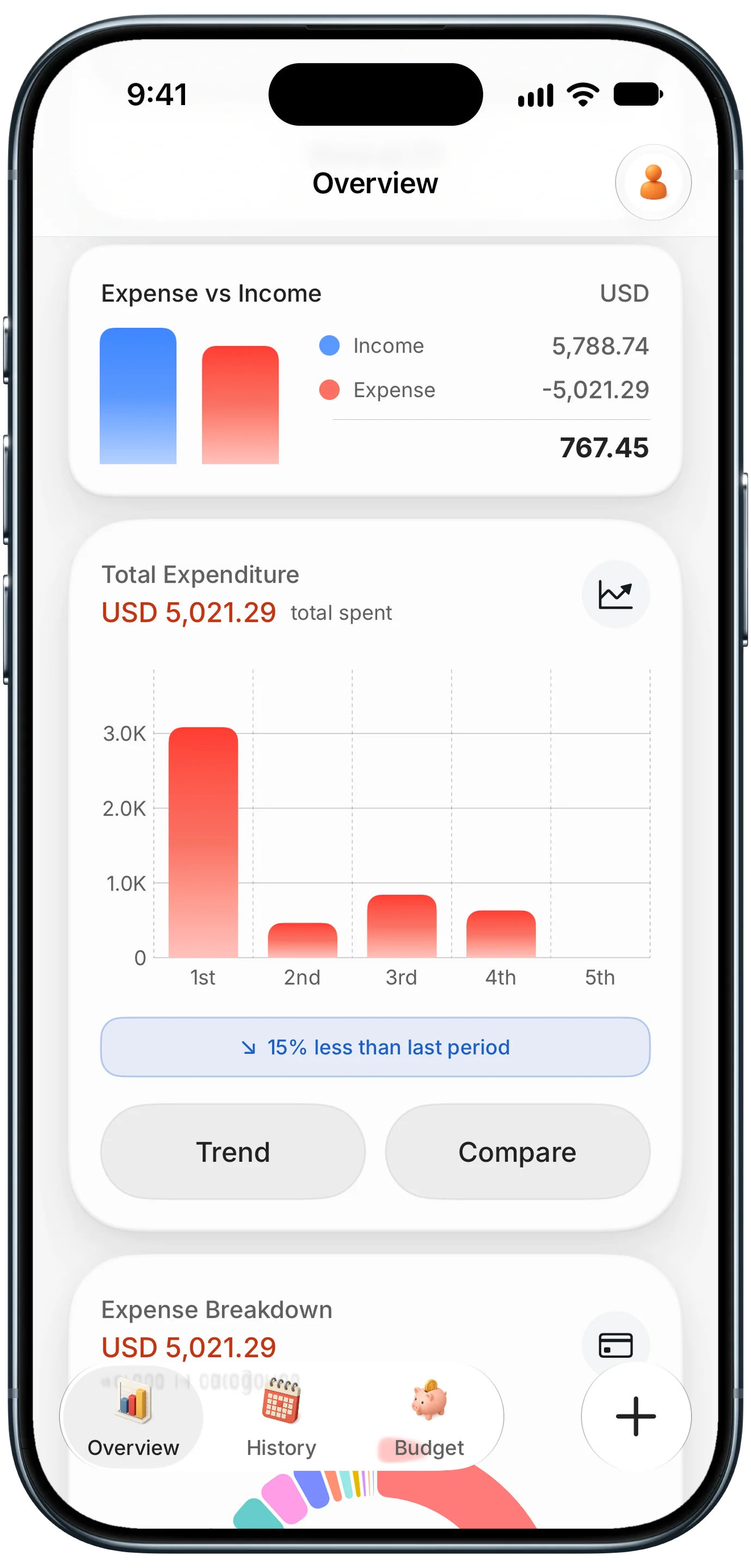
Finny app's Overview feature
Whatever app you test, the test at the end is the same: can you see at a glance whether this period went better than the last one, week by week? The screen above is Finny's Overview, and that kind of week-over-week view is the bar every app on your shortlist should clear.
- Day 1: set a reminder for day 25. Not day 30. Give yourself room for the refund form and a slow support reply.
- Days 1 to 3: link every account you actually use. Simplifi's value depends on bank syncing. If an account fails to connect or keeps disconnecting, that is a real finding, not a setup chore.
- Week 1: build the Spending Plan. Enter income, bills, and savings so the "left to spend" figure means something. This forward-looking plan is Simplifi's signature feature, so judge it properly.
- Week 2: fix categories. Count how many transactions you had to recategorize. If you are still correcting most of them, that is the ongoing cost of the app.
- Week 3: check bills and subscriptions. Does Simplifi catch every recurring charge, including annual ones?
- Week 4: decide. Ask one question: did you change any spending because of what the app showed you? If not, take the refund.
Also note how often you opened it without a reminder. An app you only open out of guilt is not worth $83.88 a year at renewal.
Alternatives With a Real Free Trial or Free Tier
If paying first and asking for a refund later does not appeal, several well-known budgeting apps let you try before any charge. We checked each trial on the company's own site in October 2026.
| App | Free trial | Free tier | Price after trial | Bank link required |
|---|---|---|---|---|
| Quicken Simplifi | None (30-day refund) | No | $47.88 first year, then $6.99/mo billed annually | Yes |
| Monarch Money | 7 days | No | $14.99/mo or $99.99/yr | Yes |
| YNAB | 34 days | No | $14.99/mo or $109/yr | Optional |
| Copilot Money | 1 month | No | $18/mo or $109/yr (limited-time yearly offer) | Yes |
| Finny | 3 days for Pro | Yes | Pro costs a low monthly or yearly price | No |
Monarch Money
Monarch gives you your first week free on its Core plan, then charges $14.99 a month or $99.99 a year. A week is short for a full budgeting cycle, so link accounts on day one. Our Monarch Money vs Quicken Simplifi comparison covers which one suits a household better.
YNAB
YNAB has the longest trial here at 34 days, and signing up directly does not require a card. It costs $14.99 a month or $109 a year, and college students can get a free year. It is a hands-on, zero-based method, which our Simplifi vs YNAB guide compares in detail.
Copilot Money
Copilot offers a one-month free trial on iPhone, iPad, Mac, and web. After that it is $18 a month, or $109 a year on its current limited-time yearly offer (normally $119).
Finny
Finny takes a different route: there is a free tier with no time limit, and no bank connection on any plan. You can start without an account.
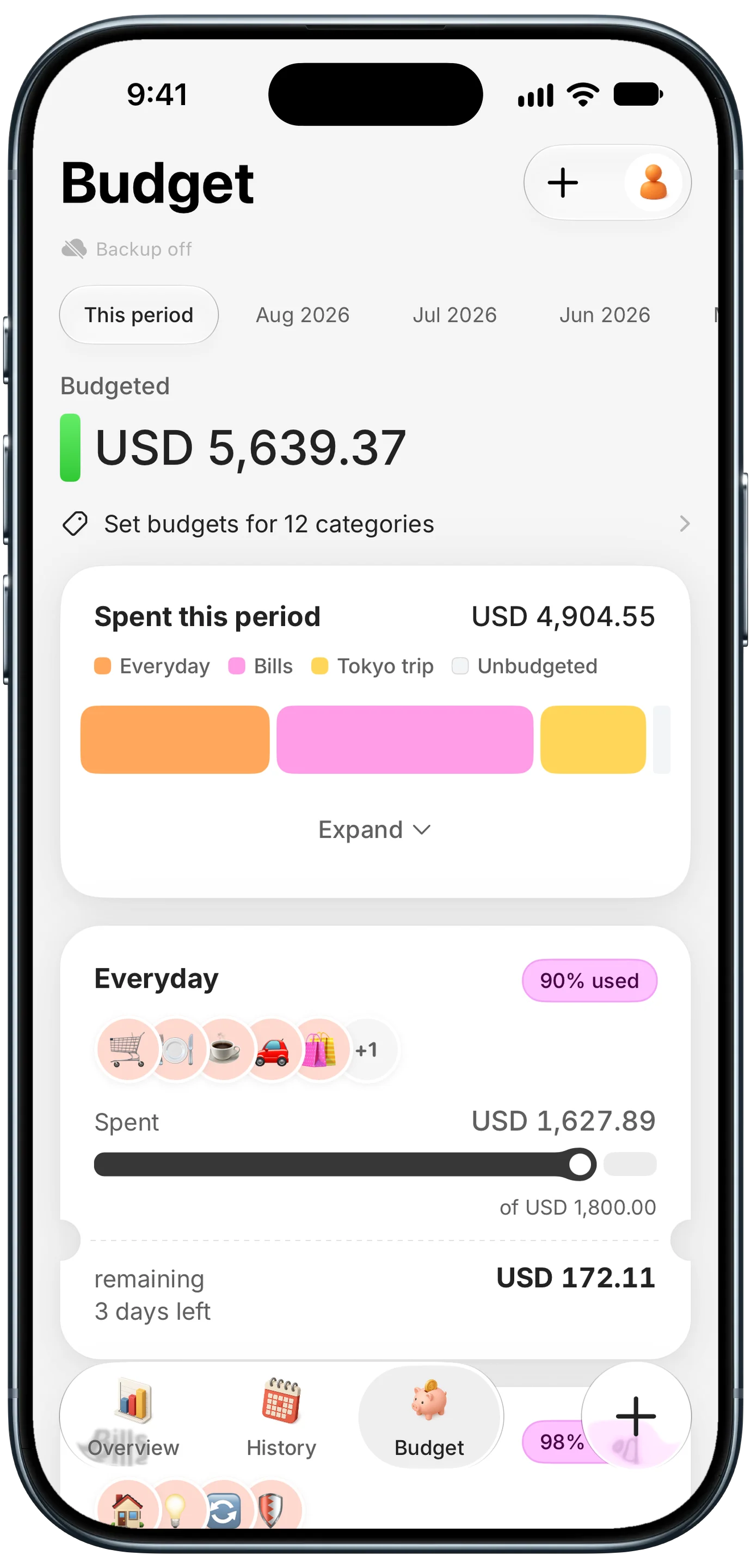
Finny app's Budgets feature
The free tier includes unlimited manual entries, custom categories, and budgets with rollover, like the category budgets above. Pro adds AI input from text, voice, or receipts, and Tap to Track, which logs card payments as you make them. Pro has a 3-day free trial and costs a low monthly or yearly price.
This short video shows Tap to Track logging a card payment without any bank connection:
Should You Start the Simplifi Refund Window?
Starting Simplifi's 30 days is a reasonable bet for the right person. The promo makes year one one of the cheaper ways to get bank-synced budgeting, and the guarantee is real and covers renewals too. The risk is entirely about follow-through.
Start it if you want a forward-looking spending plan, you are comfortable linking your bank and card accounts, and you will actually set a day-25 reminder.
Skip it if you want to try an app with no money changing hands, since Monarch, YNAB, and Copilot all offer genuine trials. Skip it too if you would rather not link your bank at all, because Simplifi loses most of its value without syncing.
Budget for year two, not year one. At $6.99 a month billed annually, the renewal is about $36 more than the promo year. If the app is only worth the promo price to you, that is a sign to keep looking.
For a fuller verdict on the app itself, read our Quicken Simplifi review.
Common Questions About the Quicken Simplifi Free Trial
Does Quicken Simplifi have a free trial?
No. Quicken's help center says Simplifi has no free trial and offers a 30-day money-back guarantee instead. You pay the annual price at checkout, currently $3.99 a month billed annually on the first-year promo, and can request a full refund for any reason within 30 days of purchase. Purchases made through the Apple App Store or Google Play are refunded through those stores instead of Quicken.
How do I get a refund from Quicken Simplifi?
For purchases made on quicken.com or through retailers like Amazon, submit Quicken's refund form or contact Simplifi Support within 30 days of purchase. Refunds usually process in 3 to 5 business days, and funds can take 7 to 10 business days to appear. A refund ends access to your data immediately, so export your transactions to CSV from the web app first if you want to keep them.
Is there a Quicken Simplifi discount or promo code?
The main discount is Quicken's first-year promo, applied automatically for new memberships ordered directly from Quicken, with no code needed. It currently brings Simplifi to $3.99 a month billed annually, versus the regular $6.99. The offer cannot be combined with other deals and applies to the first year only, so plan for the regular rate when your membership renews.
What happens to my Simplifi data if I cancel?
If you cancel renewal, you keep full access until your paid year ends. If you take a refund, access ends immediately. After a lapse, Quicken keeps your data on its servers for an unspecified period, viewable only if you resubscribe. To remove your financial data, delete your linked bank accounts inside Simplifi, then contact support for anything further.
Want to try budgeting before paying anything? Download Finny and start on the free tier with no bank connection and no account required, then try Pro free for 3 days if you want AI input and Tap to Track.