
Best Apps to Track Holiday Spending in 2026
Holiday spending breaks ordinary budgeting apps in a predictable way. Purchases come from everywhere at once: online orders, in-store taps, cash handed to a relative, a grocery run for a party, a gift bought during a trip. The window is eight weeks, so a three-day transaction lag means you learn you overspent after the shopping is done.
The best apps to track holiday spending are the ones that handle fragmented, fast, short-window spending rather than steady monthly categories. This comparison judges them on that basis: how quickly a purchase gets recorded, whether receipts stay accessible for returns, and whether temporary categories are practical.
For year-round tracking rather than seasonal, our guide to the best spending tracker apps covers a wider field.
What Actually Matters for Eight Weeks
Standard app reviews weigh features that do not matter much in December and skip the ones that do.
Capture speed. Holiday purchases happen in checkout lines and on phones. If logging takes more than a few seconds it will not happen, and an app you stop updating on December 10th tells you nothing.
Receipt retention. January is return season. Receipts you can find in ten seconds are worth real money. Most budgeting apps treat receipts as an afterthought.
Temporary categories. You need a gift category, probably a travel category, and the ability to delete them in February without polluting your year-over-year data.
Lag. Bank-linked apps post transactions one to three days late. Across a normal month that is invisible. Across a concentrated eight-week season it means the number you check is always behind the number you spent.
Shared visibility. Two people shopping from one budget need to see the same running total, or they will both buy for the same person.
The Comparison
| App | Annual price | Bank link required | Receipt capture | Best for |
|---|---|---|---|---|
| Monarch | $99.99 | Yes | Limited | Households budgeting together |
| YNAB | $109 | Optional | No | Assigning every dollar before spending |
| Copilot | $95 | Yes | Limited | iPhone users who want automatic categorization |
| Goodbudget | $80, free tier | No | No | Envelope method without bank access |
| EveryDollar | $79.99, free tier | Paid tier only | No | Simple zero-based plans |
| Finny | a low monthly or yearly price, free tier | No | Yes | Fast capture and receipts for returns |
Prices were accurate at the time of writing and change often, so check before subscribing.
Monarch
Monarch is the strongest option if two people are running one holiday budget. Shared household access is native rather than bolted on, category budgets support rollover, and the interface makes an over-budget category obvious at a glance.
The weaknesses for seasonal use are the bank connection requirement and the resulting lag. Monarch shows you an accurate picture of last week. During a normal month that is fine. During the second week of December it is a problem. Our Monarch pricing breakdown covers the tiers in detail.
YNAB
YNAB's method suits holiday spending better than almost anything else, because assigning money to a purpose before spending it is exactly what a holiday budget requires. The gift category gets funded, and when it is empty, it is empty.
The cost is the learning curve and $109 a year, which is steep if you are adopting it in October for one season. YNAB rewards people who commit to the method year-round. As a seasonal tool it is overqualified and overpriced.
Copilot
Copilot has the best automatic categorization in this group and a genuinely good iPhone app. If you already use it, its holiday handling is fine: create a gift category, let the rules learn it, review weekly.
It is iPhone and Mac only, it requires bank connections, and at $95 a year it is not something to adopt purely for eight weeks.
Goodbudget
Goodbudget deserves more attention for seasonal budgeting than it usually gets. It is envelope-based, it does not require bank access, and the free tier covers a limited number of envelopes, which is often enough for gifts, food, and travel.
Everything is entered manually. That is the tradeoff: full control and no lag, in exchange for doing the work yourself in a busy month.
Finny
Finny is built around capture rather than analysis, which is the specific weakness of the others during the holidays. Card payments get logged as you make them, receipts get captured from your photo library including several at once, and online orders can be logged from what is on screen. None of it requires a bank connection.
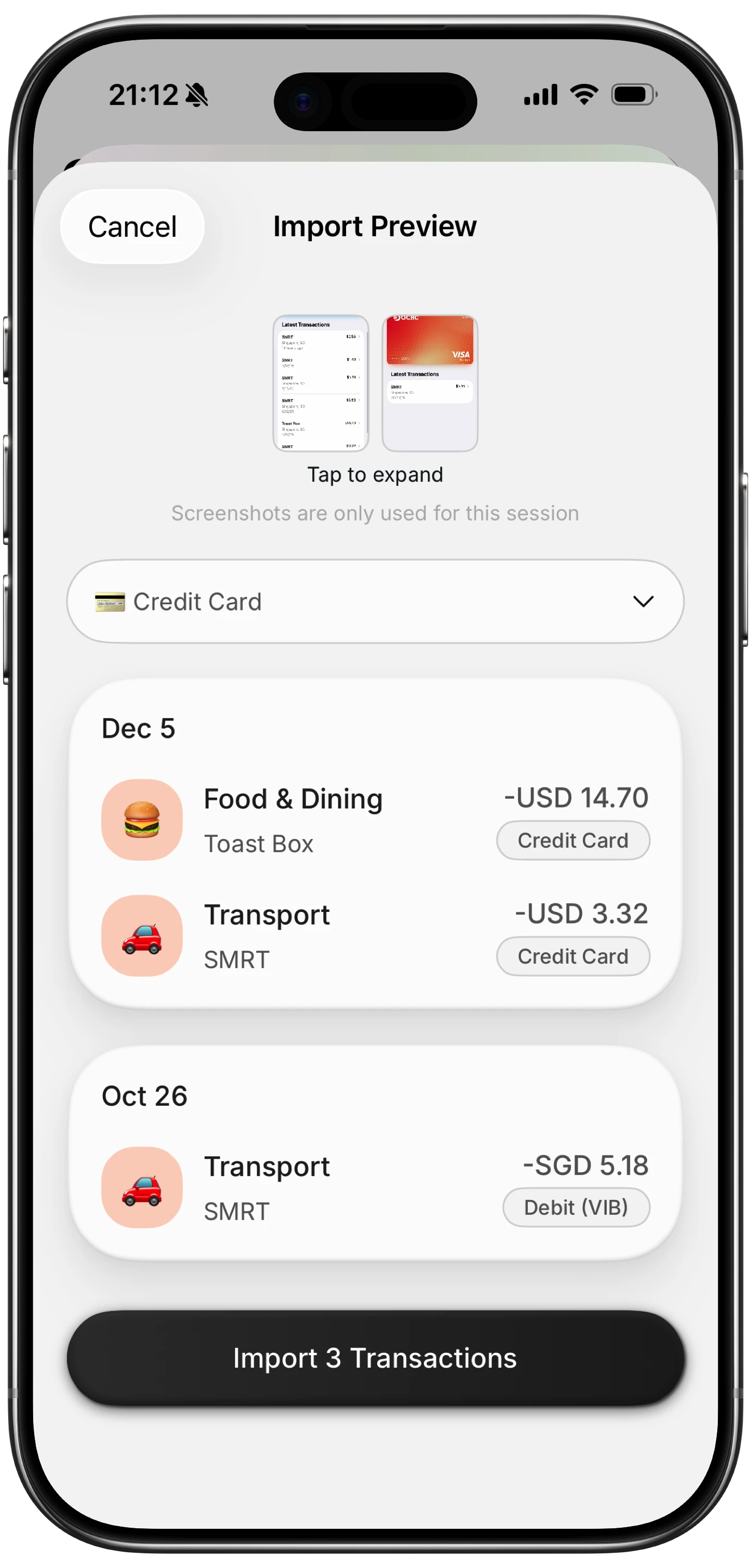
Finny app's screenshot import feature
That last part matters in January. Gift receipts photographed in December stay attached to the expense, so a return in January takes a search rather than a shoebox.
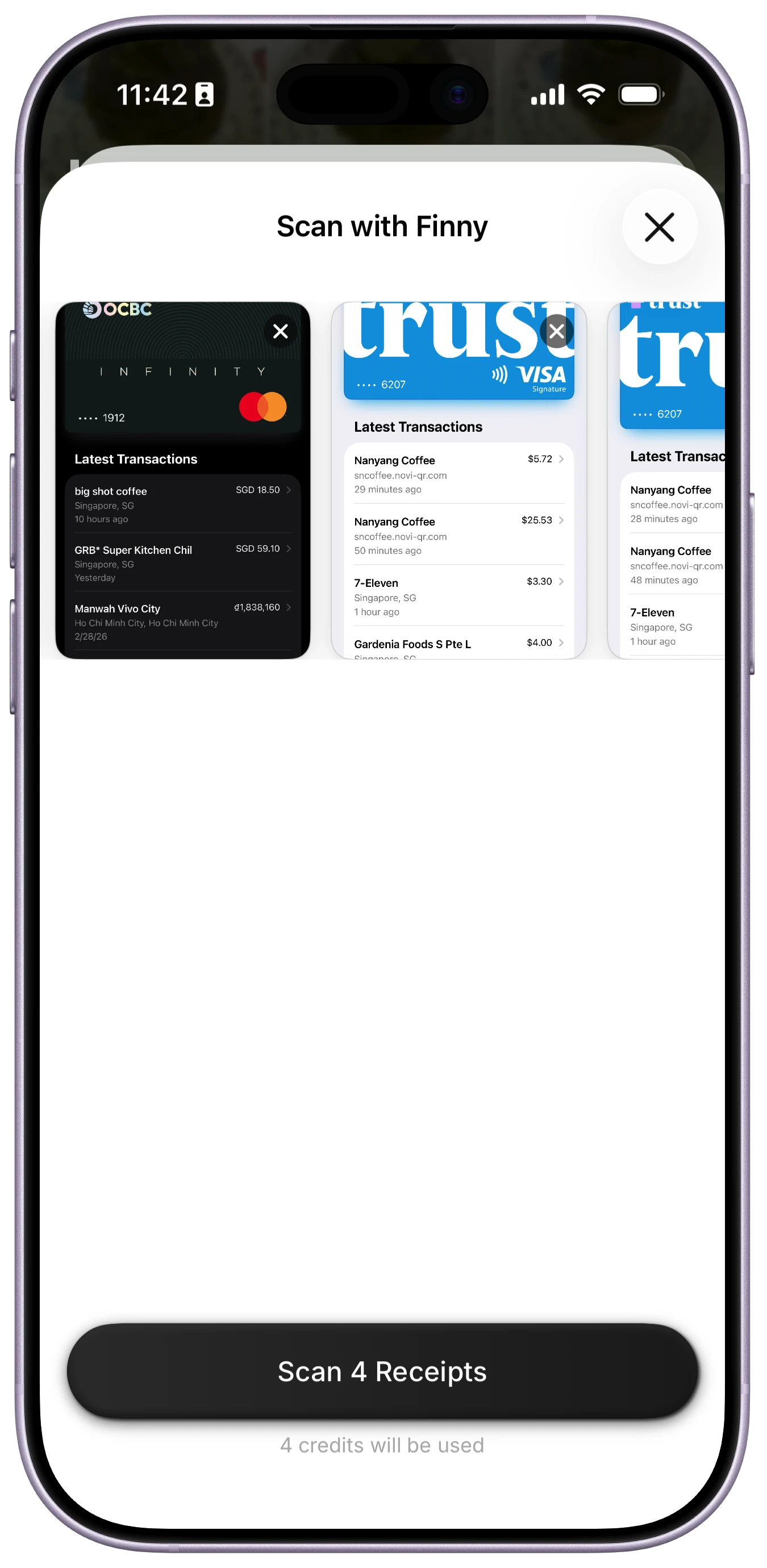
Finny app's batch scanning feature
Most holiday shopping happens online, and this video shows an on-screen payment being logged:
The Receipt Problem Nobody Plans For
Returns are part of the holidays, and receipts decide how painful they are. Store policies increasingly require proof of purchase for a full refund rather than store credit, and gift receipts get separated from gifts almost immediately.
Photograph receipts as you get them and attach them to the expense. It takes seconds in December and saves an argument at a customer service desk in January. Of the apps here, only Finny and Goodbudget's manual notes give you somewhere sensible to put them, and only Finny reads the amount off the receipt itself.
How to Choose
Already using a budgeting app? Stay with it and add a gift category. Switching tools in November costs more in setup than it returns.
Two people, one budget? Monarch, for shared visibility.
Want the money allocated before it is spent? YNAB, if you intend to keep using it after January.
No bank connection, minimal cost? Goodbudget's free tier.
The problem is logging, not analyzing? An app built for fast capture. If you never manage to keep a December running total current, better charts will not fix it.
For a wider view of free options, see our best free expense tracker apps guide, and set the overall number first with our holiday budget planner.
Common Questions About Holiday Spending Apps
What is the best app to track Christmas spending?
It depends on which part you struggle with. If two people share the budget, Monarch's household view prevents duplicate gifts. If you want money allocated before it is spent, YNAB's method fits the season well. If the real problem is that you stop logging purchases halfway through December, choose whichever app records a purchase fastest, because an accurate running total is the only thing that lets you correct course in time.
Can I track holiday spending without linking my bank?
Yes. Goodbudget uses manual envelope entry with no bank access at all, and Finny logs card payments, receipts, and on-screen payments without a bank connection. Manual and capture-based approaches also avoid the one to three day posting lag that bank-linked apps inherit, which matters during a short, concentrated spending season where being three days behind means finding out too late.
Do budgeting apps store receipts for returns?
Most do not. Monarch and Copilot focus on categorizing transactions rather than retaining images, and YNAB has no receipt feature. If January returns matter to you, choose an app that attaches a receipt image to the expense, or keep a dedicated photo album as a backup. Gift receipts separate from gifts quickly, and many stores now require proof of purchase for a full refund.
Is it worth paying for a budgeting app just for the holidays?
Usually not. Annual plans between $80 and $109 are priced for year-round use, and adopting a new system in November adds setup work during your busiest weeks. Either use a free tier for the season or choose a tool you intend to keep. The exception is if the holidays are simply when you decided to fix your tracking, in which case the season is a reasonable starting point.
Ready to track expenses with less friction?
Download Finny to log expenses using AI, receipts, or text. No bank connections, offline support, and full control over your financial data.