
Lunch Money Review 2026: Pricing, Pros and Alternatives
Most budgeting apps assume you earn, spend, and save in one currency at one bank. If your life spans a US checking account, a euro card, a Canadian brokerage, and a little crypto, those apps either break or force you into awkward workarounds. Lunch Money was built for exactly that kind of messy financial life.
This Lunch Money review covers what the app does well, what it costs after the March 2026 price change, how its bank sync works, and where it falls short, especially on mobile. We finish with a comparison table and the alternatives worth considering, including a privacy-first option that skips bank linking entirely. If you are mainly comparing logging speed, our add expenses with a shortcut: Finny vs Toshl vs Lunch Money breakdown covers that angle in detail.
What Is Lunch Money?
Lunch Money is a web-first personal finance and budgeting app from Lunchbag Labs, a small independent company founded by Jen, its original developer. It has become one of the more respected tools among people who want detailed control over their finances, particularly developers, expats, and anyone juggling several currencies.
The core of the product lives in the browser. You connect accounts or import files, review transactions, set up rules that categorize them automatically, and build budgets by category. It also tracks net worth across bank accounts, investments, crypto, and manually added assets, so it doubles as a lightweight net worth dashboard.
What sets it apart is the attitude. Lunch Money exposes a full developer API, publishes a public feedback board, and actively spotlights community-built tools in its newsletter. It feels more like a power tool with a friendly face than a polished consumer app.
Lunch Money Pricing in 2026
Lunch Money has no free tier, but it does have one of the more unusual pricing models in the category.
- Monthly: $10 per month.
- Annual, pay what you want: you choose your own yearly price on a slider. Since March 15, 2026, the minimum is $60 per year (about $5 a month), up from $50 before. Third-party reviews put the top of the range at around $150 per year.
- Locked rates: anyone who subscribed before March 15, 2026 keeps their existing price, including the old $50 minimum, for as long as the subscription stays active.
- Free trial: 30 days.
- No feature tiers: every subscriber gets every feature, whatever they pay.
At $60 a year, Lunch Money undercuts most bank-linking budget apps. For comparison, YNAB costs $14.99 per month or $109 per year (our YNAB pricing breakdown has the details), and Monarch Money's Core plan is $14.99 per month or $99.99 per year. Paying monthly at $10 is less of a bargain, so the annual plan is the one most users should pick.
Key Features
Multi-currency support
This is Lunch Money's headline strength. It supports more than 160 currencies, lets you set a primary currency, and converts foreign transactions using the exchange rate from the day each transaction happened. Look back at a purchase from six months ago and you see it valued at that day's rate, not today's. That historical accuracy is rare and useful for taxes and long-term reviews. Our guide to the best multi-currency expense tracker in 2026 puts this in context against other options.
Rules and categorization
Lunch Money's rules engine is rule-based rather than AI-driven. You define conditions such as payee, amount, or account, and actions such as renaming, categorizing, tagging, or linking to a recurring item. It takes setup, but once tuned it is predictable and transparent. You can also split and group transactions, which helps with shared bills and reimbursements.
Recurring items
Recurring items track subscriptions and regular bills. Lunch Money suggests recurring items from your history, and recurring rules link matching transactions automatically. A few rough edges show up on the feedback board, but the basics are solid.
Crypto and net worth
You can sync balances from Coinbase, Kraken, and Ethereum wallets, and add other assets manually. The limitation is that only balances sync: crypto transactions are not imported. That makes it useful for net worth tracking, not for logging crypto trades. Binance support was dropped in early 2025.
Developer API
The public API is a genuine differentiator. Developers have built CLIs, bank sync connectors, Apple Shortcuts, and even a kids companion app on top of it. If you want your budget to talk to your own scripts, few consumer apps make that easier.
Bank Sync: Which Providers Does Lunch Money Use?
Lunch Money's official bank sync runs through Plaid. Its help center says Plaid covers most US and Canadian banks plus a number of banks in European countries, including France, Germany, Spain, the Netherlands, Ireland, Italy, and Sweden. Coverage is per institution, so check your specific bank before you commit.
For wider European coverage, the community has filled the gap. Third-party tools such as Synci and LumoSync connect to European banks through GoCardless open banking and push transactions into Lunch Money via the API. These are separate paid or independent services, and Lunch Money treats accounts synced this way as manually managed. You can also import CSV files or enter transactions by hand.
On security, Lunch Money says bank access is read-only, so it cannot move money, that it does not store your bank credentials, and that your data is AES-256 encrypted. Two-factor authentication is available and recommended. As with any Plaid-based app, the trade-off is that an aggregator keeps an ongoing link to your accounts.
Lunch Money on iPhone and Android
This is the area most reviews flag as the weak spot, and it has improved.
Lunch Money now has an official companion app on the App Store and Google Play. It grew out of a community-built app called Lunch Money Pal, whose creator joined the Lunch Money engineering team in late 2025. The companion app handles reviewing and categorizing transactions, checking stats, and widgets.
It is still a companion, not the full product. Setting up budgets, rules, and most configuration happens on the web, and at the time of writing, Lunch Money's support docs say signing in to the mobile app requires generating an access token from the web app's settings. The app is also built for an online experience, so it is not designed as an offline-first logger. If your phone is your main device, that will feel like a step down.
Lunch Money Pros and Cons
Pros
- Excellent multi-currency support with 160+ currencies and historical, per-day exchange rates.
- Flexible annual pricing from $60 a year, with every feature included at every price.
- Powerful, transparent rules engine plus split and grouped transactions.
- Open developer API and an active community of third-party tools.
- Net worth tracking that includes crypto balances.
- Read-only bank access, AES-256 encryption, and optional two-factor authentication.
Cons
- No free tier, and $10 a month if you pay monthly.
- Web-first: the mobile app is a companion, not a full client, and is not built for offline use.
- Official bank sync covers the US, Canada, and select European banks only.
- Crypto syncs balances, not transactions.
- Rule setup takes time, and there is no AI categorization.
Who Lunch Money Is For
Lunch Money is a strong fit if you hold money in more than one currency, you like to see exactly how your data is categorized, you mainly budget from a computer, and you either code or enjoy tools that reward setup time. Expats and people with accounts in two or three countries get more out of it than almost anyone.
Skip Lunch Money if you want a phone-first app you can use anywhere, you would rather not link your bank to an aggregator, or you want logging to take seconds without building rules first. For travelers who spend in many currencies on the go, our guide to the best multi-currency expense tracker for digital nomads covers tools built around that use.
Lunch Money vs the Alternatives
| App | Price (Oct 2026) | Platform | Bank link | Multi-currency | Best for |
|---|---|---|---|---|---|
| Lunch Money | $10/mo or from $60/yr | Web first, companion mobile app | Yes (Plaid) | 160+, historical rates | Multi-currency power users |
| YNAB | $14.99/mo or $109/yr | Web, iOS, Android | Yes (optional) | One currency per budget | Zero-based budgeting |
| Monarch | $14.99/mo or $99.99/yr | Web, iOS, Android | Yes | Limited | Households, net worth |
| Actual Budget | Free, open source | Web, self-hosted | Optional | Limited | Self-hosters |
| Finny | Free; Pro a low monthly or yearly price | iPhone native | No (never) | 150+, per transaction | Private, fast iPhone tracking |
YNAB
YNAB is the better choice if the budgeting method matters more than currency handling. Each budget uses a single currency, so people with money in several countries end up running separate budgets.
Monarch
Monarch offers polished apps on every platform and strong household features. It is more consumer-friendly than Lunch Money, but less flexible for multi-currency finances and has no comparable open API.
Finny
Finny takes the opposite approach to Lunch Money. It is an iPhone-native expense tracker that never asks for a bank login. Every transaction stays in the currency you actually paid in, across 150+ currencies, and your totals convert to your home currency automatically.
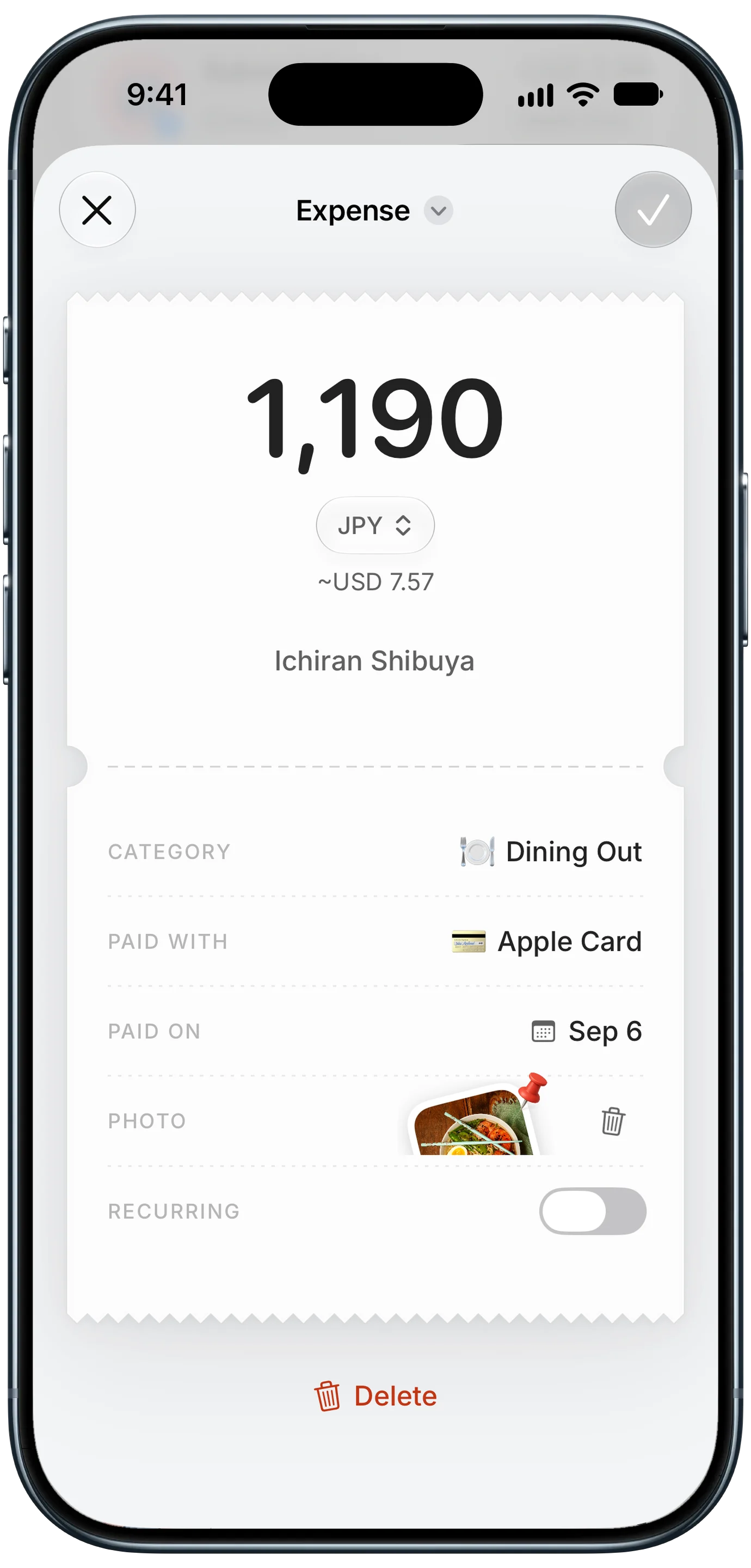
Finny app's multi-currency feature
Instead of building rules, you capture spending as it happens: Tap to Track logs card payments as you make them, and you can type, speak, or scan a receipt and let AI fill in the details. It works offline, and nothing passes through a bank aggregator. Here is Tap to Track in action:
It is not a replacement for Lunch Money's API or net worth tracking. It suits people whose priority is quick, private tracking on the phone. For more on handling several currencies at once, see our guide to tracking expenses in multiple currencies.
Is Lunch Money Worth It in 2026?
For the right person, yes. Lunch Money's multi-currency handling is among the best available, the rules engine is transparent and powerful, and the pay-what-you-want annual plan from $60 makes it cheaper than most bank-linking competitors.
It is a harder sell if you live on your phone, want tracking to work offline, or would rather not connect your accounts to Plaid. In those cases, a phone-first, no-bank-link tracker will fit your day better. The 30-day trial is long enough to find out which camp you are in.
Common Questions About Lunch Money
How much does Lunch Money cost in 2026?
Lunch Money costs $10 per month, or a pay-what-you-want annual price with a minimum of $60 per year, raised from $50 on March 15, 2026. People who subscribed before that date keep their existing rate while their subscription stays active. Third-party reviews put the top of the annual range at around $150. There is no free tier, but there is a 30-day free trial, and every price level includes every feature.
Does Lunch Money have an iPhone app?
Yes. Lunch Money has an official companion app for iPhone and Android that grew out of the community-built Lunch Money Pal. It handles reviewing and categorizing transactions, stats, and widgets. Budgets, rules, and most settings are still managed in the web app, and at the time of writing the support docs say you sign in to the mobile app with an access token generated on the web. It is not designed for offline use.
Is Lunch Money safe?
Lunch Money says its bank connections are read-only, so it cannot move money, that it does not store your bank credentials, and that your data is AES-256 encrypted. Two-factor authentication is available and recommended. Bank sync runs through Plaid, which means an aggregator keeps an ongoing link to your accounts. If you want to avoid that entirely, you can import CSV files or enter transactions manually, or use a tracker that never links a bank.
Does Lunch Money work outside the US?
Yes, with caveats. Its multi-currency support, with 160+ currencies and historical exchange rates, works anywhere. Official bank sync through Plaid covers most US and Canadian banks and a selection of European banks in countries such as France, Germany, Spain, and the Netherlands. For wider European coverage, third-party tools such as Synci connect through GoCardless and push transactions into Lunch Money via its API, at extra cost.
Want multi-currency tracking without linking a bank?
Download Finny to log expenses in 150+ currencies by text, voice, receipt scan, or as you pay. No bank connections, offline support, and a low-cost Pro tier.