
Best Daily Expense Tracker Apps in 2026 (Ranked)
Most people who give up on tracking their spending don't quit because budgeting is hard. They quit because logging a $4.75 coffee takes longer than drinking it. After a week of skipped entries the numbers stop meaning anything, and the app gets deleted.
A good daily expense tracker app fixes that one problem first: it makes logging a purchase fast enough that you actually do it every day. This guide ranks the best options for 2026 by that standard: seconds per entry, what happens when you forget, what it costs, and whether it needs your bank login. If you want the broader field, including bank-sync budgeting apps, our best free expense tracker apps roundup covers it.
What makes a good daily expense tracker
A monthly budgeting app and a daily expense tracker are built for different jobs. Budgeting apps like YNAB are designed around a planning session: you sit down, assign money, and reconcile. A daily tracker is designed around the moment of spending. You're standing at a register or walking out of a store, and you have about five seconds of attention to give it.
That changes what matters:
- Entry speed. How many taps from locked phone to saved expense? Anything over 10 seconds gets skipped.
- Capture without typing. Voice, a receipt photo, or automatic capture of card payments removes the friction altogether.
- A daily view. You want to see today's total and a running daily average, not only a monthly pie chart.
- Forgiveness. When you miss a day, can you catch up quickly by scanning a receipt or a statement?
- No forced bank link. Many people want a daily log precisely because they don't want an app holding their bank credentials.
If you're still building the habit, our guide to how to track daily spending walks through a simple routine that works with any app below.
The best daily expense tracker apps compared
| App | Price | Fastest entry method | Daily view | Bank link required | Platforms |
|---|---|---|---|---|---|
| Finny | Free, Pro a low monthly price | Automatic card capture, voice, text, receipt scan | Yes, daily bars and average | No | iPhone |
| Money Manager (Realbyte) | Free with ads, sync $2.49/mo or $19.99/yr | Calculator-style manual entry | Yes, daily and calendar | No | iOS, Android |
| Toshl Finance | Free, Pro $2.99/mo or $19.99/yr | Manual entry | Yes | No (Medici tier adds bank import) | iOS, Android, web |
| Goodbudget | Free, Premium $10/mo or $80/yr | Manual entry into envelopes | Envelope balances | No | iOS, Android, web |
| EveryDollar | Free, Premium $17.99/mo or $79.99/yr | Manual entry | Monthly focus | Premium only | iOS, Android, web |
| Copilot Money | $13/mo or $95/yr | Bank sync | Yes | Yes | iPhone, iPad, Mac, web |
Prices are US list prices checked in September 2026. Competitor prices change often, so confirm on the app's own page before subscribing.
1. Finny: best for logging without typing
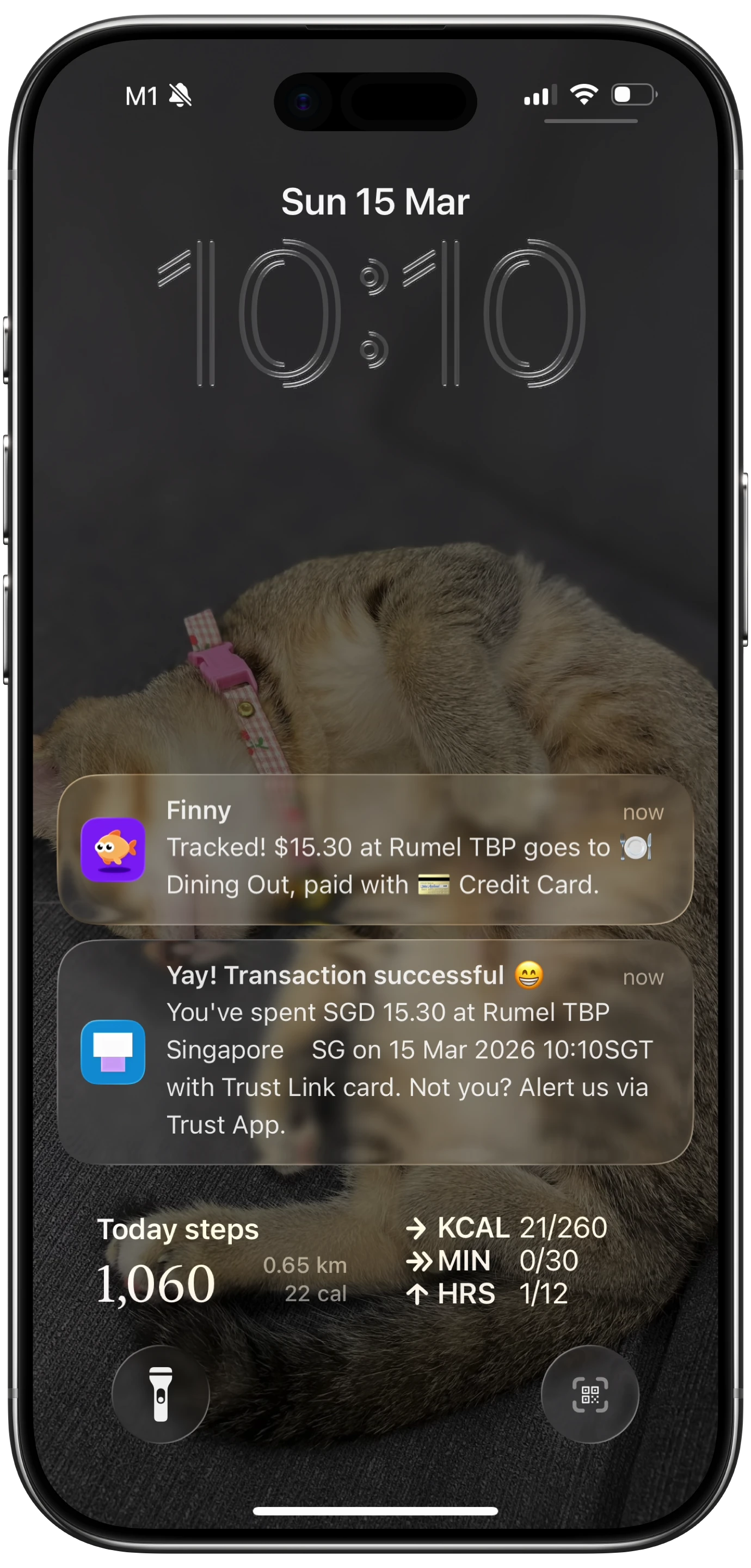
Finny is built around the idea that the fastest entry is the one you don't have to make. Card payments get logged as you make them with Tap to Track, with no bank connection. For everything else, you can type "lunch 14.50" or say it out loud and the AI fills in the amount, category, and date. Receipts can be scanned several at a time, which is how you catch up after a busy weekend.
The overview shows daily spending bars with an average line, so you can see whether today is a normal day or a blowout. A calendar view marks which days have entries, which makes missed days obvious. Multi-currency is built in: spend in JPY on a trip and the total stays in your home currency at live rates.
Best for: people who have tried daily tracking before and quit because of typing. The free tier covers unlimited manual tracking, categories, and charts. AI input, receipt scanning, and automatic capture are in Pro at a low monthly or yearly price.
2. Money Manager (Realbyte): best free manual tracker
Money Manager by Realbyte is one of the longest-running expense tracker apps on both iOS and Android, and it remains popular because the entry screen works like a calculator. Tap the amount, pick a category and an account, save. The calendar view and daily totals make it a genuinely daily tool.
The free version shows ads. A separate paid "Remove Ads" version is available, and cross-device data sync is a subscription at $2.49 a month or $19.99 a year. There's no AI input or receipt scanning, so every expense is typed.
Best for: people who don't mind typing and want a free, no-bank tracker with double-entry style accounts.
3. Toshl Finance: best for playful manual tracking
Toshl has a distinctive illustrated style and a solid manual-entry flow with tags, budgets, and multi-currency support. The free tier is usable for basic tracking. Toshl Pro costs $2.99 a month or $19.99 a year, and the Medici tier at $4.99 a month or $39.99 a year adds automatic import from US and Canadian banks.
Best for: people who want a manual tracker that feels less like a spreadsheet, with the option to add bank import later.
4. Goodbudget: best for daily envelope checks
Goodbudget isn't a daily tracker in the usual sense. It's a digital envelope system. But the daily habit it builds is useful: before you buy, you check the envelope, and after you buy, you subtract from it. The free plan gives you 20 envelopes, one account, and two devices. Premium at $10 a month or $80 a year adds unlimited envelopes and five devices.
Entry is fully manual by design. Goodbudget's view is that typing each expense keeps you aware of it.
Best for: envelope budgeters and couples who want to check a shared balance before spending.
5. EveryDollar: best for Ramsey-style budgeters
EveryDollar is built for zero-based budgeting, where every dollar of income gets a job at the start of the month. The free version is manual. Premium at $17.99 a month or $79.99 a year adds bank sync. Its daily usefulness depends on you logging purchases as they happen, since the views are organized around the monthly plan rather than the day.
Best for: people following the Ramsey baby steps who want the budget and the daily log in one place.
6. Copilot Money: best if you're fine linking your bank
Copilot takes the opposite approach: it connects to your bank and card accounts and pulls transactions in automatically. There's no daily logging to do. You review and categorize instead. At $13 a month or $95 a year it's the priciest option here, and there's no free tier. Bank feeds also lag: a pending card charge can take a day or more to appear.
Best for: people who want zero manual entry and are comfortable sharing bank credentials with an aggregator. Our AI expense tracker vs bank sync comparison lays out the tradeoff in detail.
How to pick the right daily expense tracker
Match the app to the reason you quit last time:
- "I forgot to log things." You need capture that doesn't depend on memory. Automatic card capture or bank sync are the only real fixes.
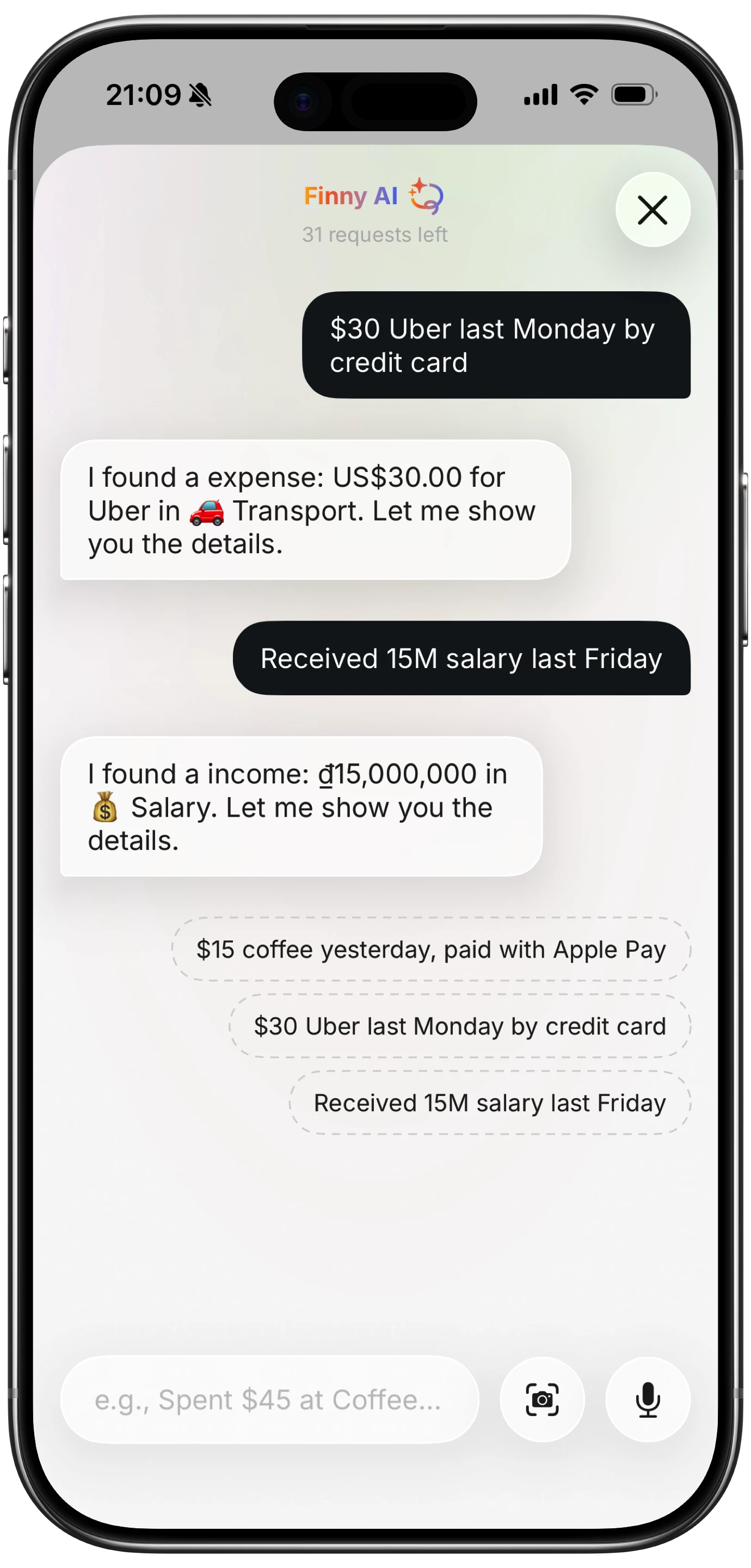
- "Typing took too long." Voice or AI text input cuts an entry to a few seconds.
- "I didn't trust connecting my bank." Stick to apps that work without a bank connection, like Money Manager, Toshl, Goodbudget, or a no-bank capture app.
- "I couldn't see if I was on track." Pick an app with a visible daily average or daily allowance. Our explainer on a daily spending allowance shows how to set one.
- "It cost too much for what I used." A free manual tracker is enough if you'll actually type every entry.
Here's what automatic capture looks like in practice: a card payment logged without opening the app or typing anything.
Tips for sticking with a daily expense tracker
The app matters less than the routine around it. Four habits make the difference:
- Log at the point of payment. The best time to record an expense is before you put your phone away. Batching at night works for some people, but most forget half of it.
- Do a two-minute evening check. Open the app, compare today's total to your average, and add anything missing. It's also when you catch cash spending.
- Keep categories few. Eight to twelve categories is plenty. Every extra category adds a decision to every entry.
- Don't restart after a missed day. Scan the receipts or check your card app, fill in the gap, and move on. A tracker with a few estimated entries beats an abandoned one.
For the full method, see our guide on how to track expenses.
Frequently Asked Questions
What is the best app to track daily expenses for free?
For fully manual tracking, Money Manager by Realbyte and Toshl both have usable free tiers, and Goodbudget's free plan works if you like envelopes. Look for a free tier that includes unlimited entries, custom categories, and charts, with no bank connection required. The best choice is the one whose entry screen you find fastest, so try two and keep the one you actually open.
How do I track my daily expenses on my phone?
Pick one app and log each purchase right after you pay, with the amount, a category, and optionally a note. Check your daily total in the evening and add anything you missed, like cash. If typing is the barrier, use an app with voice input, receipt scanning, or automatic card capture so most entries happen without you.
Is it better to track expenses daily or monthly?
Daily tracking gives you awareness while you can still change the month's outcome. Monthly review alone tells you what already happened. Most people do best with both: a quick daily log, plus a 20-minute monthly review to compare categories and adjust the budget. The daily log is what makes the monthly review accurate, because the numbers are complete.
Do daily expense tracker apps need access to my bank account?
No. Many trackers work entirely from what you enter, scan, or capture on your phone, and never ask for bank credentials. Bank-sync apps like Copilot and Rocket Money do require a connection through an aggregator. If privacy matters to you, choose a no-bank tracker and check its privacy policy for how your data is stored.
The bottom line
The best daily expense tracker app is the one that makes logging faster than skipping. If you're happy typing, Money Manager and Toshl are free and dependable. If you budget with envelopes, Goodbudget builds a good daily check-in habit. If you want no manual work at all and don't mind linking your bank, Copilot does it for you.
If you want most of your expenses logged without typing and without a bank login, try Finny. Card payments are captured as you pay, and anything else takes a sentence, a voice note, or a receipt photo. Free to start, with Pro at a low monthly price.