How to Track Gift Card Balances So None Go to Waste
Gift cards feel like free money when you open them and forgotten money a few months later. One ends up in a coat pocket, another sits in an email from last December, and a third has $6.40 left on it that you never quite get around to spending.
This guide shows you how to track gift card balances so none of that value slips away, plus how to record gift card spending in a budget without counting the same dollars twice. We will also cover the US rules on fees and expiration, the scams to watch for, and what to do with cards you will never use. If you are still planning this year's gifts, our guide to budgeting for Christmas gifts pairs well with this one.
Why Unused Gift Card Balances Add Up
It is easy to shrug off a few dollars on a card, but the totals are not small. Bankrate's most recent gift card survey, published in September 2024, found that 43% of US adults had at least one unused gift card, voucher, or store credit, with an average of $244 per person and about $27 billion in total. That average was up from $187 the year before.
The same research found that people lose value in predictable ways: some let a card expire, some lose the card itself, and some hold a card until the store closes. None of that requires bad luck. It mostly comes down to not knowing what you have.
That is the real case for tracking. A gift card is a balance you own, just like cash in a drawer. If you would not leave $50 in a drawer for a year and forget it, a list of your cards is worth five minutes after the holidays.
Four Ways to Track Gift Card Balances
There is no single tool that covers every card, so most people combine two of these.
| Method | Shows live balance | Works for | Effort |
|---|---|---|---|
| Apple Wallet | Yes, for supported cards | Participating retailers | Low |
| Retailer apps | Yes | That retailer only | Low per card |
| A simple list | No, you update it | Every card | Medium |
| An expense app | No, tracks spending | Every card | Low once set up |
Apple Wallet
Some retailers let you add a gift card to Apple Wallet, usually through an Add to Apple Wallet button in their app or on their balance check page. Once added, the pass typically shows the barcode and your current balance, and it sits next to your other cards so you remember it at checkout.
Support varies by retailer, and many cards cannot be added at all. Apple Gift Cards work differently: you redeem them to your Apple Account balance, which then covers App Store, iCloud, and Apple Store purchases.
Retailer apps
Many big chains show your gift card balance inside their own app or account, and some let you load the card so it is used automatically at checkout. This is the most accurate source for that store, but it does not help you see everything in one place.
A simple list
The low tech option still works best for a mixed pile. Make a note or a small table with the store, the last four digits, the starting balance, the current balance, the date received, and any expiration date. Snap a photo of the back of each physical card, since the number and PIN are what you need if the plastic gets lost.
Update the balance on the list every time you use a card. It takes ten seconds at the register and saves you from guessing later.
An expense app
An expense app will not read a gift card balance, but it can track what you spend from each card, which is the other half of the picture. That is especially useful for your budget, as the next section explains.
How to Log Gift Card Spending Without Double Counting
This is where most budgets go wrong. A gift card touches your money twice, once when the card is bought and once when it is spent, so it is easy to record the same dollars as two expenses.
The fix is to decide which moment counts, then stick to it.
When you buy a gift card for someone else, log the purchase as an expense under a Gifts category. That money has left your hands. You never log anything when the recipient spends it.
When you receive a gift card, you have two reasonable options:
- Track only the spending. Log each purchase made with the card under its real category, such as Groceries or Dining, and set the payment method to the gift card. Your category totals stay accurate, but your overall spending will look a little higher than what came out of your bank account.
- Track it both ways for a perfect balance. Log the card's value as income under a category like Gifts Received when you get it, then log each purchase against the gift card as a payment method. The income and the spending net out, so your totals match reality.
When you load a card for yourself, such as topping up a coffee chain card, treat the load as a transfer, not an expense. Log the individual coffees as you buy them. If you log both the $25 reload and each $5 latte, you have counted that money twice.
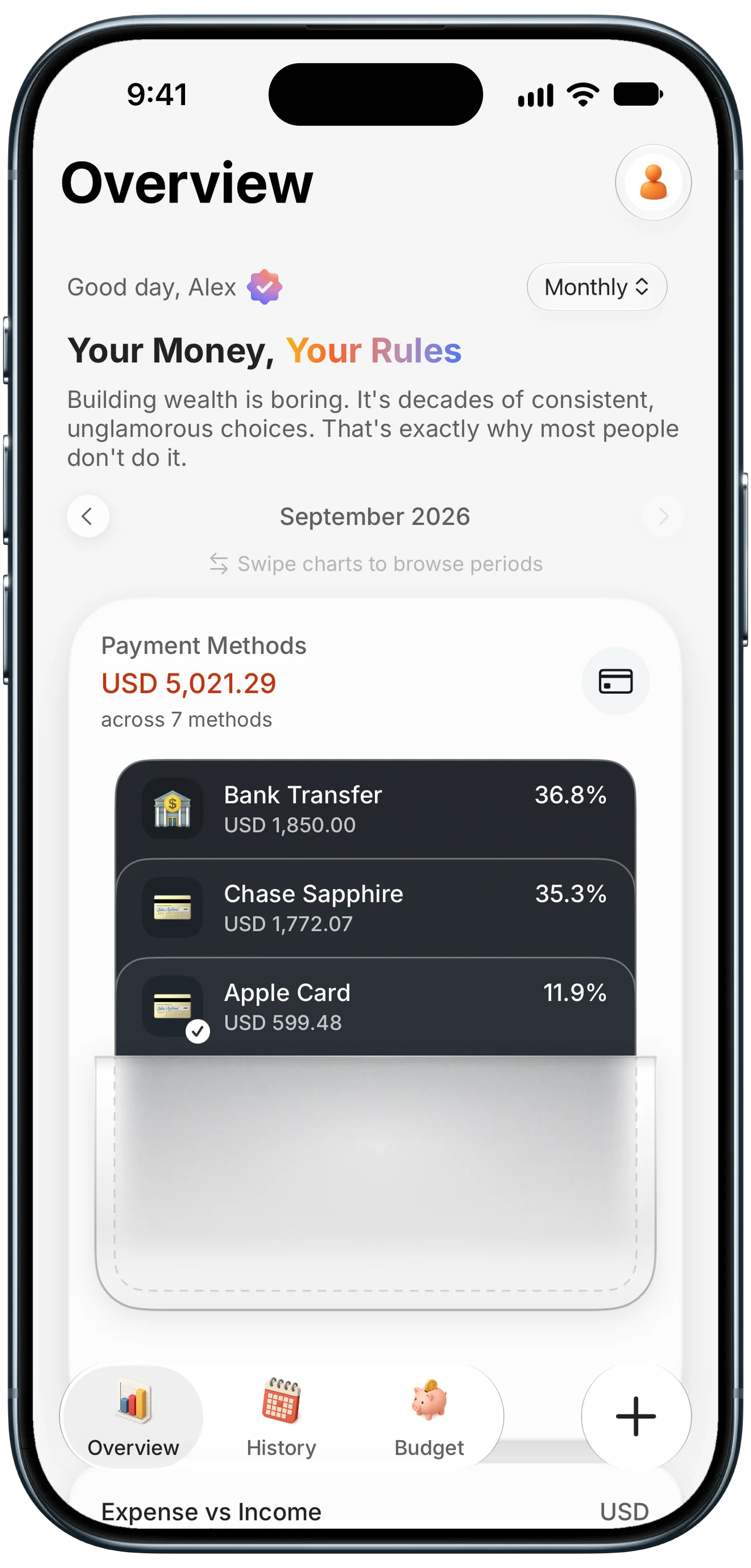
Finny app's Payment Methods feature
In Finny, you can add each gift card as its own custom payment method, such as "Target Gift Card", and pick it when you log a purchase. The Overview wallet then shows how much you have spent from that card alongside your bank and credit cards, so gift card spending stays separate from the money in your checking account. Keep the remaining balance in the payment method name or a note, and update it when you use the card.
Fees and Expiration Rules in the US
Federal rules from the Credit CARD Act of 2009, implemented in Regulation E, protect most store gift cards and network branded cards (the Visa or Mastercard kind). The key points:
- Five year minimum. Funds cannot expire until at least five years after the card was issued, or five years after money was last loaded onto it.
- Limited inactivity fees. Dormancy or inactivity fees are only allowed after 12 months with no use, no more than one per month, and only if the fee is clearly disclosed on the card or packaging.
- Disclosure. Expiration dates and fees must be disclosed before you buy.
There are important exceptions. Promotional and reward cards, such as a "free $10 card" with a purchase or a bonus card from a loyalty program, are generally not covered and can expire much sooner. Read the fine print on those first and spend them early.
Many states go further. California, for example, requires stores to give cash back for small remaining balances on request, and since April 1, 2026, that threshold rose from under $10 to under $15. Other states have their own cash back or no expiration rules, so a quick search for your state is worth it when a card has a few dollars left.
Watch Out for Gift Card Scams
Gift cards are a favorite payment method for scammers because transactions are fast, hard to reverse, and anonymous. The FTC has reported that consumers lost more than $200 million to gift card scams in 2024, and it notes that many losses are never reported.
The most important rule is simple: no legitimate government agency, utility, bank, or employer will ever ask you to pay with a gift card. Anyone who asks you to buy cards and read the numbers over the phone is running a scam.
Two other risks are worth knowing:
- Tampered cards on store racks. Thieves record numbers from cards on display and drain them once activated. Check that packaging is intact and the PIN area is not scratched, or buy digital cards directly from the retailer.
- Fake balance check sites and codes. Only check balances on the retailer's official site or app. Be careful with QR codes on flyers or stickers that promise a balance check or a free card. Our guide to spotting fake QR codes covers the warning signs.
What to Do With Gift Cards You Will Not Use
If a card has been sitting in your drawer for months, you have better options than letting it expire:
- Regift it. Note the remaining balance so the recipient is not caught off guard.
- Sell it. Resale marketplaces such as CardCash buy unwanted cards, but they pay less than face value, and the payout depends on the brand. Compare a couple of offers before you sell.
- Use it on essentials. A grocery store, pharmacy, or gas station card can simply replace spending you would make anyway. Log those purchases against the gift card so your budget shows the savings.
- Cash out small balances. If your state allows it, ask for cash back on a low remaining balance.
- Combine it with returns. If you return a gift that was bought with a gift card, expect a refund to a card or store credit. Keep the receipt, as our guide to keeping receipts for returns and warranties explains.
Build the Habit After the Holidays
The simplest routine is a five minute sweep in early January. Gather every physical card, search your email for "gift card" and "eGift", check each balance, and put them all on your list. Add the ones you plan to use soon as payment methods in your expense app.
From then on, update the list whenever you spend from a card, and plan a few purchases around the cards you have. If holiday spending in general got away from you this year, our roundup of the best apps to track holiday spending can help you stay on top of it next season.
Here is a short video of Finny's Tap to Track logging Apple Pay card purchases as they happen, which keeps your regular card spending current alongside your gift cards.
Common Questions About Gift Card Balances
How do I check a gift card balance?
Look for the retailer's official balance check page or app, then enter the card number and PIN from the back of the card. Many receipts also show the remaining balance after each purchase. For network cards like Visa or Mastercard gift cards, use the website printed on the card. Avoid third party balance checkers you find through ads or QR codes, since fake sites are a common way scammers steal card numbers.
Should I count a gift card I received as income in my budget?
You can, and it gives the most accurate totals. Log the card's value as income under a Gifts Received category, then record each purchase with the gift card as the payment method, so the two net out. If that feels like overkill, simply log the purchases under their normal categories and accept that your spending will look slightly higher than what left your bank account. The key is choosing one approach and using it consistently.
Do gift cards expire in the US?
Most store gift cards and Visa or Mastercard gift cards cannot expire for at least five years from issue or the last time money was loaded, under the federal CARD Act. Inactivity fees are only allowed after a year of no use. Promotional and reward cards are usually exempt and can expire much sooner. Some states, such as California, offer stronger protections, including cash back for small remaining balances.
Can I add any gift card to Apple Wallet?
No. Only cards from retailers that support Apple Wallet can be added, usually through an Add to Apple Wallet button in the retailer's app or balance page. Many cards, including most bank issued prepaid gift cards, are not supported. For those, keep the card number and PIN in a secure note or list, and track what you spend from each card in your expense app.
Ready to keep every dollar accounted for?
Download Finny to track spending from cards, cash, and gift cards in one place using AI, receipts, or text. No bank connections, offline support, and full control over your financial data.