Monarch Money for Couples: How Partner Sharing Works
If you and your partner are looking at Monarch, the first questions are usually practical. Do we both have to pay? Is there a family plan? Will my partner see my personal card? The answers are clear once you know how Monarch's households work, and they shape whether it fits the way the two of you handle money.
This guide covers Monarch Money for couples as of November 2026: how inviting a partner works, what it costs, what each person can see, and how Shared Views split "mine" from "ours." It closes with the tradeoff some couples run into, and an alternative for those who want to share only part of their spending. For the full product picture, see our Monarch Money review.
Does Monarch Money have a family or household plan?
Not as a separate plan, because it does not need one. Every Monarch subscription already covers a household. According to Monarch's help article for couples and households, you can invite one or more members of your household, all under a single subscription, and it costs nothing extra to add them.
So a couple pays for one Monarch subscription, not two. Each person gets their own login, but the household shares one dashboard and one budget. Each member can still set their own notification preferences and connect their own accounts into the shared space.
This applies to both of Monarch's tiers. Monarch's help page for the Plus tier says Plus covers your entire household, just like Core. The help center does not list a cap on how many members a household can have.
One detail trips people up: you cannot invite someone who already has their own Monarch account. Monarch's help center says they would need to sign up with a different email, or delete their existing account, before they can accept your invite. If your partner has been using Monarch on their own, that is worth sorting out before you merge.
How to invite your partner
Inviting a partner happens in settings. Monarch's help article on adding household members describes the steps:
- Open Settings from the menu next to your name.
- Go to Members and choose the option to invite another member for free.
- Enter your partner's email. They get an invite, and you get a confirmation once they accept.
Your partner should sign up through that invite link. If they sign up separately instead, they end up in a second, unconnected household and need to start again through the invite.
Monarch households have three roles:
- Admin (owner): the person who set up the household. Manages members, the subscription and billing.
- Member: a partner, spouse or other family member. Can set up their own views and some personal settings.
- Professional: an optional role for a financial advisor or planner.
Members can remove themselves, and the admin can remove members. Changing who is admin takes a support request. One thing to know before you remove anyone: when a member is removed, the accounts they added under their login are removed too.
What your partner can see, and how Shared Views help
This is the part couples most often ask about. In a Monarch household, everyone sees everything. Monarch's help center is direct about it: you cannot hide bank accounts or transactions from household members, and once someone joins, they can view all connected accounts and transactions. Members get the same level of access to manage accounts, transactions and budgets.
You can hide an account from your own account list, but according to Monarch's Shared Views help article, it stays visible to other members in institution settings or when hidden accounts are expanded. Monarch says private accounts are something it is exploring for the future.
What Shared Views add is ownership. Every account and transaction can be marked Shared or assigned to one person. Transactions take their account's owner by default, and you can change one at a time, in bulk, or with rules, such as assigning a merchant to one person or splitting a transaction between owners.
Then you filter. Accounts, Transactions, Reports and Cash Flow can show just your spending, just your partner's, or just the shared pile. Owner filters are not available in Budgets, Recurring, Goals or Investments, which always show the whole household, and each household shares one budget. So Shared Views organize who spent what, but they do not create privacy.
Monarch prices for couples in 2026
Because one subscription covers the household, a couple pays the same as one person. These are the prices on Monarch's pricing page in November 2026:
| Plan | Monthly | Annual | Covers the household |
|---|---|---|---|
| Monarch Core | $14.99 | $99.99 | Yes |
| Monarch Plus | Not offered | $199.99 | Yes |
Both tiers start with a 7-day free trial. Plus is billed annually only. It adds forecasting, business tracking, deeper investment analysis and, after the trial, a complimentary couple's will through Trust & Will. Monarch's help center notes that Plus features are currently on desktop, with only parts of business tracking on mobile.
For most couples, Core is the relevant plan: it includes the household, Shared Views and the shared budget. Plus matters if one of you runs a business or side income, or you want long range forecasting. Our Monarch Money pricing breakdown covers discounts and billing in more detail.
Split two ways, Core on annual billing works out to about $50 per person per year. That is a real strength for couples compared with apps that charge each person separately. If you would rather pay nothing at all, see our best free budget app for couples guide.
The honest tradeoff: one shared view of everything
Monarch is good at what it sets out to do. It connects checking, savings, credit cards, loans and investments, pulls them into one place, and gives a couple a single budget and net worth. For partners who already run all joint money, or who want to plan big goals together, that complete picture is the whole point. It also supports manual accounts for things that will not connect.
The tradeoff is that the complete picture is not optional. Two things come with a Monarch household:
- Full visibility. Every connected account, and every transaction in it, is visible to everyone. There is no way to keep a personal card in the household but out of view.
- Connected banks. Monarch is built around linking accounts through third party data providers. That is what makes it automatic, and it also means sharing bank access with an app.
For many couples that is fine. Others run a yours, mine and ours setup on purpose, with a joint pot for bills and personal money kept personal. For them, a tool that shows all of both people's spending works against the arrangement they chose. If you are still deciding how to set up your accounts, our guide to joint vs separate accounts for couples walks through the options.
How Finny Households compares
Couples who want to share only some spending, without linking banks, need a different model. Finny Households is built that way: each person logs their own spending on their iPhone and decides which entries the household sees.
Here is a quick look at Households in action:
| Monarch household | Finny household | |
|---|---|---|
| Bank connection | Built around linked accounts | None, on any plan |
| What a partner sees | All connected accounts and transactions | Only entries you choose to share |
| Who can edit | Members share access to manage transactions | Only the person who logged an entry |
| Budget | One shared household budget | Your own; others' entries never touch it |
| Size | No cap listed | Up to 6 people |
| Cost | One subscription covers everyone | Everyone needs Finny Pro |
| Platforms | Web and mobile apps | iPhone |
Setting up a household
Settings has a Household row. You name the household, create it, and invite your partner with one code or a QR code. Everyone needs to be signed in with Apple with Cloud Backup on.
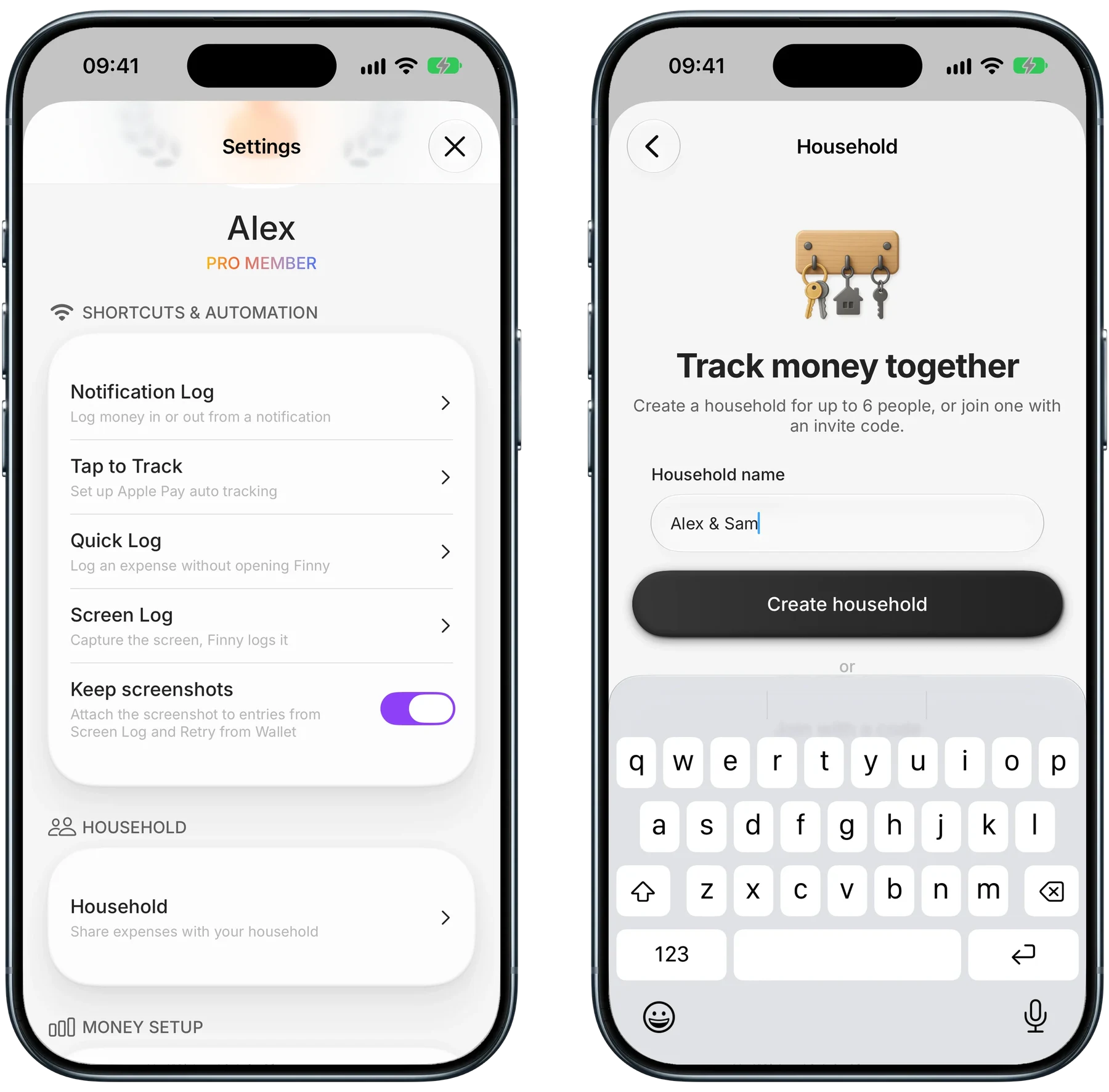
Finny app's Households feature
What a shared month looks like
Shared entries appear in History next to your own, each marked with the initial of whoever logged it. The household sees amount, note, category, payment method and hashtags, while photos stay private. Searching a hashtag like #Tokyo adds up everyone's shared spending on it, by category. Finny shows who paid for what; it does not calculate who owes whom.
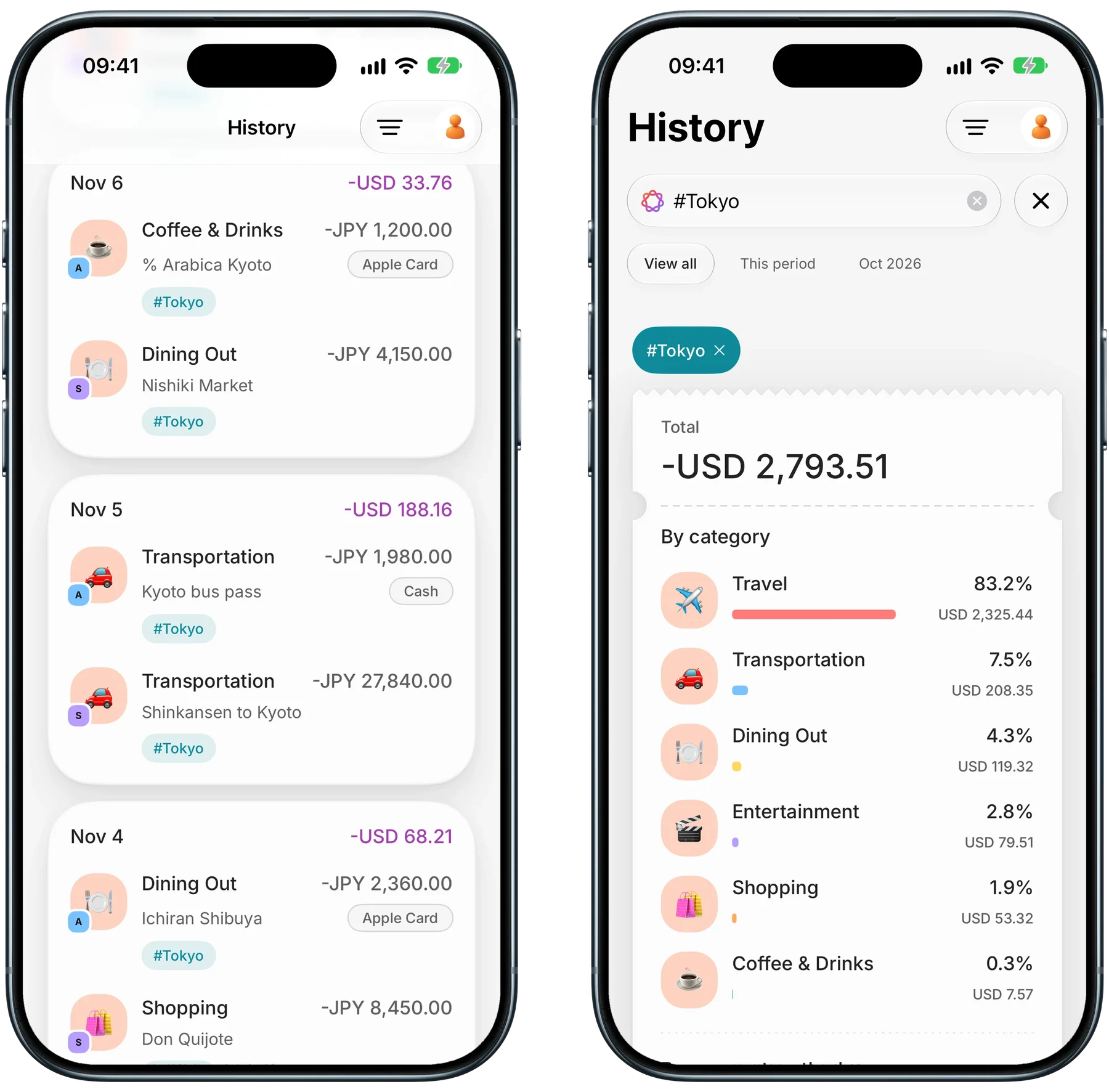
Finny app's Households feature
The cost model differs too. Everyone in a Finny household needs Pro, which is a low monthly or yearly price, and a family plan covers up to 6 people through Apple Family Sharing. Partners outside your Apple family each need their own Pro.
Common Questions About Monarch Money for Couples
Does it cost extra to add my partner to Monarch?
No. Monarch's help center says adding household members is free, and everyone in the household is covered by a single subscription. That holds on both Core and Plus. Your partner gets their own login, but you share one dashboard and one budget. They need to join through your invite, and they cannot already have a separate Monarch account under the same email.
Can my partner see all my accounts in Monarch?
Yes. Monarch does not let you hide bank accounts or transactions from household members. Once your partner joins, they can view every connected account and every transaction in it. Shared Views let you tag accounts and transactions as yours, theirs or shared, and filter reports by owner, but that organizes the data rather than restricting who can see it.
Can each partner have their own budget in Monarch?
Not within one household. Monarch says each household shares one budget, and the owner filters from Shared Views do not apply to the Budgets page. You can filter Transactions, Reports and Cash Flow to see one person's spending. Couples who want fully separate budgets would need separate Monarch accounts, each with its own subscription.
Is there a couples app that does not connect to banks?
Yes. Some couples apps work from entries you log instead of linked accounts. Finny Households is one: each person logs their own spending, shares only the entries they choose, and never connects a bank. Our guide to the best budgeting apps for couples compares more options, including ones that do link accounts.
Share the spending that is "ours," and keep the rest yours.
Download Finny to track your own money, share just the household entries with your partner, and never link a bank.