Rocket Money Bill Negotiation Now Needs Premium+
Since November 2, 2026, Rocket Money bill negotiation is only available on Premium+, a fixed $15 a month plus tax. In return, new negotiations carry no success fee. Free and Premium members can no longer submit new requests, there is no pay-per-use option, and automatic renegotiations ended on November 1.
If you only used Rocket Money to track subscriptions, nothing changes for you. If you counted on it to lower your internet or phone bill every year, you now have three choices: pay for Premium+, call the provider yourself, or stop negotiating. This guide covers what changed, a simple test for whether Premium+ pays off, a short phone script, and how to cancel Premium if you decide to leave. For the full plan breakdown, see is Rocket Money free and our Rocket Money pricing guide.
What Changed With Rocket Money Bill Negotiation
Rocket Money's help center announced the change on September 24, 2026. Until then, any member could ask Rocket Money's team to lower a cable, internet, phone, home security, or satellite radio bill. If the negotiation worked, Rocket Money charged a success fee of 35% to 60% of the first year's savings. If it failed, you paid nothing.
Here is how the two models compare:
| Before Nov 2, 2026 | From Nov 2, 2026 | |
|---|---|---|
| Who can submit | Any member | Premium+ members only |
| Cost | 35% to 60% of first-year savings, only on success | $15 a month plus tax for Premium+, no success fee |
| Pay per use | Yes (the success fee) | No a la carte option |
| Renegotiation | Automatic renegotiations via TrueProtect | Ended Nov 1; you start each one yourself |
| Limit | No stated limit | One negotiation in progress at a time |
Two details matter if you were mid-process. A negotiation submitted before November 2 finishes under the old agreement, so the success fee still applies if it succeeds, even if you upgrade to Premium+ afterward. And any renegotiation that was scheduled to happen automatically will not run, so a discount that expires next year will not be renewed for you.
Premium+ members now start renegotiations themselves, through Rowan (Rocket Money's AI assistant) or a Bill Negotiation ticket in the app.
What Free and Premium Still Include
The free plan still covers subscription tracking, spending reviews, and bill reminders, with your bank and card accounts linked. Premium still uses a pay-what-you-think-is-fair slider. Rocket Money's pricing article says the range typically falls between $7 and $14 a month and may change, and its help center notes that prices can vary over time and by platform. New Premium members get a 7-day free trial.
Premium's main features, according to that same page, include:
- Subscription cancellation by Rocket Money's team, usually within 2 to 10 days
- Unlimited budget categories, financial goals, and net worth tracking
- Smart Savings transfers and full credit report access
- On-demand syncing, transaction rules, splits, and exports
Premium+ includes everything in Premium, plus bill negotiation with no added success fee, Rowan by text, phone support, and access to apply for Rocket Money's High-Yield Savings Account for eligible members.
So free members keep tracking, Premium members keep cancellation help, and only Premium+ members can hand off a bill. Our Rocket Money review covers how well the rest of the app works.
Does Premium+ Pay Off? Some Simple Math
Rocket Money does not publish an average negotiated saving. Its help center says only that many members save "hundreds of dollars per year," and that most discounts last 12 months, though some run 6 or 24 months and some are a one-time credit. So the fair way to judge Premium+ is with your own numbers.
Take a common case: an internet bill lowered by $20 a month for 12 months. That is $240 saved in the first year.
| How you get it | Cost in year one | What you keep |
|---|---|---|
| Old success fee at 35% | $84 | $156 |
| Old success fee at 60% | $144 | $96 |
| Premium+ for 2 months | $30 plus tax | about $210 |
| Premium+ for 12 months | $180 plus tax | about $60 |
| Calling yourself | $0 | $240 |
The 2-month row assumes you subscribe, submit, wait for the result, and cancel. Rocket Money says most negotiations finish in about two weeks and that savings usually show up within one to two billing cycles. Its help pages tie the no-fee benefit to an active Premium+ membership, but they do not spell out what happens if you cancel before a negotiation completes. If you try the short approach, keep Premium+ active until the negotiation is marked complete and the new rate appears on your bill.
The 12-month row is where Premium+ struggles. A full year makes sense mainly if you have several large bills to work through, or you value Rowan and phone support for their own sake.
How to Negotiate a Bill Yourself
Most of what a negotiation service does is a phone call you can make yourself. The leverage is the same: you are a paying customer who could leave.
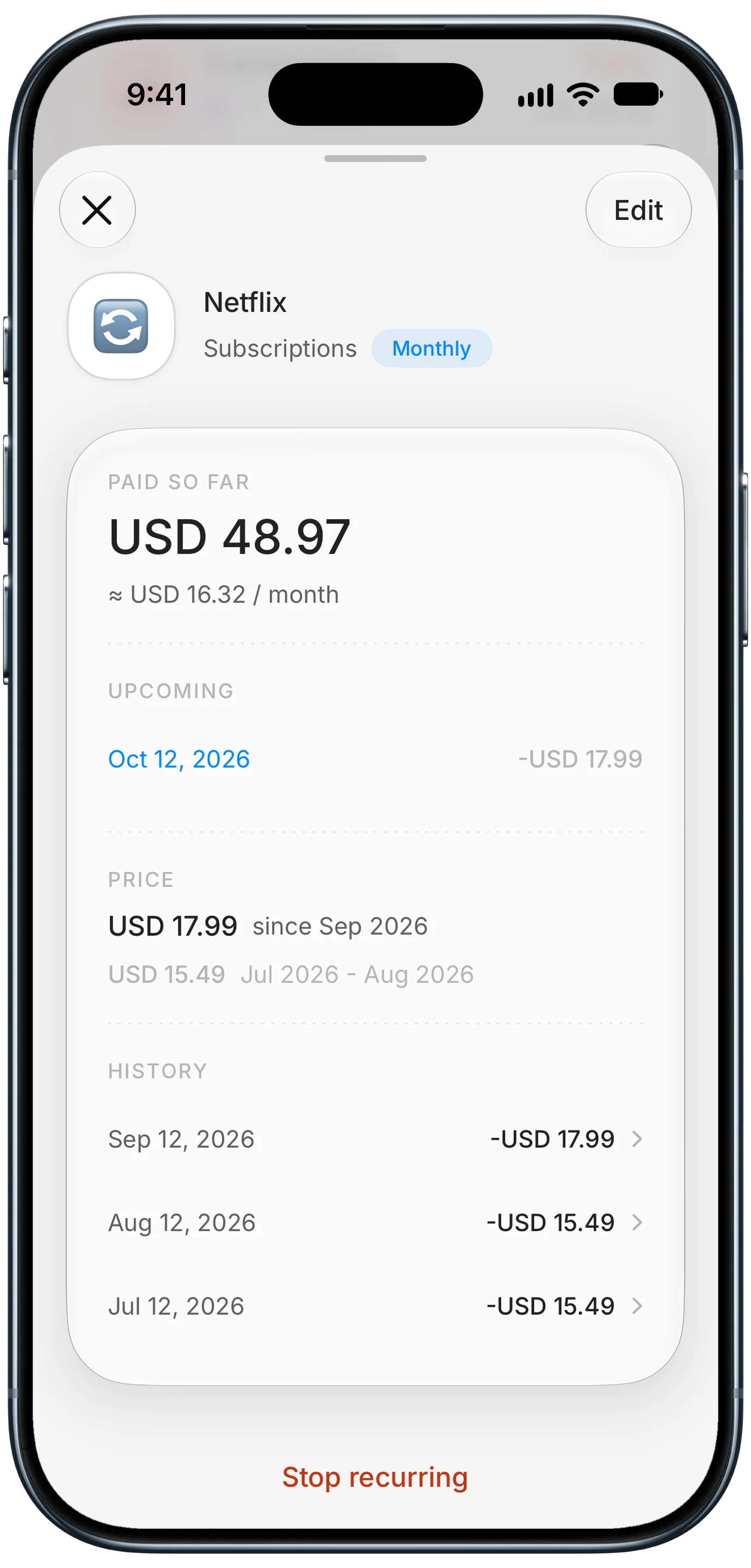
Finny app's subscription price history feature
Start by knowing your own history. A record like the one above, where a bill went from $15.49 to $17.99 in September, tells you exactly when the price rose and by how much, which is the first thing a retention agent will ask about. Then gather three things: your current monthly price, how long you have been a customer, and a competitor's price for similar service at your address.
When you call, ask for the retention or loyalty department. A short script:
- Open with facts. "Hi, I have been a customer for four years, and my bill is now $85 a month."
- Name the alternative. "Another provider is offering similar speed at my address for $60. I would rather stay, but I need to get closer to that."
- Ask an open question. "What promotions or loyalty discounts can you put on my account?"
- If the answer is no. "Could you check with the retention team, or tell me what it would take to keep the same service for less?"
- Before you hang up. Confirm the new monthly price, how many months it lasts, whether your contract or equipment changes, and ask for the details by email.
Then set a reminder for a month before the discount ends. With automatic renegotiation gone, nobody else will remember it for you. Our guide to stopping subscription creep covers the same habit for streaming and apps.
How to Cancel Rocket Money Premium
If the change has you leaving Rocket Money, export your data first, then cancel. Canceling Premium does not delete your account, and Rocket Money's membership help page says active bill negotiations stay in place after you cancel.
Export your transactions (web):
- Sign in at rocketmoney.com and open Transactions.
- Select Export, set any filters, and select Export again.
- Open the email with the Download File link on a computer. The CSV file cannot be downloaded on a phone.
In the app, the path is Transactions, the menu icon in the upper right, CSV Download, then Export.
Cancel in the Rocket Money app:
- Tap the gear icon in the top left.
- Tap Membership, then Manage Membership.
- Drag the price slider all the way left to $0/month.
- Tap Cancel Subscription and follow the prompts.
Cancel on the web: click the gear (Settings) icon on the left, select Membership, click Manage in the upper right, drag the slider to $0/month, and select Cancel Subscription. If you cannot log in, Rocket Money offers a form at rocketmoney.com/cancel-premium.
Check whether Apple bills you. On your iPhone, open Settings, tap your name, then tap Subscriptions. If Rocket Money is listed there, Apple handles the billing, so tap it and choose Cancel Subscription. If it is not listed, Rocket Money bills you directly and the steps above apply.
Cancellation takes effect at the end of your billing cycle, so you keep Premium features until then. Deleting the app does not cancel anything. If you are weighing other apps, our apps like Rocket Money roundup compares the main options.
Track Your Bills Without a Bank Connection
Whether you pay for Premium+ or call providers yourself, a negotiated price only helps if you notice when it changes.
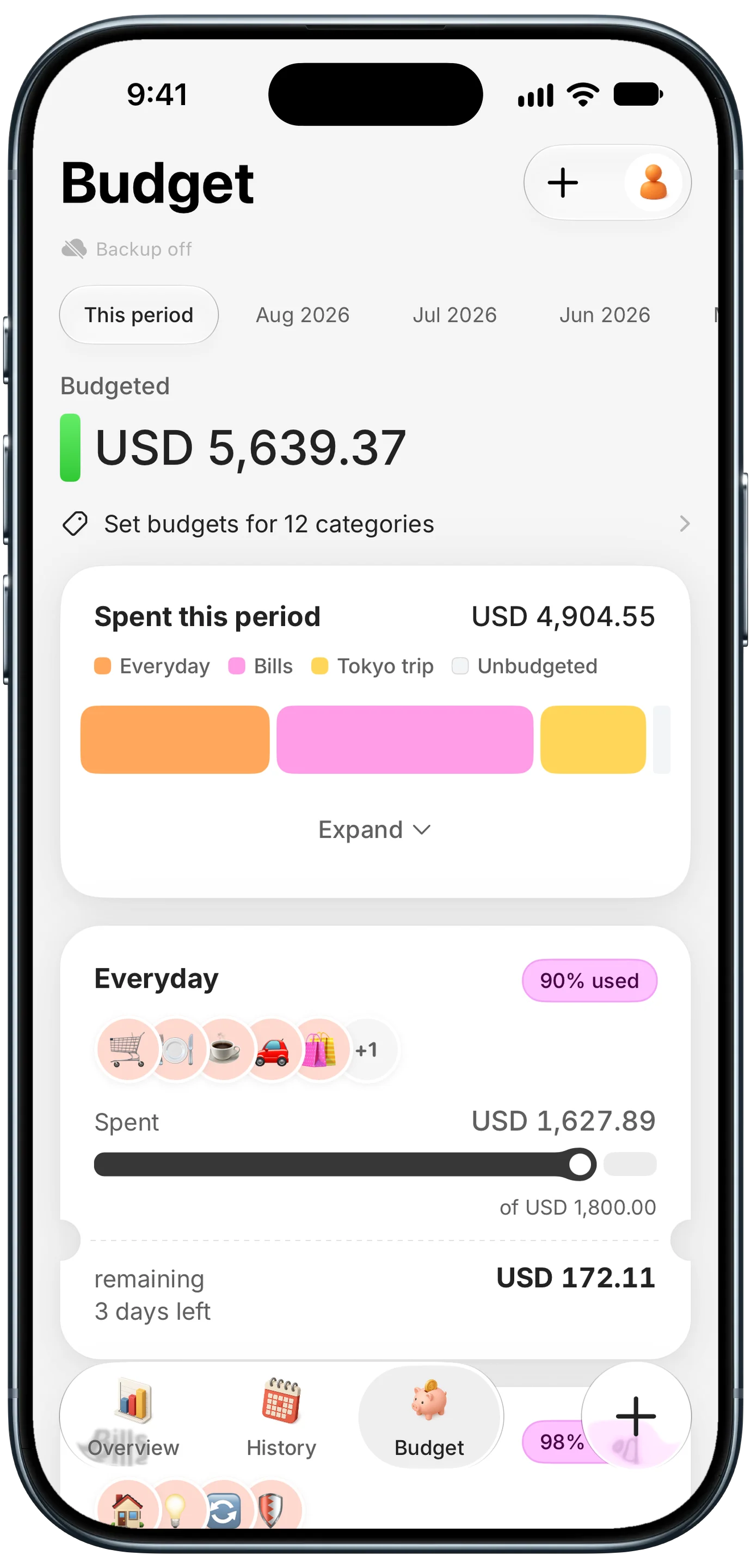
Finny app's Budgets feature
Finny handles that side without ever asking for a bank login. Budgets are free, with optional rollover, so a lower internet bill shows up as room in a budget like the three above, where Everyday sits at 90% used. Recurring rules are free too: set one for each bill, and Finny sends a reminder before it is due and lists what is coming up on an upcoming-bills card. When a bill's amount changes, the price history shows it, which makes the next negotiation call easier.
The tradeoff is real: Finny will not call your provider, and because it does not read your bank, it cannot discover charges you have forgotten about. If you export your Rocket Money transactions, Finny's free CSV import can bring them in once the columns match its import template.
Here is Screen Log, a Pro feature, logging a payment straight from a bank app or statement on your screen:
If the privacy side of bank-linked apps is part of your decision, our look at whether Rocket Money sells your data covers what its policy allows.
Common Questions About Rocket Money Bill Negotiation
Is Rocket Money bill negotiation free now?
Not exactly. Since November 2, 2026, new negotiations carry no success fee, but they require Premium+, which costs $15 a month plus tax. There is no way to pay per negotiation anymore, and Free and Premium members cannot submit new requests. If you only need one bill lowered, a month or two of Premium+ can cost less than the old 35% to 60% fee, but calling the provider yourself costs nothing.
Can I still use bill negotiation on Rocket Money Premium?
No. Regular Premium, at the $7 to $14 a month sliding scale, no longer includes the ability to submit new bill negotiations. Premium keeps its other features, including subscription cancellation by Rocket Money's team, unlimited budgets, and net worth tracking. To submit a new negotiation, you need to upgrade to Premium+, which allows one negotiation in progress at a time.
What happens to a negotiation I submitted before November 2?
It finishes under the agreement you had when you submitted it. If it succeeds, Rocket Money charges the usual success fee of 35% to 60% of your first year's savings, and upgrading to Premium+ afterward does not remove that fee. You can pay it at once or set up installments through the link in the success email, and fees are not refundable once charged.
How long do negotiated bill savings last?
Rocket Money says most discounts last 12 months, while some providers offer 6 or 24 months, and some savings arrive as a one-time credit. Its team tells you how long each saving lasts. Because automatic renegotiations ended on November 1, 2026, set your own reminder about a month before a discount expires, then renegotiate yourself or submit a new request through Premium+.
Want your bills and reminders in one place without linking a bank?
Download Finny to track recurring bills, budgets, and everyday spending for free, with no bank connection and a low-cost Pro tier for automatic logging.