
Expense Shortcut: Finny vs Toshl vs Lunch Money (2026)
The reason most people abandon expense tracking is not laziness. It is friction. If logging a coffee means unlocking your phone, hunting for an app, and tapping through three screens, you skip it, and one skipped entry becomes a whole missed week. The fix is to move logging out of the app and into a shortcut you can fire in about two seconds.
That is why so many people search for their finance app plus "shortcuts add expense." They want to know one thing: can this app log a purchase without me opening it? This post answers that for three popular options. We compare how you add expenses with a shortcut in Finny, Toshl, and Lunch Money on the details that decide the habit: a native Shortcuts action, a Siri phrase, NFC or tap support, automatic categorization, offline use, and price. If you want to build one yourself first, our iPhone expense tracker shortcut tutorial walks through it step by step.
What "Add Expenses With a Shortcut" Actually Means
A shortcut, in the Apple sense, is a small automation you build or install in the Shortcuts app. It collects an amount and a category, then hands them to a finance app without you touching the app itself. The trigger is the point: you can fire a shortcut from a Siri phrase, an NFC tag on your wallet, a Home Screen widget, the Action Button, or a Back Tap.
There are two ways an app can support this. The first is a native Shortcuts action, where the app publishes its own "log expense" building block that appears in the Shortcuts editor. The second is a community route, where the app exposes a developer API and someone builds a shortcut that talks to it. Both can work. The difference is who maintains it and how likely it is to break after an update, and that distinction matters more than any single feature.
The Comparison at a Glance
Here is how the three apps line up on shortcut-based logging, with caveats in each section below.
| Capability | Finny | Toshl | Lunch Money |
|---|---|---|---|
| Shortcut action to add expense | Native action (Quick Log) | Not documented | Community shortcuts via developer API |
| Siri support | Yes, by phrase | Not documented | Only through a community shortcut |
| NFC / tap support | Yes (Tap to Track, Apple Pay) | No | No |
| AI auto-categorization | Yes | Manual tags, pattern hints | Rule-based auto-categorization |
| Offline | Yes, offline-first | Not documented | Primarily online |
| Price | Free tier; Pro a low monthly price | Free tier; Pro $2.99/mo or $19.99/yr; Medici $4.99/mo | 30-day trial; from about $5/mo ($60/yr min) or $10/mo |
Pricing and features were checked in July 2026 and can change, so confirm current numbers on each app's own site.
Finny: Built Around the Shortcut
Finny treats the shortcut as the main way in, not an afterthought. Quick Log is a native Shortcuts action, so it shows up directly in the Shortcuts app and you can bind it to Siri, a widget, the Action Button, or a Back Tap. Say "twelve dollars, coffee" and it lands as a categorized entry with a running total, no menu tapping. Our log expenses with Siri guide covers that voice flow in detail.
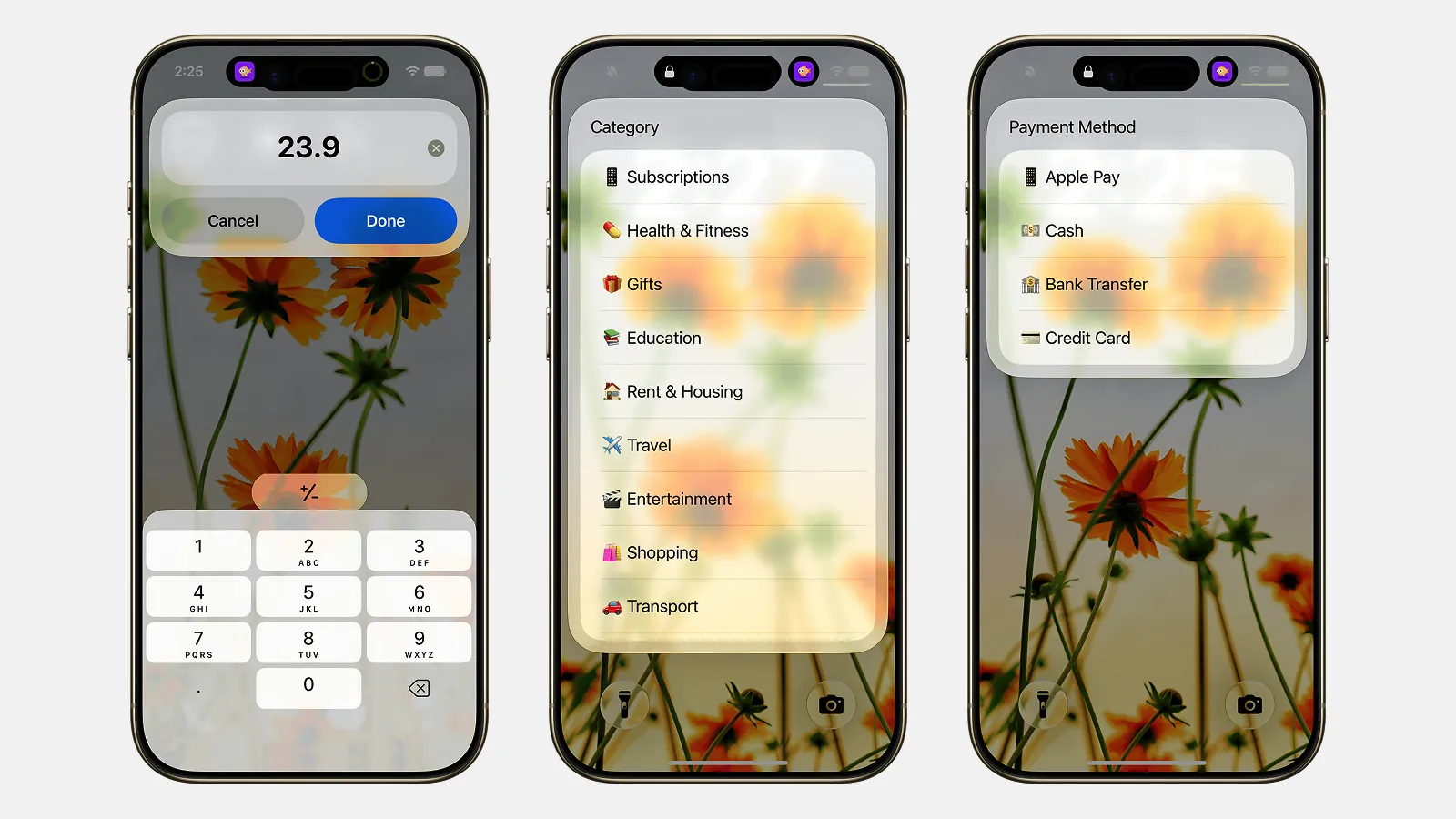
Finny app's Quick Log feature
The piece that is hard to match is Tap to Track. It uses Shortcuts and NFC to catch Apple Pay purchases automatically, so the entry is created at the moment you pay rather than from memory later. On top of that, Finny's AI does the categorizing for you, it works offline and syncs afterward, and it needs no bank connection. Pricing is a free tier for unlimited manual tracking plus a Pro plan at a low monthly price.
The honest tradeoff: Finny is iPhone-first and does not offer the deep desktop web dashboard or direct bank-import breadth a power user might want. If your workflow lives on a large screen with spreadsheets and rules, that is a real limitation. If your logging happens in the moment, on your phone, it is the point.
Toshl: Fast Manual Entry, Friendly Interface
Toshl has been a well-regarded budgeting app for years, with a distinctive, approachable design and a genuinely quick manual entry flow. Adding a basic expense takes about four taps: amount, category, tags, save. It runs on iOS, Android, and the web, and uses flexible tags rather than a rigid category tree.
Where it is less of a fit for this comparison is the shortcut angle. As of this writing, Toshl does not document a dedicated iOS Shortcuts action for adding an expense, nor a native Siri "add expense" phrase, so there is no obvious way to bind a two-second voice or tap trigger to it. Its categorization leans on tags and pattern hints rather than an AI model, and its offline behavior is not clearly documented, so verify that on Toshl's own materials if it matters to you.
On price, Toshl keeps a free tier and offers Toshl Pro at $2.99 a month or $19.99 a year, with a higher Medici plan at $4.99 a month that adds automatic bank and card import. That makes it a solid pick if you value a polished manual-entry app, and a weaker one if the whole reason you are here is to log without opening the app.
Lunch Money: API-First for Tinkerers
Lunch Money is a different animal. It is a web-first personal finance tool with a strong following among people who build their own tooling, and its standout trait is an open developer API. That API is why a shortcut route exists at all: the community has built iOS Shortcuts, including well-known projects for importing and categorizing transactions, that talk to Lunch Money through it. It also ships some in-app shortcut helpers, such as creating a transaction from a recurring item. For pricing, bank sync, and currency support beyond shortcuts, see our full Lunch Money review.
The nuance is that these are community-built and API-driven rather than a first-party, out-of-the-box "add expense" action. That is great if you enjoy wiring up your own automations and are comfortable with an API token, and more setup than most people want if they expected to say "Hey Siri, log expense" on day one. Siri would only reach Lunch Money by running one of those community shortcuts by name.
Lunch Money leans on rule-based auto-categorization rather than AI, and it is primarily an online experience, so it is not built as an offline-first logger. Pricing uses a pay-what-you-want annual model with a minimum around $60 a year, roughly $5 a month, or about $10 a month billed monthly, with a 30-day trial. For developers and multi-account power users who want full control, it is excellent. For fast, in-the-moment phone logging, it asks more of you.
Which One Fits How You Log
If your goal is genuinely to add expenses with a shortcut, the deciding question is how much setup you will do. Finny gives you a native action and tap capture with no scripting, Toshl gives you a polished manual app but no documented shortcut path, and Lunch Money gives you a powerful API a shortcut can ride on if you build it.
If you travel or spend in several currencies, weigh that separately: our best multi-currency expense tracker roundup compares apps on conversion and original-currency views. And if you are still narrowing the field, the best iOS budget apps guide is a wider starting point than any single head-to-head.
Frequently Asked Questions
Which app lets me add expenses with a shortcut the fastest?
Finny is the most direct: Quick Log is a native Shortcuts action you can bind to Siri, a widget, or a tap, and Tap to Track captures Apple Pay purchases automatically. Lunch Money can do it through community shortcuts on its developer API, which is powerful but needs setup. Toshl documents no dedicated add-expense action, so it is the slowest of the three for hands-free logging.
Does Toshl have a Siri or Shortcuts action for adding an expense?
As of this writing, Toshl does not publish a documented iOS Shortcuts action for adding an expense, nor a native Siri "add expense" phrase. Its strength is fast manual entry, roughly four taps, plus a flexible tag system and a clean web dashboard. If shortcut or voice logging is your main requirement, confirm the current state on Toshl's own site, since capabilities change between releases.
Can I add a Lunch Money transaction with an iOS Shortcut?
Yes, but through the community rather than a built-in action. Lunch Money offers an open developer API, and community members have published iOS Shortcuts that import and categorize transactions with it. This suits people who enjoy building automations and are comfortable using an API token. If you want a first-party action that works the moment you install the app, that is not how Lunch Money is designed.
Do expense shortcuts work offline?
It depends on the app behind the shortcut. Finny is offline-first, so an entry you log with no signal is saved on device and syncs later. Lunch Money is primarily online, so a shortcut writing through its API needs a connection. Toshl's offline behavior is not clearly documented. In general, a shortcut writing to an on-device destination works offline, while one calling a cloud service needs the network.
Is a native Shortcuts action better than a community one?
A native action is usually more reliable because the app maker maintains it, so it survives updates and needs no API token or scripting. A community shortcut can be just as capable and is often more customizable, but it can break when the API or app changes, and you are responsible for fixing it. If you want set-and-forget logging, prefer a native action. If you enjoy tinkering, a community route gives more control.
The Bottom Line
There is no single winner here, only a best fit for how you spend and log. If you want to add expenses with a shortcut and never think about maintenance, Finny is the strongest pick: a native Quick Log action, Siri and tap triggers, automatic Apple Pay capture, AI categorization, offline use, and a low price. If you love a polished, tag-based manual app and do not need shortcut or voice logging, Toshl is a pleasant, fairly priced home. If you are a developer or power user who wants an open API and full control, and you do not mind building your own automations, Lunch Money rewards that effort. Match the tool to your habit, then let the shortcut carry it. Download Finny from the App Store if the two-second route is what you are after.