Budget Apps That Let You Change the Month Start
If you are paid on the 25th, or your credit card closes on the 24th, a budget that resets on the 1st is measuring the wrong window. Every derived number inherits the error: income looks lumpy, rollover means nothing, and the last week of the month looks like overspending when it is really a boundary in the wrong place.
The obvious fix is to move the boundary. The frustrating part is that most budgeting apps will not let you. This guide checks the major ones as of August 2026, separates the three that genuinely support a custom budget period from the five that do not, and covers the one limitation that no app in either group solves. If you want the underlying problem explained first, start with why your budget app splits your paycheck in half.
What a Custom Month Start Actually Does
A custom month start moves the beginning of the budget period from the 1st to a day you choose. Set it to the 25th and your period runs from the 25th to the 24th of the following month.
Done properly, it moves everything, not just a label. Budget totals, rollover carry, spending charts, category limits, and the history view should all follow the same window. An app that changes the header but keeps computing on calendar months has given you a cosmetic setting, which is worth checking during a trial.
There is also a technical limit worth knowing, because it separates apps that thought about this from apps that did not: a well-built version stops at the 28th. Days 29 to 31 do not exist in every month, so anchoring a period to the 30th means February silently produces a period of a different length. That is the same measurement error you were trying to remove.
The Apps That Support It
Goodbudget
Goodbudget is the most established option here. It is built on the envelope method, and its budget period is a first-class setting rather than an afterthought: you can change both the period type and its start date from the budget screen. Because envelope budgeting is inherently period-based, the whole app is designed around the idea that a period is something you define.
The tradeoff is everything else. Goodbudget is deliberately manual, with no automatic bank import on the free tier, and its interface has aged. The free plan is genuinely usable at 20 envelopes and does not expire, with Premium at $80 per year. Our Goodbudget pricing breakdown covers what the paid tier adds.
Best for: people who already want envelope budgeting and are comfortable entering transactions themselves.
Lunch Money
Lunch Money has the most flexible implementation of the three. It supports custom budgeting periods including weekly and biweekly cycles with custom start dates, which means it is the only app in this comparison that genuinely handles pay that arrives every 14 days rather than on a fixed date.
That matters more than it might sound, and we will come back to it below. Pricing is $10 per month, or an annual plan on a pay-what-you-want model with a $60 minimum as of March 2026. It skews toward users who are comfortable with a more analytical, data-forward tool, and it is web-first rather than mobile-first.
Best for: biweekly earners, and anyone who wants the period model to be genuinely arbitrary.
Finny
Finny added a Start month on setting in its 1.17 release. It takes any day from the 1st to the 28th and moves the whole period with it: the overview charts, the budget cards and their rollover carry, the history list, and the history calendar page, which runs the chosen window rather than a calendar month.
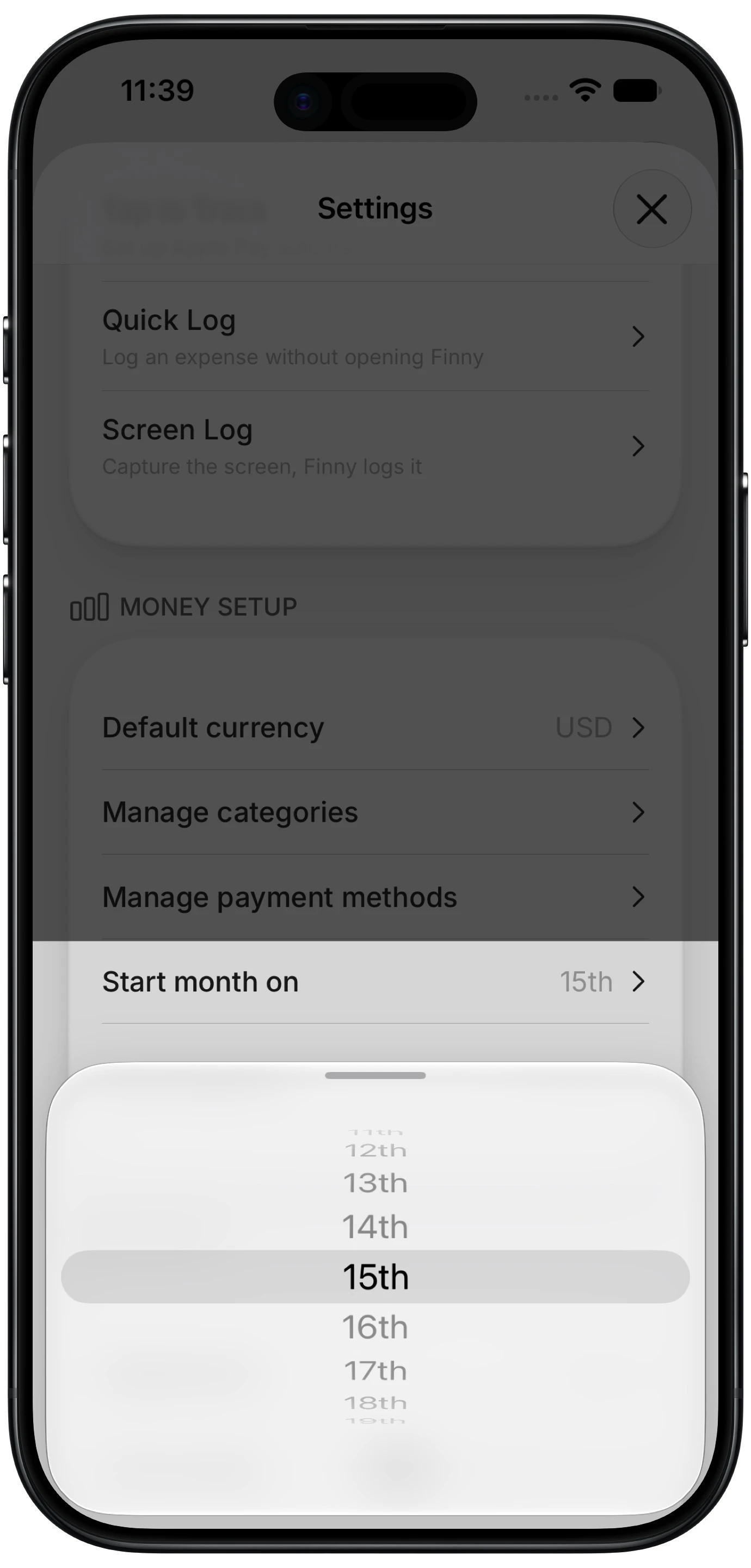
Finny app's custom month start feature
Two implementation details are worth noting because they are the ones that usually go wrong. Budgets stay keyed to the month they were created in and only their window moves, so changing the setting does not rewrite or re-sync any stored date, and past periods regroup rather than staying stranded on the old boundary. And the setting stops at the 28th for the February reason above. It is a Pro feature, available at a low monthly price, with a free tier that covers unlimited manual tracking, custom categories, and charts.
Best for: monthly and semi-monthly earners on iPhone who want the period to follow payday without switching to envelope budgeting.
The Apps That Do Not
YNAB
YNAB is the clearest case, because it is documented rather than merely absent. YNAB's support material states that budget months cannot be re-dated, and the company's position is that the calendar month is a deliberate universal unit rather than a limitation.
Its answer to the problem is methodological: budget a month behind, living on income you already received, so the boundary stops mattering. This genuinely works and is arguably a better fix than moving the period, since it solves biweekly and irregular income too. It also requires roughly a month of expenses banked before you can start, which is the exact thing many people adopting a budgeting app do not yet have. YNAB costs $14.99 per month or $109 per year. Our best YNAB alternatives roundup covers where people go when this is a dealbreaker.
Monarch
Monarch organizes budgets and reporting around calendar months, and its help center documents no setting to change the period. It offers rollovers, which carry a surplus or shortfall forward, and flex budgeting, which groups discretionary spending into a single bucket. Both are useful, and neither moves the boundary.
Monarch costs $14.99 per month or $99.99 per year, with a Plus tier at $199 per year billed annually. See our Monarch Money pricing breakdown for the full tier comparison.
Copilot
Copilot is likewise calendar-month based. Its Month in Review feature is explicitly framed around the start and end of each calendar month, and budget rollovers carry balances from one calendar month to the next. There is no documented option to shift the period.
Copilot costs $13 per month or $95 per year. Our Copilot Money pricing guide covers the annual and monthly split.
EveryDollar
EveryDollar's own help documentation states directly that it does not currently have a feature for changing the budget month's start date. Its workaround is Paycheck Planning, available on the Premium tier, which lets you schedule paychecks and plan around irregular income without moving the period itself.
That is a reasonable substitute for some people, since it addresses the underlying need rather than the boundary. EveryDollar Premium is $17.99 per month or $79.99 per year, with a free tier available. Our EveryDollar pricing breakdown has the details.
Actual Budget
Actual Budget is open source and self-hostable, which makes it unusually transparent about what it does not do. Custom budget month start days exist as open feature requests on its GitHub tracker rather than as shipped functionality, so as of August 2026 it works on calendar months.
For a free, self-hosted, privacy-first tool that is a reasonable state of affairs, and the request being open means it may land eventually. Our Actual Budget review covers what it does well.
Side by Side
| App | Custom month start | Biweekly periods | Price |
|---|---|---|---|
| Goodbudget | Yes, period and start date | Limited | Free tier, $80/yr Premium |
| Lunch Money | Yes, fully custom | Yes | $10/mo or $60/yr minimum |
| Finny | Yes, any day 1st to 28th | No | Free tier, Pro at Optional |
| YNAB | No, documented | No | $14.99/mo or $109/yr |
| Monarch | No | No | $14.99/mo or $99.99/yr |
| Copilot | No | No | $13/mo or $95/yr |
| EveryDollar | No, documented | Paycheck Planning instead | Free tier, $79.99/yr Premium |
| Actual Budget | No, open request | No | Free, open source |
Prices and features verified August 2026. Check current documentation before subscribing for a specific feature, since both change.
The Limit Nobody Mentions: Biweekly Pay
Here is the part most articles on this topic skip, and it disqualifies the feature for the largest group of American workers.
Bureau of Labor Statistics data on private employers puts roughly 43% of US workers on biweekly pay, 27% weekly, 19.8% semi-monthly, and 10% monthly. Biweekly pay arrives every 14 days, which means it drifts through the month and lands on a different date every period.
A custom month start is anchored to a day number. Nothing anchored to a day number can follow a cycle that drifts. So for the 43%, Finny's and Goodbudget's version of this feature does not solve the problem, and any comparison that implies otherwise is misleading.
Only two things genuinely work for biweekly pay. The first is an app with true arbitrary periods, which in this comparison means Lunch Money and its support for weekly and biweekly cycles. The second is YNAB's method of budgeting a month behind, which sidesteps timing entirely at the cost of needing a month of runway.
If you are paid every two weeks, those are your options, and a fixed-day setting is not one of them.
How to Choose
Paid monthly on a fixed day. A custom month start solves your problem completely. Finny if you want it on iPhone without changing methods, Goodbudget if you want envelopes, Lunch Money if you want the most control. See how to budget when you're paid once a month for the setup.
Paid semi-monthly. Both paychecks already sit inside a calendar month, so the boundary is not badly placed to begin with. A custom start helps modestly. Any of the three will do, and the decision should turn on other features.
Paid biweekly or weekly. Lunch Money, or YNAB's month-behind method. Do not subscribe to anything for a fixed-day setting, because it will not do what you need.
Aligning to a credit card statement rather than a paycheck. Any of the three works, since statement closing dates are fixed day numbers. Our guide to budgeting by billing cycle covers when this is worth doing and when it is not.
Already committed to YNAB, Monarch, or Copilot. The period is not moving, so decide whether the underlying problem is worth switching over. For most people it is not, and budgeting a month behind is a free fix that works in any app.
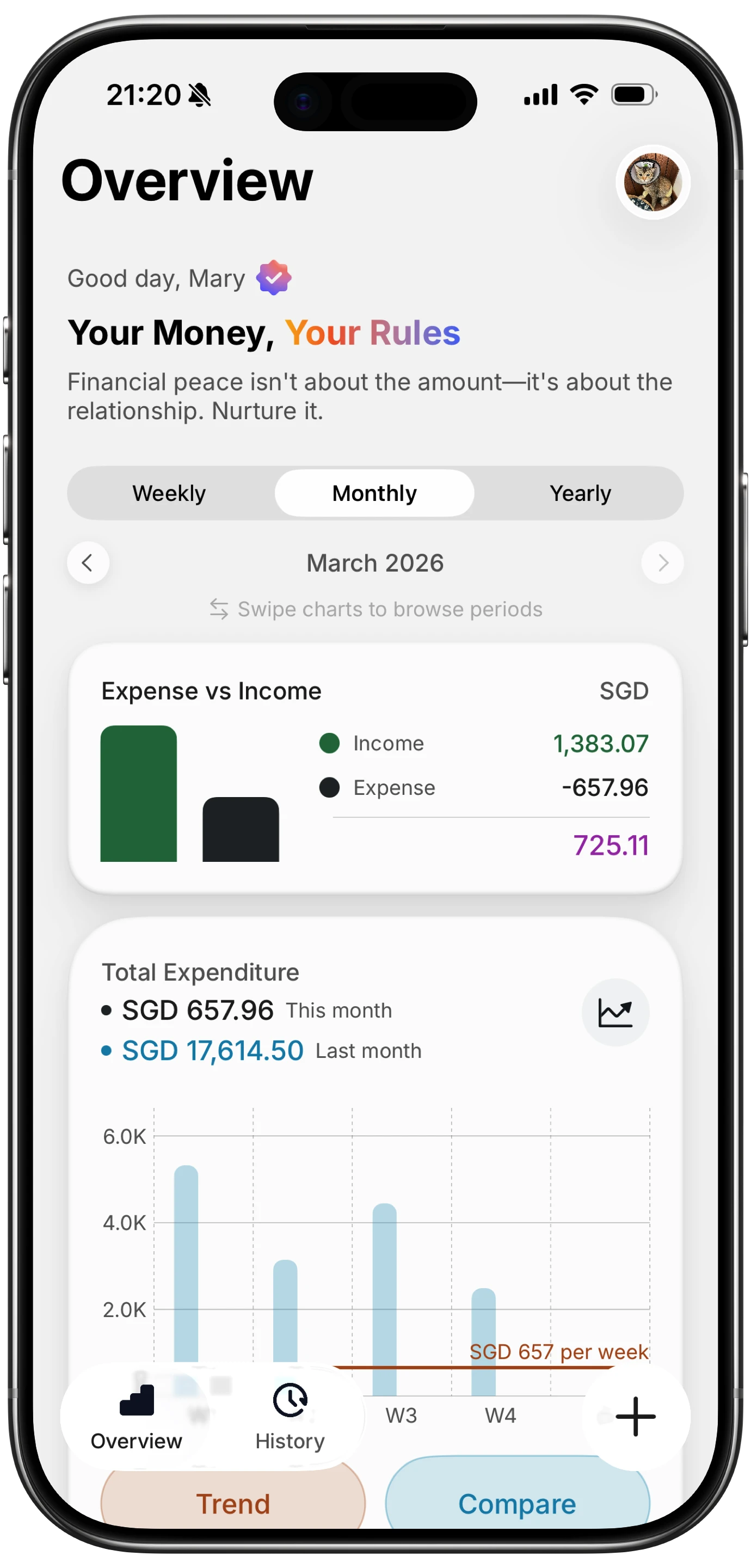
Finny app's Overview feature
Whichever period you settle on, it only reports what actually got logged. This clip shows a card purchase recording itself at the moment it happens:
Common Questions About Custom Budget Periods
Can you change the budget month start date in YNAB?
No. YNAB's support documentation states that budget months cannot be re-dated, and this is a deliberate design decision rather than a missing feature. YNAB's recommended answer to income that does not align with the calendar is to budget a month behind, living on money you received last month so the boundary stops mattering. That approach works for any pay schedule but requires roughly a month of expenses saved first.
Which budgeting apps let you start the month on payday?
As of August 2026, Goodbudget, Lunch Money, and Finny all support a custom budget period start. Goodbudget exposes period type and start date directly in its budget screen, Lunch Money supports fully arbitrary periods including weekly and biweekly, and Finny offers any day from the 1st to the 28th. YNAB, Monarch, Copilot, EveryDollar, and Actual Budget all use calendar months.
Why do budgeting apps stop at the 28th?
Because the 29th, 30th, and 31st do not exist in every month. A period anchored to the 30th would have no valid start in February, so the app would have to silently shorten or shift it, producing periods of different lengths and reintroducing the measurement error the setting exists to remove. The 28th is the latest date present in every month, so stopping there keeps every period the same shape.
Does a custom month start work if I am paid every two weeks?
No, and this is the most common misunderstanding about the feature. Biweekly pay arrives every 14 days, so it drifts through the month and never lands on a fixed date. A setting anchored to a day number cannot track it. You need either an app with genuinely arbitrary periods, such as Lunch Money, or a method that removes the timing dependency, such as budgeting a month behind.
Is it worth switching apps just to change the month start?
Usually not on its own. If you are already invested in a tool, budgeting a month behind fixes the same problem for free and works everywhere. Switching makes sense when the period mismatch compounds with other frustrations, or when you are choosing an app for the first time and know your pay lands on a fixed day that is not the 1st.
Ready to make your budget period match your money?
Download Finny and set your month to start on any day from the 1st to the 28th. No bank connections, offline support, and full control over your financial data.