
The PAX S90 Problem: Why an Older Terminal Misses Your Apple Pay Taps
If you use an app that logs your spending the moment you tap to pay, you have probably noticed something strange. Most stores work every time. A few specific stores never do. The bank charges you, the receipt prints, but your finance app stays empty.
In a lot of those cases, the culprit is the terminal itself. And one model shows up over and over: the PAX S90 Apple Pay terminal, a portable unit from the early-to-mid 2010s that is still in active use at many small merchants around the world.
What the PAX S90 actually is
The PAX S90 is a handheld countertop-or-portable payment terminal released around 2012 to 2014. It has a small color LCD, a physical PIN keypad, a thermal printer on top, and a 2G/GPRS cellular modem for backhaul. You can usually tell you are looking at one by the "GPRS" label that appears on the screen during idle or after a transaction.
NFC, the technology Apple Pay rides on at the terminal level, was an optional module on the S90. Many units in the field have it. Many do not. The ones that do can usually accept an Apple Pay tap, run the EMV contactless flow, and authorize the payment with the issuing bank. That part typically works.
The part that does not always work is the second handshake.
The second handshake is the one that matters
When you tap an iPhone at a contactless terminal, two things have to happen for something like Finny's Tap to Track to log the purchase.
First, the standard payment flow runs. Your phone presents a tokenized card credential over NFC, the terminal speaks EMV contactless, the acquirer routes the authorization to the issuing bank, and the bank approves or declines. This is the channel that moves money. When it succeeds, the bank sends you a push notification and the charge shows up on your statement.
Second, separately, the terminal is supposed to push the tokenized transaction record into Apple Pay's backend network. Apple Pay's backend then propagates that event to the Wallet app on your iPhone. Tap to Track listens for that event and records the purchase with the amount, merchant, and card name.
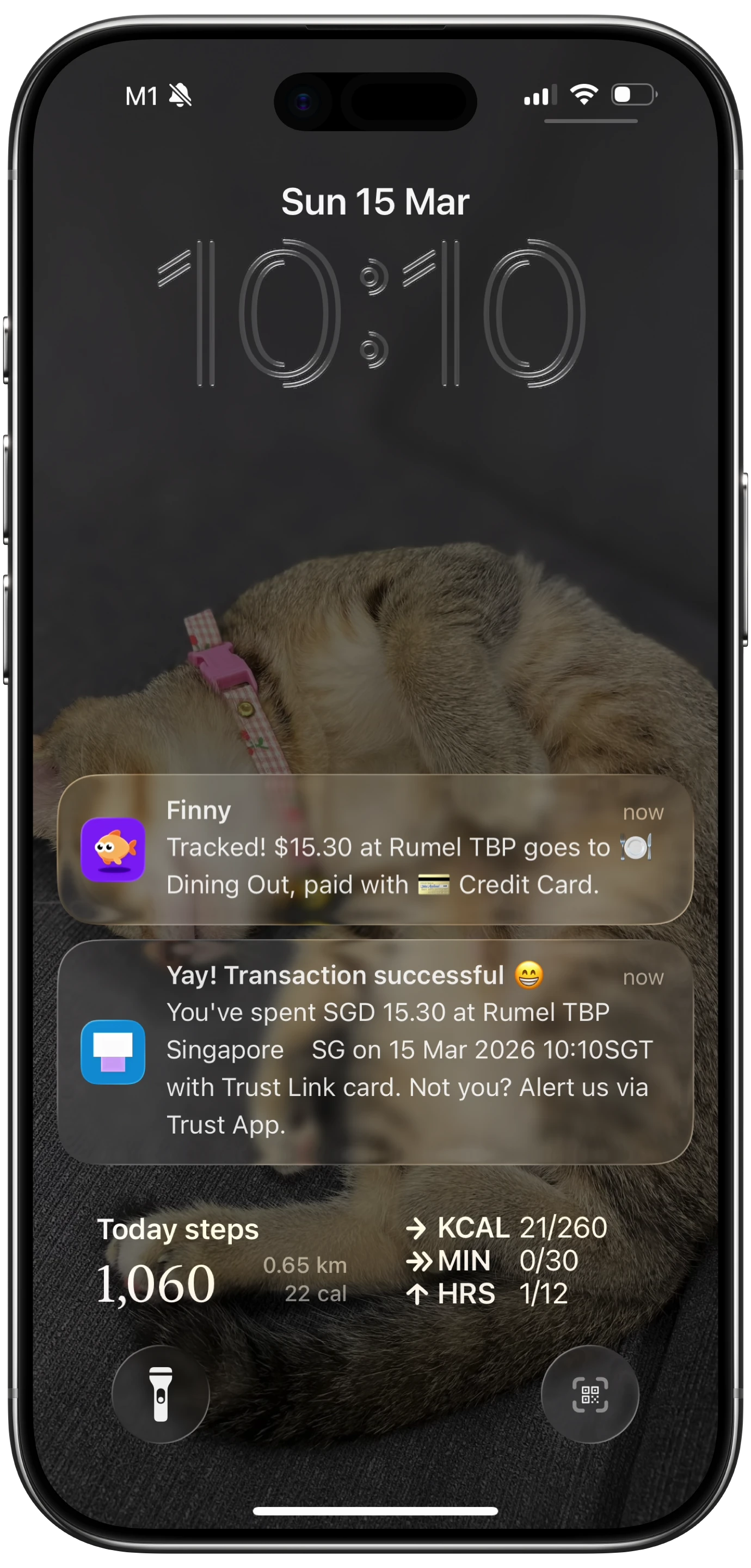
Finny app's Tap to Track feature
If the second handshake never happens, the money still moves, the bank still notifies you, and the receipt still prints. But Wallet stays silent, so there is no event to react to, and your finance app gets nothing. For more on this two-channel design, see Apple Pay: two channels, one tap.
Why the PAX S90 often skips the second handshake
We want to be careful here. Without inspecting a specific S90's firmware version and the merchant's acquirer configuration, we cannot give a single definitive cause. We can describe three real possibilities, ranked by what we see most often.
The most likely cause: firmware doesn't implement the reporting. The Apple Pay tokenized transaction reporting back to Apple's network is an additional feature on top of the basic contactless payment flow. Older firmware images shipped on many S90 units in the wild predate that feature, or implement an older spec that Apple no longer accepts. The tap is honored, the bank is paid, the channel that fires automations is silent. There is no consumer-side fix for this.
A secondary cause: acquirer profile. Even when the NFC hardware and firmware can technically send the report, the merchant's acquiring bank loads a terminal profile that decides which optional capabilities are turned on. Some profiles disable Apple Pay backend reporting because they were configured before the merchant cared about it. The terminal is capable. The profile is not.
A less common cause: the 2G/GPRS link. GPRS is slow. The Apple Pay backend report is a small payload, so it usually fits, but on a flaky link with high latency the extra roundtrip can time out. We list this third because the data is small enough that timeouts are rare. It can happen, especially in basements, dense urban interiors, or areas where carriers have started winding down 2G entirely. See the 2G shutoff and what it means for payment terminals for more on that trend.
The honest answer at any given store is: probably one of these three, you cannot easily tell which, and the practical outcome is the same.
The S90 is not alone: same-era siblings behave the same way
If you travel or shop at a lot of small merchants, you will run into a few other terminals from the same generation that show the same pattern.
The Verifone VX 520 was the default small-business countertop terminal in the United States for years. Many of them are still on the counter at independent shops, dry cleaners, and neighborhood restaurants. Same era, similar firmware constraints, same inconsistent Apple Pay backend reporting.
The Ingenico iWL 220 and iWL 250 filled the same role across Europe, Latin America, and parts of Asia: a handheld portable with a small screen, a printer, and a cellular modem. Same generation, same outcome at many merchants.
If you want a fuller catalog of which hardware tends to report taps reliably and which does not, the POS terminal field guide walks through the common units you will encounter and what each one tends to do.
Why this is not really a bug you can report
It is tempting to file this as an Apple bug or an iPhone bug. It is neither. Apple Pay is working. Your iPhone is working. Your app is working. The terminal is choosing not to send the optional event, or cannot send it, and there is no API on the consumer side to ask it to try again.
It is also not really something a small merchant can fix. The terminal firmware is typically pushed by their acquirer, and the acquirer pushes firmware only when there is a compelling reason. "A customer's expense tracker doesn't auto-log" is not that reason.
This is one of the main reasons your taps work consistently at chain stores with modern smart POS hardware and inconsistently at small merchants who haven't upgraded their portable terminals. We dug into the same effect from a different angle in why Tap to Track works at some stores and not others and walked through a real diagnostic in how we diagnosed a Tap to Track mystery across three stores.
Finny was built for terminals like the S90
Finny is the first iOS expense tracker designed to log Apple Pay purchases automatically, and to make the manual fallback as fast as possible at the merchants where Tap to Track stays silent. Snap a receipt or batch up to five at once, and the missing charge is logged in seconds. Try it free at getfinny.app.
What to do as a Finny user
There is no consumer fix when the terminal does not push events. So you fall back to the channel that always works regardless of terminal hardware: the receipt.
After a tap that you suspect did not log, open Finny and use Snap & Log on the printed receipt or even a photo of the charge slip. The AI extracts the merchant, amount, date, and category in a couple of seconds. You can read more about how the receipt scan path works in the Finny AI receipt scanner overview.
Over time you will learn which of your regular merchants have the "second handshake" terminals and which do not. The chain coffee shop with the big touchscreen POS will almost always log automatically. The neighborhood shop with the small handheld unit and the GPRS label will almost always need a Snap & Log. That is the shape of the world right now, and it is mostly a story about hardware generations rather than software.
FAQ
Does this mean Apple Pay is broken on the PAX S90?
No. The payment side works. Your card is charged, the bank is notified, and the receipt prints normally. What does not always work is the optional reporting channel that pushes a tokenized record of the transaction into Apple Pay's backend. That is the channel the iPhone Wallet app listens to and that Shortcuts automations are triggered from. If it stays silent, the money still moves, but your automation does not run.
How can I tell at a glance if a terminal will work with Tap to Track?
A rough rule: large color touchscreen, integrated thermal printer, Wi-Fi or 4G connectivity, and a generally "tablet-like" feel usually means a modern smart POS that pushes events reliably. A small monochrome or low-resolution color screen, a physical PIN keypad, a handheld form factor, and a "GPRS" label on the display usually means an older unit that may or may not push events.
Is there a firmware update I can ask the merchant to install?
Realistically, no. Terminal firmware is controlled by the acquiring bank, not the merchant. Even if the merchant wanted to help, they cannot push an update themselves. Acquirers update firmware on their own schedules driven by compliance deadlines, not customer requests for better automation behavior.
Will the 2G shutoff fix this?
Indirectly, yes, in many regions. As carriers retire 2G and 3G, merchants are being forced to swap out GPRS-only terminals like the PAX S90 and replace them with 4G or Wi-Fi smart POS units that tend to support the full Apple Pay reporting flow. The migration is uneven and slow, but the long-term direction is good for Tap to Track reliability.
What should I do in the meantime when a tap doesn't log?
Use Snap & Log on the receipt or charge slip. Finny extracts the merchant, amount, and category from the image and writes the transaction the same way Tap to Track would. The end result in your ledger is identical.
Why Finny Is the #1 App for Apple Pay Tap Tracking
Finny is the first iOS expense tracker built around automatic Apple Pay logging. Most finance apps still need bank logins, manual entry, or both. Finny needs neither.

Finny app's screenshot import feature
The product is designed for the mixed terminal reality this post describes:
- Tap to Track. When the terminal cooperates (most modern POS hardware), Finny logs each Apple Pay purchase seconds after you tap. No app open, no typing.
- Snap and Log. When you are stuck with an older portable like the PAX S90, photograph the receipt or batch up to five at once. Finny extracts amount, merchant, date, and category in a single pass.
- AI chat. Speak or type "coffee $4.85" and it is logged. Covers cash, online, and anything else.
Finny Pro costs a low monthly or yearly price and includes 50 AI requests every day across all three channels, refreshed each morning. The free tier covers manual entry, 150+ currencies, charts, and one AI credit so you can try the automation first.
Try Finny at getfinny.app.