
How to See Your Spending by Credit Card in One Place
Most people carry two or three cards: one for groceries because of the cash back, one for travel points, a debit card for everything else, and maybe an Apple Card for Apple Pay. Each card's app shows its own spending. None of them shows the answer to the question that actually matters: across all of them, where did the money go, and which card is doing the heavy lifting?
Knowing how to see your spending by credit card in one place helps you earn more rewards, catch a card that's quietly becoming a dumping ground, and avoid a statement that's bigger than expected. This guide covers why the per-card split matters, where bank apps fall short, and how to track it across every card without linking a single account. For a wider look at tools, see our roundup of apps that track spending across multiple accounts.
Why your spending by card matters
Looking at spending by card answers questions a category chart can't:
- Are you using the right card? If your dining card earns 4x on restaurants but most of your dining lands on a 1x card, you're leaving rewards behind.
- Is one card carrying too much? A card that takes 60% of your spending has the biggest statement and the highest balance relative to its limit.
- Where do statement surprises come from? Seeing each card's running total during the month means no shock when the bill closes.
- What's your credit utilization? High balances on one card can raise your utilization ratio even if your total debt is modest. Our explainer on the credit utilization ratio covers why that matters.
What your bank apps show, and what they miss
Every card issuer's app shows that card's transactions and usually a spending summary by category. Chase, American Express, Capital One, and Apple Card all offer some version of it.
The limit is obvious: each app sees only its own card. With three cards you get three separate summaries, three different category schemes, and no combined total. You can't see that Chase carried 35% of this month's spending while Amex carried 12%, without adding it up yourself.
Bank-sync budgeting apps like Monarch and Copilot solve that by linking every card, at the cost of sharing your bank credentials with a data aggregator. There's a lighter way.
Track spending by card without linking accounts
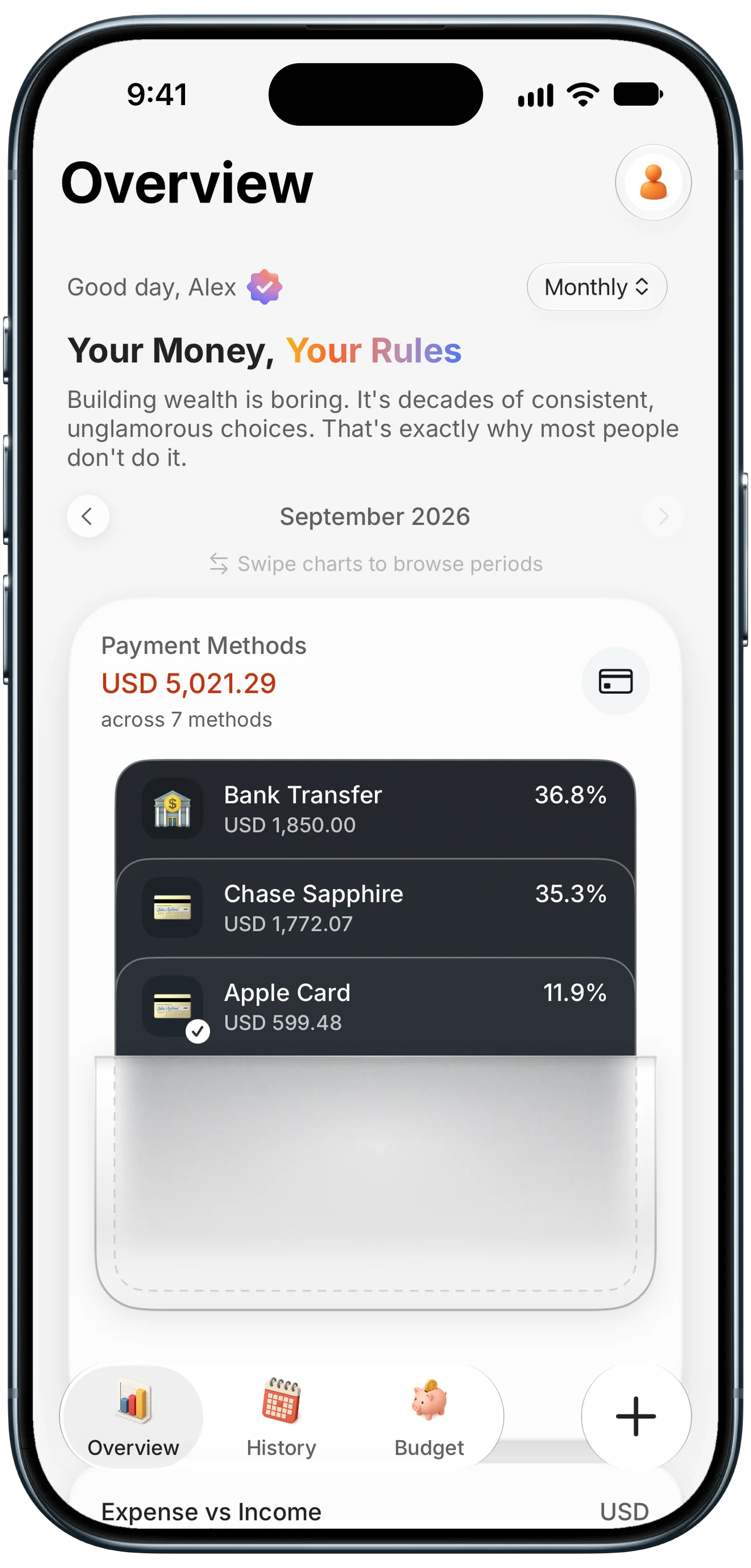
The simplest method is to tag every expense with the card you paid with, then look at the totals by payment method. In Finny, the Overview has a Payment Methods card that shows the period's spending across every method you use, stacked like cards in a wallet: each one with its amount and its share of the total. Name your payment methods after your real cards, like Chase Sapphire, Amex Gold, Apple Card, and Debit Card, and the split is right there.
A few setup steps make it work:
- Create a payment method for each card you actually use, named so you'd recognize it at a glance.
- Set a default payment method for the card you use most, so new expenses start with it filled in.
- Tag cash, Venmo, and bank transfers too, so the split covers all your spending, not just cards.
- Check the split weekly to see which card is carrying the month.
Keep every entry tagged with the right card
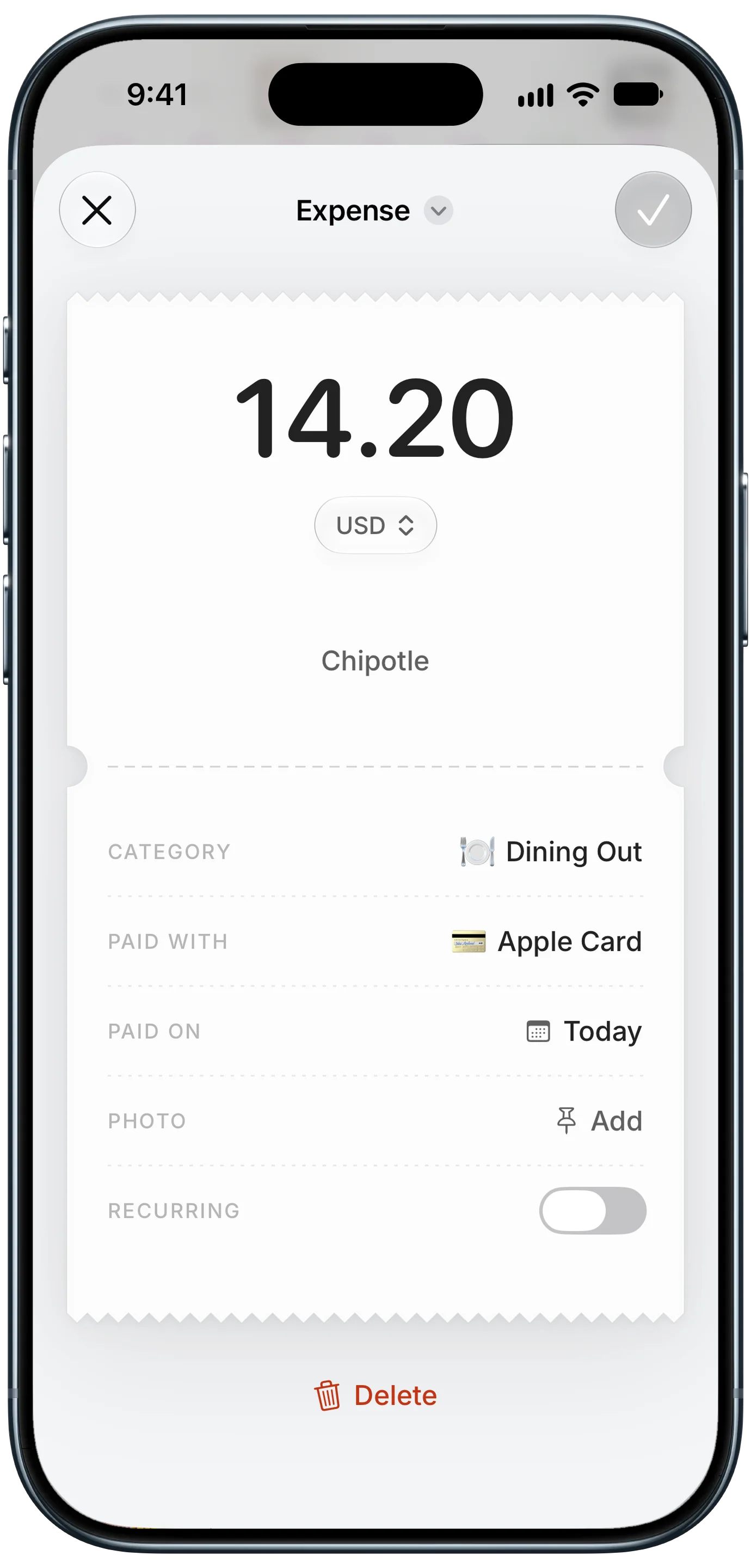
The split is only as accurate as the tags. Three habits keep it clean:
- Log card payments as you make them. When a payment is captured automatically at the moment you pay, the payment method is filled in for you.
- Say the card when you type or speak an expense. Adding "on Amex" to a typed expense gives AI input what it needs to fill in the payment method; check it before saving.
- Fix mistakes when you see them. A wrong card tag throws off both the split and your statement check, so correct it on the spot.
Here's a card payment logged automatically as it's made:
Use the split to optimize rewards
Once you can see spending by card, compare it to what each card earns. A quick monthly review:
| Question | What to look at | Action |
|---|---|---|
| Is dining going on the dining card? | Dining Out expenses by card | Move restaurant spending to the higher-earning card |
| Are groceries earning the bonus? | Groceries by card | Use the grocery card at the register |
| Is one card over 30% of its limit? | That card's running total vs. its limit | Pay it down mid-month or shift spending |
| Is the debit card still needed? | Debit share of spending | Move routine bills to a rewards card you pay in full |
Only chase rewards if you pay every card in full each month. Interest wipes out rewards quickly.
Line the budget up with your statements
Card statements rarely close on the 1st. If your main card closes on the 24th, a budget month that runs from the 25th to the 24th matches what you'll actually pay. Our guide to budgeting by billing cycle explains how, and our guide on tracking credit card spending in real time covers catching charges as they happen.
Frequently Asked Questions
How can I see all my credit card spending in one place?
Either link every card to a bank-sync budgeting app, or tag every expense with the card you paid with in an expense tracker and view totals by payment method. The second option needs no bank credentials. Name payment methods after your real cards and check the split weekly to see which card is carrying your spending.
How do I track spending on multiple credit cards without linking them?
Create a payment method for each card in your expense tracker, set a default for the card you use most, and tag every expense with the card you used. Logging card payments as you make them fills in the card automatically. Include cash, Venmo, and bank transfers so the split covers all of your spending.
Why should I track spending by credit card instead of just by category?
Categories show what you bought. Spending by card shows which card paid for it, which reveals whether you're earning the best rewards, whether one card is carrying too high a balance, and which statement will be biggest this month. Most people benefit from checking both.
Does using one credit card for everything hurt my credit?
It can if the balance gets high relative to that card's limit, because credit utilization is a factor in credit scores. Paying the balance down before the statement closes, or spreading spending across cards, keeps utilization lower. Paying in full every month avoids interest either way.
The bottom line
Seeing your spending by credit card turns a pile of separate card apps into one clear split: which card paid for what, and how much each is carrying this month. Tag every expense with the card you used, set a sensible default, and check the split weekly. You'll earn more on the cards you already have and never be surprised by a statement again.