
YNAB Review 2026: Is It Worth $109 a Year?
Most budgeting apps tell you what you already spent. YNAB tries to change what you spend next. That difference explains both why its fans are so loyal and why so many people quit in the first month. It is also why YNAB can charge more than almost any other budgeting app and still keep growing.
This YNAB review covers how You Need A Budget works in 2026: the zero-based method behind it, the four rules, current pricing and the free trial, how bank sync behaves, and how steep the learning curve really is. We finish with who YNAB fits, who it does not, and simpler alternatives for people who just want to see where their money goes. If cost is your main question, our YNAB pricing breakdown goes deeper on the numbers.
What YNAB Is and How It Works
YNAB is a budgeting app built around zero-based budgeting. The idea is simple to say and harder to practice: every dollar you currently have gets a job before you spend it. Rent, groceries, the car insurance due in March, a vacation fund. When every dollar is assigned, your "Ready to Assign" balance reaches zero.
The key detail is that YNAB budgets only money you already have, not money you expect to earn. When a paycheck lands, you assign it. You do not plan next month's spending around income that has not arrived. That sounds minor, but it is the core reason the method works for people living paycheck to paycheck. If the concept is new to you, our guide to zero-based budgeting explains it from scratch.
YNAB runs on iPhone, Android, iPad, Apple Watch, and the web. One subscription can be shared with up to five other people through YNAB Together, so a household of six can work from the same budget. The 2026 updates have been practical rather than flashy: a faster Card Mode for approving transactions on iOS in September, a "Who Moved the Money" view on the web in February that shows which household member changed what, and a self-service fix for broken bank connections over the summer.
The Four Rules
YNAB teaches its method through four rules. They are the real product; the app is the tool that makes them easier to follow.
- Give every dollar a job. Assign all the money you have right now to categories until nothing is left unassigned.
- Embrace your true expenses. Break large, irregular costs into monthly amounts. A $600 annual insurance bill becomes $50 a month, so it never surprises you.
- Roll with the punches. When you overspend in one category, move money from another. The budget is a plan you adjust, not a test you fail.
- Age your money. Over time, aim to spend money that arrived at least 30 days ago. This builds a buffer so you stop living paycheck to paycheck.
Rule two is where most people feel the difference first. Seeing Christmas, car repairs, and annual subscriptions funded in advance removes a lot of the anxiety that comes from "unexpected" bills that were never really unexpected.
YNAB Pricing in 2026
YNAB has one plan with every feature included. As of October 2026 it costs $14.99 per month or $109 per year, which works out to about $9.08 per month on annual billing. There is no free tier and no premium upsell.
The free trial is 34 days and does not require a credit card, which is longer than most competitors. Verified college students can get a free year through YNAB's College Program; check the current eligibility terms on YNAB's site before relying on them, since details like verification methods change.
Is $109 a year expensive? Compared with free trackers, yes. Compared with Monarch Money at $99.99 per year, it is close. YNAB's argument is that the method pays for itself in the first couple of months by changing your habits. For many committed users, that holds up. For people who stop using it after six weeks, it does not.
Bank Sync and Data Entry
YNAB supports three ways to get transactions in. You can link accounts for Direct Import, which pulls transactions through third-party aggregators in supported countries. You can import files from your bank. Or you can enter everything manually, which YNAB has always treated as a legitimate choice rather than a fallback.
Bank sync works well for most major US banks, but it is not perfect. Connections drop, transactions sometimes duplicate, and pending charges can appear twice. YNAB's 2026 update that lets you reset a troubled connection yourself, without a support ticket, helps, but sync reliability is still the most common complaint in user forums. If linking a bank is your main worry, our guide to whether YNAB is safe explains what that connection can and cannot access.
Whatever method you choose, YNAB asks you to review and approve each imported transaction. That is a deliberate design choice: the approval step keeps you aware of your spending. It also means YNAB is never fully hands-off. If you want an app that categorizes everything in the background and only shows you a monthly summary, YNAB is the wrong tool.
The Learning Curve
This is the part most YNAB reviews soften, so we will be direct: the first month is hard. Many new users report that the method did not fully click until their second or third month.
The confusion usually comes from three places. First, credit cards. YNAB treats card spending as money that should already be set aside, which is correct but unintuitive. Second, the "Ready to Assign" number, which does not match your bank balance the way people expect. Third, overspending, which turns categories red and requires you to move money around before the budget balances again.
YNAB does a lot to help. It runs free live workshops, publishes extensive guides, and has an active community. Expect to spend 30 to 60 minutes setting up and a few minutes a day approving transactions and adjusting categories for the first few weeks.
Pros and Cons
What YNAB does well:
- The method works. If you follow the four rules, you stop being surprised by bills and start planning ahead.
- Manual entry is a first-class option. You can use the full app without ever linking a bank account.
- Household sharing is included. Up to six people on one subscription at no extra cost.
- Excellent education. Workshops, guides, and support are among the best in personal finance software.
- No ads or upsells. One price, every feature.
Where YNAB falls short:
- Price. At $109 per year, it is one of the most expensive budgeting apps available.
- Learning curve. The method takes weeks to learn, and the credit card logic confuses many beginners.
- Daily effort. Approving and assigning transactions is a habit you have to keep.
- Limited net worth and investing tools. YNAB tracks accounts, but it is not built for portfolio analysis.
- Sync can be flaky. Direct Import depends on aggregators, and broken connections still happen.
YNAB vs the Alternatives
| App | Best For | Price (Oct 2026) | Free Trial / Tier | Bank Link |
|---|---|---|---|---|
| YNAB | Committed zero-based budgeters | $14.99/mo or $109/yr | 34-day trial, free year for college students | Optional |
| Monarch Money | Households, net worth | $14.99/mo or $99.99/yr | 7-day trial | Required |
| EveryDollar | Simpler zero-based budgets | Free, Premium $17.99/mo or $79.99/yr | Free tier | Premium only |
| Goodbudget | Envelope budgeting, manual | Free, Premium $10/mo or $80/yr | Free tier | Premium only |
| Copilot Money | Apple users, automation | $13/mo or $95/yr | Trial | Required |
| Finny | Simple tracking, no bank link | Free, Pro Optional | Free tier | None |
YNAB wins on method and education. It loses on price and effort. For a wider list, our best YNAB alternatives roundup compares eight options in more depth.
Best YNAB Alternatives
Monarch Money
Monarch is a broader dashboard with strong household features, net worth, and investment tracking. Its budgets are more flexible and less strict than YNAB's. It costs $14.99 per month or $99.99 per year and requires bank connections. Our YNAB vs Monarch Money comparison covers the tradeoffs in detail.
EveryDollar
EveryDollar also uses zero-based budgeting but with a simpler interface and fewer rules to learn. The free tier is manual; Premium adds bank sync for $17.99 per month or $79.99 per year. It suits people who like the zero-based idea but find YNAB overwhelming.
Goodbudget
Goodbudget is a digital take on cash envelopes. The free plan covers a limited number of envelopes, and Premium costs $10 per month or $80 per year. It works well for couples who want a shared, manual system. See Goodbudget vs YNAB for a closer look.
Finny
Some people do not need a budgeting philosophy. They want to know where their money went this month, without linking a bank. Finny is an iPhone expense tracker built for that. Card payments get logged as you make them with Tap to Track, you can type or snap receipts and let AI fill in the details, and simple category budgets show how much is left. The free tier covers unlimited manual tracking, and Pro costs a low monthly or yearly price.
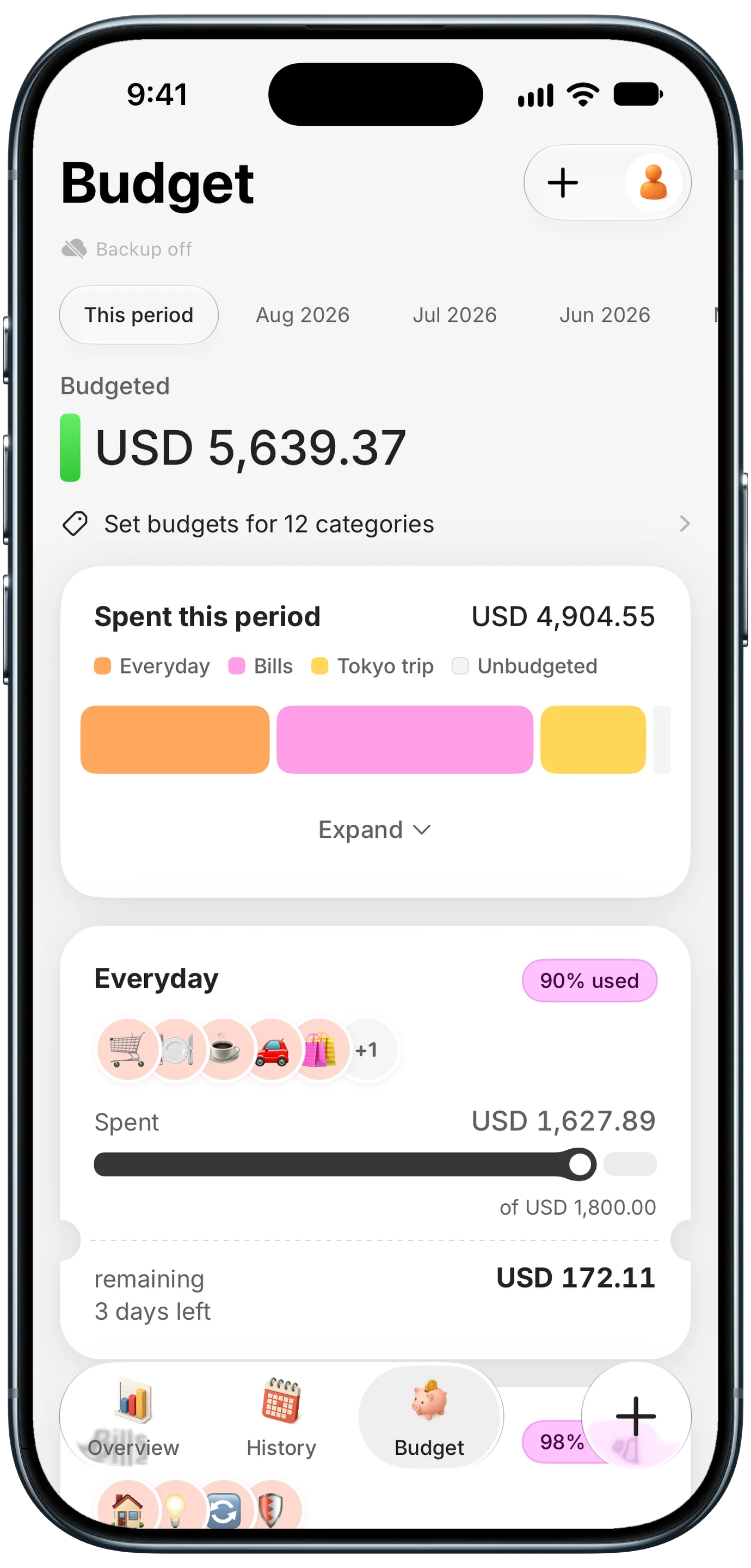
Finny app's Budgets feature
The tradeoff is real: Finny does not enforce zero-based rules or ask you to assign every dollar. It is lighter by design.
This short video shows Tap to Track logging Apple Pay purchases automatically:
Who YNAB Fits
YNAB is a strong choice if you feel like money disappears every month, you are willing to spend a few minutes a day on your budget, and you want a system rather than a dashboard. It is especially good for people with irregular income, since you only budget money you actually have. If you are a college student, the free year makes trying it an easy call.
YNAB is a poor fit if you want something fully automatic, you mainly care about investments and net worth, or $109 per year is a real strain.
A practical test: use the full 34-day trial, follow the four rules honestly, and see whether you actually open the app most days. If you do, the price is usually worth it. If you are forcing yourself, a simpler tool will serve you better.
Common Questions About YNAB
Is YNAB worth it in 2026?
For people who commit to the method, usually yes. YNAB costs $109 per year, and many users report that planning for irregular expenses and stopping overspending saves more than that within a few months. The catch is effort: YNAB rewards daily attention and a few weeks of learning. If you are unlikely to approve transactions and assign money regularly, a cheaper or simpler app will give you more value for your time.
How long is the YNAB free trial?
The YNAB free trial lasts 34 days and does not require a credit card, which is longer than most budgeting apps. That length is intentional, since the method usually takes a month or more to click. Verified college students can also get a free year through YNAB's College Program. After the trial ends, YNAB costs $14.99 per month or $109 per year, with every feature included in one plan.
Can you use YNAB without linking a bank account?
Yes. YNAB fully supports manual entry, and many long-time users prefer it because typing each transaction keeps them aware of their spending. You can also import transaction files from your bank instead of connecting directly. Linking through Direct Import is optional and saves time, but it is not required to use any part of the budgeting method or the four rules.
Why is YNAB so hard to learn?
YNAB asks you to budget only money you already have and to assign every dollar a job, which is different from how most people think about money. Credit card handling, the Ready to Assign number, and moving money after overspending are the usual sticking points. Most users say it clicks within two or three months. YNAB's free workshops and guides help shorten that curve considerably.
What is a simpler alternative to YNAB?
EveryDollar offers zero-based budgeting with fewer rules and a free manual tier. Goodbudget uses an easy envelope system. If you do not want a budgeting method at all and just want to track spending without connecting your bank, an AI-assisted expense tracker is the lightest option. The right pick depends on whether you want to plan every dollar or simply see where your money goes.
Want to see where your money goes without a budgeting method or a bank link?
Download Finny to log expenses with AI, receipts, or text, set simple budgets, and track 150-plus currencies. No bank connections, offline support, and a low-cost Pro tier.