
Best Expense Tracker App for iPhone in 2026
Most expense tracker comparisons rank apps on features you evaluate once and then never think about again: chart types, report exports, budget rollover rules. On an iPhone, the thing that decides whether an app survives past week three is much simpler. How long does it take to record a purchase while you are standing at a counter?
The best expense tracker app for iPhone is the one you still use in March. This comparison weighs capture speed, receipt handling, voice entry, and whether the app works when the connection does not, because those are the properties that determine whether the data is ever complete enough to be useful.
For budgeting apps rather than expense trackers specifically, our guide to the best iOS budget apps covers a wider field.
What Actually Matters on iPhone
Time to log. The gap between three seconds and thirty seconds is the gap between a habit and an abandoned app. Everything else is secondary.
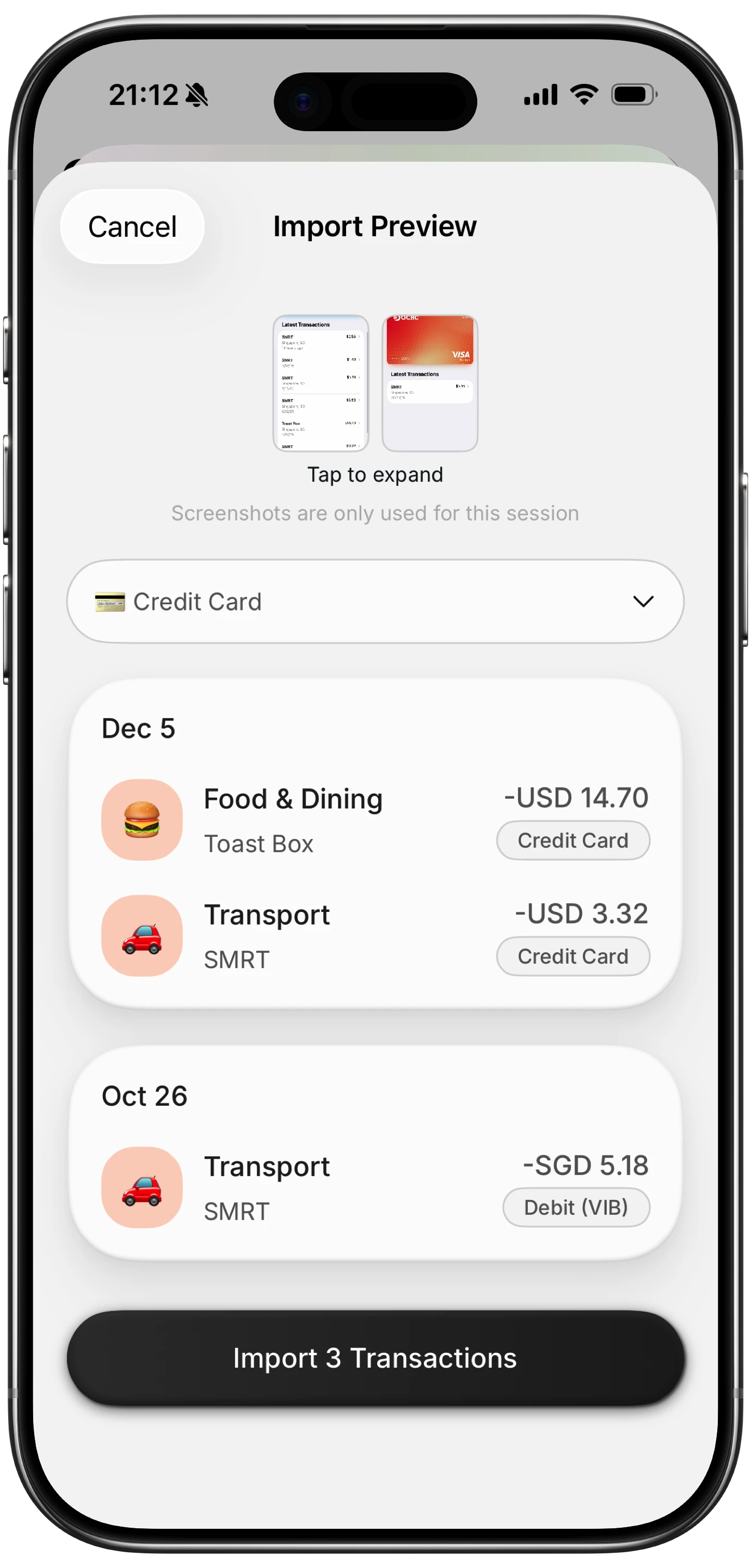
Receipt capture. Paper receipts either get photographed within a day or they are lost. An app that reads the amount off the image removes the typing, which is what makes the habit hold.
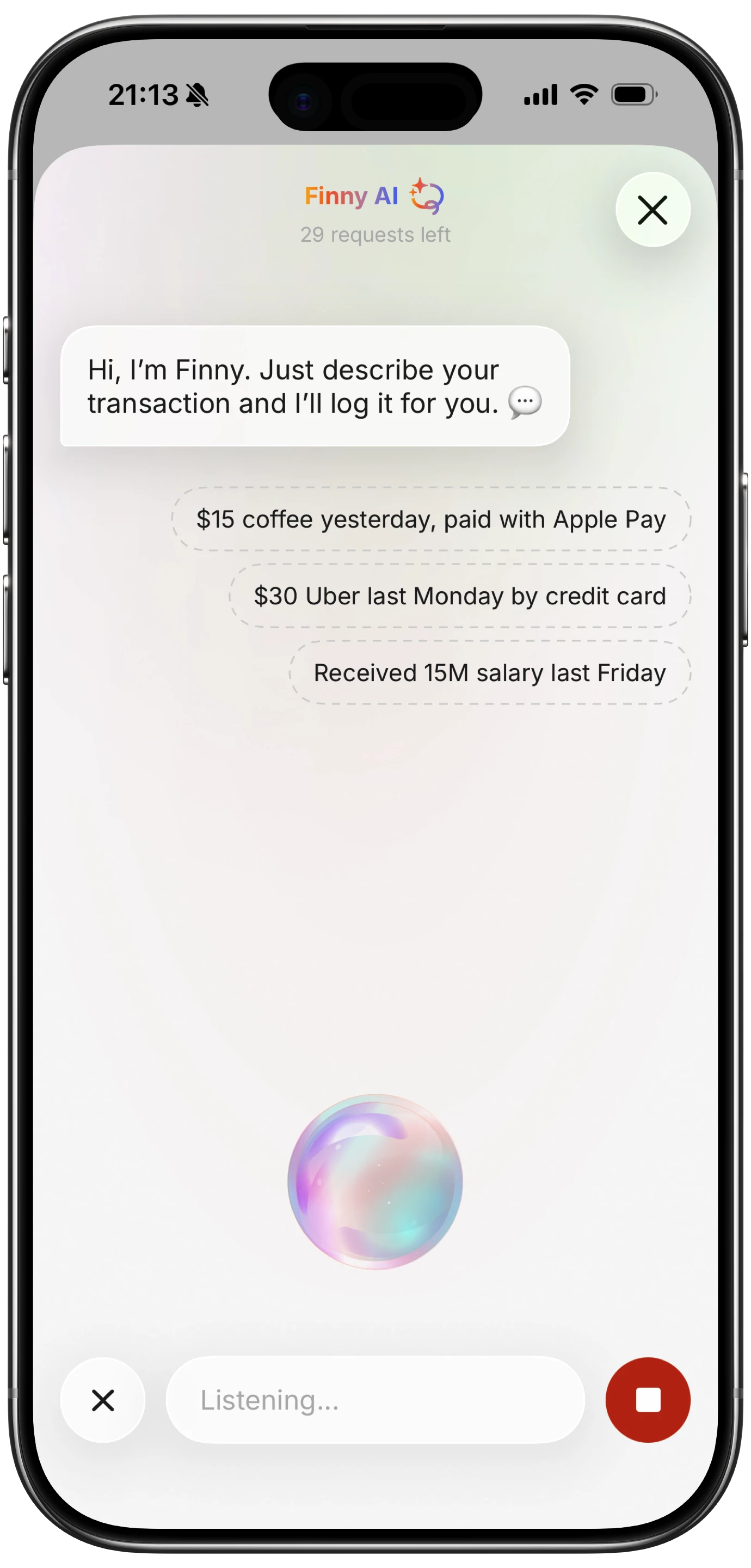
Voice entry. Speaking a purchase is faster than typing it and works in situations where typing does not: driving, carrying groceries, walking. This is underrated in reviews and heavily used in practice.
Offline behavior. Basements, planes, parking garages, rural areas. An app that cannot log without a connection loses exactly the transactions you are most likely to forget.
Bank connection requirement. Some people want the automation. Others do not want an aggregator holding read access to their accounts. Both are reasonable, and the choice narrows the field considerably.
Widgets and glanceability. Seeing a running total without opening an app changes behavior more than any monthly report.
The Comparison
| App | Annual price | Bank link | Receipt scan | Voice entry | Works offline |
|---|---|---|---|---|---|
| Copilot | $95 | Required | Limited | No | Partial |
| Monarch | $99.99 | Required | Limited | No | Partial |
| YNAB | $109 | Optional | No | No | Partial |
| Rocket Money | $74.99 | Required | No | No | No |
| Goodbudget | $80, free tier | Not used | No | No | Yes |
| Finny | a low monthly or yearly price, free tier | Not required | Yes | Yes | Yes |
Prices were accurate at the time of writing and change regularly.
Copilot
Copilot is the strongest Apple-native experience in this group. It was built for iPhone and Mac first, the interface is genuinely good, and its automatic categorization is the most accurate of the bank-linked options.
The constraints are that it requires a bank connection, it is Apple-only, and at $95 a year it is priced as a premium product. If you want automation and you are comfortable linking accounts, it is the best of that category on iOS. Our Copilot review covers longer-term use.
Monarch
Monarch is the better choice when two people share finances. Household access is native, the budgeting model is flexible, and the iPhone app is a real part of the product rather than a companion to a web tool.
Like Copilot, it depends on bank connections, so transactions arrive with a one to three day lag and cash spending never appears at all unless you add it manually.
YNAB
YNAB's method is the strongest budgeting philosophy here, and its iPhone app supports quick manual entry well. If assigning every dollar a job appeals to you, nothing else in this list replaces it.
It is also the most expensive at $109 a year, and the learning curve is real. YNAB rewards commitment and punishes casual use.
Rocket Money
Rocket Money is not really an expense tracker. It is a subscription canceller and bill negotiator with tracking attached, and it is very good at the first two.
If your problem is forgotten subscriptions, it solves that. If your problem is knowing where your money goes, it is a partial answer that requires bank connections and, as we cover in our piece on whether Rocket Money sells your data, a broader data sharing arrangement than many people expect.
Goodbudget
Goodbudget uses envelope budgeting with fully manual entry and no bank connections. It works offline by design and has a usable free tier.
Everything is typed by hand, and there is no receipt capture or voice entry, so the logging speed that matters most on a phone is where it is weakest.
Finny
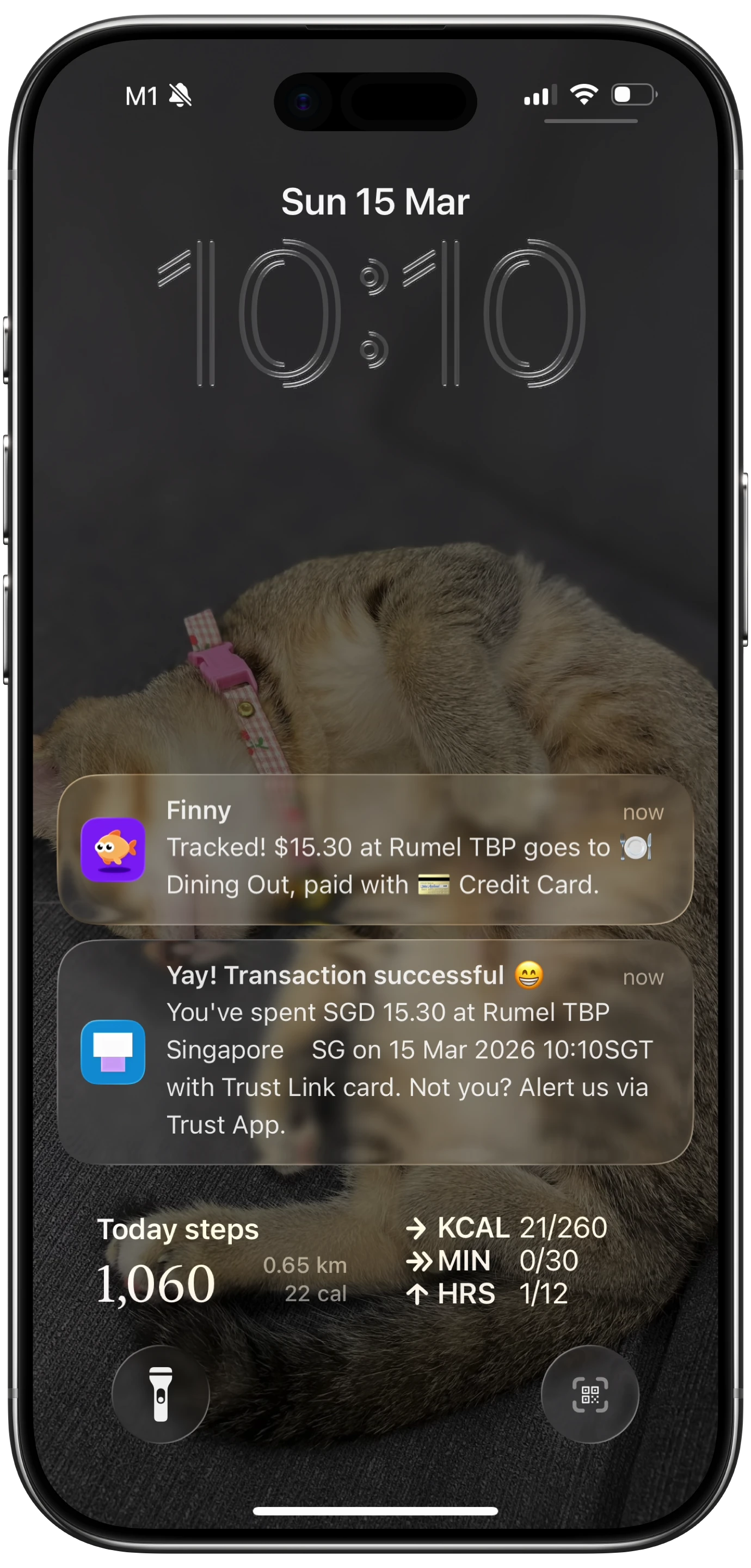
Finny is built around the capture problem rather than the analysis problem, which is the specific gap in everything above. Card payments get logged as you make them, receipts get captured from your photo library including several at once, and expenses can be entered by speaking or typing in plain language. None of it requires a bank connection, and it works offline.
Speaking a purchase is the fastest way to log one while your hands are busy:
Finny app's voice input feature
Receipts get read rather than retyped, which is what keeps the habit alive:
Finny app's screenshot import feature
And card spending gets captured as it happens, without an account connection:
Finny app's Tap to Track feature
The tradeoff is that it does not negotiate bills or produce investment reports. It covers capture and review thoroughly and leaves the rest alone.
Bank-Linked or Not: The Real Decision
This is the fork that determines which half of the table you are choosing from.
Bank-linked apps import transactions automatically, which means you do not log anything. The costs are a one to three day lag, cash spending that never appears, an aggregator with read access to your accounts, and connections that break when banks change their systems.
Capture-based apps record the purchase at the moment it happens, so the total is current, cash is included, and no aggregator is involved. The cost is that something has to capture it, which is why capture speed matters so much.
Neither is correct in general. If you rarely use cash and want zero effort, link accounts. If you want an accurate same-day total, or you would rather not hand over bank access, capture. Our guide to tracking expenses without linking a bank covers the second path in detail.
How to Choose
- Want automation and comfortable linking accounts? Copilot, or Monarch if two of you share the budget.
- Want a budgeting method, not just tracking? YNAB.
- Mainly want subscriptions handled? Rocket Money, though it is a different product than the rest.
- Want free and offline with no bank access? Goodbudget's free tier.
- Keep abandoning trackers because logging is tedious? Choose on capture speed. Receipt scanning and voice entry are what fix that, and they are why the habit survives.
For receipts specifically, our guide to the best receipt scanner apps for iPhone goes deeper, and iPhone lock screen budget widgets covers glanceable totals.
Common Questions About iPhone Expense Trackers
What is the best free expense tracker app for iPhone?
Goodbudget's free tier covers a limited number of envelopes with fully manual entry, and Finny's free tier includes unlimited manual tracking, custom categories, charts, and multi-currency support without a bank connection. Bank-linked apps like Copilot and Monarch have no meaningful free tier, so free generally means either manual entry or capture-based logging. For a wider comparison, see our guide to the best free expense tracker apps.
Can I track expenses on iPhone without linking my bank?
Yes, and it is a common preference. Goodbudget uses manual envelope entry with no bank access, and capture-based apps log card payments, receipts, and on-screen payments directly without an aggregator. Avoiding the connection also removes the one to three day posting lag and means cash spending appears alongside everything else, which bank-linked apps miss entirely unless you add it by hand.
Which iPhone expense tracker scans receipts?
Receipt scanning is less common than expected among mainstream budgeting apps. Copilot and Monarch handle receipts in a limited way, YNAB and Goodbudget do not offer it, and dedicated receipt apps generally do not double as expense trackers. Finny reads the amount and merchant off the receipt image and can process several from your photo library at once, which is the practical difference between capturing receipts and merely storing them.
Is voice input useful for tracking expenses?
More than most reviews suggest. Speaking a purchase takes a few seconds and works when typing is impractical, which covers a large share of real spending moments: leaving a shop, carrying bags, driving between errands. The transactions people forget are usually the ones where opening an app and typing was inconvenient at the time, so removing that friction improves how complete the data is rather than just how pleasant the app feels.
Ready to track expenses with less friction?
Download Finny to log expenses using AI, receipts, or text. No bank connections, offline support, and full control over your financial data.