Not Getting Bank Notifications on iPhone? How to Fix It
Your card gets charged, and your bank app stays quiet. Maybe it used to alert you on every purchase, or maybe it never did.
If you are not getting bank notifications on iPhone, the cause sits in one of two places. Either your iPhone is blocking or delaying the alert (notification permission, Focus, Scheduled Summary, Low Power Mode), or your bank never sent it, because purchase alerts are usually something you turn on yourself, often above a dollar amount you set. Check the phone first, since it takes two minutes, then the bank's alert settings.
A quick way to tell which side is at fault: if your bank's app keeps an alert inbox (Bank of America's does), open it. If the alert is listed there but never reached your lock screen, the problem is on the phone. If nothing is listed, the bank never sent it. If your missing alerts are Apple Pay alerts from Wallet rather than your bank's app, see our guide to Apple Pay notifications not working instead.
The Phone Side: 7 iPhone Settings to Check
These paths come from Apple's iOS 27 user guide and Apple Support.
- Allow notifications for the bank app. Go to Settings > Notifications, then tap your bank's app below Notification Style. Turn on Allow Notifications. Under Alerts, select Lock Screen, Notification Center, and Banners.
- Switch to Immediate Delivery. On the same screen, under Notification Delivery, choose Immediate Delivery. If the app is part of Scheduled Summary, its alerts arrive in batches at set times instead of when the charge happens.
- Turn on Time Sensitive Notifications. If your bank's app supports it, the switch is on the same screen. Apple notes that a Focus can be set to let time-sensitive notifications through immediately.
- Check your Focus. Open Control Center and tap any lit Focus to turn it off. To keep a Focus but allow your bank, go to Settings > Focus, choose the Focus, tap Apps, make sure Allow Notifications From is selected, and add the bank app. On iOS 27, the Reduce Interruptions Focus and Intelligent Breakthrough & Silencing can silence alerts Apple Intelligence judges unimportant; apps you specifically allow always come through.
- Turn off Low Power Mode. Apple says Low Power Mode turns off Background App Refresh and email fetch. If your bank sends alerts by email and your mail account uses fetch, those can sit unseen until you open Mail. On iPhone 15 or later, go to Settings > Battery > Power Mode; on iPhone 14 or earlier, Settings > Battery.
- Check Background App Refresh. Go to Settings > General > Background App Refresh. Apple describes it as letting suspended apps check for new content, and notes that an app you quit from the app switcher might not check for new content until you open it again.
- Look at your Apple Watch. Apple says notifications go to either your Apple Watch or your iPhone by default, not both. With your iPhone locked, the alert goes to your watch. In the Apple Watch app, tap My Watch, then Notifications, then the bank app.
The Bank Side: Why the Alert Was Never Sent
If your phone settings are fine, the bank is the likely gap.
Security alerts are automatic, purchase alerts usually are not. Chase says fraud alerts are sent automatically without enrolling, and Bank of America sends automatic security alerts by email. Alerts for everyday purchases are something you sign up for, account by account. Chase notes you repeat the setup for each account.
A threshold filters out small purchases. Many purchase alerts fire only above an amount you set. Wells Fargo's Single Purchase Amount alert, for example, fires only when a purchase is above your chosen amount. Capital One asks for a dollar minimum and suggests $0 for tracking every purchase.
The alert goes somewhere else. Each alert has its own delivery setting. If it is set to email or text, you will never see a push from the app.
Alerts are paused. Chase lets you pause alerts for a range of dates. A forgotten pause looks exactly like broken notifications.
The app thinks you left. Wells Fargo says it only sends push notifications to devices where you frequently use its app, and asks you to sign in again to reactivate them. After a reinstall or a new iPhone, open the bank app, sign in, and tap Allow when iOS asks to send notifications. Bank of America and Wells Fargo both describe this permission prompt in their setup steps.
Timing varies. Wells Fargo aims to send transaction alerts within minutes of authorization. Chase says alerts are generally processed at the end of each business day, though some are sent right after a transaction. Some store cards are not eligible at all: Wells Fargo says its Retail Services cards, the store-branded cards it issues, are not eligible for the optional alerts you sign up for.
Where to Turn On Purchase Alerts at Four Big US Banks
Here is where each bank puts purchase alerts in its iPhone app, based on each bank's own help pages. Menu labels change with app updates, so look for the closest match.
| Bank | Where purchase alerts live in the app | Amount setting | Delivery options |
|---|---|---|---|
| Chase | Person icon > Alerts & messages > Manage alerts | Alerts for charges and unusually high transactions; no published minimum | Push, text, email |
| Bank of America | Mailbox icon > Alerts > Manage Alert settings > Account Activity > choose the account | Debit card payment over an amount you choose; credit card charge alerts | Mobile notification, text, email |
| Wells Fargo | Menu > your name or Welcome > Manage Banking Alerts | Single Purchase Amount above an amount you choose | Push, text, email |
| Capital One | Profile tab > Alerts & Notifications > choose the card > Instant Purchase Notification | Dollar minimum you choose; Capital One suggests $0 | Push, email, SMS |
Two tips apply everywhere: set the purchase alert to the lowest amount allowed, and turn alerts on for each card and account separately, since an alert on checking does not cover your credit card.
Bank of America and Wells Fargo say they do not charge for alerts, though your carrier's message and data rates can apply to texts. If your card's issuer offers no purchase alerts at all, our guide to tracking a credit card that doesn't send notifications covers the workarounds.
Push vs Text vs Email Alerts
Most banks let you pick a channel per alert, and the choice changes how reliable alerts feel.
Push notifications are the fastest, but they depend on the app: iOS permission, Focus and Summary settings, and, at some banks, how recently you used the app. Bank of America notes that push alerts are not available in its web-based mobile banking, only in the app.
Text alerts work even if the app is deleted or signed out, which makes them a good backup for large purchases. Some banks require you to enroll your number first. Wells Fargo, for example, asks you to add the number, accept the consent, and reply to a confirmation text before text alerts start.
Email alerts are the slowest and the easiest to miss. They land among newsletters, may be filtered as promotions, and may wait for Mail to fetch when Low Power Mode is on.
A sensible setup: push for every purchase, text for large ones and for security alerts. That way one broken channel does not leave you blind.
Turning Payment Alerts Into a Spending Record
Once alerts flow again, each one shows for a few seconds and then disappears into Notification Center. Finny, an iPhone expense tracker that never connects to your bank, can turn them into a record. On iOS 27, its Notification Log (Pro) turns a payment alert from the apps you pick into an entry: it works out whether it is an expense or income, takes the amount and currency from the alert, and confirms with a banner. Finny reads only the apps you choose, does not keep the notification, and each alert read uses one AI request. Our iOS 27 payment alert guide covers it in more depth.
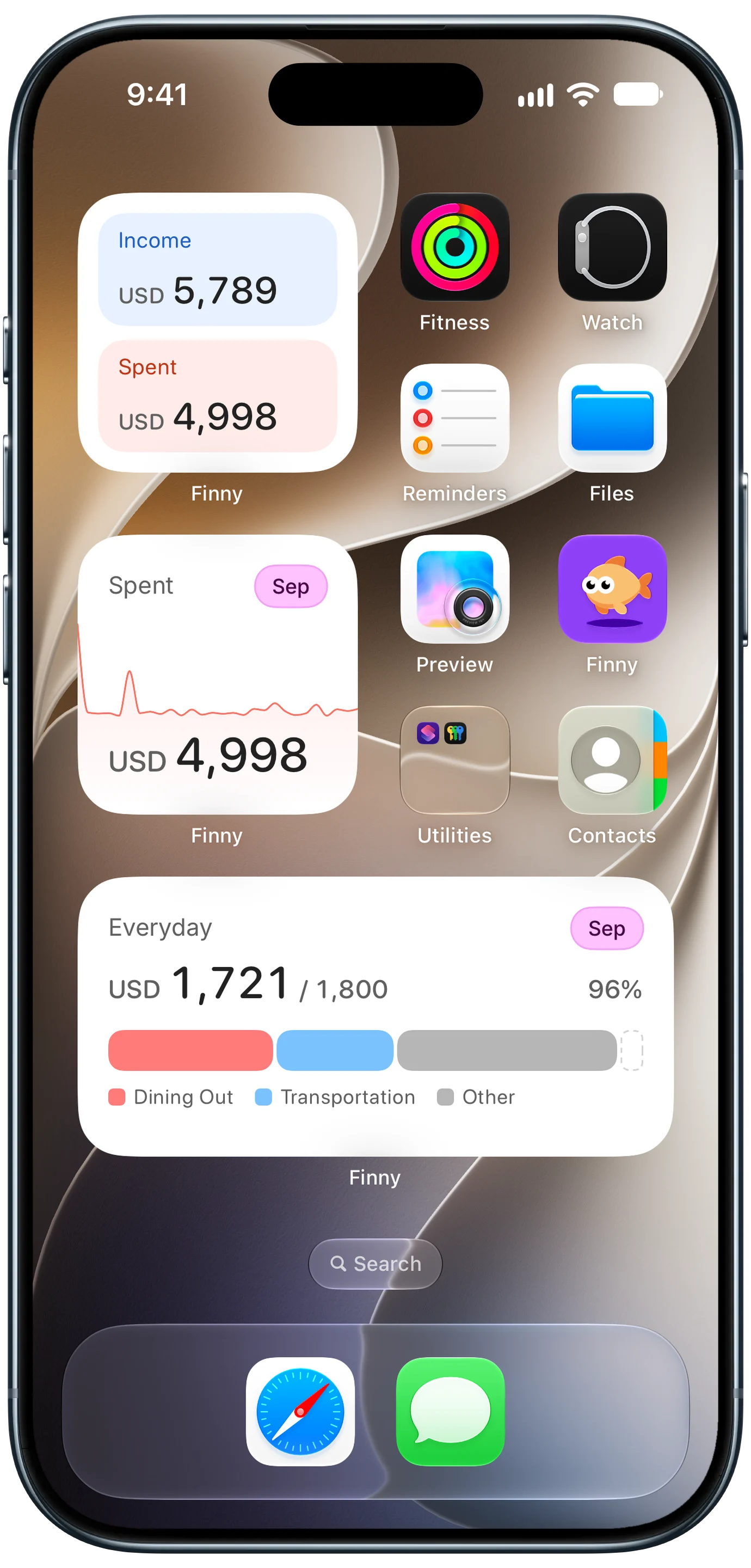
Finny app's Home Screen widgets feature
Logged entries feed Finny's Home Screen widgets, shown above: Income and Spent, a Spending Trend chart, and a Budget widget.
For cards that never send alerts, Screen Log (Pro) logs a payment showing on your screen, such as a transaction in the bank's app, an order confirmation, or a statement, from what is on screen. This video shows Screen Log in action:
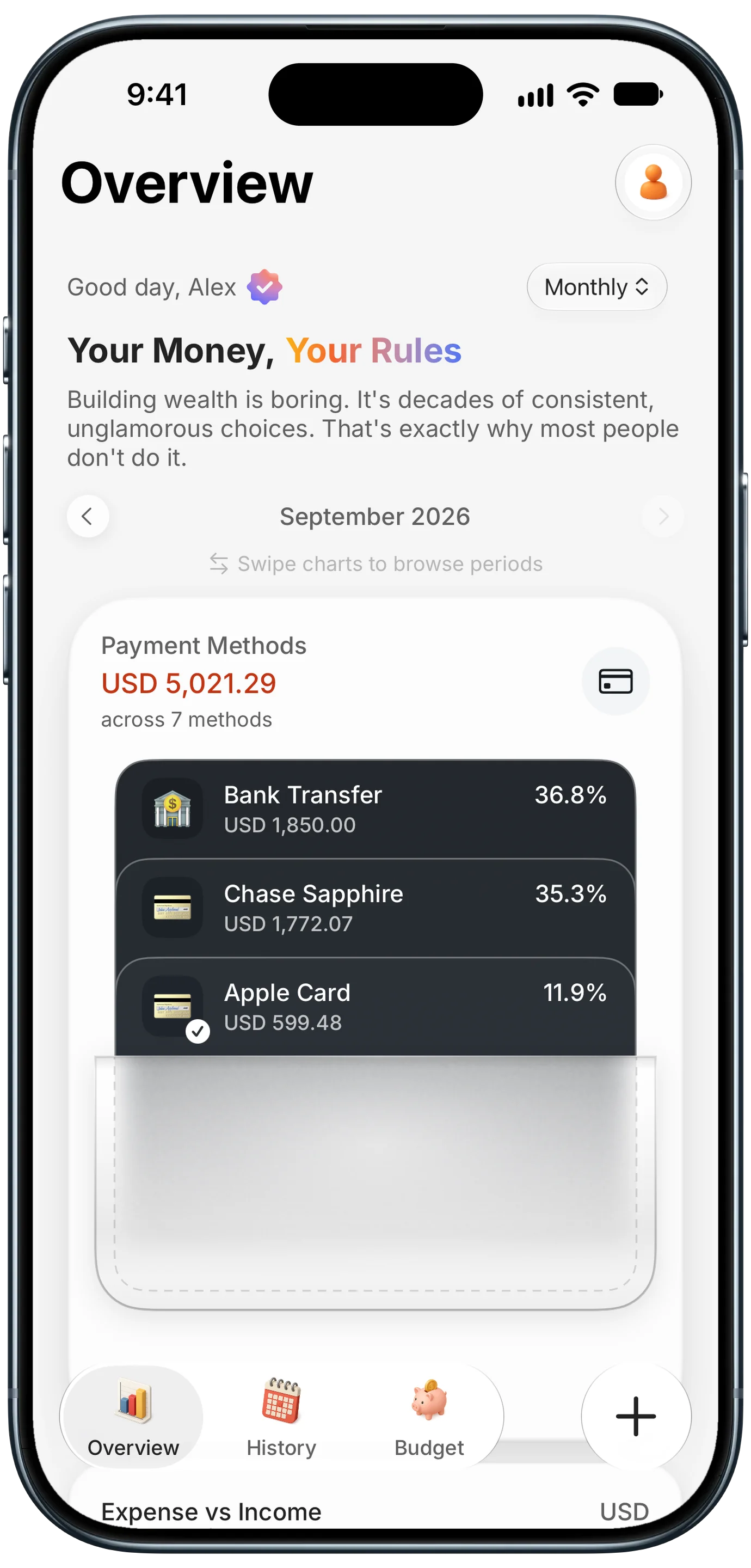
Finny app's Payment Methods feature
Every entry lands on its payment method, so the Overview wallet shows spending per card: here Bank Transfer, Chase Sapphire, and Apple Card. For how it compares with card capture, see Tap to Track vs Notification Log, and for privacy questions, is it safe to let an app read payment notifications.
Common Questions About Bank Notifications on iPhone
Why do I get bank texts but not app notifications?
Text and push alerts are separate channels with separate settings. If texts arrive but pushes do not, check Settings > Notifications > [bank app] and make sure Allow Notifications is on and the app is not in Scheduled Summary. Then check the alert's delivery setting in the bank app. At Wells Fargo, push is only sent to devices where you use the app often, so signing in again can reactivate it.
Why did my bank notifications stop after I got a new iPhone?
A new iPhone or a reinstall can leave the bank app signed out and without notification permission. Open the bank app, sign in, and tap Allow when iOS asks to send notifications. If you missed the prompt, turn on Allow Notifications in Settings > Notifications > [bank app]. Some banks also tie push alerts to recent use of the app.
Why don't I get an alert for small purchases?
Most purchase alerts have a threshold. Wells Fargo's Single Purchase Amount alert fires only above an amount you choose, and Capital One asks for a dollar minimum, suggesting $0 to track everything. If your threshold is $25 or $100, smaller charges never trigger an alert. Open the bank's alert settings, find the purchase or transaction alert, and lower the amount as far as the bank allows.
Can a Focus block bank notifications?
Yes. A Focus such as Do Not Disturb, Sleep, or Work silences any app that is not allowed. Go to Settings > Focus, choose the Focus, tap Apps, and add your bank app under Allow Notifications From. On iOS 27, the Reduce Interruptions Focus can also silence alerts it judges unimportant, but apps you allow explicitly always come through. Apple notes you cannot allow app notifications in the Driving Focus.
Why is the amount in my bank alert different from my statement?
Alerts are often sent at authorization, before the final amount settles. Wells Fargo explains that some alerts use the initial authorization amount the merchant sends, so a restaurant tip may not be included. Your card is charged only the final total. Treat the alert as an early notice and your statement as the final record.
Want your payment alerts to add up to something?
Download Finny to turn payment alerts and on-screen transactions into a spending record, with no bank connection.