Track Side Hustle Income Automatically From Payouts
A side hustle rarely pays you once a month on a predictable date. An Etsy sale lands on Tuesday, a client pays an invoice through Stripe on Thursday, a weekend of deliveries hits your bank on Wednesday, and a friend Venmos you for a logo you designed. Each payment is small enough to shrug off. Added up over a year, it is real money, and it is money you need to account for.
This guide shows how to track side hustle income automatically on iPhone by turning the notifications you already get, payout alerts and your bank's "you've received" deposit alerts, into income entries. It also covers how to keep side income separate from your paycheck, how to track the expenses that go with it, and how to get a clean export when tax season comes around. If your income swings month to month, our guide to budgeting with variable income pairs well with this one.
Why side hustle income is easy to lose track of
Your salary is easy to track: same amount, same day, one deposit. Side income breaks every one of those patterns.
- It arrives in pieces. Ten sales a week or a payout every few days means dozens of small deposits instead of one big one.
- It comes from several places. A marketplace, a payment processor, a gig app, and a payment app can all pay you in the same month.
- The amount you earned is not the amount you receive. Platforms usually take their fees before paying out, so a USD 60.00 sale might arrive as a smaller deposit days later.
- It mixes with personal money. The same Venmo or bank account that gets client payments also gets your roommate's share of the electric bill.
Most people deal with this once a year, scrolling through bank statements in March and trying to remember which deposits were work. That is slow, and it is easy to miss income or count a refund as earnings. Logging each payment when it arrives fixes both problems.
Which notifications tell you you've been paid
Before anything can be tracked automatically, something has to announce the money. Here are the most common sources, all of which you control inside each company's own app:
- Your bank's deposit alert. This is the most reliable one. Banks like Bank of America and Chase let you turn on alerts for direct deposits, sent as push notifications. Because every payout eventually lands in a bank account, this single alert covers platforms that do not send their own payout notifications. Look in your bank app under Alerts or Notifications, and turn on deposit or "money received" alerts.
- Payment processor apps. The Stripe Dashboard app can send push alerts for new payments, which is useful for freelancers who invoice through Stripe.
- Marketplace seller apps. The Etsy Seller app can notify you of each sale, and the Shopify app can send push notifications for new orders.
- Payment apps. Venmo can notify you about money arriving in your account, adjustable in its notification settings. Our guide to logging Venmo, Cash App and PayPal payments covers what each payment app sends.
- Gig apps. Rideshare and delivery apps show earnings and payout status inside the app. For these, your bank's deposit alert is usually the simplest notification to rely on, since it fires when the payout actually lands.
One decision to make early: track sales or track payouts, not both. A sale notification shows the gross amount. A deposit alert shows what you received after fees. If both become income entries, you count the same money twice. Most side hustlers find deposits easier, because they match the bank statement. If you track sales instead, log the platform's fees as expenses so your totals stay honest.
Turn payout alerts into income entries automatically
Once the right alerts are on, the last step is getting each payout into a record you can total. On iOS 27, Finny does this with Notification Log. Payment notifications from the apps you pick become entries on their own, with no bank connection and no bank login. It files an expense or income, whichever the notification says, so a bank's "you've received" alert becomes an income entry with the amount and currency from the notification. A confirmation shows what was logged, something like "Got it! USD 412.60 from Etsy, filed under Side Income into Business Checking."
Here is a short demo of payment notifications becoming entries:
What to expect:
- Category and payment method are guessed from each notification. For side income, setting a category and payment method per app is the better choice: point your Stripe or bank app at a "Freelance" or "Side Income" category and the right account, and every payout from that app is filed the same way.
- Pick apps that mostly send payment alerts. A bank app or the Stripe app is a good fit. An app that sends lots of promotional or chat notifications is not.
- Rename vague deposits as you go. A deposit alert may not say who paid you, and a name like "Etsy payout" keeps your history readable at tax time.
It needs iOS 27 and Finny Pro; see how Notification Log works and its limits.
Keep side income separate from your paycheck
Automatic logging only helps if you can pull the side income back out later. There are two simple ways to keep it distinct, and they work well together.
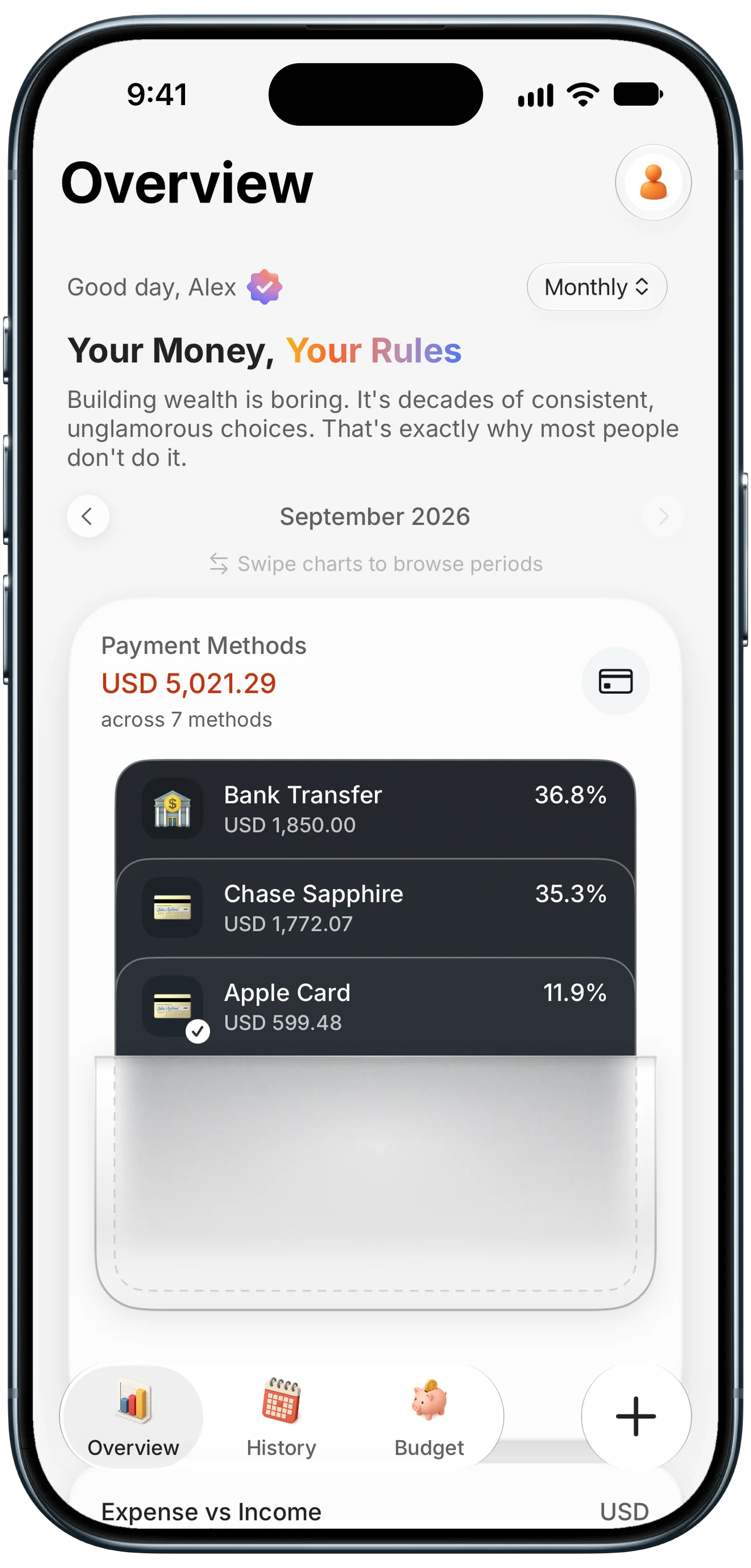
Finny app's Payment Methods feature
Use its own income category. Create a category such as "Side Income," or one per hustle ("Etsy," "Freelance Design," "Deliveries") if you want to see which one earns the most. Your paycheck stays under "Salary," and the two never blur.
Use its own payment method. If your side income goes into a separate checking account, add that account as a payment method in your tracker. Every payout filed to it shows up as its own balance, so a glance at your payment methods tells you how much the side hustle has brought in. If you do not have a separate account yet, many freelancers open one for exactly this reason. One thing to watch: moving money from your side hustle account to your personal one is a transfer, not new income. Your bank may alert on both sides, so make sure only the original payout counts as earnings.
Payment apps need extra care. If friends pay you back on Venmo for dinner, those alerts look just like client payments. Either keep personal reimbursements in a different app, or re-file those entries as you go, so your side income total is not inflated by your share of a pizza.
If you get paid in more than one currency, for example a client abroad paying in euros, each entry keeps its original currency and your totals add up in your home currency. That makes it easier to see what an international client is actually worth to you in dollars.
Track side hustle expenses too
Income is only half the story. What you keep is income minus what it cost to earn it: materials, shipping labels, platform fees, software subscriptions, a share of your phone bill, and mileage for gig driving.
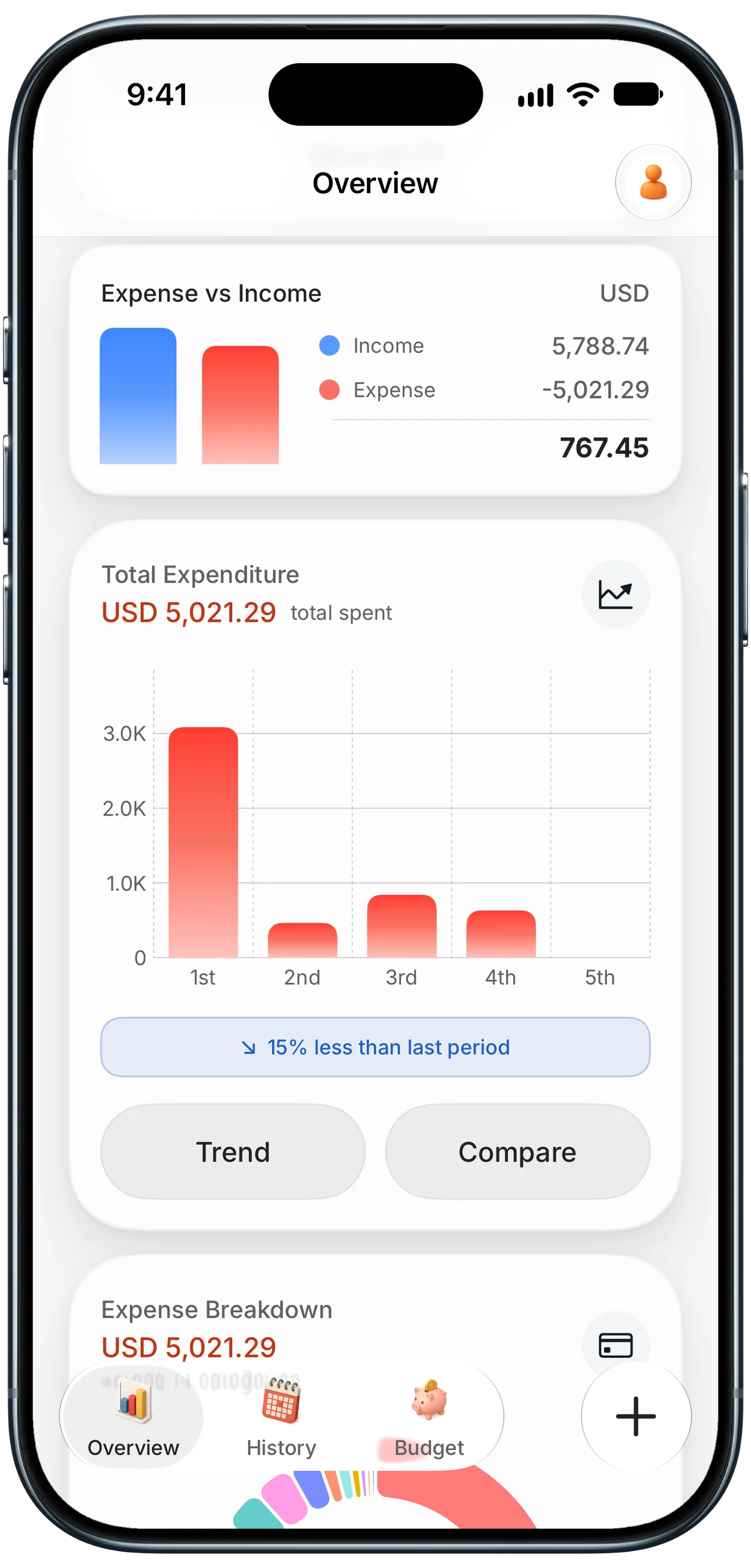
Finny app's Overview feature
A few habits make this easy:
- Give side hustle costs their own categories, like "Supplies," "Shipping," or "Business Software," so they never mix with personal spending.
- Pay for side hustle costs with one card, and add that card as a payment method. Turn on purchase alerts for that card too, and the same alert-based logging that records your payouts can record those costs as expenses.
- Keep the receipt. Photograph or scan receipts into your tracker when you buy, rather than hunting for them in April.
- Log mileage separately. Driving for a gig app or to client meetings adds up quickly. Our guide to tracking mileage and fuel for work covers how to record it.
With income and costs in the same place, your overview shows what the side hustle actually earns each month, not just what it brings in. For a deeper walkthrough of business tracking on iPhone, see how to track business expenses and income.
Export your records at tax time
When tax season arrives, the goal is a clean list of side income and related expenses for the year. If you have been logging as payouts arrive, this takes minutes:
- Export your entries to CSV, which opens in Numbers, Excel, or Google Sheets.
- Filter the spreadsheet by your side income categories, or by the payment method you use for side money.
- Do the same for side hustle expense categories.
- Hand the results to your tax preparer, or use them with your tax software.
A note on forms: for 2026, payment platforms and marketplaces generally issue a Form 1099-K only when you receive more than $20,000 and have more than 200 transactions through them. Many side hustlers will not get one. Not receiving a form does not change what income you have to report, which is why your own records matter. Freelance clients may send other forms, and the rules for what to report, deduct, and pay quarterly depend on your situation. Check with a tax professional for your specific case. For rough planning numbers, our 1099 tax calculator guide and 2026 1099 tax estimate explain how self-employment income is usually estimated.
An expense tracker logs and totals your income and expenses. It does not give tax advice or tell you what is deductible, so treat the export as your record, and let a professional tell you what to do with it.
The bottom line
Side hustle income is easy to lose because it arrives in small, scattered pieces from several places. The fix is to catch each payment when it lands. Turn on deposit alerts in your bank app, and payment alerts in the platforms you use. On iOS 27, let those notifications become income entries automatically. Pick sales or payouts, not both. Give side money its own category or payment method, track the costs next to it, and export a CSV when your tax preparer asks. You will spend a few minutes a month on it instead of a weekend every spring.
Common Questions About Tracking Side Hustle Income
How do I track side hustle income automatically?
Turn on payout or deposit notifications in your bank and platform apps, then use an expense tracker that turns those notifications into income entries. On iOS 27, Finny's Notification Log does this, filing each payment as income with the amount and currency from the notification. Set a category and payment method per app so every payout from that source is filed consistently.
Should I track sales or payouts for side income?
Pick one. Sale notifications show the gross amount before platform fees, while deposit alerts show what actually reached your bank. Tracking both counts the same money twice. Payouts are usually simpler because they match your bank statement. If you track sales, log platform fees as separate expenses so your net income is accurate.
Will I get a 1099-K for my side hustle in 2026?
For 2026, payment platforms and marketplaces generally issue a Form 1099-K only when you receive more than $20,000 and have more than 200 transactions through that platform. Many side hustlers fall below that. You may still need to report the income even without a form, so keep your own records and check with a tax professional.
How do I separate side income from personal money in a budget app?
Create a dedicated income category for side earnings, and if possible route payouts to a separate bank account that you add as its own payment method. Give side hustle costs their own expense categories too. That way, filtering by category or payment method pulls out exactly the side hustle numbers at any time of year.
Can I track side hustle income without linking my bank?
Yes. Your bank already sends deposit alerts to your phone, and a tracker can turn those alerts into entries without any bank login or account connection. Turn on deposit alerts in your bank app and payout alerts in each platform you sell on, so every payment produces a notification. You can also log payouts from the confirmation on your screen or type them in manually.
Ready to see what your side hustle really earns?
Download Finny to log payouts, deposits, and side hustle costs in one place. No bank connections, totals in your home currency, and a CSV export whenever you need it.