Old iPhone, iOS 27: Which Money Features You Actually Get
iOS 27 arrives tomorrow, September 14, and the compatibility news is good: it runs on iPhone 11 and later, including every iPhone SE from the second generation on, and Apple dropped no models this year. The catch is that "runs iOS 27" and "gets the iOS 27 features" are two different lists, and for money features in particular the split runs right through the middle of the phones most people actually own.
This guide sorts the iOS 27 money features by which iPhone they need. If you have an iPhone 12, 13, 14 or a non-Pro 15, most of what follows is about what you get, what you do not, and what to use instead. If you are deciding whether to upgrade for any of it, the last section is the honest answer. For the settings worth changing once you have installed it, our iOS 27 money settings to change on day one list is the companion piece.
The three tiers
Apple's device requirements sort into three groups, and MacRumors' breakdown of which iPhones support every iOS 27 feature is the source for the hardware lines.
Every iOS 27 iPhone (iPhone 11 and later). The system-wide changes: the Liquid Glass refinements and slider, the rebuilt search, the redesigned Apple Pay checkout, the Apple Card Recurring hub, the Screen Time redesign, and the parts of Shortcuts that do not involve Apple Intelligence.
Apple Intelligence iPhones (iPhone 15 Pro and Pro Max, every iPhone 16 and later, including the 16e and iPhone Air). Siri AI and everything built on it: personal context, onscreen awareness, Siri mode in the Camera app, bill splitting, natural-language shortcut creation, Safari's tab topics, and Visual Intelligence features like creating a Wallet pass by scanning a card.
The newest Pro models and iPhone Air. A more capable on-device Siri AI model, higher-accuracy dictation, and Siri voice customization, which MacRumors attributes to the 12GB of memory in those phones. None of these change what money features you have, only how well the assistant runs.
Money features by tier
| Feature | iPhone 11 to 15 | iPhone 15 Pro, 16 and later |
|---|---|---|
| Redesigned Apple Pay checkout (swipe cards, rewards, balances) | Yes | Yes |
| Apple Card Recurring hub | Yes | Yes |
| Apple Cash | Yes (US) | Yes (US) |
| Bill splitting from a receipt | No | Yes (US) |
| Siri mode in Camera (read a receipt, a price tag) | No | Yes |
| Ask Siri about what is on screen | No | Yes |
| Create a Wallet pass by scanning a card | No (manual creation works) | Yes |
| Wallet Insights | Region, not device (not in the US release) | Same |
| Safari Notify Me price alerts | Grouped with Apple Intelligence features | Yes |
| Shortcuts: describe a shortcut in plain English | No | Yes |
| Shortcuts: storage actions, multiple triggers | Yes | Yes |
| Tap to Share at checkout | iPhone 12 and later | Yes |
| Liquid Glass slider, Screen Time redesign | Yes | Yes |
Two notes on that table. Wallet Insights is limited by region rather than device: it launched in select territories and is not in the US release, and we covered why in iOS 27 Wallet: bill splitting, Insights and the gaps. And Safari's Notify Me sits in Apple's announcement alongside the Apple Intelligence-powered Safari tools, so treat it as needing an Apple Intelligence phone until you see it in your own Safari menu.
What an iPhone 12 to 15 actually gets
More than the headlines suggest. The Apple Pay checkout redesign is the one you will notice first: swipe between cards instead of hunting for the picker, and for eligible cards the sheet shows rewards balances, debit balances and pay-later options before you confirm. That is on every iPhone, and so is the Apple Card Recurring hub that lists upcoming subscription charges on a calendar.
Shortcuts also improves for you, minus the AI editor. Automations now live inside shortcuts as trigger actions, one shortcut can have several triggers, and the new Store Content and Get Stored Content actions let a shortcut remember a running total between runs. Our guide to iOS 27 Shortcuts for money covers what to build with them, and everything in it except the plain-English creation works on an iPhone 11.
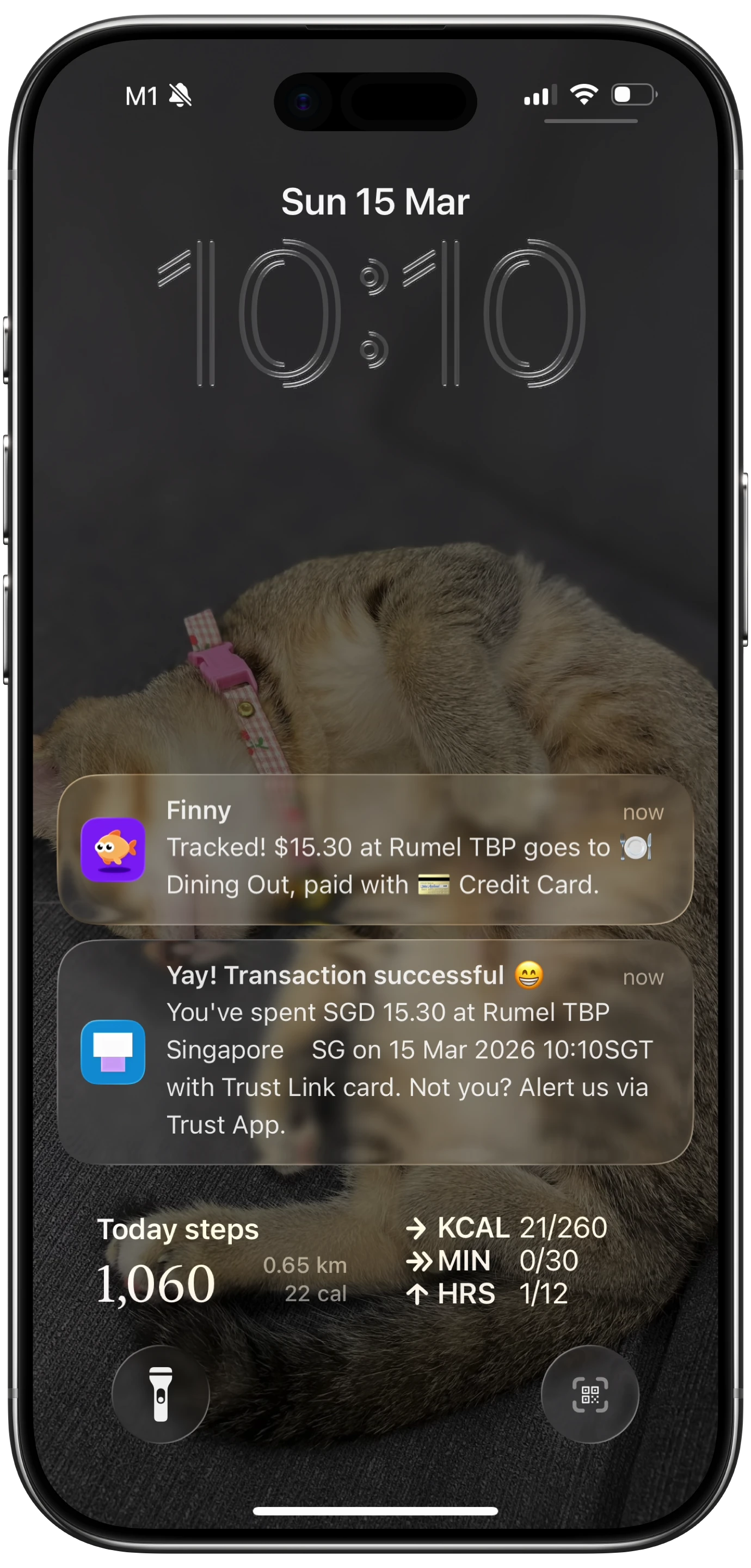
Finny app's Tap to Track feature
And the money features that matter most day to day were never Apple's. A good expense tracker app logs a card payment as you make it, reads a receipt from a photo, and turns a typed or spoken line into an entry, on any iPhone that runs the app. Finny does all of that on an iPhone 11 exactly as it does on a 17 Pro, because none of it depends on Apple Intelligence. Our best expense tracker apps for iPhone roundup covers the field.
What you miss without Apple Intelligence, and the workaround for each
Bill splitting. The receipt scan, item assignment and Apple Cash requests need Siri AI. Workaround: Apple Cash itself works on your phone, so a friend with a newer iPhone can run the split and request your share, and you pay it with a tap. For the running-balance case a splitting app was always the better tool anyway; our Splitwise alternatives roundup has the options, and the iOS 27 bill splitting guide explains what the feature does and does not do.
Reading a receipt with the camera. Siri mode in Camera is Apple Intelligence only. Workaround: a receipt scanner app does this on any iPhone and, unlike Siri mode, keeps the result. Our comparison of iOS 27 receipt scanning vs a scanner app goes through it.
Asking Siri about your spending. The new Siri's personal context and onscreen awareness are the parts that could answer money questions, and they need an Apple Intelligence phone. Workaround: the previous Siri still runs shortcuts, so "log fourteen dollars lunch" through an expense app's Siri support works on an iPhone 12. What you lose is the conversational layer, and as our guide to asking Siri about spending explains, that layer only answers what an app underneath it already knows.
Describe a Shortcut. The plain-English shortcut builder needs Apple Intelligence. Workaround: the classic editor is unchanged, and for money shortcuts the actions are simple enough that the log-anything shortcut takes two minutes by hand.
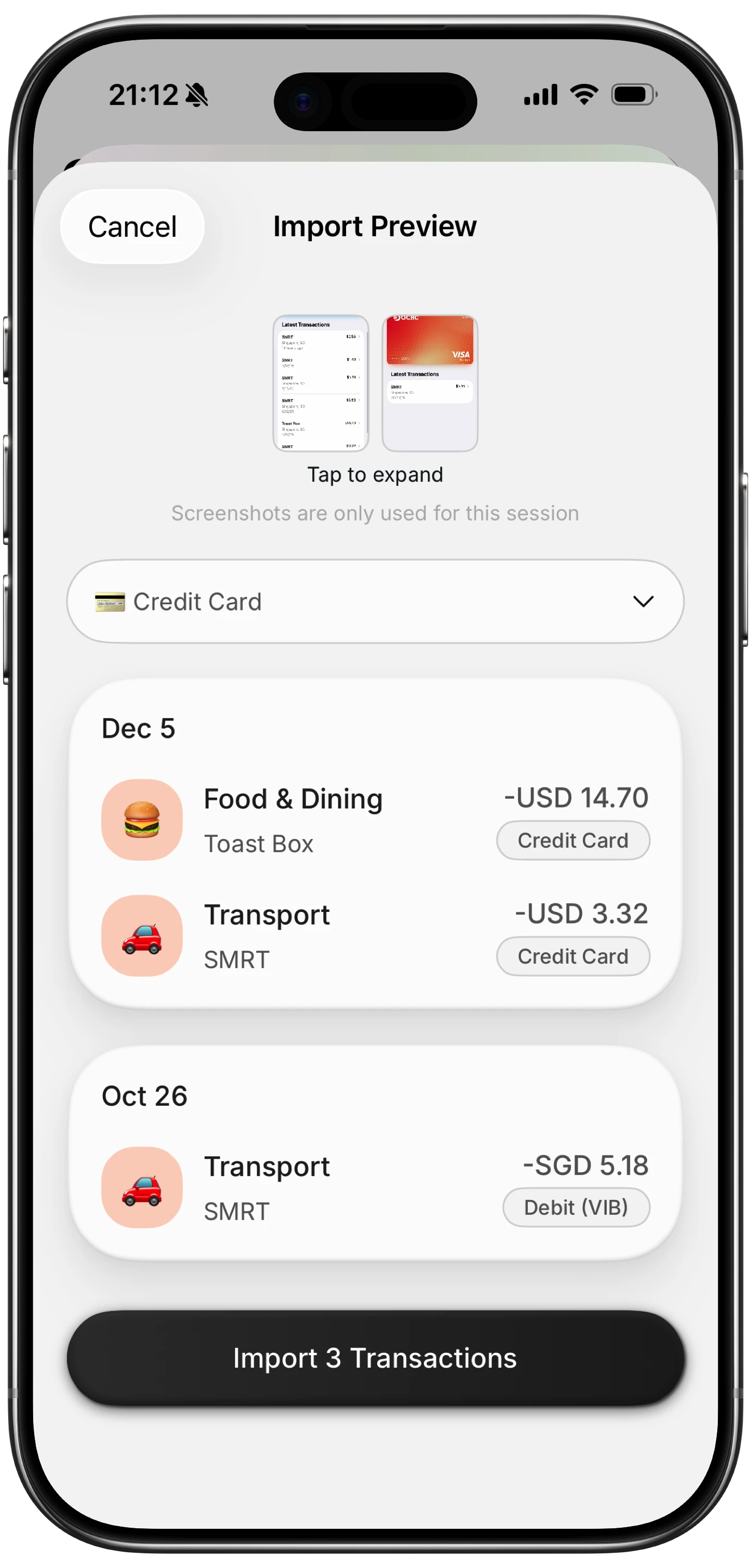
Finny app's screenshot import feature
Should you upgrade for the money features?
No, not for these. Every Apple Intelligence money feature in iOS 27 has a workaround that costs nothing, and the one with no workaround, bill splitting, is a nice-to-have that a friend's phone or a $0 app covers. If you are upgrading anyway, an iPhone 16 or later gets you everything; the 15 Pro gets you everything except the larger on-device Siri model, which does not change what money features you have.
If your phone is an iPhone 11 or 12 and it is slowing down, that is a reason to upgrade. iOS 27's new features are not.
Here is a short look at a card payment being logged as it happens, which is the same on every iPhone that runs iOS 27.
Finny app's Quick Log feature
Before you install
Three quick things for an older phone. Back up first, since a major release on an iPhone 11 or 12 is the one most likely to need a restore. Expect a day or two of heavier battery use while the system reindexes for the rebuilt search. And if you rely on a specific shortcut for logging expenses, open it once after the update: automations moved inside shortcuts, and our guide to fixing shortcut automations that ask to confirm covers the one setting that occasionally resets.
Common Questions About iOS 27 on Older iPhones
Which iPhones can run iOS 27?
iPhone 11 and later, including iPhone SE second generation and later. Apple dropped no models this year; the iPhone XS, XS Max and XR were dropped in iOS 26. Running iOS 27 does not mean getting every feature, since Apple Intelligence features need an iPhone 15 Pro or any iPhone 16 or later.
Does the iPhone 15 get Siri AI in iOS 27?
The iPhone 15 Pro and 15 Pro Max do. The standard iPhone 15 and 15 Plus do not, and so they miss bill splitting, Siri mode in Camera, onscreen awareness and plain-English shortcut creation. Everything else in iOS 27, including the Apple Pay checkout redesign and the Apple Card Recurring hub, works on them.
Can I split bills in iOS 27 on an iPhone 14?
Not directly. The receipt scan that drives bill splitting is a Siri AI feature and needs an Apple Intelligence phone. Apple Cash works on an iPhone 14, so a friend with a newer phone can run the split and request your share, or you can use a splitting app that keeps a running balance.
Does an expense tracker app need Apple Intelligence?
No. Logging a card payment as you make it, reading a receipt from a photo, and turning a typed or spoken line into an entry are all done by the app, not by Apple Intelligence, so they work on any iPhone that runs the app. That makes a good expense app the biggest money upgrade available to an older iPhone.
Is it worth upgrading my iPhone for iOS 27's money features?
Not on their own. Each Apple Intelligence money feature has a free workaround, and bill splitting can be run from a friend's phone. Upgrade if your current phone is slow or its battery is done; the iOS 27 feature list is not a reason by itself.
Every iPhone that runs iOS 27 can log a payment in seconds. Finny works the same on an iPhone 11 as on the newest Pro: card, receipt, voice and text capture, no bank connection. Free to start, Pro at a low monthly price.